

On Sale Filter (Hyva Companion) for Magento 2
The Hyvä template for the Panth Sale Filter module on Magento 2. It renders the On Sale layered navigation filter with Alpine.js and Tailwind, and it needs mage2kishan/module-sale-filter installed to do anything.
- Free
- MIT license
- Hyvä
- Magento 2.4.4 to 2.4.9
composer require mage2kishan/module-sale-filter-hyva
- Adobe CertifiedDeveloper since 2021
- 5.0 on UpworkFrom 100+ reviews
- MIT open sourceRead and change the code
- HyväSame module, both themes
- PHP 8.1 to 8.4Magento 2.4.4 to 2.4.9
What it does for your store
The main features, as listed in the module documentation.
-
Hyvä layered navigation template
replaces the Luma Knockout markup with an Alpine.js template when a Hyvä theme is active
-
Hyvä appearance setting
one toggle under Stores > Configuration > Panth Extensions > Sale Filter
-
Expanded By Default
whether the filter renders open or collapsed on first paint (default: Yes).
-
Cache-safe toggle
the filter block cache key follows the setting, so admin changes show up straight away
Installation
Run these from your Magento root. Test on staging first.
- 1Require the packageComposer pulls in the base module too.
- 2Upgrade, compile, deployThe usual setup commands.
- 3ConfigureStores, Configuration, Panth Extensions.
$ composer require mage2kishan/module-sale-filter-hyva
$ bin/magento setup:upgrade
$ bin/magento setup:di:compile
$ bin/magento setup:static-content:deploy -f
$ bin/magento cache:flush
Compatibility
| Magento Open Source | 2.4.4 to 2.4.9 |
|---|---|
| Adobe Commerce | 2.4.4 to 2.4.9 |
| PHP | 8.1, 8.2, 8.3, 8.4 |
| Themes | Hyvä |
| License | MIT, free and open source |
| Requires | mage2kishan/module-core (Composer adds it) |
Documentation
The full module guide, from the README on GitHub.
Overview
Panth Sale Filter Hyvä is the Hyvä-native storefront template for the Panth Sale Filter extension on Magento 2 and Adobe Commerce that replaces the core Luma Knockout markup with Alpine.js and Tailwind when a Hyvä theme is active.
The Panth Sale Filter Hyvä package registers a drop-in template at Panth_SaleFilter::layer/filter/sale.phtml that takes over rendering of the On Sale layered-navigation filter the moment a Hyvä theme is detected. Alpine.js handles the open and close interaction, Tailwind handles the styling, and the module ships zero jQuery and zero RequireJS, keeping Hyvä's lean frontend budget intact.
It adds a dedicated Appearance (Hyvä) admin group at Stores → Configuration → Panth Extensions → Sale Filter with an Expanded By Default toggle so merchants can choose whether the filter renders open or collapsed on first paint. The renderer's full-page-cache key varies on that toggle, so admin changes bust the cached block slot cleanly without manual flushes.
This package is a hard companion to mage2kishan/module-sale-filter: installing it alone does nothing. The core module owns the indexer, the filter logic, the URL parameters, and the admin grid; this Hyvä package supplies only the Alpine + Tailwind template and the Appearance config group.
Best for:
- Hyvä Themes 1.3+ storefronts already running the Panth Sale Filter core module
- Merchants migrating from Luma to Hyvä who need feature parity for layered-navigation filters
- Hyvä-first developers who refuse to ship jQuery or Knockout into a Tailwind storefront
What you get
Panth Sale Filter Hyvä gives the core On Sale filter a true Hyvä storefront:
- Alpine.js plus Tailwind template at Panth_SaleFilter::layer/filter/sale.phtml : zero jQuery
- Appearance (Hyvä) admin group with an Expanded By Default toggle, store-view scoped
- FPC cache key varies on the appearance toggle so admin changes bust cleanly
- Auto-activates when a Hyvä theme is detected: falls back to Luma elsewhere
- Tested on Hyvä Themes 1.3+, PHP 8.1 to 8.4, and Magento 2.4.4 to 2.4.9
Magento 2 Sale Filter Hyva
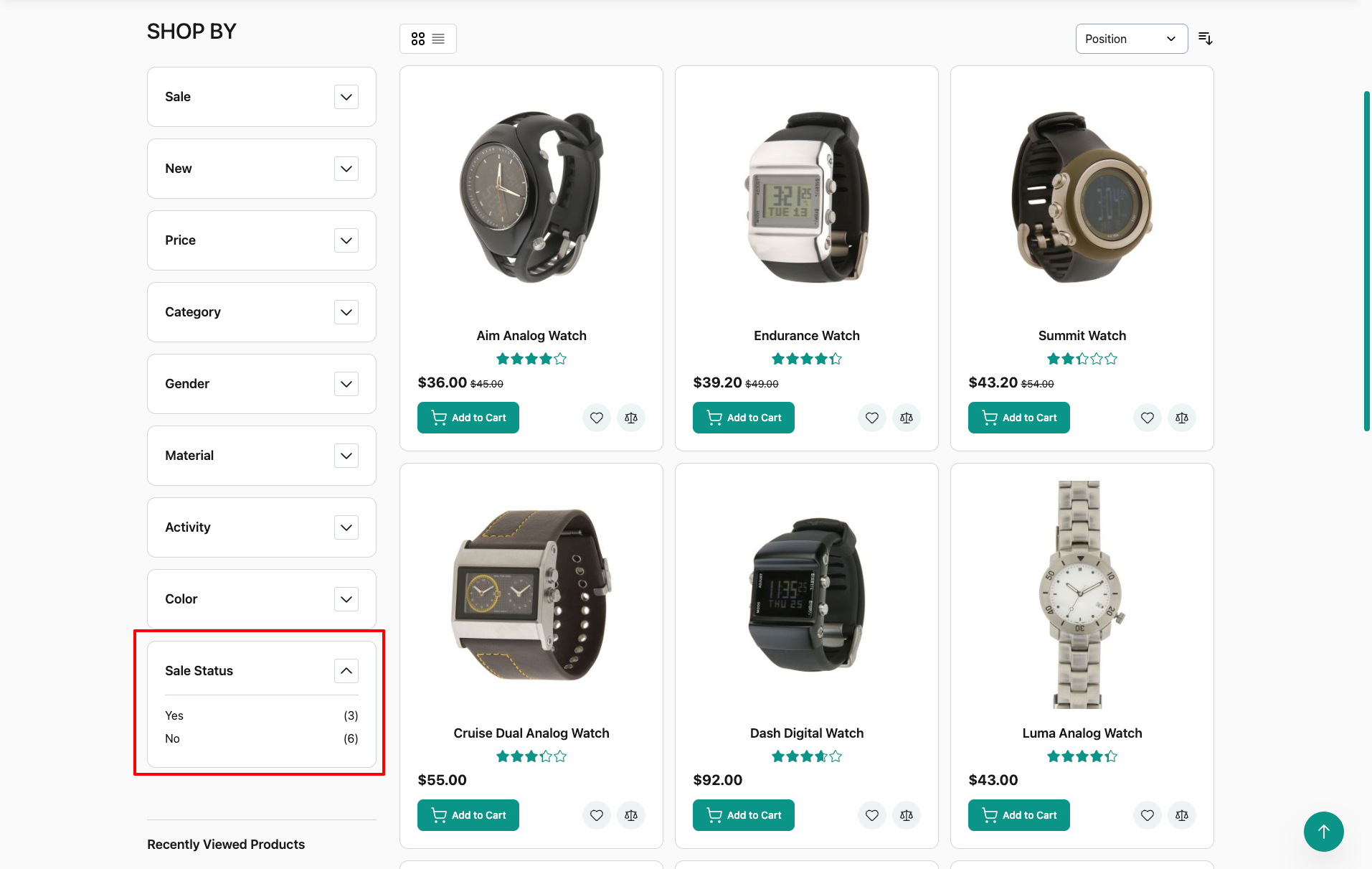
Hyva companion module for the Panth Sale Filter extension. It renders the options of the "On Sale" layered navigation filter with its own Tailwind CSS template inside the Hyva layered navigation, plus an admin setting that controls whether that filter opens expanded or collapsed. The indexer, filter logic and the filter itself are provided by the base module mage2kishan/module-sale-filter, which this package requires.
Product page: Magento 2 Sale Filter Hyva
Features
- Hyva template
Panth_SaleFilterHyva::layer/filter/sale.phtml(list classpanth-salefilter-hyva) for the sale filter options, styled with Tailwind CSS utility classes. It is wired in the Hyva layout handleshyva_catalog_category_viewandhyva_catalogsearch_result_index, so it renders on Hyva category and search result pages. No jQuery or RequireJS code is shipped. - The sale filter sits in the standard Hyva filter card, whose Alpine.js toggle opens and closes it like every other filter. All other filters keep the Hyva theme template.
- Block class
Panth\SaleFilterHyva\Block\LayeredNavigation\FilterRenderer, which extends the base module'sPanth\SaleFilter\Block\LayeredNavigation\FilterRendererand addsisDefaultExpanded(). - The block adds the expanded/collapsed state to its cache key, so each state is cached separately.
- One admin setting, "Expanded By Default", added to the base module's configuration section. Default: Yes. Configurable at default, website and store view scope.
- Filter items show the product count when the base module's count setting is enabled (
isShowCount()from the base block).
Usage
The base module injects the "On Sale" filter into Magento's layered navigation filter list on category pages and search results, and a plugin on the layered navigation renderer draws the options of that filter with a module template.
On Hyva storefronts this module sets the renderer arguments panth_salefilter_template and panth_salefilter_block on catalog.navigation.renderer and catalogsearch.navigation.renderer in the layout handles hyva_catalog_category_view and hyva_catalogsearch_result_index. The Hyva layered navigation still draws the filter card (title, chevron and Alpine.js open/close toggle) for every filter; inside the sale filter card the option list comes from this module's template. The list shows the product count when the base module's Show Product Count setting is Yes. Other filters are not changed, and Luma store views on the same installation keep the base module's Luma template, because the hyva_ handles are only added for Hyva themes.
When "Expanded By Default" is Yes, a small inline script in before.body.end (template Panth_SaleFilterHyva::layer/filter/expand.phtml) sets the initial open state of the sale filter card to true before Alpine.js starts. The script is registered with Hyva's CSP helper.
To change the markup, copy the template into your theme:
app/design/frontend/<Vendor>/<theme>/Panth_SaleFilterHyva/templates/layer/filter/sale.phtml
Changelog
See CHANGELOG.md.
Compatibility
| Component | Supported |
|---|---|
| Magento Open Source | 2.4.4 to 2.4.9 |
| Adobe Commerce | 2.4.4 to 2.4.9 |
| PHP | 8.1, 8.2, 8.3, 8.4 (~8.1.0 || ~8.2.0 || ~8.3.0 || ~8.4.0) |
| Themes | Hyva |
Composer constraints: magento/framework ^103.0, magento/module-catalog ^104.0, magento/module-config ^101.2, magento/module-store ^101.1, hyva-themes/magento2-theme-module ^1.3, hyva-themes/magento2-default-theme ^1.3.
Requirements
Declared in composer.json (require):
mage2kishan/module-core^1.0(modulePanth_Core)mage2kishan/module-sale-filter^1.1.0(modulePanth_SaleFilter, the base module; 1.1.0 adds the renderer plugin this module relies on)magento/framework^103.0,magento/module-catalog^104.0,magento/module-config^101.2,magento/module-store^101.1hyva-themes/magento2-theme-module^1.3(moduleHyva_Theme)hyva-themes/magento2-default-theme^1.3
etc/module.xml loads this module after Panth_Core, Panth_SaleFilter and Hyva_Theme.
The base module does not require this package; it lists mage2kishan/module-sale-filter-hyva under suggest, as the source of the Hyva Alpine template and the Appearance admin group.
Installation
composer require mage2kishan/module-sale-filter-hyva
bin/magento module:enable Panth_Core Panth_SaleFilter Panth_SaleFilterHyva
bin/magento setup:upgrade
bin/magento setup:di:compile # production mode only
bin/magento cache:flush
Composer installs the base module and mage2kishan/module-core as dependencies. The module ships no view/*/web assets and no Tailwind configuration, so no static content deploy or Tailwind rebuild step is specific to this module.
Check that the module is enabled:
bin/magento module:status Panth_SaleFilterHyva
Configuration
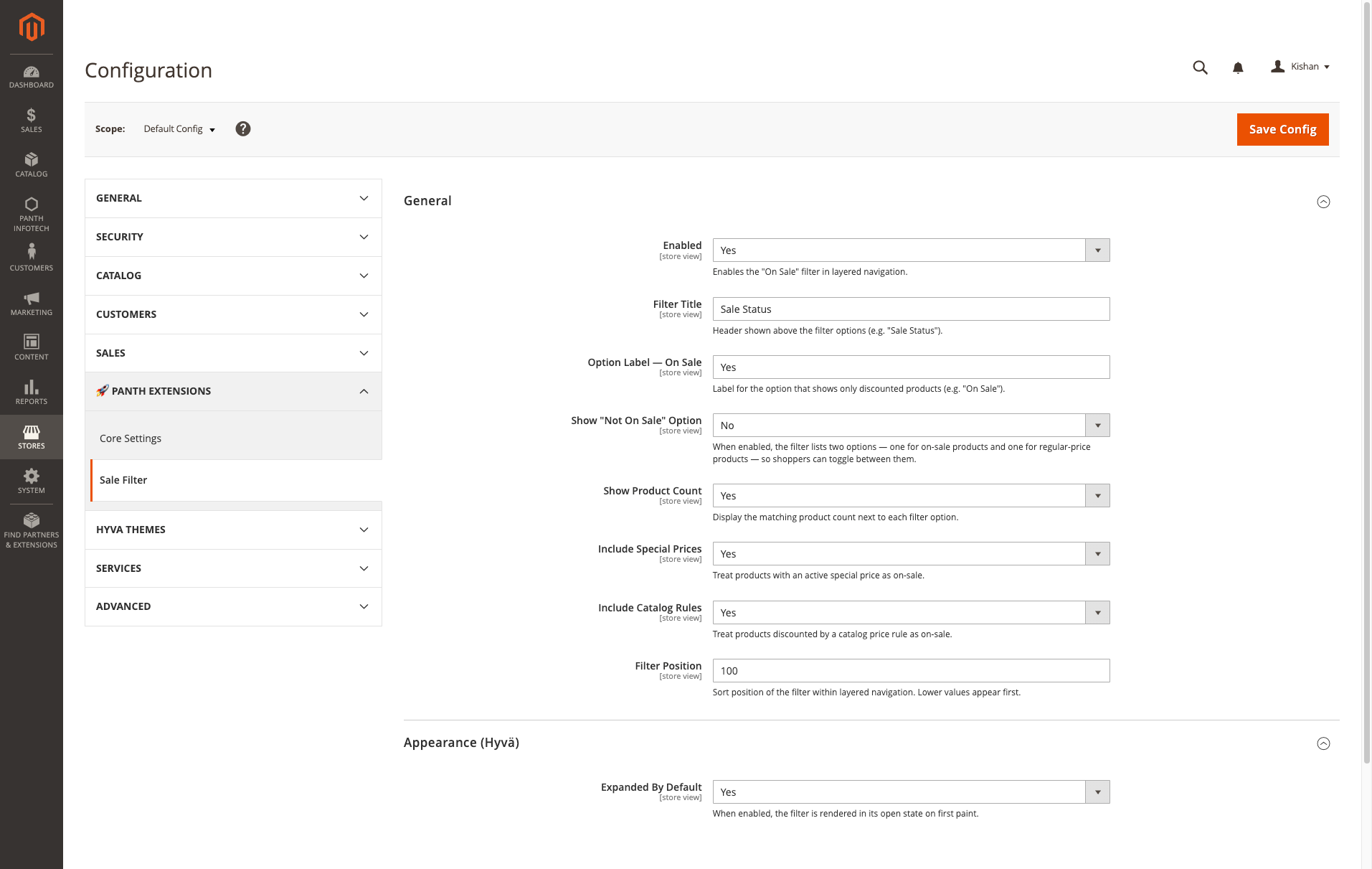
Stores > Configuration > Panth Extensions > Sale Filter > Appearance (Hyva)
The "Panth Extensions" tab comes from Panth_Core and the "Sale Filter" section from the base module; this module adds the "Appearance (Hyva)" group (the label in system.xml spells Hyva with an umlaut).
| Setting | Config path | Default | Scope | Description |
|---|---|---|---|---|
| Expanded By Default | panth_salefilter/appearance/default_expanded |
Yes | Default, Website, Store View | When enabled, the sale filter card is open when the page loads. The other filters keep their own state. |
All other sale filter settings (enable, filter title, option labels and the rest) live in the base module's configuration. See mage2kishan/module-sale-filter.
Uninstallation
bin/magento module:disable Panth_SaleFilterHyva
composer remove mage2kishan/module-sale-filter-hyva
bin/magento setup:upgrade
bin/magento cache:flush
If a theme override references this module's template, remove it first. Removing this package leaves the base module installed.
License
MIT License. Free and open source. The package is published on Packagist and can be installed with Composer; see the product page for the terms of use.
Developer Notes
- Module name:
Panth_SaleFilterHyva - Composer package:
mage2kishan/module-sale-filter-hyva - PHP namespace:
Panth\SaleFilterHyva\ - Classes:
Block\LayeredNavigation\FilterRenderer,Model\Config(readspanth_salefilter/appearance/default_expandedat store scope) - Templates:
view/frontend/templates/layer/filter/sale.phtml(option list),view/frontend/templates/layer/filter/expand.phtml(Expanded By Default script) - Layout:
view/frontend/layout/hyva_catalog_category_view.xmlandview/frontend/layout/hyva_catalogsearch_result_index.xml - The module does not register with
hyva-themes/magento2-compat-module-fallbackand has nodi.xml; the renderer plugin lives in the base module. - The module adds no database tables, plugins, observers or cron jobs.
| Module Category | Catalog & Products |
|---|---|
| Best For | All Sizes |
Works well with
Separate free modules. Install only what you need.
-

Custom Product Image Gallery for Magento 2
Replaces the default Magento 2 product image gallery with horizontal, vertical or grid thumbnails, inner or... -

Custom Product Options for Magento 2 (Hyva + Luma)
Restyles Magento 2 product custom options on Hyvä and Luma: card-style radio buttons and checkboxes with... -

FAQ Module for Magento 2 with FAQPage Schema
A Magento 2 FAQ extension with category pages at clean URLs like /faq/orders-shipping. One question can be... -

On Sale Layered Navigation Filter for Magento 2
Adds an On Sale option to Magento 2 layered navigation on category and search pages. It reads special prices... -

Product Attachments for Magento 2
Attach PDFs, manuals and links to Magento 2 products, categories and CMS pages from one file library... -

Product Tabs Customizer for Magento 2
Controls the tabs on Magento 2 product pages: horizontal or vertical layout, an accordion on mobile, extra...

Questions before you install?
Send me your composer.json and I will check for conflicts first. Free. Installation is +$45, custom work is quoted first.