Two layout modes
Two Column (details + summary sidebar) or Single Column (centered), switchable from admin config per store view
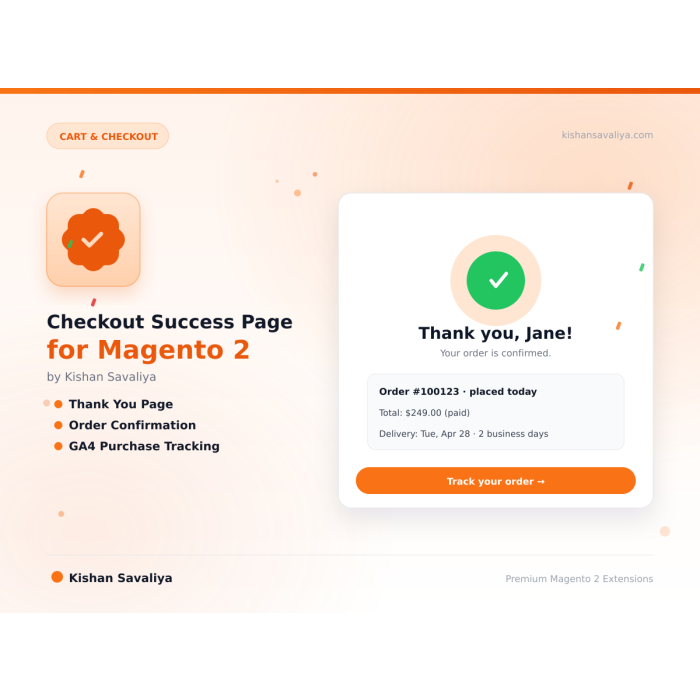
Replaces the plain Magento 2 order success page with a thank you page that shows order details, item thumbnails, addresses and totals. It adds a guest sign-up prompt and a slot for GA4 or Google Ads tracking code.
Key Features:
Additional Services
Built-in from day one. No add-ons, no upsell, no licence keys to renew.
Two Column (details + summary sidebar) or Single Column (centered), switchable from admin config per store view
order number, date, payment method, and shipping method displayed in a clean meta grid
product images, names, SKUs, quantities, and row totals in a professional table layout
rendered via Magento's standard address renderer; billing address shown only when it differs from shipping
Panth Checkout Success Page is a thank-you page upgrade for Magento 2 and Adobe Commerce that replaces the stock confirmation screen with a structured order summary, address blocks, conversion tracking hooks, and an admin-selectable CMS slot. Every section can be toggled per store view, so the post-purchase screen matches each brand and locale.
The Checkout Success Page renders two layout modes, Two Column (details + summary sidebar) or Single Column (centered), with an order details card (order number, date, payment method, shipping method), an ordered items table including thumbnails, SKUs, quantities, and row totals, shipping and billing addresses (billing only shown when different), and a sticky totals summary covering subtotal, shipping, tax, discount, and grand total. A guest account creation prompt, a Continue Shopping button, and an invoice PDF download link appear when relevant.
For conversion tracking, Checkout Success Page injects custom HTML/JS with safely escaped order placeholders: {{orderId}}, {{orderTotal}}, {{orderSubtotal}}, {{orderCurrency}}, {{customerEmail}}, {{paymentTitle}}, {{shippingTitle}}, {{couponCode}}, {{orderItemCount}}, {{shippingAmount}}, {{taxAmount}}, and {{discountAmount}}. Drop in GA4, Facebook Pixel, Google Ads, or TikTok tags without touching layout XML. A sample Trust Signals CMS block installs automatically.
Checkout Success Page restyles post-purchase behavior with per-store-view controls:
Modern, fully configurable thank you page for Magento 2 that replaces the default bare-bones order confirmation with a polished, conversion-optimized success page, complete with order details, ordered items with thumbnails, shipping and billing addresses, totals summary, payment and shipping method, guest account registration prompt, a flexible CMS block slot, and custom tracking scripts supporting GA4, Facebook Pixel, Google Ads, and any other conversion tracker with order variable placeholders.
Panth Checkout Success Page transforms Magento 2's default, uninspiring order confirmation into a modern, admin-controlled experience that reassures customers, encourages account creation, and captures every conversion event accurately. Choose between a two-column layout (order details + summary sidebar) or a single-column centered layout, toggle every section independently from admin, inject a CMS block for trust signals or upsells, and fire pixel-perfect analytics events using built-in order variable placeholders, all without writing a single line of code.
Designed for merchants who understand that the thank-you page is the highest-intent moment in the customer journey. Whether you need cleaner post-purchase UX, accurate GA4 purchase events, Facebook Pixel conversion API data, or a place to showcase trust badges and social links, this extension delivers everything in one tightly integrated package built to MEQP standards.
{{orderId}}, {{orderTotal}}, {{orderSubtotal}}, {{orderCurrency}}, {{customerEmail}}, {{paymentTitle}}, {{shippingTitle}}, {{couponCode}}, {{orderItemCount}}, {{shippingAmount}}, {{taxAmount}}, {{discountAmount}}Left column contains order details, ordered items, and addresses. Right column (sidebar) contains order totals, account creation prompt, order history link, invoice download, and Continue Shopping button.
All content centered in a single column, ideal for stores that prefer a simpler, focused layout or minimal theme aesthetic.
Switch layouts at Stores → Configuration → Panth Extensions → Checkout Success Page → Appearance → Page Layout.
The module installs a sample CMS block called "Checkout Success, Trust Signals" (identifier: panth_checkout_success_bottom) during setup:upgrade. This block displays four trust-signal cards: Free Returns, Fast Shipping, 24/7 Support, and Secure Payments.
To use it:
Edit the block content at Content → Blocks in admin.
Inject conversion tracking code (GA4, Facebook Pixel, Google Ads, TikTok, etc.) that automatically includes real order data at render time.
Example, Google Analytics 4 purchase event:
<script>
gtag('event', 'purchase', {
 transaction_id: '{{orderId}}',
 value: {{orderTotal}},
 currency: '{{orderCurrency}}',
 shipping: {{shippingAmount}},
 tax: {{taxAmount}},
 coupon: '{{couponCode}}',
 items: []
});
</script>
Example, Facebook Pixel Purchase event:
<script>
fbq('track', 'Purchase', {
 value: {{orderTotal}},
 currency: '{{orderCurrency}}',
 content_ids: ['{{orderId}}'],
 num_items: {{orderItemCount}}
});
</script>
Available placeholders:
| Placeholder | Value |
|---|---|
{{orderId}} |
Order increment ID |
{{orderTotal}} |
Grand total |
{{orderSubtotal}} |
Subtotal |
{{orderCurrency}} |
Currency code (USD, EUR, etc.) |
{{customerEmail}} |
Customer email |
{{paymentTitle}} |
Payment method title |
{{shippingTitle}} |
Shipping method title |
{{couponCode}} |
Coupon code (if any) |
{{orderItemCount}} |
Number of visible items |
{{shippingAmount}} |
Shipping amount |
{{taxAmount}} |
Tax amount |
{{discountAmount}} |
Discount amount |
All values are safely escaped for use inside JavaScript.
| Symptom | Cause | Fix |
|---|---|---|
| Default Magento success page still shows | Module disabled or cache stale | Verify bin/magento module:status Panth_CheckoutSuccess returns enabled; flush cache |
| Product thumbnails missing | Product has no thumbnail image assigned | Assign a thumbnail image to the product in the catalog |
| CMS block not rendering | Block not selected in config, or block is inactive | Check config setting and ensure the CMS block is active |
| Custom scripts not appearing | Custom Scripts field is empty or module disabled | Enter your script in the Tracking & Scripts config section |
| Session expired, fallback message shown | Customer revisited the success page after session expired | Expected behavior; a friendly fallback message is displayed |
| Addresses not rendering | Order has no address (e.g. virtual product) | Addresses only show for orders with physical shipping |
Ready to upgrade your Magento 2 checkout experience?
SEO Keywords: magento 2 checkout success page, magento 2 thank you page extension, magento 2 order confirmation page, magento 2 success page customization, magento 2 custom thank you page, magento 2 ga4 purchase tracking, magento 2 google analytics 4 ecommerce, magento 2 facebook pixel purchase event, magento 2 google ads conversion tracking, magento 2 tiktok pixel, magento 2 checkout tracking scripts, magento 2 order variable placeholders, magento 2 post purchase upsell, magento 2 trust signals checkout, magento 2 guest account creation success page, magento 2 cms block checkout success, magento 2 two column success page, magento 2 single column thank you, magento 2 hyva success page, magento 2 luma success page, magento 2 conversion rate optimization, magento 2 checkout optimization, magento 2 order summary page, magento 2 invoice pdf download, magento 2 continue shopping button, panth checkout success, panth infotech, mage2kishan, mage2sk, hire magento developer, top rated plus upwork magento, kishan savaliya magento, magento 2.4.8 checkout module, php 8.4 magento extension, magento 2 marketplace, adobe commerce checkout extension, custom magento development india, magento 2 meqp compliant module
| Requirement | Versions Supported |
|---|---|
| Magento Open Source | 2.4.4, 2.4.5, 2.4.6, 2.4.7, 2.4.8 |
| Adobe Commerce | 2.4.4, 2.4.5, 2.4.6, 2.4.7, 2.4.8 |
| Adobe Commerce Cloud | 2.4.4-2.4.8 |
| PHP | 8.1.x, 8.2.x, 8.3.x, 8.4.x |
| MySQL | 8.0+ |
| MariaDB | 10.4+ |
| Required Dependency | mage2kishan/module-core ^1.0 (free) |
| Hyva Theme | 1.0+ (optional, supported) |
| Luma Theme | Native support |
Tested on:
composer require mage2kishan/module-checkout-success
bin/magento module:enable Panth_CheckoutSuccess
bin/magento setup:upgrade
bin/magento setup:di:compile
bin/magento setup:static-content:deploy -f
bin/magento cache:flush
app/code/Panth/CheckoutSuccess/ in your Magento installationbin/magento module:enable Panth_CheckoutSuccessbin/magento module:status Panth_CheckoutSuccess
# Expected output: Module is enabled
Place a test order and confirm the new success page appears after checkout.
Navigate to Stores → Configuration → Panth Extensions → Checkout Success Page.
| Setting | Default | Description |
|---|---|---|
| Enable Custom Success Page | Yes | Replace the default Magento success page. Disable to fall back to core behavior. |
| Setting | Default | Description |
|---|---|---|
| Show Order Number | Yes | Display order number in details card |
| Show Order Date | Yes | Display order date in details card |
| Show Ordered Items | Yes | Display items with thumbnails, SKUs, qty, and row totals |
| Show Order Totals | Yes | Display totals summary sidebar |
| Show Shipping Address | Yes | Display shipping address (billing shown only when different) |
| Show Payment Method | Yes | Display payment method name |
| Show Create Account | Yes | Guest account creation prompt |
| Show Continue Shopping | Yes | Continue Shopping button |
| Additional CMS Block | None | CMS block rendered below order details |
| Setting | Default | Description |
|---|---|---|
| Page Layout | Two Column | "Two Column (Details + Summary)" or "Single Column (Centered)" |
| Thank You Title | Thank you for your order! | Main heading text |
| Thank You Message | (configurable) | Subheading message text |
| Setting | Default | Description |
|---|---|---|
| Custom Scripts | (empty) | HTML/JS with order variable placeholders injected into the success page |
Proprietary, see LICENSE.txt. One license per production domain.
| Module Category | Cart & Checkout |
|---|---|
| Best For | All Sizes |
Talk to Kishan directly: written quote, scope and timeline within 24 hours. No sales call.
Checkout Success Page for Magento 2