Real-Time Social Proof Notifications
Recent Purchases, show live order notifications pulled from real sales data
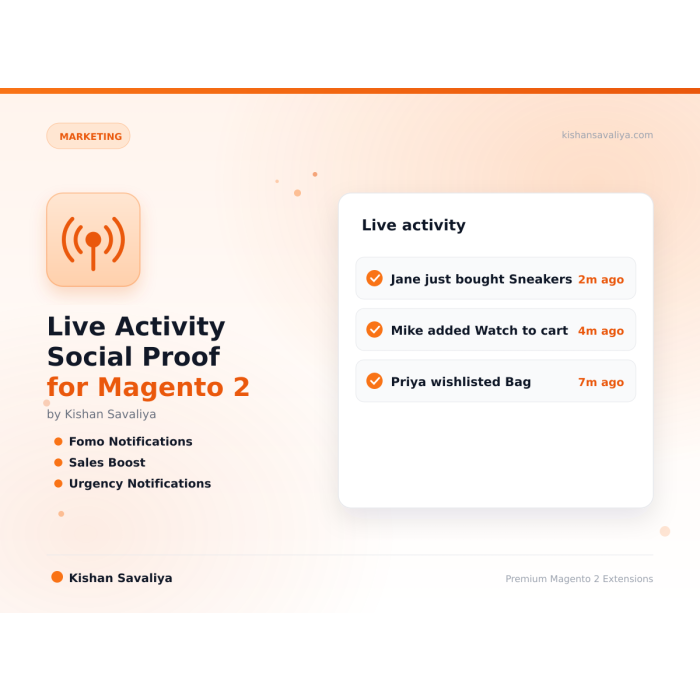
Shows small social proof popups on a Magento 2 store for recent purchases, cart adds and wishlist saves. You choose real store data or a list of sample names, plus timing, animation and which products to feature.
Key Features:
Additional Services
Built-in from day one. No add-ons, no upsell, no licence keys to renew.
Recent Purchases, show live order notifications pulled from real sales data
Real or Fake Activity, use genuine data or fall back to a curated pool of fake names and locations during low-traffic periods
Custom templates, fully styled phtml templates for Hyva and Luma
Touch-friendly, dismissible with a tap on mobile devices
MEQP compliant, passes Adobe's Magento Extension Quality Program
Panth Live Activity is a social proof and FOMO notification extension for Magento 2 that displays real-time customer activity on the storefront to lift conversion rates.
The Panth Live Activity extension surfaces recent purchases, cart additions, and wishlist saves as subtle, non-intrusive popups on Magento 2 and Adobe Commerce storefronts, building trust and urgency by showing shoppers that other customers are actively buying from the store right now.
It is built for Magento 2 merchants who want measurable conversion lift on product, category, and cart pages without paying a recurring SaaS fee. Display real activity straight from the database, or fall back to a curated list of fake names and locations when traffic is low so new stores still benefit from social proof from day one.
Configure animation style (slide-in, fade, bounce, zoom), display frequency, featured products, position, and mobile behavior to match the brand. The module is fully mobile-responsive, ships native templates for both Hyvä and Luma themes, and respects admin toggles so individual stores can disable specific notification types.
Best for:
Panth Live Activity delivers configurable, theme-aware social proof popups for Magento 2 storefronts.
Live Activity shows small notification cards on the storefront that describe recent customer activity: purchases, cart additions, wishlist additions, a live viewer count, a trending view count and a low stock alert. Each card can show a product thumbnail and an activity icon, and clicking or tapping it opens the product page.
The numbers come from two sources that can be used together. Real purchase, cart and wishlist events are recorded by event observers and read back from a database table. Simulated notifications are generated on every request with random names, locations, timestamps and counts. The live viewer count and the trending view count are always random; a low stock alert is only shown when the product's real stock quantity is between 1 and 10. The module is used by store owners who want social proof messages on their storefront, and it ships one template with separate CSS rules for Hyva and Luma themes.
Product page: kishansavaliya.com/magento-2-live-activity.html
sales_order_place_after, checkout_cart_product_add_after and wishlist_add_product events, stored in the panth_live_activity table with the store ID and a created timestamp.--panth-bottom-bar-offset, the floating button slots of its side and --panth-float-edge, and below 1024 px it leaves room for the floating buttons on the other side (--panth-float-reserve-right / -left).Panth_Core through etc/theme-config.json.prefers-reduced-motion block.fetch() call to a JSON endpoint after the page has loaded; no jQuery, Knockout or RequireJS is used on the storefront.The block live.activity.notifications is added to the after.body.start container by view/frontend/layout/default.xml, and the block renders only on the page types selected in Show On Pages (never on cart, checkout or customer account pages). On checkout it is also removed by layout: checkout_index_index.xml and multishipping_checkout.xml remove the block, and a CSS rule hides it on body.checkout-index-index, so it never covers the Place Order button. On a product page the block reads the id request parameter and passes it to the endpoint, so real events are limited to that product (plus events with no product); on other pages all real events for the current store are used.
| Type | Real data | Simulated data |
|---|---|---|
| Purchase | One row per visible order item on sales_order_place_after. |
Random name, location and time 5 to 180 minutes ago. |
| Cart addition | Recorded on checkout_cart_product_add_after. |
Same as above. |
| Wishlist addition | Recorded on wishlist_add_product. |
Same as above. |
| Live viewers | Not recorded. | Random count between 3 and 25. |
| Trending | Not recorded. | Random count between 30 and 150 views "in the last hour". |
| Low stock | Not recorded. | The real stock quantity of the product; skipped unless that quantity is between 1 and 10. |
For real events the stored customer name is the logged-in customer's first name plus last initial or, for guests, a random first name from a fixed list plus a random initial. No location is stored for real events; the module does not read the customer's address. Names already stored in full by earlier versions are shortened to first name plus last initial when the feed is built, but locations already stored with older real events are returned as stored until those events fall outside the time range.
What is simulated: every entry with "is_real": false in the feed is invented, including its name, location, time and product choice. The live viewer count, the trending view count and the stats numbers (current_viewers, views_today, cart_adds_today, purchases_today) are always random; the stats block is only returned when Use Simulated Activity is Yes and then carries "simulated": true. The low stock quantity is always the real stock quantity. Every simulated entry names a real, visible product; entries that cannot be given one are dropped. Only entries with "is_real": true come from real purchases, cart additions and wishlist additions.
The endpoint liveactivity/ajax/getactivity (GET, optional product_id) returns up to 10 real events within the configured time range (the cutoff and the age of each event are calculated by the database, so PHP and database time zones cannot drift apart) plus 3 to 7 simulated entries, sorted by timestamp and cut to 20 entries. The storefront script fetches this feed once per page view (after requestIdleCallback, or 500 ms after DOM ready), waits for the display delay, then shows one card at a time for the configured duration, pauses for the configured interval and moves to the next entry. When it reaches the end of the list it starts again from the beginning until the maximum per page is reached. There is no polling; new data is only fetched on the next page load. Each card has a close button and a progress bar that runs for the duration; the timer and the progress bar pause while the pointer is over the card or a control inside it has keyboard focus, and resume with the remaining time. Closing a card stops further cards for the rest of the browser session (a panthLiveActivityDismissed flag in sessionStorage). Each card is announced through a polite role="status" region, the product name is a keyboard-focusable link and the close button has a 44 px hit area. With Top Left or Top Right the card is placed 12 px below the visible header. The card never covers primary actions (add to cart button, quantity, swatches and options, sticky add-to-cart bars, cart checkout buttons): if it would, it switches to the opposite edge, and if both edges would cover one it stays hidden with its timer paused until scrolling frees a spot. The check runs when the card appears and on scroll and resize.
The module does not store the feed in any Magento cache. The JSON endpoint returns a plain JSON result without layout, so it is not served from the full page cache. The product collection used for simulated notifications is fetched once per request. Product thumbnails are requested through the standard catalogue image helper at 90x90 pixels.
view/frontend/templates/notifications.phtml, referenced as Panth_LiveActivity::notifications.phtml. It contains the container, the inline CSS and the JavaScript. Override it in your theme at Panth_LiveActivity/templates/notifications.phtml.view/adminhtml/templates/system/config/product_picker.phtml, fake_names.phtml and fake_locations.phtml. These use Alpine.js from view/adminhtml/web/js/alpine.min.js.etc/theme-config.json: live-activity-bg, live-activity-shadow, live-activity-highlight, live-activity-text, live-activity-text-secondary, live-activity-text-muted, live-activity-border. The template also reads --live-activity-icon-bg, --live-activity-progress, --live-activity-close and dark-scheme variants with built-in fallbacks.body:not([class*="hyva"]) apply the Luma layout; the base rules apply on Hyva.USER_GUIDE.md walks an administrator through installation, verifying the extension is active, each configuration group, the featured product picker, fake names and locations, how notifications work and troubleshooting.
See CHANGELOG.md.
| Platform | Versions |
|---|---|
| Magento Open Source | 2.4.4 to 2.4.8 (as published on the product page) |
| Adobe Commerce | 2.4.4 to 2.4.8 (as published on the product page) |
| PHP | 8.1, 8.2, 8.3, 8.4 (from composer.json) |
| Themes | Hyva and Luma |
Composer constraints on Magento packages: magento/framework ^103.0, magento/module-catalog ^104.0, magento/module-sales ^103.0, magento/module-checkout ^100.4, magento/module-wishlist ^101.0, magento/module-store ^101.1, magento/module-backend ^102.0, magento/module-config ^101.2, magento/module-catalog-inventory ^100.4.
mage2kishan/module-core ^1.0 (module Panth_Core), which provides the "Panth Extensions" admin menu group and the theme configuration view model this module registers with.composer.json declares no suggested packages.composer require mage2kishan/module-live-activity
bin/magento module:enable Panth_Core Panth_LiveActivity
bin/magento setup:upgrade
bin/magento setup:di:compile
bin/magento setup:static-content:deploy -f
bin/magento cache:flush
setup:di:compile is only needed in production mode. setup:static-content:deploy is listed because the module ships an admin JavaScript file under view/adminhtml/web/js/.
Check the result with:
bin/magento module:status Panth_LiveActivity
Go to Stores > Configuration > Panth Extensions > Live Activity & Social Proof. The tab label in etc/adminhtml/system.xml is "Panth Extensions" with a rocket emoji in front of it, which is omitted here. The section is also reachable from the admin menu under Panth Extensions > Live Activity > Configuration. All fields can be set at default, website and store view scope.
| Setting | Default | What it does |
|---|---|---|
| Enable Live Activity | Yes | Master switch. When set to No the block renders nothing, the AJAX endpoint returns a "disabled" response and observers stop recording activity. |
| Show On Pages | Product pages | Page types where notifications may appear: product, category, home, search results and CMS pages. Cart, checkout and customer account pages never show notifications. |
| Notification Position | Bottom Left | Corner of the viewport where cards appear. Shown when the module is enabled. |
| Display Delay (seconds) | 5 | Wait before the first notification (0 to 60). |
| Notification Duration (seconds) | 5 | How long each card stays on screen (3 to 30). |
| Interval Between Notifications (seconds) | 8 | Pause between one card closing and the next opening (5 to 120). |
| Maximum Notifications Per Page | 10 | Cap per page view; 0 means unlimited. |
| Setting | Default | What it does |
|---|---|---|
| Show Recent Purchases | Yes | Shows " |
| Show Cart Additions | Yes | Shows " |
| Show Wishlist Additions | Yes | Shows " |
| Show Live Viewers Count | Yes | Shows " |
| Show Trending Products | Yes | Shows "Trending: |
| Show Low Stock Alerts | Yes | Shows "Stock Alert: Only |
| Setting | Default | What it does |
|---|---|---|
| Use Real Activity Data | Yes | Records purchase, cart and wishlist events and includes them in the feed. |
| Use Simulated Activity | Yes | Adds 3 to 7 generated notifications to every feed response. |
| Activity Time Range | Last 24 Hours | How far back real events are read. Shown when Use Real Activity Data is Yes. |
| Anonymize Customer Names | Yes | No longer changes the output. Logged-in customers are always stored and shown as first name plus last initial (for example "John D."), whatever this setting is. |
| Featured Product IDs | empty | Comma-separated product IDs chosen with the product picker. When set, simulated notifications use only these products; when empty, up to 50 enabled, visible products are used. |
| Fake Customer Names | 15 sample names | JSON list of names used for simulated notifications. Shown when Use Simulated Activity is Yes. |
| Fake Customer Locations | 15 sample cities | JSON list of locations used for simulated notifications only. Shown when Use Simulated Activity is Yes. |
| Setting | Default | What it does |
|---|---|---|
| Animation Style | Slide In | Entrance animation: Slide In, Fade In, Bounce In or Scale Up. |
| Show Product Image | Yes | Shows a 90x90 product thumbnail when the product has an image. |
| Show Activity Icon | Yes | Shows an SVG icon for the activity type. |
| Custom CSS | empty | Appended to the inline style block of the template. Any < character is written as the CSS escape \3C so the value cannot close the style tag. |
| Setting | Default | What it does |
|---|---|---|
| Exclude Categories | empty | Products in these categories are left out of the simulated product pool. Real events are not filtered. |
| Enable on Mobile | Yes | When No, the script exits on viewports narrower than 768px and on touch devices with a mobile user agent. |
Config paths:
live_activity/general/enabled, live_activity/general/position, live_activity/general/display_delay, live_activity/general/notification_duration, live_activity/general/interval, live_activity/general/max_notificationslive_activity/activity_types/show_purchases, live_activity/activity_types/show_cart_adds, live_activity/activity_types/show_wishlist_adds, live_activity/activity_types/show_live_viewers, live_activity/activity_types/show_trending, live_activity/activity_types/show_low_stocklive_activity/data_source/use_real_data, live_activity/data_source/use_simulated_data, live_activity/data_source/time_range, live_activity/data_source/anonymize_names, live_activity/data_source/featured_products, live_activity/data_source/fake_names, live_activity/data_source/fake_locationslive_activity/appearance/animation_style, live_activity/appearance/show_product_image, live_activity/appearance/show_icon, live_activity/appearance/custom_csslive_activity/advanced/exclude_categories, live_activity/advanced/mobile_enabledDefault behaviour after installation: the module is enabled, all six types are on, real and simulated data are both on, and notifications appear bottom left on product pages after 5 seconds.
bin/magento module:disable Panth_LiveActivity
composer remove mage2kishan/module-live-activity
bin/magento setup:upgrade
bin/magento setup:di:compile
bin/magento cache:flush
The tables panth_live_activity and panth_live_activity_stats and the live_activity/* rows in core_config_data are not removed by these commands; drop or delete them manually if you no longer need them. mage2kishan/module-core stays installed if other modules depend on it.
Commercial software license. See LICENSE.txt in this repository.
Panth_LiveActivitymage2kishan/module-live-activity (version 1.0.8)Panth\LiveActivityPanth_Core, Magento_Catalog, Magento_Sales, Magento_Checkout and Magento_Wishlist.Key classes:
Panth\LiveActivity\Model\ActivityProvider: getRecentActivity(?int $productId): array builds the feed; getViewerStats(int $productId): array returns random counts (flagged simulated) only when Use Simulated Activity is Yes, otherwise an empty array; they are included in the JSON response as stats but not used by the storefront script.Panth\LiveActivity\Model\ActivityTracker: track(string $activityType, array $data): void saves a real event.Panth\LiveActivity\Observer\TrackOrderPlacement, TrackCartAdd, TrackWishlistAdd: observers declared in etc/events.xml (global scope).Panth\LiveActivity\Controller\Ajax\GetActivity: frontend JSON endpoint, route liveactivity.Panth\LiveActivity\Controller\Adminhtml\Product\Search and GetByIds: admin endpoints liveactivity/product/search and liveactivity/product/getbyids for the product picker, protected by the ACL resource below.Panth\LiveActivity\Block\Activity: isEnabled(), getConfigJson(), getAjaxUrl(), getCurrentProductId(), getCustomCss().Panth\LiveActivity\Helper\Config: config path constants, getFrontendConfig(), getFeaturedProductIds(), getExcludedCategoryIds(), getEnabledFakeNames(), getFakeLocations().Panth\LiveActivity\Model\Activity with type constants purchase, cart_add, wishlist_add, live_viewers, trending, low_stock (and an unused view).Model\Config\Source\Position, Animation, TimeRange, Category.Dependency injection: etc/di.xml is empty. etc/frontend/di.xml adds Panth_LiveActivity to the registeredModules argument of Panth\Core\ViewModel\ThemeConfig. No plugins or preferences are declared.
ACL resource: Panth_LiveActivity::config ("Panth Live Activity Configuration") under Magento_Config::config.
Database tables from etc/db_schema.xml:
panth_live_activity: activity_id, activity_type, product_id, product_name, customer_name, customer_location, created_at, store_id, is_real. Written by the tracker and read by the provider.panth_live_activity_stats: stat_id, product_id, current_viewers, views_today, cart_adds_today, wishlist_adds_today, purchases_today, last_view, updated_at. Declared but not read or written by any class in this version.| Module Category | Marketing |
|---|---|
| Best For | All Sizes |
No. The notification feed is cached, assets are lightweight, and the JS runs asynchronously after page load.
Only first names (or curated fake names) and city-level locations are shown, no personally identifiable information is exposed. Always review your local regulations.
Yes. Disable Use Fake Names in configuration and the module will only show genuine activity.
Yes. Panth Live Activity is natively compatible with Hyva themes using Alpine.js, no jQuery required.
Yes. Use the Page Scope setting to restrict display to specific page types.
Yes. All settings respect Magento's standard scope hierarchy (default → website → store view) and all strings are translatable via Magento's __() function.
Yes. Override the phtml template in your custom theme under Panth_LiveActivity/templates/notification.phtml.
Yes. mage2kishan/module-core is a required dependency and is pulled in automatically by Composer.
Talk to Kishan directly: written quote, scope and timeline within 24 hours. No sales call.
Live Activity Social Proof for Magento 2