
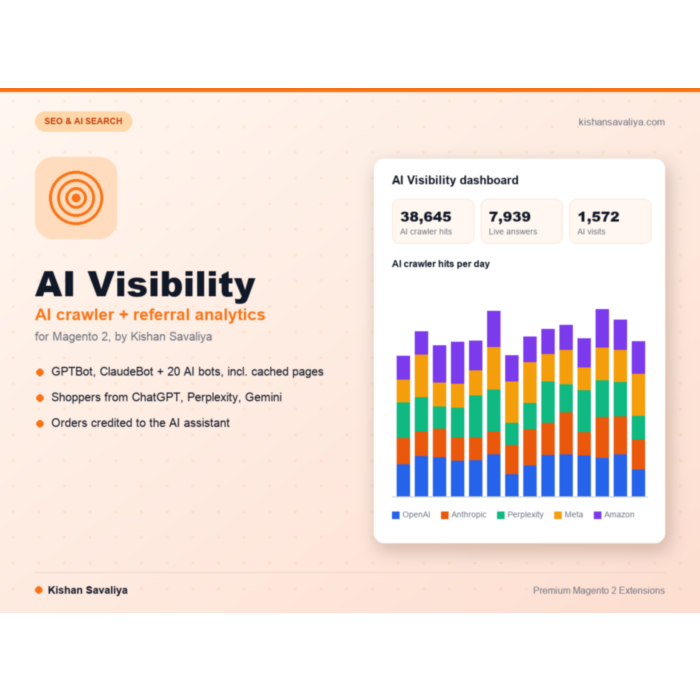
Panth AI Visibility for Magento 2
Free and open-source (MIT) AI crawler and AI referral analytics for Magento 2. Counts GPTBot, ClaudeBot, PerplexityBot and 19 more AI bots, including full page cache hits, detects shoppers from ChatGPT, Perplexity and Gemini, and credits their orders. Magento 2.4.7 - 2.4.9.
Key Features:
- AI crawler tracking for 22 built-in bots from OpenAI, Ant...
- Bot categories: training, AI search and live answer, so y...
- AI referral visits from ChatGPT, Perplexity, Gemini, Copi...
- First-touch and last-touch order attribution with an AI S...
Additional Services
$0.00
In stock
SKU
panth-ai-visibility
Lifetime Updates
Every Magento release
1-Year Free Support
Email + WhatsApp
Adobe-Certified
Magento 2 Developer
30-Day Money Back
No-questions refund
What you get
Everything in the box
Built-in from day one. No add-ons, no upsell, no licence keys to renew.
Bot categories: training, AI search and live answer, so y...
AI referral visits from ChatGPT, Perplexity, Gemini, Copi...
First-touch and last-touch order attribution with an AI S...
Overview
Panth AI Visibility for Magento 2 is a free, open-source (MIT) analytics extension that measures how AI crawlers and AI assistants use your store, from GPTBot fetching product pages to shoppers who arrive from ChatGPT and place an order.
AI search is a new traffic source that standard analytics tools miss. Crawlers such as GPTBot, ClaudeBot and PerplexityBot never run JavaScript, so they never show up in Google Analytics, and pages served from Magento's full page cache never reach most server-side trackers either. This module records each AI crawler request while Magento sends the response, including cached pages, and stores the bot, page type, status code and response time. Human visitors only cost an in-memory User-Agent check.
On the shopper side, a small collector script recognizes visits from ChatGPT, Perplexity, Gemini, Microsoft Copilot, Claude and five more assistants by referrer or utm_source, keeps the first and latest source in a signed first-party cookie, and credits the resulting orders with first-touch or last-touch attribution. The admin dashboard turns this into KPIs, charts and insights, such as AI bots blocked in robots.txt or products no AI bot has fetched. Everything stays in your Magento database; the module makes no outbound requests. It runs on Magento 2.4.7 to 2.4.9 and PHP 8.1 to 8.5, on Hyvä and Luma, and the full source code is on GitHub under the MIT License.
- Best for: stores working on AEO and GEO that want proof AI search engines actually read their catalog.
- Best for: merchants who want to know how much revenue ChatGPT, Perplexity and Gemini send them.
- Best for: Magento 2 and Adobe Commerce teams that need AI traffic data without a third-party analytics service.
What you get
Panth AI Visibility covers both sides of AI traffic, the bots that read your store and the shoppers they send:
- Counts 22 built-in AI crawlers per page type, status and response time, including full page cache hits
- Classifies every bot as training, AI search or live answer
- Detects AI assistant visits by referrer host or utm_source and keeps them in a signed, HttpOnly cookie
- Credits orders to the AI source with first-touch or last-touch attribution and an order grid filter
- Lists unknown bots and AI referrer apps in Discovery so you can confirm them as AI
- Runs seven hourly data-health checks and imports Varnish or CDN access logs when needed
Magento 2 AI Visibility
Panth AI Visibility shows how AI crawlers and AI assistants use a Magento 2 store. It counts requests from AI crawlers (training, search and live-answer bots), including pages served from Magento's built-in full page cache, detects shoppers who arrive from AI assistants such as ChatGPT, Perplexity, Gemini or Copilot, credits their orders to the assistant, and presents the results on an admin dashboard with insights and data-health checks.
Everything is measured and stored inside the Magento database. The module makes no outbound requests and sends no data to third-party services.
Features
- AI crawler tracking. 22 built-in AI bots from OpenAI, Anthropic, Perplexity, Meta, Amazon, Apple, DuckDuckGo, Mistral, You.com, ByteDance, Common Crawl, Cohere and Diffbot (for example GPTBot, OAI-SearchBot, ChatGPT-User, ClaudeBot, Claude-SearchBot, Claude-User, PerplexityBot, Perplexity-User, Amazonbot, Applebot, Bytespider, CCBot). Each hit is stored with bot, company, category, store view, page type (product, category, CMS, other), path, HTTP status and response time.
- Cached pages are counted. Hits are recorded while Magento serves the response, including built-in full page cache hits. Human visitors only cost an in-memory User-Agent check and cause no database work.
- Bot categories. Every bot is classed as training (collects data for model training), search (builds an AI search index) or live answer (fetches a page while a user is waiting for an answer), so the dashboard shows which kind of AI traffic a page receives.
- AI referral visits. A small CSP-safe collector script (under 2 KB, no libraries, works on Hyva and Luma) reports once per browser session when a shopper arrives from an AI assistant. Built-in sources: ChatGPT, Perplexity, Gemini, Microsoft Copilot, Claude, Meta AI, Le Chat (Mistral), DeepSeek, Grok and You.com, recognised by referrer host or
utm_source. Custom hosts andutm_sourcevalues can be added. - Signed attribution cookie. The first and the latest AI source are kept in a signed, HttpOnly, SameSite=Lax first-party cookie (
panth_aiv) for a configurable attribution window. Magento cookie consent is respected. - Order attribution. Orders placed through the one-page checkout and the multishipping checkout are tagged with the first-touch and the last-touch AI source. An "AI Source" column and filter appear in the order grid, and an "AI Attribution" block on the order view. The attribution model (first or last touch) can be switched at any time without losing data.
- Dashboard and insights. KPIs, server-rendered SVG charts, top pages, top bots, AI visits and revenue by source, with a date range and store view filter. Insights point out AI bots blocked by
robots.txt,llms.txtfetches, products that AI bots have not fetched and bot error rates. - Crawler Log. Admin grid of detailed crawler hits with filters, column controls and export.
- Discovery. Bot-like User-Agents that are not in the catalogue, clients that fetch
/llms.txt, and AI-looking referrer hosts andutm_sourcevalues are listed as candidates. Confirm a candidate as AI (it is then counted like a built-in bot or source, including its earlier hits), mark it Not AI, or ignore it. Ordinary browsers and well-known search engine, social, SEO and uptime bots are never listed. - Data-health checks. Seven checks (page cache, cron, collector, cookie consent, table size, access log import, tracking) run hourly and on demand, and are shown on the dashboard.
- Access log importer for Varnish and CDN stores. Cached responses served by Varnish or a CDN never reach Magento. The importer reads nginx, Apache and varnishncsa access logs (combined format) with resume, rotation detection and locking, so these hits are counted as well.
- Traffic simulator. A deterministic generator creates realistic test traffic (marked as simulated and hidden on the dashboard by default) and removes it again with one option.
- Bounded storage. Raw rows are kept for a configurable number of days, daily summaries for a configurable number of months, and a daily cap limits detailed rows during a crawler storm while totals stay correct.
How the numbers are kept
- Raw rows (crawler hits, AI visits, landings) are kept for the configured number of days; daily summaries are kept for the configured number of months, so the dashboard keeps its history after raw rows are deleted.
- All days are UTC days and every stored time is UTC, whatever the store or server time zone.
- The daily summaries are rebuilt from the raw rows per store view and per real / simulated data. A day whose raw rows were already removed by retention is never rebuilt, so its summaries are kept as they are. Raising a retention setting does not bring deleted raw rows back.
- Above "Max Detailed Hits per Day" a hit is only counted (per bot, store view and status class), not stored in detail; it still appears in the totals as page type "other". Unknown bots above the cap share one counter.
- Top pages keep the 500 most fetched paths per store view, category and day. The "products AI bots have not fetched" insight is based on those paths, so on very large catalogues it can list products that were fetched but never reached the daily top 500.
- The table size health check uses MySQL table statistics, which the database refreshes on its own; the figure is an estimate.
Access log import (Varnish / CDN)
Behind Varnish or a page-caching CDN most bot requests never reach PHP. Enable Access Log Import, then list one file per line as /absolute/path/access.log | store_code. The combined / varnishncsa default format is read.
- Only new, complete lines are read; the position is saved per file. Rotation (new inode), truncation (
> file) and a file that was truncated and written again past the saved position are detected and read from the start. - Configure the current log file only. Compressed rotated files (
.gz) are not supported and are reported as an error. A symlink and its target are imported once. - Web API requests (
/rest,/soap,/graphql), static files and media (except sitemaps) are skipped, like for requests handled by PHP. - Days that receive hits are summarised at the end of each run, also days older than yesterday. Lines of days whose raw rows were already removed by retention are only summarised when that day has no summary yet.
- A line whose write fails stops the run at that line; after three failed runs on the same line it is skipped, so the import never stalls. The last error is shown by the "Log import" health check and by the command output.
- When a store view is mapped to a log file, PHP tracking skips crawler hits for that store view so nothing is counted twice.
Data and privacy
- The collector (
POST /panth_aiv/collect) never starts a PHP session, never sets a session cookie and does not renew Magento'sprivate_content_versioncookie. The only cookie it may set ispanth_aiv(signed, HttpOnly, SameSite=Lax), and only when cookie consent allows it. - The collector sends only the referrer host name, the
utm_sourcevalue and the landing path. No full referrer URLs, query strings, IP addresses or customer data are stored. - Rate limiting stores only a salted hash of the IP address in short-lived counters. Requests are counted per client IP: at most "Max Reports per IP per Minute" beacons per client and 50 times that in total per minute.
- Crawler hit rows hold the bot, path, status and response time; visit rows hold the source, referrer host and landing path. Order attribution rows hold the order ID, the first and last AI source with their times, and the landing path.
- All data stays in the Magento database. The module makes no outbound requests.
Known limitations
- Google AI Overviews / AI Mode and Microsoft Copilot answers are fetched by Googlebot and Bingbot, so their share cannot be separated from ordinary search crawling.
- Errors that end a request before Magento sends its response (uncaught exceptions with a 500 page, the 503 maintenance page) are not recorded, so the 5xx share of crawler hits can be lower than in the web server log. Use the access log import for exact error rates.
- AI referrer visits are only attributed on the storefront domain that sets the cookie. Headless storefronts on another domain and cross-domain checkouts are not attributed.
- A visitor whose browser sends no referrer and no
utm_sourcecannot be recognised as coming from an AI assistant; sampled direct landings show which deep pages are opened this way. - Ordinary browsers that open
/llms.txtare treated as people and never become Discovery candidates. AI agents that browse with an unmodified browser User-Agent cannot be told apart from shoppers. - When a log file is rotated by renaming, lines written to the old file after the last import run (up to 5 minutes) can be missed.
- Discovery lists the 200 most active candidates per status.
- The "AI Source" column of the order grid sorts by source code, not by the displayed name.
- After a Discovery rule is deleted, its raw rows go back to the candidate; summaries of days whose raw rows were already removed keep the rule code and are shown as "Deleted rule (code)".
Changelog
See CHANGELOG.md.
Compatibility
| Platform | Versions |
|---|---|
| Magento Open Source | 2.4.7 to 2.4.9 |
| Adobe Commerce | 2.4.7 to 2.4.9 |
| PHP | 8.1, 8.2, 8.3, 8.4, 8.5 |
| Themes | Hyva and Luma |
Requirements
- Magento Open Source or Adobe Commerce 2.4.7 to 2.4.9.
- PHP 8.1 to 8.5.
mage2kishan/module-core(modulePanth_Core), installed automatically by Composer.- MySQL 8 or MariaDB 10.6 or later (all module tables use
utf8mb4). - A working Magento cron for the daily summaries, retention, Discovery, health checks and the access log import.
Installation
composer require mage2kishan/module-ai-visibility
bin/magento module:enable Panth_Core Panth_AiVisibility
bin/magento setup:upgrade
bin/magento setup:di:compile
bin/magento setup:static-content:deploy -f
bin/magento cache:flush
setup:di:compileandsetup:static-content:deployare only needed in production mode.setup:upgradecreates the 14panth_aiv_*tables.
Check that the module is enabled:
bin/magento module:status Panth_AiVisibility
Configuration
Settings: Stores > Configuration > Panth Infotech > AI Visibility (section panth_aivisibility, ACL resource Panth_AiVisibility::config).
Reports: Panth Infotech > AI Visibility in the admin menu, with the pages Dashboard, Crawler Log, Discovery and Configuration (ACL resources Panth_AiVisibility::dashboard, Panth_AiVisibility::log and Panth_AiVisibility::discovery).
Defaults after installation: crawler tracking, visit tracking and Discovery are on; the access log import is off until log files are listed.
| Group | Setting | Default |
|---|---|---|
| General | Enable AI Visibility (store view scope) | Yes |
| General | Track AI Crawlers | Yes |
| General | Track Visits from AI Assistants | Yes |
| General | Attribution Window (days), 1 to 365 | 30 |
| General | Attribution Model | First touch |
| AI Crawlers | Discover Unknown AI Bots and Apps | Yes |
| AI Crawlers | Custom AI Bots (Name | token | category | company per line) |
empty |
| AI Crawlers | Max Detailed Hits per Day, 1000 to 10000000 | 200000 |
| AI Referrer Sources | Custom AI Referrer Hosts (host | Source Name per line) |
empty |
| AI Referrer Sources | Custom utm_source Values (utm_value | Source Name per line) |
empty |
| Storefront Collector | Max Reports per IP per Minute, 1 to 600 | 20 |
| Storefront Collector | Direct Landing Sample Rate (%), 0 to 100 | 25 |
| Privacy and Data Retention | Respect Cookie Consent | Yes |
| Privacy and Data Retention | Keep Detailed Crawler Hits (days), 1 to 365 | 14 |
| Privacy and Data Retention | Keep Detailed AI Visits (days), 1 to 730 | 30 |
| Privacy and Data Retention | Keep Direct Landings (days), 1 to 365 | 30 |
| Privacy and Data Retention | Keep Daily Summaries (months), 1 to 60 | 13 |
| Access Log Import (Varnish / CDN) | Import Crawler Hits from Access Logs | No |
| Access Log Import (Varnish / CDN) | Log Files (/absolute/path/access.log | store_code per line) |
empty |
| Access Log Import (Varnish / CDN) | Max Lines per Run, 1000 to 5000000 | 200000 |
Numeric settings are checked when they are used: values out of range fall back to the nearest allowed value or the default.
Disabling and uninstalling
To stop collecting data, set Enable AI Visibility to "No" (store scope) or turn off crawler / visit tracking. This keeps all data.
Warning: bin/magento module:disable Panth_AiVisibility followed by bin/magento setup:upgrade drops all 14 panth_aiv_* tables (declarative schema), including the order attribution history. Back up the tables first (for example mysqldump <database> $(mysql -N -e "SHOW TABLES LIKE 'panth_aiv_%'" <database>)), or run bin/magento setup:upgrade --safe-mode=1, which keeps a backup of the dropped data in var/declarative_dumps_csv/ that setup:upgrade --data-restore=1 can restore.
To remove the module after taking a backup:
bin/magento module:disable Panth_AiVisibility
composer remove mage2kishan/module-ai-visibility
bin/magento setup:upgrade
bin/magento cache:flush
The configuration rows under panth_aivisibility/ in core_config_data are left in place.
License
Free and open source under the MIT License. See LICENSE.txt.
Console commands
| Command | Purpose |
|---|---|
bin/magento panth:aivisibility:rollup [--date=Y-m-d] [--days=N] |
Rebuild the daily summaries for a day (default today) or the last N days. Safe to run any time. |
bin/magento panth:aivisibility:import-logs [--file=/abs/path] [--dry-run] [--from-start --force] |
Import AI crawler hits from the configured access logs now. --dry-run parses and counts without writing (also while the import is disabled). --from-start reads the files again from byte 0 and needs --force, because lines imported before are counted twice. |
bin/magento panth:aivisibility:simulate --days=30 [--seed=7] [--store=1] [--scale=1] [--until=Y-m-d] [--with-orders=N] [--force] [--purge] |
Generate deterministic simulated traffic for testing (marked is_simulated, hidden on the dashboard unless "show simulated data" is used). --purge removes every simulated row. Do not run it on a production store. |
Cron jobs (group default)
| Job | Schedule | What it does |
|---|---|---|
panth_aiv_rollup |
every 30 minutes | Rebuilds the daily summaries of today and yesterday. |
panth_aiv_retention |
03:10 daily | Deletes raw and daily rows past the retention settings, expired rate-limit rows, and Discovery candidates that are not confirmed and were not seen for 90 days. |
panth_aiv_discovery |
hourly at :25 | Scores AI referrer candidates against live-answer crawler fetches. |
panth_aiv_health |
hourly at :40 | Runs the data-health checks shown on the dashboard. |
panth_aiv_import_logs |
every 5 minutes | Imports new access log lines (does nothing unless the log import is enabled). |
Need this customised?
Talk to Kishan directly: written quote, scope and timeline within 24 hours. No sales call.
Panth AI Visibility for Magento 2
$0.00