Rule-Based Fee Engine
create unlimited fee rules with conditions and priorities
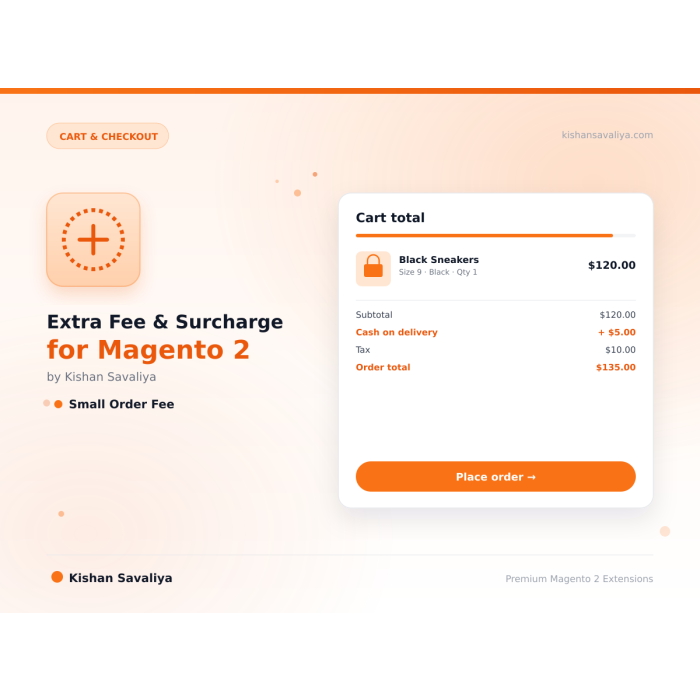
Add extra fees to the Magento 2 checkout by payment method, country, customer group, subtotal or SKU. Each fee shows as its own line in the cart, order, invoice and credit memo, and can be taxed and refunded.
Key Features:
Additional Services
Built-in from day one. No add-ons, no upsell, no licence keys to renew.
create unlimited fee rules with conditions and priorities
Fixed, Percentage, Combined (Fixed + Percent), Percentage with Fixed Minimum
Per Order, Per Product (unique line items), Per Quantity (per unit)
store, website, date, customer group, payment method, country, subtotal, quantity, product IDs, product SKUs, category IDs
Panth Extra Fee is a configurable surcharge and fee extension for Magento 2 and Adobe Commerce that adds payment, small-order, country, customer-group, and product-specific fees to checkout as separate line items.
A rule engine with 11 condition types and 4 calculation methods covers cash-on-delivery surcharges, small-order penalties, country-based handling charges, customer-group discounts, and per-product fees. Each fee renders as its own row in cart totals, checkout, order view, invoices, credit memos, and order emails, so customers see a transparent breakdown and finance teams get an auditable trail.
The admin grid filters by type, status, and amount, while the rule editor includes product and category browse popups, schedule controls, and per-rule tax settings. An order-fees tracking view links every charge to its order with invoiced and refunded totals, and a per-item Extra Fee column appears in the Items Ordered table.
Compatible with Hyvä and Luma themes on Magento 2.4.4–2.4.9 with PHP 8.1–8.4, the Panth Extra Fee module ships full tax and refund support out of the box and is MEQP-compliant.
Best for:
Panth Extra Fee gives Magento 2 store owners complete control over surcharges:
Panth Extra Fee adds rule-based extra fees and surcharges to the Magento 2 cart and checkout. Fee rules are managed in the admin grid and can depend on payment method, customer group, country, store view, website, order subtotal, item quantity, products, categories and a date range. A separate "Small Order Fee" can be enabled from configuration without creating a rule. Each fee is collected as a quote total, stored per order, carried into invoices and credit memos, and shown in the customer order pages and order emails.
The module is used by merchants who need to charge, for example, a cash-on-delivery fee, a handling fee for small orders, or a surcharge for specific countries or customer groups. The cart totals template ships for the Hyva theme, and the Knockout totals component is added to the Luma cart and checkout summary.
Product page: kishansavaliya.com/magento-2-extra-fee.html
panth:extrafee:install-sample-data that creates eight sample rules.panth_extra_fee runs on every totals collection. It stops if the shipping assignment has no items. Otherwise it removes the stored fee rows of the quote and stops if the module is disabled or if the admin area is active and "Apply Fees to Admin Orders" is No.panth_extra_fee_quote and the fee amounts are added to the quote grand total. The fee tax is added to the quote tax total only when "Charge Tax On Fees" is Yes; the quote total collector runs after Magento's tax collector (sort order 460) for that reason.sales_model_service_quote_submit_success (and again on checkout_submit_all_after, which skips orders that already have fee rows) the observer copies the quote fee rows to panth_extra_fee_order. The first event runs before the order confirmation email is sent, so the email lists the fees.view/frontend/templates/cart/totals/extra-fee.phtml is added to the checkout.cart.totals block and renders every total segment whose code starts with panth_extra_fee inside the Hyva totals loop.Panth_ExtraFee/js/view/checkout/summary/extra-fee is added to the cart totals and to the order summary totals at sort order 45 and renders one row per segment panth_extra_fee_<rule_id> with a value above 0. Segment titles are the rule's "Fee Label".etc/pdf.xml and Panth\ExtraFee\Model\Pdf\Total\ExtraFee.sales_order_invoice_register), so opening or updating the new invoice form does not change it. Credit memos refund the invoiced but not yet refunded fee of refundable rules and the small order fee; the refunded fee and tax amounts are recorded when the credit memo is refunded (sales_order_creditmemo_refund). Fees whose rule has "Is Refundable" set to No are left out of the credit memo total and the admin credit memo totals block.Panth_ExtraFee::cart/totals/extra-fee.phtml (Hyva cart totals line)Panth_ExtraFee/template/checkout/summary/extra-fee.html and Panth_ExtraFee/js/view/checkout/summary/extra-fee.js (Luma checkout summary)Panth_ExtraFee::order/items/column/extra-fee.phtml (admin Items Ordered column)Panth_ExtraFee::rule/assign-products.phtml (admin product and category popups)view/frontend/templates/cart/totals.phtml is shipped but is not referenced by any layout file in this version. Block\Cart\ExtraFeeTotals is the block class of the Hyva cart totals line.Colours for the cart line are exposed as CSS variables through etc/theme-config.json (for example --extra-fee-label-color, --extra-fee-amount-color) registered with Panth Core.
See CHANGELOG.md.
| Platform | Versions |
|---|---|
| Magento Open Source | 2.4.4 to 2.4.8 |
| Adobe Commerce | 2.4.4 to 2.4.8 |
| PHP | 8.1, 8.2, 8.3, 8.4 (`~8.1.0 |
| Themes | Hyva (cart totals template), Luma (cart and checkout summary component) |
Composer constraints on Magento packages: magento/framework ^103.0, magento/module-sales ^103.0, magento/module-quote ^101.2, magento/module-checkout ^100.4, magento/module-catalog ^104.0, magento/module-customer ^103.0, magento/module-tax ^100.4, magento/module-backend ^102.0, magento/module-ui ^101.2, magento/module-directory ^100.4, magento/module-store ^101.1, magento/module-config ^101.2, magento/module-catalog-inventory ^100.4, magento/module-payment ^100.4, magento/module-cms ^104.0.
mage2kishan/module-core (^1.0), installed automatically by Composer; the module registers itself with Panth\Core\ViewModel\ThemeConfig and places its admin menu under the Panth Core menu groupetc/module.xml)composer require mage2kishan/module-extra-fee
bin/magento module:enable Panth_Core Panth_ExtraFee
bin/magento setup:upgrade
bin/magento setup:di:compile
bin/magento setup:static-content:deploy -f
bin/magento cache:flush
setup:di:compile is only needed in production mode. setup:static-content:deploy is listed because the module ships JavaScript and an HTML template under view/frontend/web.
Check the result:
bin/magento module:status Panth_ExtraFee
Optional sample rules (existing rules with the same name are skipped):
bin/magento panth:extrafee:install-sample-data
Admin path: Stores > Configuration > Panth Extensions > Extra Fee. All settings can be set at default, website and store view scope. The same page is linked from the admin menu item "Extra Fee" > "Configuration".
| Setting | Default | What it does |
|---|---|---|
| Enable Extra Fee | Yes | Master switch. When No, no fees are calculated and no fee lines are rendered. |
| Apply Fees to Admin Orders | No | When No, the quote total collector skips fees while the admin area is active (orders created in the backend). |
| Fee Display Title | Additional Fees | Label of the single aggregated line when "Show Fee Breakdown" is No. |
Config paths: panth_extra_fee/general/enabled, panth_extra_fee/general/apply_to_admin_orders, panth_extra_fee/general/fee_display_title.
| Setting | Default | What it does |
|---|---|---|
| Show in Cart | Yes | Shows the fee lines in the cart totals (Hyva and Luma). On Hyva the rows sit between Subtotal and Grand Total; the position follows sales/totals_sort/panth_extra_fee when set (default 45). |
| Show in Checkout | Yes | Not read in this version; see the note below. |
| Show in Order View | Yes | Shows the fee lines in the customer order view. |
| Show in Invoice | Yes | Shows the fee lines in the customer invoice view. |
| Show in Credit Memo | Yes | Shows the fee lines in the customer credit memo view. |
| Show in Order Emails | Yes | Shows the fee lines in the order, invoice and credit memo emails. |
| Show in Order Grid | No | Adds the "Extra Fees" column to the Sales > Orders grid. |
| Tax Display Type | Excluding Tax | "Excluding Tax", "Including Tax" or "Including & Excluding Tax" (two lines per fee). |
| Show Fee Breakdown | Yes | Yes: one line per fee. No: one line labelled with "Fee Display Title". |
| Show Zero Amount Fees | No | Yes: rules that evaluate to 0 are still stored and rendered. |
Config paths: panth_extra_fee/display/show_in_cart, show_in_checkout, show_in_order_view, show_in_invoice, show_in_creditmemo, show_in_email, show_in_order_grid, tax_display, show_fee_breakdown, show_zero_fees.
The Knockout totals component used by the Luma cart and checkout summary follows "Show in Cart" and "Show in Checkout" through window.checkoutConfig.panthExtraFee. The admin order, invoice and credit memo pages always show the fee lines while "Enable Extra Fee" is Yes.
| Setting | Default | What it does |
|---|---|---|
| Enable Small Order Fee | No | Adds a fee when the order subtotal is below "Minimum Order Amount". |
| Minimum Order Amount | 50 | Subtotal threshold (base currency). |
| Fee Type | Fixed Amount | "Fixed Amount" or "Percentage of Subtotal". |
| Fee Amount | 5 | Fixed amount or percentage. |
| Fee Label | Small Order Fee | Label of the fee line. |
| Tax Class | None | Product tax class used to calculate tax on the fee. |
| Message Template | Orders below %1 will incur a %2 handling fee. | Message text with %1 for the minimum amount and %2 for the fee amount. |
The fields below "Enable Small Order Fee" are shown only when it is set to Yes. Config paths: panth_extra_fee/small_order/enabled, minimum_amount, fee_type, fee_amount, fee_label, tax_class_id, message. The small order fee is stored with rule_id 0 and fee_type small_order.
| Setting | Default | What it does |
|---|---|---|
| Apply Fees After Discount | No | Yes: percentages and the small order threshold use the subtotal with discount; No: the subtotal before discount. |
| Maximum Total Fee Per Order | (empty) | When the sum of all fees exceeds this base amount, every fee and its tax are scaled down by the same ratio. |
| Exclude Virtual Products | No | Yes: virtual items are not counted for "Per Product" and "Per Quantity" fees. |
| Charge Tax On Fees | No | Yes: the tax worked out from each fee's tax class (and the small order fee tax class) is added to the quote tax total, so it is part of the order tax and grand total, and it is carried into invoices and credit memos. No: fee tax is calculated and stored but never charged, as in earlier versions. |
| Debug Mode | No | Yes: rule evaluation, skipped rules and cap handling are logged at debug level. |
Config paths: panth_extra_fee/advanced/apply_after_discount, maximum_fee, charge_fee_tax, exclude_virtual, debug_mode.
"Maximum Total Fee Per Order" is applied after rounding, so the capped fees never add up to more than the cap. Any rounding difference is taken off the last fee.
Admin menu: "Extra Fee" > "Fee Rules" (route panth_extrafee/rule/index). The grid lists ID, Name, Fee Label, Fee Type, Fee Amount, Fee Percent, Apply Per, Active, Sort Order and Created At, supports inline edit, and has mass actions "Delete", "Enable" and "Disable". "Add New Fee Rule" opens the form with these fieldsets:
| Fieldset | Fields |
|---|---|
| General Settings | Name, Description, Active, Sort Order, Stop Further Rules |
| Fee Calculation | Fee Label, Fee Type, Fee Amount, Fee Amount Percent, Apply Per, Minimum Fee Amount, Maximum Fee Amount |
| Tax Settings | Tax Class, Is Refundable |
| Conditions | Store Views, Websites, Customer Groups, Payment Methods, Countries, Minimum Order Subtotal, Maximum Order Subtotal, Minimum Order Qty, Maximum Order Qty, Specific Products ("Browse Products..."), Categories ("Browse Categories...") |
| Schedule | From Date, To Date |
Empty multiselects mean "no restriction". "From Date" and "To Date" are compared with the current date in the store's configured timezone, not the server clock. "Fee Amount Percent" is used by "Percentage of Subtotal", "Fixed + Percentage" and "Percentage with Fixed Minimum"; "Fee Amount" is the fixed part. Amounts, percentages, quantities and subtotals must be 0 or more, a minimum cannot be greater than its maximum and "From Date" cannot be later than "To Date"; the form and the save action both reject such values. Leaving an optional field empty stores no limit (NULL). The include_in_subtotal column is kept for existing data but is no longer shown in the form because the calculation does not use it.
Admin menu: "Extra Fee" > "Order Fees" (route panth_extrafee/orderfee/index). Columns: ID, Order # (linked to the order), Fee Label, Fee Type, Fee Amount (Base), Fee Amount, Tax (Base), Tax, Fee Invoiced (Base), Fee Refunded (Base), Created At. The grid export button downloads order_fees.csv.
bin/magento module:disable Panth_ExtraFee
composer remove mage2kishan/module-extra-fee
bin/magento setup:upgrade
bin/magento setup:di:compile
bin/magento cache:flush
The module has no uninstall routine. Disabling it leaves the tables panth_extra_fee_rule, panth_extra_fee_quote and panth_extra_fee_order and the panth_extra_fee/* rows in core_config_data in place; drop them manually if you want a clean database. The columns panth_extra_fee_amount, panth_base_extra_fee_amount, panth_extra_fee_tax, panth_base_extra_fee_tax and panth_extra_fee_details added to sales_invoice and sales_creditmemo also stay in place. Keep mage2kishan/module-core if other Panth modules are installed.
Free and open source under the MIT License. See LICENSE.txt.
Panth_ExtraFee; Composer package: mage2kishan/module-extra-fee; PHP namespace: Panth\ExtraFee.etc/sales.xml): code panth_extra_fee, sort order 460 in the quote section and 450 in the order_invoice and order_creditmemo sections. Collectors: Model\Total\Quote\ExtraFee, Model\Total\Invoice\ExtraFee, Model\Total\Creditmemo\ExtraFee. Quote renderers: Block\Adminhtml\Sales\Order\Totals\ExtraFee (adminhtml) and Block\Sales\Order\Totals\ExtraFee (frontend).panth_extra_fee_<rule_id> (panth_extra_fee_0 for the small order fee). The frontend and admin totals blocks add entries panth_extra_fee_<index> (with _excl and _incl suffixes for the "Including & Excluding Tax" mode) after the tax total.Model\Calculator\FeeCalculator (public calculateFees, calculateAmount, calculateSmallOrderFee, calculateTax) and Model\Calculator\ConditionChecker (isRuleValid).Api\Data\FeeRuleInterface and Api\FeeRuleRepositoryInterface (save, getById, getList, delete, deleteById) with preferences to Model\FeeRule and Model\FeeRuleRepository. Rule columns regions and product_skus are evaluated by the condition checker but have no form field; they can be set through the repository.Observer\SaveOrderFees on sales_model_service_quote_submit_success (etc/events.xml) and on checkout_submit_all_after (declared in etc/events.xml and etc/frontend/events.xml), Observer\MarkMultishippingOrder on checkout_type_multishipping_create_orders_single (frontend), Observer\RegisterInvoiceFees on sales_order_invoice_register and Observer\RegisterCreditmemoFees on sales_order_creditmemo_refund.Helper\Data (shouldApplyFees, isEnabled, and one getter per config field). View model: ViewModel\ExtraFee (getOrderFees, getQuoteFees, formatPrice).Console\Command\InstallSampleDataCommand (panth:extrafee:install-sample-data).panth_extra_fee_rule_listing, panth_extra_fee_rule_form, panth_extra_fee_order_listing, and a sales_order_grid column panth_extra_fee rendered by Ui\Component\Listing\Column\OrderExtraFee.panth_extrafee, controllers Rule/* (index, new, edit, save, delete, inlineEdit, massDelete, massStatus, productsGrid, categoryTree) and OrderFee/* (index, export).Panth_ExtraFee::config (configuration section), Panth_ExtraFee::extra_fee (menu group), Panth_ExtraFee::manage_rules (rule controllers), Panth_ExtraFee::view_order_fees (order fee grid and export).etc/db_schema.xml). The columns panth_extra_fee_amount, panth_base_extra_fee_amount, panth_extra_fee_tax, panth_base_extra_fee_tax and panth_extra_fee_details (JSON fee lines) are added to sales_invoice and sales_creditmemo. Module tables:panth_extra_fee_rule: rule definition (rule_id, name, description, is_active, sort_order, fee_type, fee_amount, fee_amount_percent, fee_label, apply_per, min_fee_amount, max_fee_amount, tax_class_id, is_refundable, include_in_subtotal, payment_methods, customer_groups, countries, regions, product_ids, product_skus, category_ids, min_order_subtotal, max_order_subtotal, min_order_qty, max_order_qty, date_from, date_to, store_ids, website_ids, stop_further_rules, created_at, updated_at).panth_extra_fee_quote: fees of the current cart (quote_id, rule_id, fee_label, fee_type, base_fee_amount, fee_amount, base_tax_amount, tax_amount, tax_charged, item_breakdown, created_at).panth_extra_fee_order: fees per order with invoiced and refunded amounts (order_id, quote_id, rule_id, fee_label, fee_type, base_fee_amount, fee_amount, base_tax_amount, tax_amount, base_fee_amount_incl_tax, fee_amount_incl_tax, base_fee_refunded, fee_refunded, base_tax_refunded, tax_refunded, base_fee_invoiced, fee_invoiced, tax_charged, item_breakdown, created_at).Psr\Log\LoggerInterface, so debug and error messages prefixed with Panth_ExtraFee: go to the standard Magento log files. A Logger\Logger and Logger\Handler (var/log/panth_extra_fee.log) are configured in etc/di.xml but are not injected anywhere in this version.etc/frontend/sections.xml invalidates the cart customer-data section on checkout/cart/add.| Module Category | Cart & Checkout |
|---|---|
| Best For | All Sizes |
Talk to Kishan directly: written quote, scope and timeline within 24 hours. No sales call.
Extra Fee & Surcharge for Magento 2 Checkout