Customer Upload Experience
Multi-file support, up to N files per item (configurable)
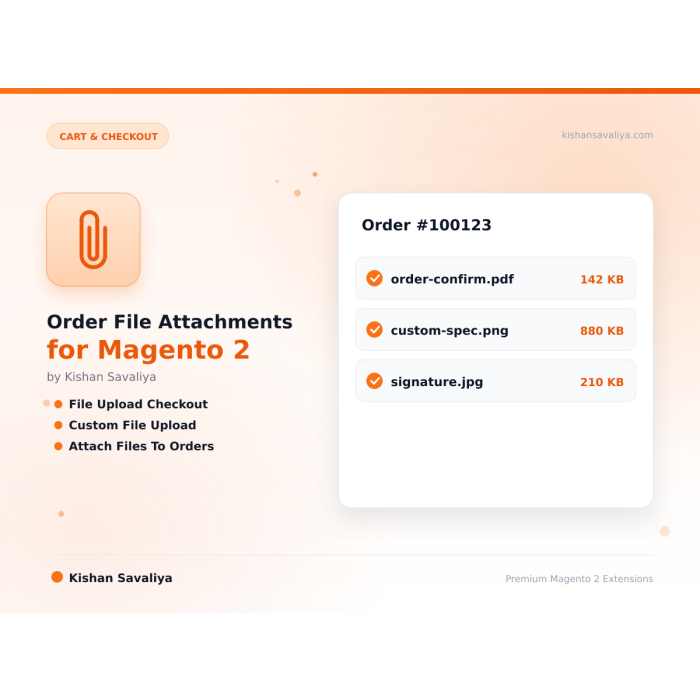
Order File Attachments empowers Magento 2 merchants to accept customer-uploaded files at checkout on a per-product-item basis, ideal for print-on-demand, custom artwork, engraving instructions, prescription uploads, personalised gifts,…
Key Features:
Additional Services
Built-in from day one. No add-ons, no upsell, no licence keys to renew.
Multi-file support, up to N files per item (configurable)
Attachments appear on quote items as rich additional_options cards
Dedicated admin grid, Sales → Panth Infotech → Order Attachments
Per-product attribute, panth_allow_order_attachment (Yes/No)
MEQP compliant, Adobe Magento Extension Quality Program tested
Panth Order Attachments is a Magento 2 file upload extension that lets customers attach files to specific order items at checkout for print-on-demand, custom artwork, and B2B workflows.
The Panth Order Attachments extension adds a per-item file upload field to Magento 2 and Adobe Commerce checkout, so shoppers can send artwork, engraving instructions, prescriptions, RFQ documents, or personalization assets alongside the order itself, without follow-up emails or support tickets.
It is built for Magento 2 merchants selling print-on-demand apparel, engraved jewelry, personalized gifts, prescription eyewear, business cards, and B2B configured products where every order needs supporting files. A simple product attribute toggles uploads on or off per SKU, so the field only shows where it belongs.
Admins manage every uploaded file from a dedicated grid with thumbnail previews, one-click downloads, order and item linking, multi-file support, and configurable size and MIME-type validation. Customers get a frictionless checkout, and the store gets a clean, searchable backend instead of a flooded inbox.
Best for:
Out of the box, Magento 2 has no native way for customers to upload files at checkout that are cleanly attached to a specific order item. Merchants selling customizable products, prescription products, or B2B documents are forced to:
Panth Order Attachments solves this properly:
Panth Order Attachments adds per-item file uploads to Magento 2 checkout with a full admin management layer.
additional_options cardssales_order_place_after observerSales → Panth Infotech → Order Attachmentspanth_allow_order_attachment (Yes/No)Open any order in admin; the Order Attachments tab lists:
Navigate to Sales → Panth Infotech → Order Attachments for a cross-order view:
The module installs a product attribute panth_allow_order_attachment (Boolean) in the Order Attachments attribute group.
| Value | Behaviour |
|---|---|
| No | Upload widget is hidden on the product page (default). |
| Yes | Upload widget appears; customer may attach files before adding to cart. |
You can set this at product, attribute set, or attribute group level.
var/order_attachments/, not publicly browsable| Requirement | Versions Supported |
|---|---|
| Magento Open Source | 2.4.4, 2.4.5, 2.4.6, 2.4.7, 2.4.8 |
| Adobe Commerce | 2.4.4, 2.4.5, 2.4.6, 2.4.7, 2.4.8 |
| Adobe Commerce Cloud | 2.4.4-2.4.8 |
| PHP | 8.1.x, 8.2.x, 8.3.x, 8.4.x |
| MySQL | 8.0+ |
| MariaDB | 10.4+ |
| Hyva Theme | 1.0+ (full Alpine.js support) |
| Luma Theme | Native support (vanilla JS) |
| Required | mage2kishan/module-core (free, auto-installed) |
Tested on:
composer require mage2kishan/module-order-attachments
bin/magento module:enable Panth_Core Panth_OrderAttachments
bin/magento setup:upgrade
bin/magento setup:di:compile
bin/magento setup:static-content:deploy -f
bin/magento cache:flush
app/code/Panth/OrderAttachments/Panth_Core to app/code/Panth/Core/ (required dependency)bin/magento module:status Panth_OrderAttachments
# Expected: Module is enabled
Navigate to Stores → Configuration → Panth Extensions → Order Attachments.
| Setting | Default | Description |
|---|---|---|
| Enable Module | Yes | Master on/off switch for Order Attachments. |
| Setting | Default | Description |
|---|---|---|
| Allowed Extensions | jpg,jpeg,png,gif,pdf,doc,docx,zip | Comma-separated whitelist. |
| Max File Size (MB) | 10 | Server-enforced maximum per file. |
| Max Files Per Item | 5 | Maximum attachments per cart line item. |
| Setting | Default | Description |
|---|---|---|
| Upload Label | Upload Your Design | Custom heading displayed above the upload widget. |
| Show in Cart | Yes | Display attachment cards on the cart page and minicart. |
| Show in Checkout | Yes | Display attachment cards in the checkout order summary. |
Edit any product → Order Attachments attribute group → set Allow Order Attachments to Yes/No.
Commercial, see LICENSE.txt. One license per Magento production installation. Includes 12 months of free updates and email support.
| Module Category | Cart & Checkout |
|---|---|
| Best For | All Sizes |
Native file custom options are tied to the cart quote item and don't persist cleanly as a first-class order record. Panth Order Attachments creates dedicated panth_quote_attachment and panth_order_attachment tables, linked to the sales order item, ensuring files remain accessible for the full order lifetime, including reorders, invoices, and RMAs.
Yes. Set Max Files Per Item in configuration (default 5). Each enabled product in the cart accepts up to that many files.
Yes. The frontend widget has both Luma (PHTML + vanilla JS) and Hyva (Alpine.js + Tailwind) implementations, auto-selected via Panth\Core\Helper\Theme.
Any extension you configure. Defaults: jpg, jpeg, png, gif, pdf, doc, docx, zip. You can add ai, psd, eps, svg, tif, xlsx, etc.
In var/order_attachments/ with SHA-256 hashed filenames. The directory is not publicly browsable; files are served only through authenticated controllers.
Yes. Both guest and registered customer checkouts are supported.
Yes. Admins can soft-delete or download any attachment from the grid and order view tab.
Yes. Files are stored in the writable var/ directory which is persisted across deploys on ACC.
Yes. Configuration respects default → website → store view scope. Attachments are stored per order regardless of store view.
REST endpoints for listing and downloading attachment metadata are included. GraphQL support is on the roadmap.
Panth Malware Scanner is built specifically for Magento 2 filesystems, it understands the directory layout, knows which folders are writable from the frontend, and ships signatures tuned for Magento-targeted threats (Magecart skimmers, PolyShell webshells, admin-layout injection). Traditional AV tools scan everything with generic signatures and produce noise.
No. All price-delta logic continues to flow through Magento's standard priceBox and price-option JS components. This module only replaces the visual rendering.
Yes. When enabled, Panth Footer takes over the footer.container block and renders its own configurable footer. You can disable it any time to restore the default footer.
No. Panth Core is completely free and will remain free forever. It is the foundation library that other (paid) Panth extensions depend on.
Yes. The module ships Hyva-native templates using Alpine.js and Tailwind. No jQuery required.
Yes. The module ships with two purpose-built templates, Alpine.js + Tailwind for Hyva and vanilla JS for Luma, and auto-switches based on your active storefront theme.
Yes. Create as many sliders as you want in the admin and place each one via its own widget or layout block. Each slider maintains independent configuration and slides.
Yes, guests can subscribe with their email address. You can optionally require login via admin config.
No. Google does not participate in IndexNow and has stated they maintain their own crawl schedule. For Google indexing, use a proper XML sitemap and Google Search Console. This module is specifically for the IndexNow ecosystem (Bing, Yandex, Seznam, Naver, Yep).
Unlimited. Each form has a unique identifier and its own submissions scope.
Talk to Kishan directly: written quote, scope and timeline within 24 hours. No sales call.
Order File Attachments for Magento 2