Configurable column layouts
1, 2 or 3 columns, sidebar left or right, fully admin-configurable
Turns the two-step Magento 2 checkout into a one-page checkout with 1, 2 or 3 columns, a sticky order summary, and the coupon field and Place Order button in the sidebar. Every option is set in the admin.
Key Features:
Additional Services
Built-in from day one. No add-ons, no upsell, no licence keys to renew.
1, 2 or 3 columns, sidebar left or right, fully admin-configurable
follows the customer as they scroll, place-order button always visible
moved out of the payment step so customers can apply discounts at any stage
passive opt-in checkbox embedded in the sidebar without extra steps
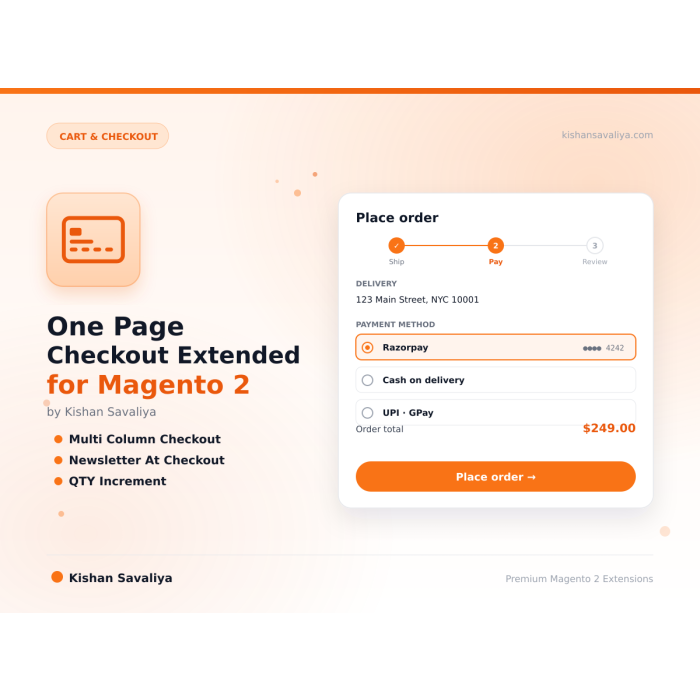
Panth One Page Checkout Extended is a checkout UX upgrade for Magento 2 and Adobe Commerce that adds multi-column layouts, a sticky order summary sidebar, qty controls, and newsletter opt-in to the native Luma checkout. It optimizes form behavior without replacing Magento’s checkout app, so payment methods and tax behavior stay native.
The One Page Checkout Extended module supports 1-, 2-, and 3-column layouts with left or right sidebar placement and a sticky summary that follows the customer as they scroll. The place-order button, coupon code field, and newsletter checkbox move into the sidebar, so the call-to-action is always visible. Cart items and the discount input are auto-expanded so customers reach payment in fewer clicks. Qty +/- buttons next to each summary line item respect qty_increments and stock-aware max caps, updating cart via AJAX with no page reload.
Auto-save persists shipping address and method as the customer types, so the payment step loads instantly; billing real-time sync mirrors typing into the “same as shipping” block. Four card styles ship (Elevated, Bordered, Flat, Glassmorphism), plus an admin color picker with server-side hex validation, pixel-level border radius, optional step indicators, Compact or Full Width field modes, and placeholder, tooltip, and billing-title toggles. Custom CSS and JS textareas inject inline and via RequireJS, behind an admin ACL.
The default Magento 2 checkout is functional but dated, a rigid two-step accordion that forces customers to scroll, expand sections, and hunt for the place-order button. Panth Checkout Extended addresses every friction point merchants complain about:
The result is a faster, cleaner, higher-converting checkout, with zero custom code.
One Page Checkout Extended reshapes Luma checkout layout and behavior:
qty_increments and stock.@noEscape.Premium one-page checkout extension for Magento 2 that replaces the default two-step accordion checkout with a configurable multi-column layout, a sticky order summary sidebar, inline newsletter subscription, qty +/- increment controls, a sidebar place-order button, coupon code in the sidebar, custom CSS/JS injection, and a modern card-style UI. Fully admin-configurable, zero code changes required.
Panth Checkout Extended transforms the default Magento checkout into a fast, modern, conversion-focused one-page experience. Customers see shipping, payment, and order summary side-by-side in a clean card-based layout. The sticky sidebar keeps the place-order button, coupon code, newsletter opt-in, and qty controls always within reach, eliminating scroll fatigue and reducing cart abandonment. Every feature is togglable from the admin panel, so you can tune the checkout UX per store view without touching a single line of code.
Built for Magento 2.4.4 through 2.4.8 on PHP 8.1 - 8.4, fully MEQP-compliant, and engineered for speed by a Top Rated Plus Magento developer with 10+ years of eCommerce experience.
qty_increments (e.g. 0.5 step)Panth_CheckoutExtended::config for granular admin permissions@noEscape, CSS/JS edits restricted to authorized admin users| Feature | Default Magento Checkout | Panth Checkout Extended |
|---|---|---|
| Layout | Fixed 2-step accordion | Configurable 1/2/3 column layout, all steps visible |
| Sidebar | Static summary, no actions | Sticky sidebar with place-order, coupon, qty, newsletter |
| Newsletter | Not available at checkout | Checkbox in sidebar; auto-subscribes guest + customer |
| Qty controls | Not available in summary | +/- increment buttons, stock-aware qty_increments |
| Coupon code | Inside payment step | Moved to sidebar for quick access |
| Place order | Bottom of payment step only | Sidebar button, always visible |
| Styling | Fixed Luma theme | 4 card styles, accent color, border radius, field modes |
| Custom code | Requires theme override | Admin textareas for CSS and JS |
| Shipping UX | Manual save | Auto-save as customer types |
| Billing sync | On submit | Real-time as customer types |
1-column (stacked), best for stores with few items per order and mobile-heavy traffic. Shipping, payment, and summary stack vertically.
2-column, the industry-standard modern checkout. Main content (shipping + payment) on one side, sticky order summary on the other. Best for the majority of stores.
3-column, maximum information density. Shipping, payment, and order summary are all visible side-by-side. Ideal for desktop-heavy B2B stores or stores with complex payment flows.
The layout switches via a custom layout handle applied by an observer, so you can further customize via your own checkout_index_index.xml if needed.
The newsletter checkbox is rendered inside the order summary sidebar so it is visible throughout the checkout flow. On order placement:
This approach is fully compatible with GDPR and CAN-SPAM since the customer explicitly opts in via an unchecked-by-default checkbox (configurable).
When enabled, +/- buttons appear next to the quantity of each item in the order summary:
qty_increments value (default 1, can be 0.5, 2, 5, etc.)For quick tweaks without a theme override, use the Custom CSS and Custom JS fields in admin:
Custom CSS example:
.checkout-extended .place-order-sidebar button {
 background: linear-gradient(90deg, #7928ca, #ff0080);
 font-size: 16px;
}
Custom JS example:
document.addEventListener('DOMContentLoaded', function() {
 // Track checkout step entry for analytics
 if (window.gtag) {
 gtag('event', 'begin_checkout');
 }
});
Both textareas are restricted to admin users with the Panth_CheckoutExtended::config ACL permission. Content is injected as @noEscape because it is admin-authored.
Common use cases:
| Symptom | Likely cause | Fix |
|---|---|---|
| Checkout looks unchanged after enabling | Cache not flushed | bin/magento cache:flush and hard-refresh |
| Layout handle not applied | Observer not firing | bin/magento module:status Panth_CheckoutExtended |
| Newsletter checkbox missing | Disabled in config | Configuration → Newsletter Subscription → Enable Newsletter Checkbox = Yes |
| Qty +/- buttons missing | Cart feature disabled | Configuration → Cart & Order Summary → Qty Increment Controls = Yes |
| Shipping info not auto-saving | JS error | Check browser console; redeploy static content |
| Accent color reverts to default | Invalid hex value | Non-hex values are sanitized server-side to the default; use the color picker or valid hex (#rgb / #rrggbb) |
| Default shipping/payment not pre-selected | Wrong method code | Use the composite code, e.g. flatrate_flatrate for shipping, checkmo for payment |
| Custom CSS/JS not appearing | FPC or browser cache | Flush full page cache and browser cache |
| Coupon not in sidebar | Extension disabled | Enable extension in General settings |
Class Panth\Core\Helper\Theme not found |
Core not installed | composer require mage2kishan/module-core |
| Requirement | Versions Supported |
|---|---|
| Magento Open Source | 2.4.4, 2.4.5, 2.4.6, 2.4.7, 2.4.8 |
| Adobe Commerce | 2.4.4, 2.4.5, 2.4.6, 2.4.7, 2.4.8 |
| Adobe Commerce Cloud | 2.4.4-2.4.8 |
| PHP | 8.1.x, 8.2.x, 8.3.x, 8.4.x |
| MySQL | 8.0+ |
| MariaDB | 10.4+ |
| Luma Theme | Native support |
| Hyva Theme | Supported when the store uses the standard Magento checkout |
| Required dependency | mage2kishan/module-core ^1.0 (free, installed automatically) |
Tested on:
composer require mage2kishan/module-checkout-extended
bin/magento module:enable Panth_Core Panth_CheckoutExtended
bin/magento setup:upgrade
bin/magento setup:di:compile
bin/magento setup:static-content:deploy -f
bin/magento cache:flush
app/code/Panth/CheckoutExtended/ in your Magento installationapp/code/Panth/Core/ is also present (free required dependency)bin/magento module:enablebin/magento module:status Panth_CheckoutExtended
# Expected output: Module is enabled
After installation, navigate to:
Admin → Stores → Configuration → Panth Extensions → Checkout Extended
Open Stores → Configuration → Panth Extensions → Checkout Extended. Every setting below is scoped per store view (default → website → store view), so a multi-store setup like acme.example.com and acme.example.com/eu can run different layouts, colors, and newsletter copy. Flush the cache after saving (bin/magento cache:flush).
All values live under the config path prefix panth_checkout_extended/, handy for bin/magento config:set and CI/CD pipelines:
# Example: switch a store to a 2-column layout with a sticky left sidebar
bin/magento config:set panth_checkout_extended/layout/columns 2
bin/magento config:set panth_checkout_extended/layout/sidebar_position left
bin/magento config:set panth_checkout_extended/layout/sidebar_sticky 1
bin/magento cache:flush
| Setting | Config Path | Default | Frontend Behavior |
|---|---|---|---|
| Enable Checkout Extended | general/enabled |
Yes | Master switch. When Yes, the multi-column layout, sidebar components, body classes, and dynamic styles are applied at checkout. When No, the storefront reverts to the stock Magento checkout, no traces left behind. |
| Setting | Config Path | Default | Frontend Behavior |
|---|---|---|---|
| Columns | layout/columns |
3 | 1 Column (Stacked), sections stack vertically, ideal for mobile-heavy stores. 2 Columns (Content + Sidebar), shipping + payment in the main column, order summary beside it. 3 Columns (Shipping | Payment | Summary), everything visible at once on desktop. Adds a panth-checkout-{n}col body class; layouts collapse gracefully on smaller screens. |
| Sidebar Position | layout/sidebar_position |
Right | Renders the order summary sidebar on the Left or Right of the main content (panth-sidebar-left / panth-sidebar-right). |
| Sticky Sidebar | layout/sidebar_sticky |
No | When Yes, the order summary, including the place-order button and coupon field, stays pinned in the viewport as the customer scrolls (panth-sidebar-sticky). |
| Setting | Config Path | Default | Frontend Behavior |
|---|---|---|---|
| Card Style | style/card_style |
Elevated (Shadow) | Visual treatment for every checkout card: Elevated (Shadow), soft drop shadows; Bordered, clean 1px outlines; Flat (No Border), minimal, background-only; Glassmorphism, frosted translucent panels. Applied via the panth-card-{style} body class. |
| Accent Color | style/accent_color |
#1a1a2e | HTML5 color picker in admin. Drives buttons, links, and highlights through the --panth-checkout-accent CSS variable (a --panth-checkout-accent-hover shade is derived automatically). The value is sanitized server-side, anything that is not valid hex falls back to the default, so CSS injection is impossible. |
| Border Radius (px) | style/border_radius |
12 | Corner radius for cards and form elements, in pixels (digits only, ≥ 0). Output as --panth-checkout-radius, with a smaller --panth-checkout-radius-sm derived for inner elements. Use 0 for a sharp, editorial look. |
| Step Indicators | style/step_indicators |
No | When Yes, numbered step badges appear above each checkout section so customers always know where they are (panth-step-indicators). |
| Setting | Config Path | Default | Frontend Behavior |
|---|---|---|---|
| Qty Increment Controls | cart/qty_increment_enabled |
No | When Yes, +/− quantity buttons appear next to each item in the order summary. Steps respect each product's qty_increments (e.g. 0.5 or 5), updates happen via AJAX with totals refreshing in place, and the + button disables at max available stock. |
| Show SKU | cart/product_sku_enabled |
No | When Yes, the product SKU is displayed below each item name in the order summary, a favorite for B2B buyers who order by part number. |
| Product Link | cart/product_link_enabled |
No | When Yes, item names in the order summary link back to their product page, letting customers double-check details without abandoning checkout. |
| Setting | Config Path | Default | Frontend Behavior |
|---|---|---|---|
| Enable Newsletter Checkbox | newsletter/enabled |
Yes | When Yes, a newsletter opt-in checkbox is rendered in the order summary sidebar. On order placement the choice is transported via payment extension attributes and the customer (guest by email, or logged-in by customer ID) is subscribed. Duplicates are skipped; failures are logged and never block the order. |
| Checkbox Label | newsletter/field_label |
Subscribe to our newsletter | The label shown next to the checkbox. Fully translatable, e.g. "Get Acme Store offers in your inbox". (Shown in admin only when the checkbox is enabled.) |
| Checked by Default | newsletter/default_checked |
Yes | When Yes, the box is pre-ticked. Set to No for strict opt-in markets (GDPR-friendly explicit consent). (Shown in admin only when the checkbox is enabled.) |
| Setting | Config Path | Default | Frontend Behavior |
|---|---|---|---|
| Field Mode | form_styles/field_mode |
Compact | Compact (Multiple Fields Per Row), related fields (e.g. city / postcode) share a row for a shorter form; Full Width (One Field Per Row), each field gets its own row for maximum clarity. Applied via panth-form-{mode}. |
| Use Placeholders | form_styles/use_placeholders |
No | When Yes, each address field's label is mirrored into its placeholder, across shipping, shared billing, and per-payment-method billing forms, for a lighter, modern form feel. |
| Show Tooltips | form_styles/show_tooltips |
No | When Yes, tooltip icons with contextual help text appear next to form fields. When No, they are hidden for a cleaner form. |
| Setting | Config Path | Default | Frontend Behavior |
|---|---|---|---|
| Default Shipping Method | shipping/default_method |
(empty) | Pre-selects a shipping method by composite code (carrier_method, e.g. flatrate_flatrate) as soon as rates load, the customer can still change it. Leave empty for no pre-selection. |
| Hide Single Method | shipping/hide_single_method |
No | When Yes and exactly one shipping method is available, it is auto-selected and the radio selector is hidden, one less decision, one less click. |
| Sort by Price | shipping/sort_by_price |
No | When Yes, shipping methods are sorted cheapest-first, putting the most attractive rate at the top. |
| Setting | Config Path | Default | Frontend Behavior |
|---|---|---|---|
| Default Payment Method | payment/default_method |
(empty) | Pre-selects a payment method by code (e.g. checkmo) when the payment list renders. All other methods remain available, nothing is removed. Leave empty for no pre-selection. |
| Setting | Config Path | Default | Frontend Behavior |
|---|---|---|---|
| Show Billing Title | billing/show_title |
Yes | When No, the "Billing Address" section title is hidden (panth-billing-title-hidden) for a tighter, less repetitive payment column. |
| Setting | Config Path | Default | Frontend Behavior |
|---|---|---|---|
| Custom CSS | custom_code/custom_css |
(empty) | Injected as an inline <style> block on the checkout page only. Enter raw CSS, do not include <style> tags (closing tags are neutralized automatically). |
| Custom JS | custom_code/custom_js |
(empty) | Injected on checkout via require([], function () { ... }) and wrapped in try/catch, a typo logs to the console but can never break order placement. Enter raw JavaScript, do not include <script> tags. |
Commercial, see LICENSE.txt. One license per Magento production installation. Includes 12 months of free updates and email support.
Every admin option translates into a predictable body class or CSS custom property on the checkout page, so theme developers can target any configuration state without touching templates.
Body classes (applied when the extension is enabled):
| Class | Driven by |
|---|---|
panth-checkout-extended |
Always present when enabled |
panth-checkout-1col / panth-checkout-2col / panth-checkout-3col |
Layout → Columns |
panth-sidebar-left / panth-sidebar-right |
Layout → Sidebar Position |
panth-sidebar-sticky |
Layout → Sticky Sidebar = Yes |
panth-card-elevated / panth-card-bordered / panth-card-flat / panth-card-glass |
Style → Card Style |
panth-step-indicators |
Style → Step Indicators = Yes |
panth-form-compact / panth-form-full |
Form Styles → Field Mode |
panth-form-placeholders |
Form Styles → Use Placeholders = Yes |
panth-form-tooltips |
Form Styles → Show Tooltips = Yes |
panth-billing-title-hidden |
Billing → Show Billing Title = No |
CSS custom properties (emitted on :root at checkout):
| Variable | Driven by |
|---|---|
--panth-checkout-accent |
Style → Accent Color (sanitized hex) |
--panth-checkout-accent-hover |
Derived hover shade of the accent color |
--panth-checkout-radius |
Style → Border Radius (px) |
--panth-checkout-radius-sm |
Derived smaller radius for inner elements |
Example, restyle only the 3-column glassmorphism configuration on example.com:
body.panth-checkout-3col.panth-card-glass .opc-block-summary {
 backdrop-filter: blur(18px);
 border-radius: var(--panth-checkout-radius);
}
| Module Category | Cart & Checkout |
|---|---|
| Best For | All Sizes |
Talk to Kishan directly: written quote, scope and timeline within 24 hours. No sales call.
One Page Checkout Extended for Magento 2