

Hreflang Manager for Magento 2
Magento 2 hreflang tags for stores with several languages or regions. Group the same product, category or CMS page across store views, and the module prints the matching alternate links plus an x-default on every page.
- Free
- Themes listed: Hyvä + Luma
composer require mage2kishan/module-hreflang
- Package requirementsRead the source documentation
- Developer profileView Upwork profile
- Themes listedHyvä + Luma
- PHP versions listed8.1, 8.2, 8.3, 8.4
- Installation questionsDiscuss your store setup
What it does for your store
The main features, as listed in the module documentation.
-
Built for Magento 2
Every multi-store Magento catalog gets hreflang wrong the first time.
-
MEQP Compliant
Adobe Magento Extension Quality Program, passes with zero severity-10 violations.
-
Hyva + Luma Ready
Vanilla JS, no jQuery dependency. Drop-in compatible with both default Luma and Hyva themes.
-
Free Forever
Lifetime updates with every Magento release. No subscription, no licence keys, no upsells.
Installation
Example commands from the Magento root. Follow the package instructions and your staging and deployment process.
- 1Check the releaseMatch Magento, PHP, theme and dependency requirements.
- 2Install on stagingReview Composer changes and follow the package instructions.
- 3Configure and verifyUse the documented settings and test the affected features.
$ composer require mage2kishan/module-hreflang
$ bin/magento setup:upgrade
$ bin/magento setup:di:compile
$ bin/magento setup:static-content:deploy -f
$ bin/magento cache:clean
Listed requirements
These are the details supplied in this listing. Confirm the selected release supports your Magento edition, PHP and storefront.
| Magento versions listed | 2.4.6, 2.4.7, 2.4.8 |
|---|---|
| PHP versions listed | 8.1, 8.2, 8.3, 8.4 |
| Themes listed | Hyvä, Luma |
| Composer package | mage2kishan/module-hreflang |
Documentation
Product details and setup guidance. Check the package repository for release-specific instructions.
Overview
Panth Hreflang adds hreflang tags to Magento 2 stores with several languages or regions, using groups that pair the same page across store views. A group can hold a product, category or CMS page, each grouped page gets its link rel="alternate" tags plus an x-default, and a check on the config page flags common setup mistakes.
When a UK shopper searches Google for a product and lands on your US store with USD pricing, Google chose the wrong alternate, almost always because the site has no hreflang tags or has tags missing return links. This module ships an admin CRUD UI for cross-store hreflang groups: pick a product, category, or CMS page, link its equivalents across store views, and the module renders the full reciprocal tag set on every group member so search engines can route the right shopper to the right URL.
The entity-finder modal lets you map equivalents across stores without copying URLs, mass actions cover bulk group creation and deletion, and x-default auto-resolves to a configurable fallback store. Storefront rendering happens at the layout level on Hyvä and Luma identically, and a CI smoke-test pattern is documented for catching missing-return-link regressions before deploy.
Group members support products, categories, and CMS pages, and the rendered URLs survive category renames because the module re-resolves canonical URLs at render time rather than caching stale strings. Mismatched or expired alternates are flagged in the admin grid so cleanup is one click.
- Multi-language Magento storefronts (EU, APAC, LATAM expansion)
- Multi-region catalogs with currency / pricing differences per store view
- Sites surfacing "alternate page" or hreflang errors in Google Search Console
What you get
Cross-store hreflang group management for Magento 2 products, categories, and CMS pages with auto x-default.
- Admin CRUD for hreflang groups across product, category, and CMS entity types
- Entity-finder modal for mapping equivalents across store views
- Automatic reciprocal return-link tags on every group member
- Auto
x-defaultresolution to a configurable fallback store - Mass actions for bulk group creation and member assignment
- Identical storefront rendering on Hyvä and Luma themes
Magento 2 Hreflang
Panth Hreflang adds <link rel="alternate" hreflang="..."> tags to the <head> of storefront pages so that search engines can serve the correct language or region version of a product, category or CMS page. Magento 2 does not emit hreflang tags on its own; this module adds a single head block on the default layout handle and fills it from admin-managed hreflang groups, or, for CMS pages, from an automatic match across store views.
It is used by merchants who run several store views for different languages or countries on one Magento installation. The output is rendered by a plain PHP template with no JavaScript, so it works on both Hyva and Luma themes.
Product page: kishansavaliya.com/magento-2-hreflang.html
Features
- Emits one
<link rel="alternate" hreflang="..." href="..."/>tag per locale on product, category and CMS pages, including the CMS home page. - Admin grid and form for hreflang groups: each group has an entity type (Product, Category or CMS Page), a code, notes, an active flag and any number of member rows (Store View, Entity ID, Locale, URL, Is Default).
- Locale fallback: when a member's Locale field is left blank, the store's
general/locale/codevalue is used with the underscore replaced by a hyphen (for exampleen_GBbecomesen-GB). - URL auto-resolution: when a member's URL field is left blank, the URL is built on save from the entity's
url_rewriteentry for that store. - Entity lookup modals on the group form (Browse Products, Browse Categories, Browse CMS Pages) that search by name, SKU, identifier or numeric ID and return up to 50 rows.
- Optional
x-defaulttag: taken from the member flagged Is Default, or from the first member when none is flagged. When no group matches the current page nothing is emitted, unless Self-Referencing x-default on Unmapped Pages is set to Yes (never on the 404 page). - Scope control: alternates can be limited to store views in the same website (default) or include store views from all websites.
- Three CMS page matching methods: Same Page ID, Same URL Key (default) or By Hreflang Identifier (manual groups only).
- Configuration Diagnostic panel on the configuration page that runs five checks against the stored groups and store settings.
- Mass delete from the grid; deleting a group also deletes its member rows (foreign key with
ON DELETE CASCADE). - Keyword search on the grid (group code, entity type, notes).
- Indexer
panth_seo_hreflang(label "Panth SEO Hreflang") with Mview subscriptions on the two module tables. - Data patch that renames legacy
panth_seo/hreflang/*configuration paths topanth_hreflang/hreflang/*duringsetup:upgrade. - Constructor dependency injection only; all admin labels and messages use
__()for translation.
Usage
Storefront output
The block panth_hreflang.head is added to head.additional in view/frontend/layout/default.xml and is declared cacheable. Its template, Panth_Hreflang::head/hreflang.phtml, prints one line per alternate:
<link rel="alternate" hreflang="en-GB" href="[UK store URL]/shirt.html" />
<link rel="alternate" hreflang="de-DE" href="[DE store URL]/hemd.html" />
<link rel="alternate" hreflang="x-default" href="[UK store URL]/shirt.html" />
The current entity is detected from the current_product and current_category registry keys, the cms_page registry key, the web/default/cms_home_page setting on cms_index_index (the identifier|page_id format written by the admin Default Pages picker is understood), and the page_id or id request parameter on cms_page_view.
Resolution rules:
- For products and categories, the resolver looks for an active group that contains the current entity on the current store view, then loads that group's members. With scope
Within Same Website, members from other websites are ignored. - Members are skipped when their store view is inactive, when a product is disabled, not visible individually or not assigned to the store view's website, or when a category is inactive or outside the store view's root category. Members whose locale is not a valid hreflang code or whose URL is not an absolute
http/httpsURL are skipped as well. - CMS page groups match both the stored entity type
cms_pageand the resolver typecms. - For CMS pages with method
Same Page IDorSame URL Key, the resolver readscms_pageandcms_page_storedirectly: every active page with the same page ID or identifier that is assigned to a store view in scope becomes an alternate, using that store view's locale andbase URL + identifieras the URL. Pages assigned to All Store Views count for every active store view that has no page of its own for that identifier, and the page configured as the store view's CMS home page uses the base URL. Inactive store views are skipped. No groups are needed. WithBy Hreflang Identifier, only groups are used. - Locales are compared case-insensitively and duplicates are dropped. If fewer than two distinct locales remain, the group produces no output.
- When at least two alternates exist and Emit x-default is Yes, an
x-defaultentry is appended unless a member already uses the literal localex-default. Its URL is the Is Default member's URL, or the first member's URL when none is flagged. - When nothing resolves for the page, nothing is emitted. With Self-Referencing x-default on Unmapped Pages set to Yes, the block emits a single
x-defaulttag with the current page URL without its query string instead. Nothing is emitted on the 404 page.
For the meaning of the tags see Google's documentation on localized versions of a page.
Admin behaviour
Saving a group writes the group row, then compares the submitted member rows with the stored ones: existing rows are updated, new rows inserted and missing rows deleted. Blank Locale values are filled from the store's general/locale/code; blank URL values are resolved from url_rewrite for the group's entity type (product, category or cms-page) and the member's store view, and are stored with a maximum length of 512 characters. Members whose locale or URL cannot be resolved are skipped. The locale must be a hreflang code such as en, en-GB, zh-Hans-CN or x-default, and the URL must be an absolute http or https URL; other rows are not saved and a warning shows how many were skipped. Member URLs are stored at save time; after changing a URL key, open and save the group again to refresh them. Saving, deleting or mass deleting a group cleans the full page cache entries of the member products, categories and CMS pages (before and after the change), so the storefront shows the new tags straight away.
The Browse buttons call panth_hreflang/hreflang/entitysearch (GET, parameters type, q, store_id) and return a JSON list of up to 50 matching entities.
Indexer
bin/magento indexer:reindex panth_seo_hreflang fills the hreflang_payload column of the panth_seo_resolved table, which is created by the optional mage2kishan/module-advanced-seo package (a soft dependency listed under suggest in composer.json). For every store view and entity that appears in the member table the resolver output is written as JSON to the matching existing row of that table. Before doing any work the indexer checks through the resource connection that the table and its hreflang_payload column exist; when they do not, the reindex returns immediately without running the resolver or writing anything. This module creates no table of its own for the payload, because the storefront reads alternates directly through the resolver. Mview subscriptions on panth_seo_hreflang_group and panth_seo_hreflang_member trigger the indexer in "Update by Schedule" mode when rows change.
Templates
view/frontend/templates/head/hreflang.phtml can be overridden in a theme at Panth_Hreflang/templates/head/hreflang.phtml. The block exposes getAlternates(), which returns an array of locale, url and is_default entries, and isEnabled().
The module registers no cron jobs, console commands, plugins, observers or web API endpoints.
Changelog
See CHANGELOG.md.
Compatibility
| Platform | Versions |
|---|---|
| Magento Open Source | 2.4.4 to 2.4.9 (as published on the product page) |
| Adobe Commerce | 2.4.4 to 2.4.9 (as published on the product page) |
| PHP | 8.1, 8.2, 8.3, 8.4 (`~8.1.0 |
| Themes | Hyva and Luma (server-rendered template, no JavaScript) |
Composer constraints on Magento packages: magento/framework ^103.0, magento/module-store ^101.1, magento/module-catalog ^104.0, magento/module-cms ^104.0, magento/module-backend ^102.0, magento/module-ui ^101.2, magento/module-config ^101.2, magento/module-url-rewrite ^102.0.
Requirements
- Magento Open Source or Adobe Commerce 2.4.4 to 2.4.9
- PHP 8.1, 8.2, 8.3 or 8.4
mage2kishan/module-core^1.0(required; provides the Panth Extensions admin tab and menu parent)- The Magento modules listed above;
Magento_Catalog,Magento_Cms,Magento_BackendandMagento_Uiare also declared in themodule.xmlload sequence
Installation
composer require mage2kishan/module-hreflang
bin/magento module:enable Panth_Core Panth_Hreflang
bin/magento setup:upgrade
bin/magento setup:di:compile
bin/magento cache:flush
setup:di:compile is only needed in production mode. The module ships no files under view/*/web, so setup:static-content:deploy is not required.
Check the result with:
bin/magento module:status Panth_Hreflang
Configuration
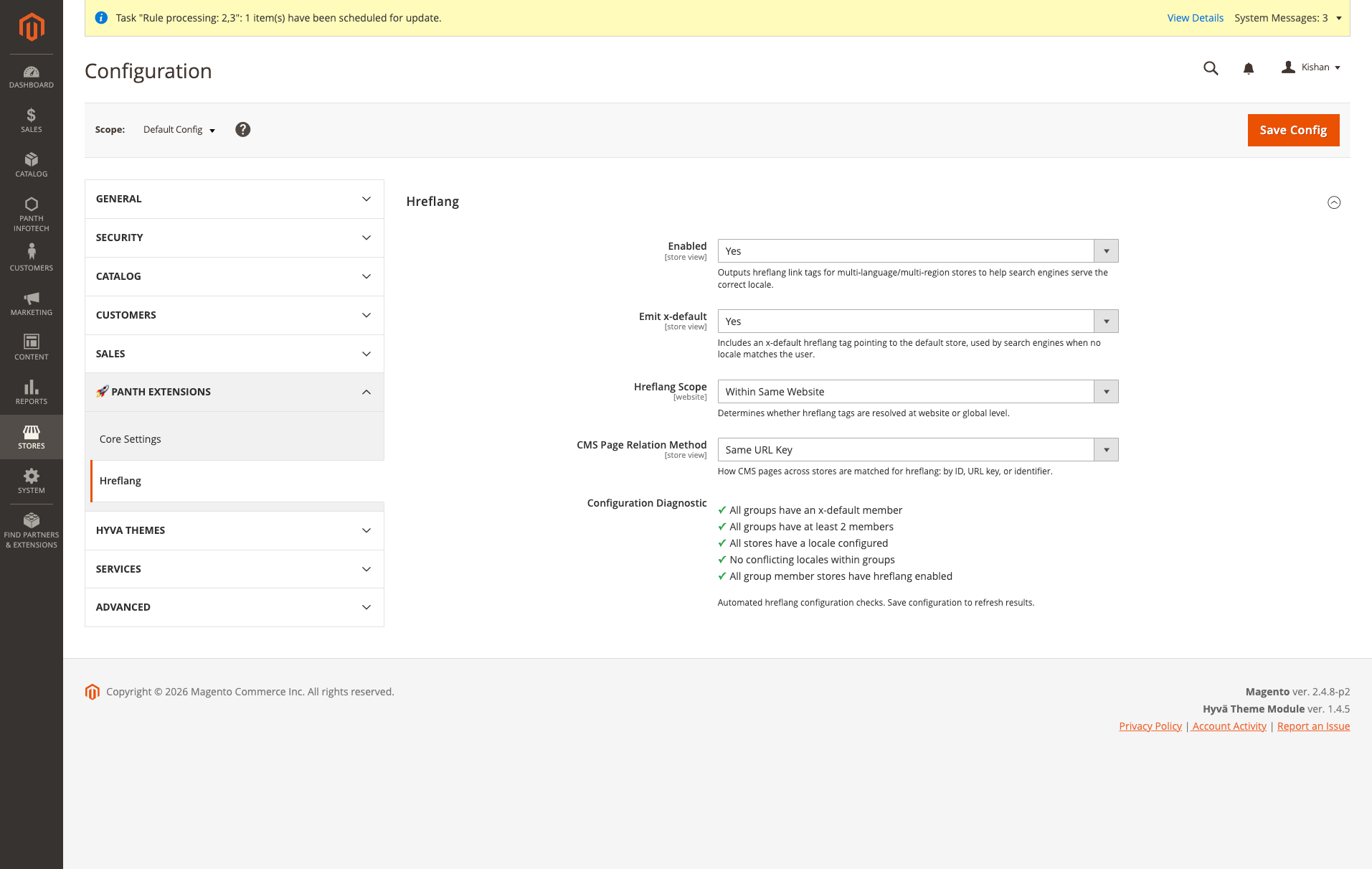
Go to Stores > Configuration > Panth Extensions > Hreflang. The section is also reachable from the admin menu under Panth Extensions > Hreflang > Configuration.
Hreflang
| Setting | Default | What it does |
|---|---|---|
| Enabled | Yes | Master switch. When set to No for a store view, the head block outputs nothing on that store view. |
| Emit x-default | Yes | Adds an x-default tag to every resolved group that does not already contain a member with locale x-default. |
| Hreflang Scope | Within Same Website | Within Same Website restricts alternates to store views of the current website; Across All Websites includes members from every website. Available at default and website scope only. |
| CMS Page Relation Method | Same URL Key | How CMS pages are matched across store views: Same Page ID, Same URL Key (pages sharing the same identifier) or By Hreflang Identifier (only manually created groups are used). |
| Self-Referencing x-default on Unmapped Pages | No | When Yes, pages without alternates get a single x-default tag with the current URL (query string removed). Keep No on multi-store setups, because each store view would claim a different x-default for the same page. |
| Configuration Diagnostic | (read-only) | Shows the result of five checks. Save the configuration to refresh it. |
Configuration paths:
panth_hreflang/hreflang/enabledpanth_hreflang/hreflang/emit_x_defaultpanth_hreflang/hreflang/hreflang_scopepanth_hreflang/hreflang/cms_relation_methodpanth_hreflang/hreflang/fallback_x_default
All settings except Enabled are hidden while Enabled is No.
With the defaults, the module is active on every store view as soon as it is enabled: product and category pages that belong to a group get their alternates, CMS pages are matched by identifier across the store views of the same website, and every other page gets no hreflang tags.
The diagnostic panel runs these checks: all active groups have a member flagged Is Default; all active groups have at least two members; every store view has a locale configured; no active group contains the same locale twice; every store view that is a member of an active group has hreflang enabled. Failures are listed under the checklist with an error or warning severity.
Hreflang groups
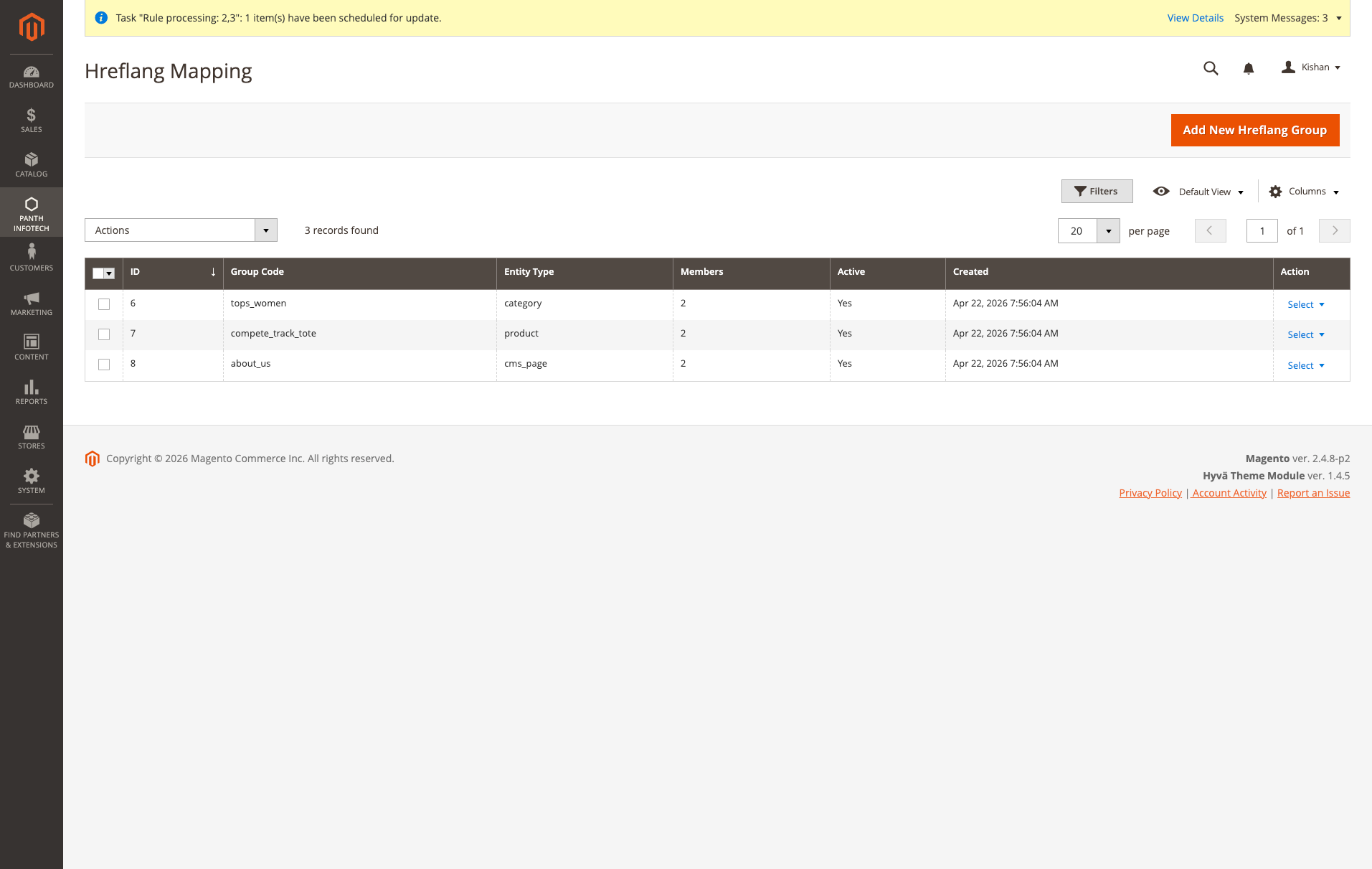
Groups are managed under Panth Extensions > Hreflang > Hreflang Mapping (admin route panth_hreflang/hreflang/index). The grid lists ID, Group Code, Entity Type, Members, Active and Created, supports filters, column controls and bookmarks, and has a Delete mass action.
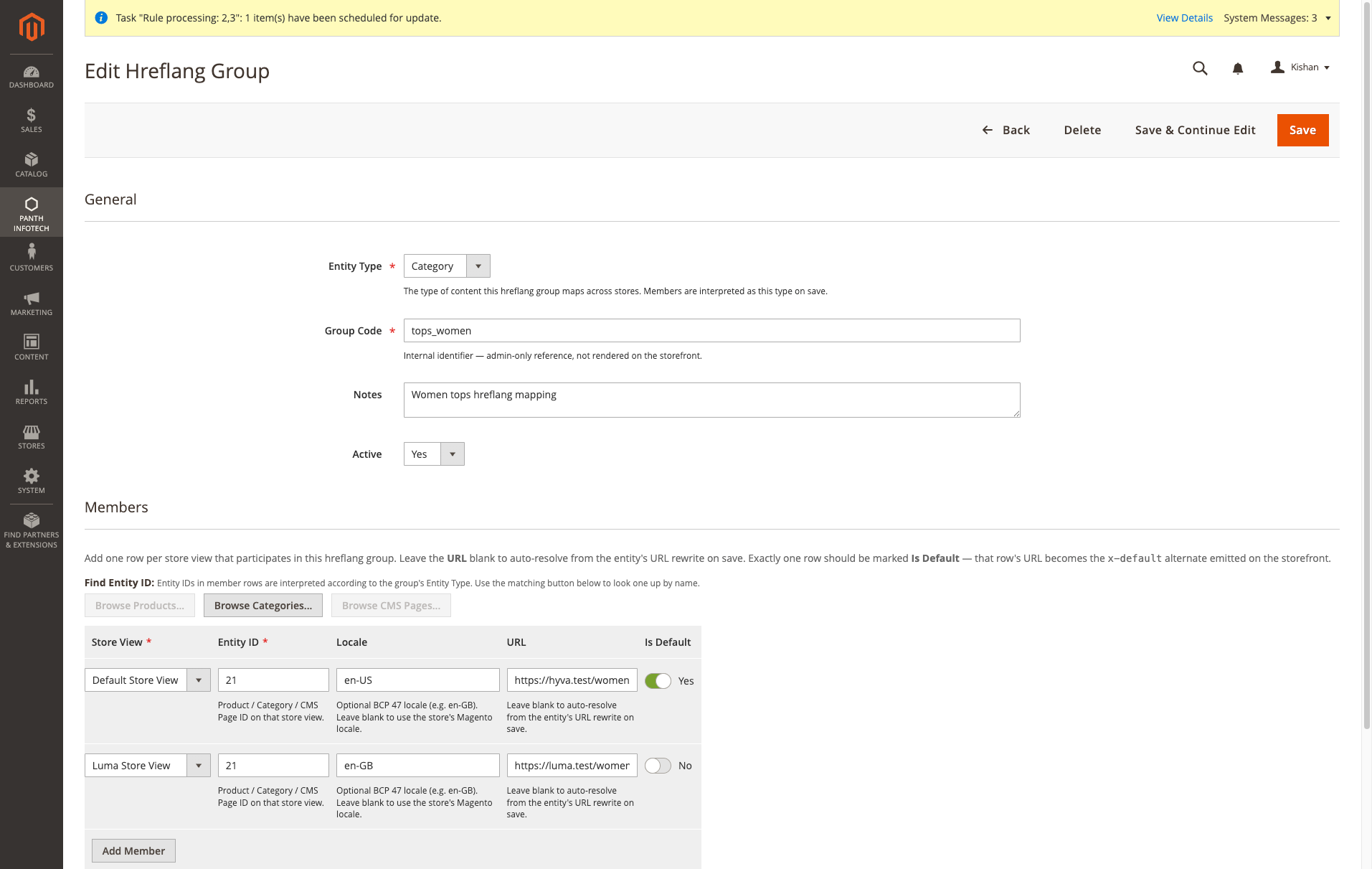
The group form has two sections:
- General: Entity Type (Product, Category, CMS Page), Group Code (required, unique, up to 64 characters, admin-only), Notes, Active. Saving without a code, or with a code another group already uses, is refused with a message.
- Members: one row per store view with Store View, Entity ID, Locale, URL and Is Default. Rows can be added and removed; on save, rows that were removed are deleted from the database and rows without a store view or entity ID are skipped.
Uninstallation
bin/magento module:disable Panth_Hreflang
composer remove mage2kishan/module-hreflang
bin/magento setup:upgrade
bin/magento setup:di:compile
bin/magento cache:flush
The tables panth_seo_hreflang_group and panth_seo_hreflang_member, the panth_hreflang/hreflang/* rows in core_config_data, the panth_seo_hreflang indexer state and the MigrateConfigPaths patch entry in patch_list are not removed automatically. Drop the tables and delete the configuration rows manually if they are no longer wanted.
License
MIT License. Free and open source. The package is published on Packagist and can be installed with Composer; see the product page for the terms of use.
Developer Notes
- Module name:
Panth_Hreflang - Composer package:
mage2kishan/module-hreflang - PHP namespace:
Panth\Hreflang Panth\Hreflang\Api\HreflangResolverInterface:getAlternates(string $entityType, int $entityId, int $storeId): arrayandvalidateGroup(int $groupId): array(returns a list of error messages). Entity type constants:product,category,cms. The preference isPanth\Hreflang\Model\Hreflang\Resolver, set inetc/di.xml.Panth\Hreflang\Api\Data\HreflangMapInterface: getters and setters for one member row, implemented byPanth\Hreflang\Model\Hreflang\Member.Panth\Hreflang\Helper\Config: typed accessors for the four configuration paths (isHreflangEnabled,emitHreflangXDefault,getHreflangScope,getCmsRelationMethod).Panth\Hreflang\ViewModel\Hreflang: entity detection and fallback;Panth\Hreflang\Block\Head\Hreflang: the head block.Panth\Hreflang\Model\Hreflang\Diagnostic:runDiagnostics(int $storeId)used by the configuration panel blockBlock\Adminhtml\System\Config\HreflangDiagnostic.Panth\Hreflang\Model\Indexer\Hreflang: indexer and Mview action forpanth_seo_hreflang.- Admin controllers under
Controller\Adminhtml\Hreflang:Index,NewAction,Edit,Save,Delete,MassDelete,EntitySearch. Admin route front name:panth_hreflang.DeleteandMassDeleteaccept POST only;MassDeleteapplies the grid's selection and filters. - UI components:
panth_hreflang_hreflang_listing(data sourceModel\ResourceModel\HreflangGroup\Grid\Collection) andpanth_hreflang_hreflang_form(data providerUi\Component\Form\DataProvider\HreflangFormDataProvider). - ACL resources:
Panth_Hreflang::manage(Panth Hreflang),Panth_Hreflang::hreflang(Hreflang Groups, used by all admin controllers),Panth_Hreflang::config(Hreflang Configuration). - Database tables from
etc/db_schema.xml:panth_seo_hreflang_group(group_id,codeunique,entity_type,notes,is_active,created_at,updated_at) andpanth_seo_hreflang_member(member_id,group_id,store_id,entity_type,entity_id,locale,url,is_default; foreign keys to the group table and tostore, bothON DELETE CASCADE; index onentity_type,entity_id,store_id). - Setup:
Setup\Patch\Data\MigrateConfigPathsrenamespanth_seo/hreflang/*rows incore_config_datatopanth_hreflang/hreflang/*.
| Module Category | SEO & Indexing |
|---|---|
| Best For | Mid-Market |
Works well with
Separate free modules. Install only what you need.
-

Advanced SEO Extension for Magento 2
Magento 2 SEO extension that writes meta titles and descriptions from token templates such as {name} and... -

Crosslinks, Auto Internal Linking for Magento 2
Automatic internal linking for Magento 2. Map a keyword to a URL, a product SKU or a category ID, and it... -

Filter SEO, Clean Layered-Nav URLs for Magento 2
Rewrites Magento 2 layered navigation URLs like /women/tops.html?color=49&size=166 into... -

HTML Sitemap for Magento 2
Adds a Magento 2 HTML sitemap page at /sitemap with a nested category tree, your CMS pages and a product list... -

Image SEO, Alt & Title Generator for Magento 2
Generates alt and title text for every Magento 2 product image from a template that can use the product name... -

IndexNow Submission for Magento 2
Sends the URL of each product, category or CMS page you save in Magento 2 to Bing, Yandex, Seznam, Naver and...

Questions before you install?
Send me your composer.json and I will check for conflicts first. Free. Installation is +$45, custom work is quoted first.