

Crosslinks, Auto Internal Linking for Magento 2
Automatic internal linking for Magento 2. Map a keyword to a URL, a product SKU or a category ID, and it turns into a link inside matching product, category and CMS text, capped at 5 links per page by default.
- Free
- Themes listed: Hyvä + Luma
composer require mage2kishan/module-crosslinks
- Package requirementsRead the source documentation
- Developer profileView Upwork profile
- Themes listedHyvä + Luma
- PHP versions listed8.1, 8.2, 8.3, 8.4
- Installation questionsDiscuss your store setup
What it does for your store
The main features, as listed in the module documentation.
-
Built for Magento 2
Automatic internal linking for Magento 2.
-
MEQP Compliant
Adobe Magento Extension Quality Program, passes with zero severity-10 violations.
-
Hyva + Luma Ready
Vanilla JS, no jQuery dependency. Drop-in compatible with both default Luma and Hyva themes.
-
Free Forever
Lifetime updates with every Magento release. No subscription, no licence keys, no upsells.
Installation
Example commands from the Magento root. Follow the package instructions and your staging and deployment process.
- 1Check the releaseMatch Magento, PHP, theme and dependency requirements.
- 2Install on stagingReview Composer changes and follow the package instructions.
- 3Configure and verifyUse the documented settings and test the affected features.
$ composer require mage2kishan/module-crosslinks
$ bin/magento setup:upgrade
$ bin/magento setup:di:compile
$ bin/magento setup:static-content:deploy -f
$ bin/magento cache:clean
Listed requirements
These are the details supplied in this listing. Confirm the selected release supports your Magento edition, PHP and storefront.
| Magento versions listed | 2.4.6, 2.4.7, 2.4.8 |
|---|---|
| PHP versions listed | 8.1, 8.2, 8.3, 8.4 |
| Themes listed | Hyvä, Luma |
| Composer package | mage2kishan/module-crosslinks |
Documentation
Product details and setup guidance. Check the package repository for release-specific instructions.
Overview
Panth Crosslinks adds internal links to Magento 2 product, category and CMS content at render time, based on keyword rules you set in an admin grid. A rule can point to a URL, a product SKU or a category ID, headings and existing links are skipped, and no page gets more than 5 links by default.
The Crosslinks engine supports three reference types: direct URL, product SKU resolved through url_rewrite, and category ID resolved through url_rewrite (SKU and category lookups cached per request). Whole-word matching is case-insensitive, and an HTML-aware ReplacementService skips <h1> to <h6>, <a>, <button>, <script>, and <style> blocks, so existing markup, prices, and headings are never broken.
Crosslinks ships per-rule max_replacements, a global max_links_per_page ceiling to avoid over-optimization, optional rel="nofollow", anchor title attribute, store scope (store_id 0 = all stores), and priority ordering so important keywords win the link budget. Optional active_from/active_to windows gate seasonal campaigns when the store-level toggle is enabled. URL schemes like javascript:, data:, vbscript:, and file: are rejected at render time, so admins cannot accidentally inject unsafe anchors.
- SEO teams that need predictable internal anchor text behavior at scale.
- Catalogs adding new categories who can’t hand-edit every description.
- Hyva and Luma stores running scheduled sale-keyword link campaigns.
What you get
Crosslinks optimizes internal linking behavior from one admin grid:
- Case-insensitive, whole-word keyword to anchor replacement.
- URL, product SKU, and category ID reference types, cached per request.
- Per-rule
max_replacementsand per-page link ceiling. - Schedule windows, store scope, priority, nofollow, and anchor
title. - Rejects dangerous URL schemes at render time for safe output.
- Hyva and Luma compatible on Magento 2.4.4-2.4.9 and PHP 8.1-8.4.
Magento 2 Crosslinks
Panth Crosslinks turns keywords in store content into internal links. You define rules in an admin grid (a keyword plus a target: a custom URL, a product SKU, or a category ID) and the module rewrites matching words into anchor tags while Magento renders product descriptions, category descriptions, CMS pages, and CMS blocks. The original content in the database is not modified.
The replacement runs in PHP through plugins on Magento\Catalog\Helper\Output and Magento\Cms\Model\Template\FilterProvider, so it does not depend on the frontend theme. It is used by merchants and content teams who want consistent internal linking across a catalog without editing each description, and it works on both Hyva and Luma storefronts.
Product page: kishansavaliya.com/magento-2-crosslinks.html
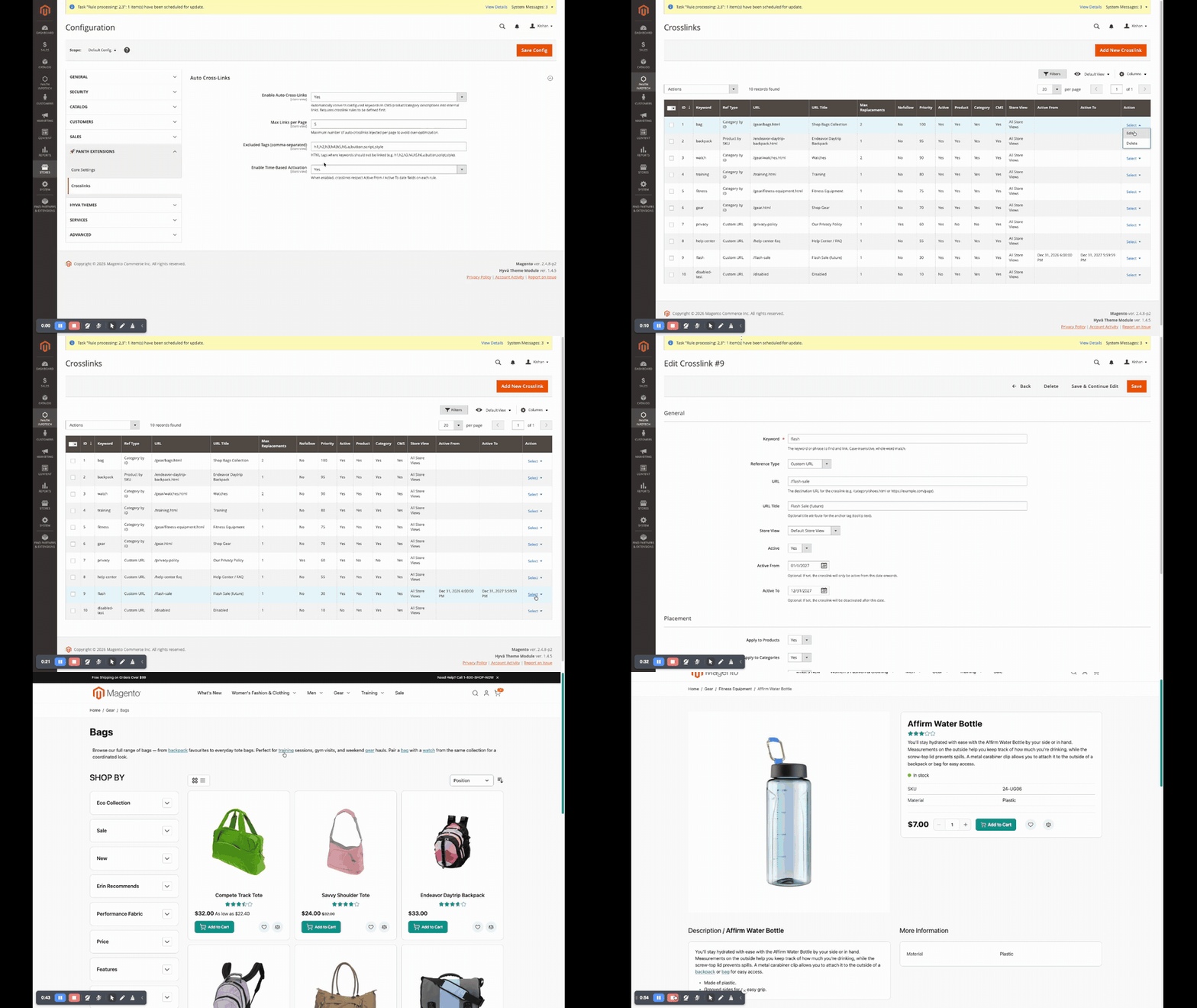
Features
- Keyword rules managed in an admin grid with keyword search (keyword, URL, link title, reference value), filters, sorting, paging, an add/edit form, and mass actions (Enable, Disable, Delete).
- Three reference types per rule: Custom URL, Product by SKU, and Category by ID. SKU and category references are resolved to the current storefront path through the
url_rewritetable at render time. - Case-insensitive, whole-word keyword matching (
bagdoes not matchhandbag). - Injection into product
descriptionandshort_description, categorydescription, and CMS page and block content. - Per-rule placement toggles for products, categories, and CMS content.
- Per-rule
Max Replacementscap and a globalMax Links per Pagecap. - Excluded HTML tags (headings, existing anchors, buttons, script, and style by default) whose contents are never rewritten; keywords inside tag attributes are never rewritten either.
- Rule priority: rules with a higher priority value are processed first.
- Store view scope per rule (
All Store Viewsor a single store view). - Optional time-based activation using
Active FromandActive Todates on each rule. - Optional
rel="nofollow"andtitleattribute per rule. - Rules whose target resolves to the page currently being viewed are skipped, so a page does not link to itself.
- URLs using
javascript:,data:,vbscript:, orfile:are rejected when a rule is saved and again at render time. - Injected anchors carry
class="panth-crosslink"; a small CSS file with a default style is shipped and can be overridden from the theme. - Existing rules created by Panth_AdvancedSEO in the
panth_seo_crosslinktable continue to work; no data migration is needed.
Usage
Once the module is enabled and rules exist, linking happens automatically during page rendering. There is nothing to run on a schedule and no console command.
- Product pages:
descriptionandshort_descriptionoutput throughMagento\Catalog\Helper\Output::productAttribute()is processed with placementproduct. - Category pages:
descriptionoutput throughMagento\Catalog\Helper\Output::categoryAttribute()is processed with placementcategory. - CMS pages and blocks: the page filter and block filter returned by
Magento\Cms\Model\Template\FilterProviderare wrapped so the replacement runs after Magento has processed directives and widgets, with placementcms.
For each processed piece of content the module loads the active rules for the current store view (rules scoped to All Store Views plus rules for that store view) that match the placement, orders them by priority, and applies them to text nodes only. Tag attributes, comments and HTML entities are never modified. Matches are first replaced with placeholder tokens and swapped for the final anchors at the end, so a link inserted by one rule is never matched again by a later rule.
Anchors look like this:
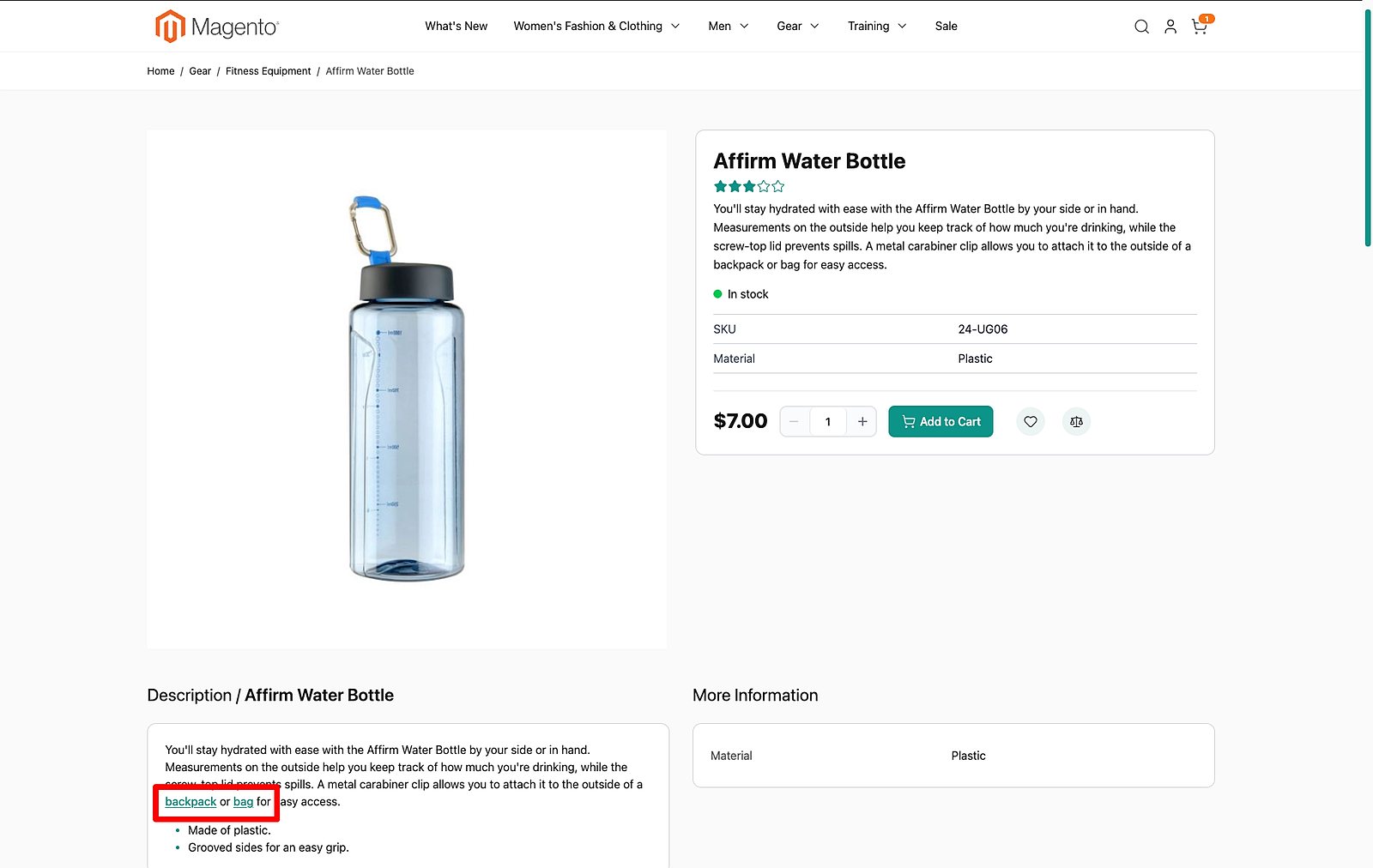
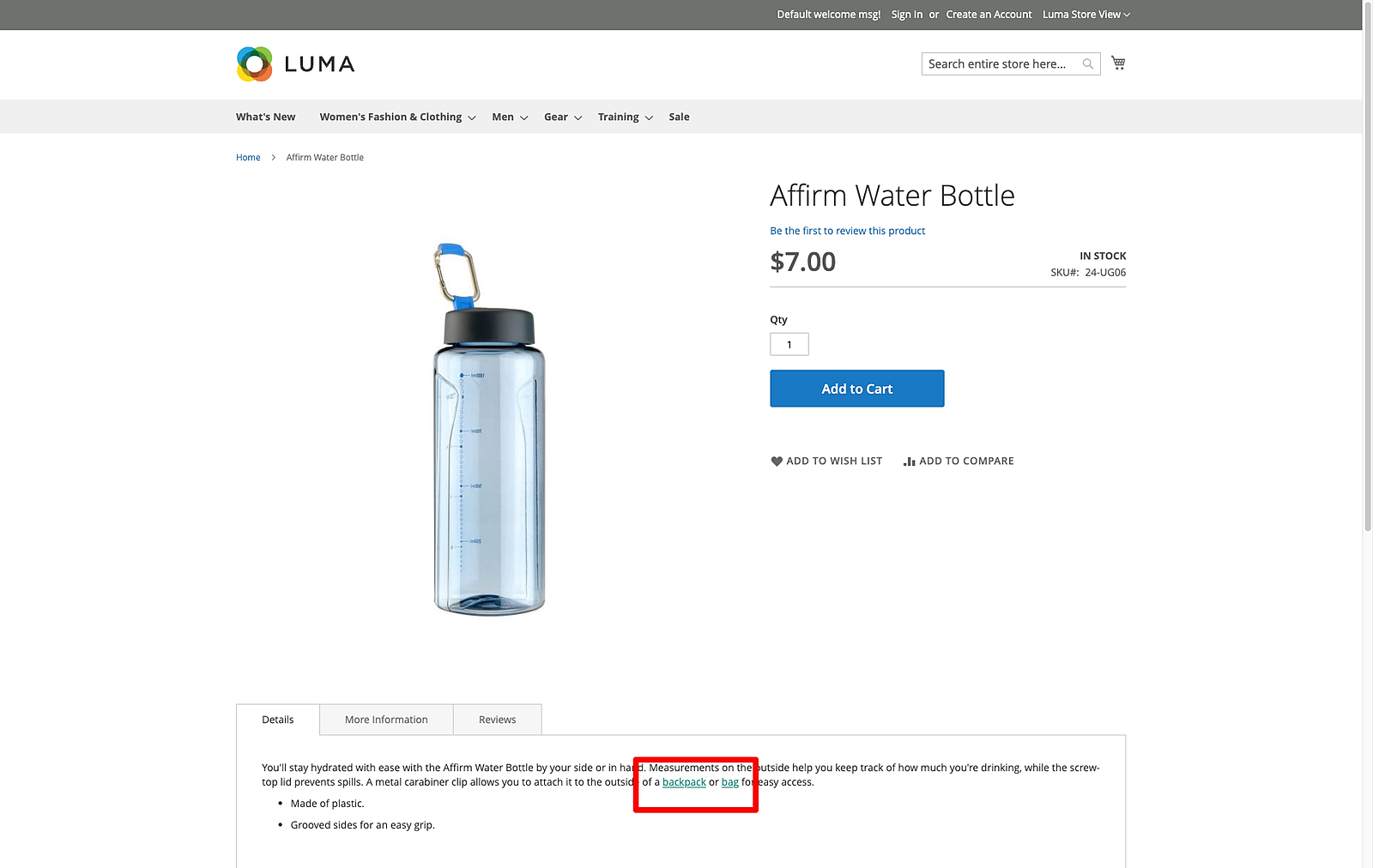
<a href="/gear/bags.html" class="panth-crosslink" title="Bags" rel="nofollow">bag</a>
The default style is in view/frontend/web/css/crosslinks.css, which is added to every frontend page through view/frontend/layout/default.xml. Override a.panth-crosslink in the theme to change it.
Storefront results on Hyva and Luma:
Changelog
See CHANGELOG.md.
Compatibility
| Platform | Versions |
|---|---|
| Magento Open Source | 2.4.4, 2.4.5, 2.4.6, 2.4.7, 2.4.8, 2.4.9 |
| Adobe Commerce | 2.4.4, 2.4.5, 2.4.6, 2.4.7, 2.4.8, 2.4.9 |
| PHP | 8.1, 8.2, 8.3, 8.4 |
| Themes | Hyva, Luma |
Composer constraints from composer.json: magento/framework ^103.0, magento/module-backend ^102.0, magento/module-store ^101.0, magento/module-catalog ^104.0, magento/module-cms ^104.0, magento/module-ui ^101.0.
Requirements
- Magento Open Source or Adobe Commerce 2.4.4 to 2.4.9
- PHP 8.1, 8.2, 8.3, or 8.4
mage2kishan/module-core(^1.0), installed automatically by Composer; it provides thePanth Extensionsconfiguration tab and admin menu group- Core Magento modules: Magento_Backend, Magento_Store, Magento_Catalog, Magento_Cms, Magento_Ui
Installation
composer require mage2kishan/module-crosslinks
bin/magento module:enable Panth_Core Panth_Crosslinks
bin/magento setup:upgrade
bin/magento setup:di:compile
bin/magento setup:static-content:deploy -f
bin/magento cache:flush
setup:di:compile is only needed in production mode. setup:static-content:deploy is needed because the module ships a CSS file under view/frontend/web/css/.
Check that the module is enabled:
bin/magento module:status Panth_Crosslinks
Configuration
Go to Stores > Configuration > Panth Extensions > Crosslinks, or use the Crosslinks Configuration entry in the Panth Extensions admin menu. All settings can be set at default, website, and store view scope.
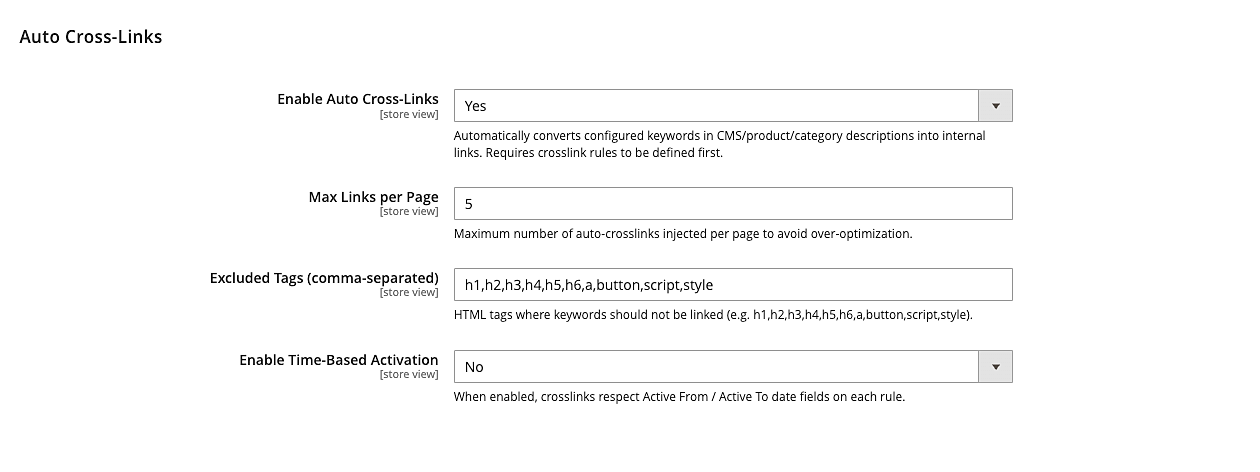
Auto Cross-Links
| Setting | Default | What it does |
|---|---|---|
| Enable Auto Cross-Links | Yes | Master switch. When set to No, no rules are applied anywhere. |
| Max Links per Page | 5 | Maximum number of anchors injected into one page request, counted across all processed content on that page (product descriptions, category description, CMS page and CMS blocks). Blocks served from the Magento block cache are not counted again. Shown only when the module is enabled. Values of 0 or less fall back to 5. |
| Excluded Tags (comma-separated) | h1,h2,h3,h4,h5,h6,a,button,script,style | HTML tags whose contents are left untouched. Shown only when the module is enabled. An empty value falls back to the default list. The tags a, button, iframe, noscript, object, script, select, style, svg, template, textarea and title are always excluded, whatever this setting contains. |
| Apply Limits Per | Page Request | "Page Request" counts Max Links per Page and each rule's Max Replacements across the whole page request. "Content Block" counts them separately for each processed piece of content (each description, CMS page and CMS block). Choose "Content Block" when the theme renders a description more than once and strips the tags from one copy: on Hyva product pages a stripped description excerpt is processed before the description tab, so with "Page Request" a rule with Max Replacements 1 may not appear in the visible description. Shown only when the module is enabled. |
| Enable Time-Based Activation | No | When Yes, each rule's Active From and Active To dates are checked. When No, the dates are ignored. Shown only when the module is enabled. |
Config paths:
panth_crosslinks/general/crosslinks_enabledpanth_crosslinks/general/max_links_per_pagepanth_crosslinks/general/excluded_tagspanth_crosslinks/general/crosslink_time_activationpanth_crosslinks/general/limit_scope
With the default values the module is active after installation, but nothing changes on the storefront until at least one rule exists.
Crosslink rules
Rules are managed at Panth Extensions > Crosslinks in the admin menu (route panth_crosslinks/crosslink/index).
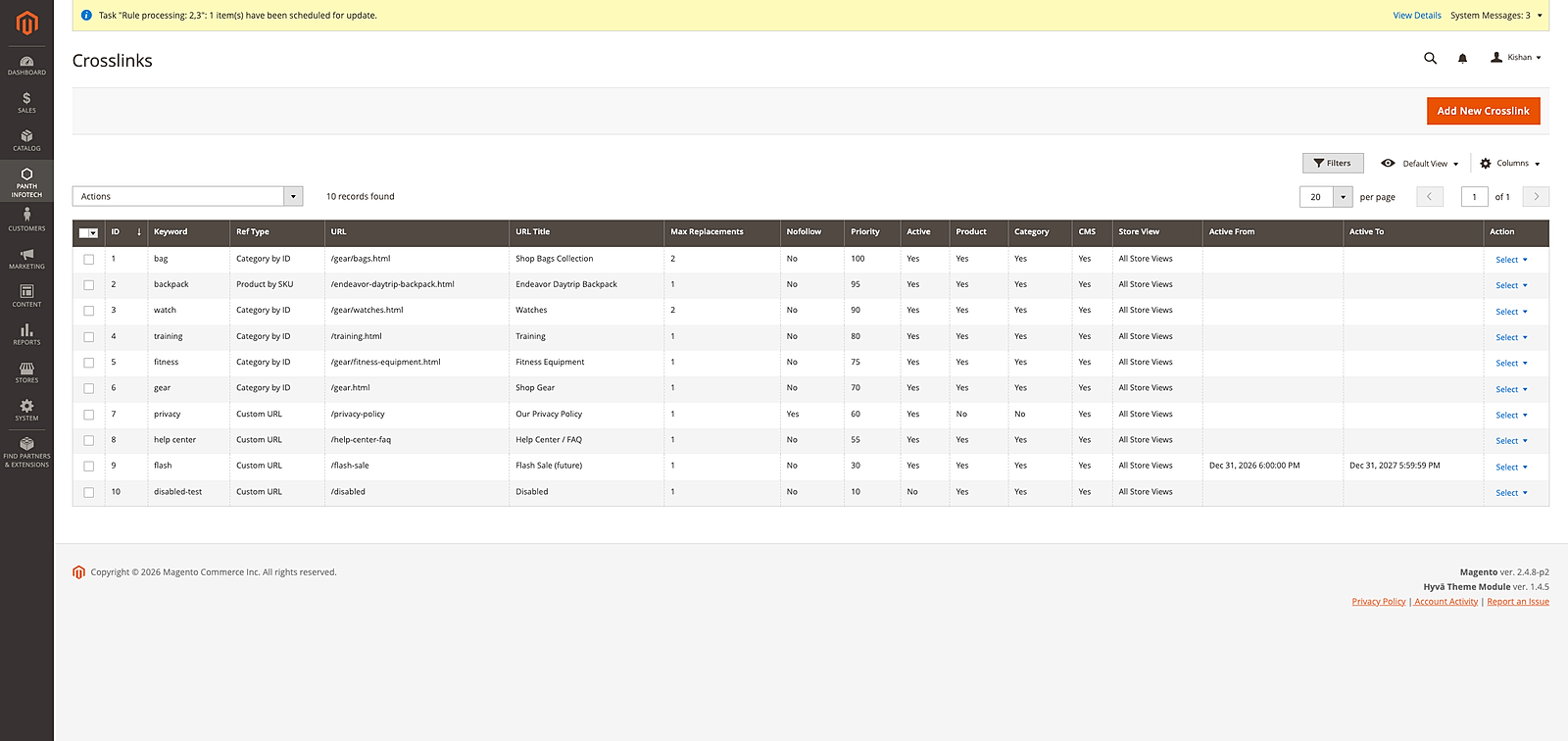
Each rule has the following fields:
| Field | Description |
|---|---|
| Keyword | Required. The word or phrase to link. Matching is case-insensitive and whole-word. Angle brackets are not allowed. |
| Reference Type | Custom URL, Product by SKU, or Category by ID. |
| URL | Required for Custom URL. Relative path (/gear/bags.html) or absolute URL. Only relative URLs and the http, https, mailto and tel schemes are accepted; other schemes, control characters and backslashes are rejected on save and skipped on output. |
| Reference Value | Required for Product by SKU (the SKU) and Category by ID (the category ID). |
| URL Title | Optional title attribute for the anchor. |
| Store View | All Store Views (0, the default for new rules) or a single store view. |
| Active | Enables or disables the rule. |
| Active From / Active To | Optional dates picked in the admin date picker and stored as calendar dates; only checked when time-based activation is enabled. Active To must not be earlier than Active From. |
| Apply to Products / Categories / CMS Pages | Placement toggles. The CMS toggle covers both CMS pages and CMS blocks. |
| Max Replacements | How many times this rule may fire on one page request. Minimum 1. |
| Nofollow | Adds rel="nofollow" to the anchor. |
| Priority | Higher numbers are processed first. Default 0. |
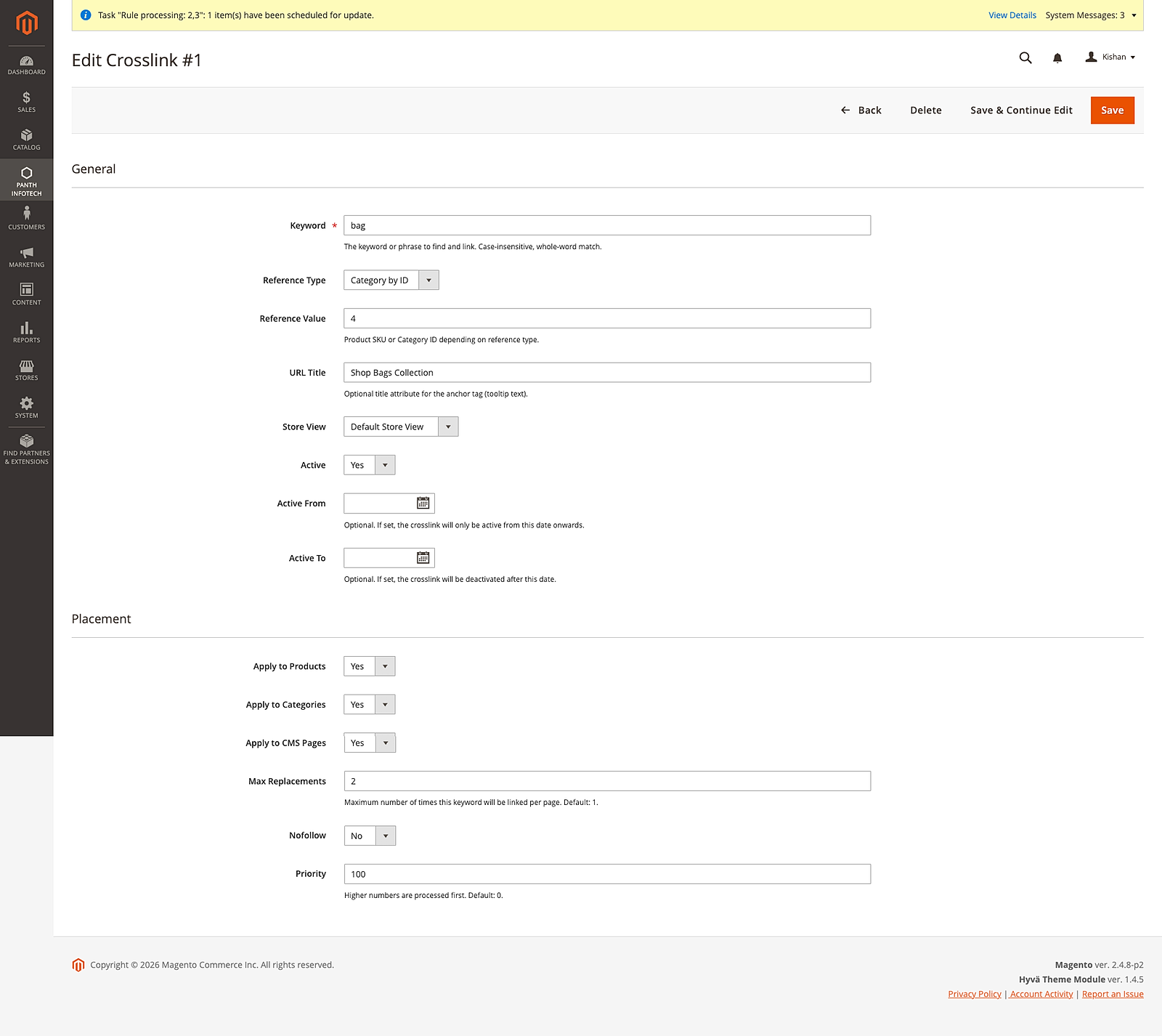
If a save is rejected (for example an unsupported URL scheme), the form reopens with the values you entered and the error message. Saving, deleting, enabling or disabling rules marks the Page Cache and Blocks HTML output cache types as invalidated, so Magento shows its usual notice and the storefront picks up the change after you refresh those cache types in System > Cache Management.
Uninstallation
bin/magento module:disable Panth_Crosslinks
composer remove mage2kishan/module-crosslinks
bin/magento setup:upgrade
bin/magento setup:di:compile
bin/magento cache:flush
The panth_seo_crosslink table and the panth_crosslinks/* values in core_config_data are not removed automatically. Drop the table and delete the config rows manually if they are no longer needed. Keep the table if Panth_AdvancedSEO still uses it.
License
Free and open source under the MIT License. See LICENSE.
Developer Notes
- Module name:
Panth_Crosslinks - Composer package:
mage2kishan/module-crosslinks - Namespace:
Panth\Crosslinks - Sequence: loads after
Panth_Core, Magento_Backend, Magento_Store, Magento_Catalog, Magento_Cms, Magento_Ui
Key classes:
Model\Crosslink\ReplacementService::processContent(string $html, string $pageType, int $storeId): stringdoes the matching and anchor building. Page types areproduct,category, andcms.Plugin\Crosslink\CatalogOutputPlugin(after-plugins onproductAttributeandcategoryAttributeofMagento\Catalog\Helper\Output).Plugin\Crosslink\CmsFilterPlugin(after-plugins ongetPageFilterandgetBlockFilterofMagento\Cms\Model\Template\FilterProvider) andPlugin\Crosslink\CrosslinkFilterDecorator, which wraps the filter and processes the output offilter(). Fluent calls such assetStoreId()return the wrapper, sogetBlockFilter()->setStoreId($id)->filter($html)(used byMagento\Cms\Block\Blockand the CMS Static Block widget) is processed too.Helper\ConfigexposesisEnabled(),getMaxLinksPerPage(),getExcludedTags(),isTimeActivationEnabled(), andisLimitPerContent(), all at store view scope.Model\Crosslink\Crosslink(model),Model\ResourceModel\CrosslinkandModel\ResourceModel\Crosslink\Collection(resource and collection),Model\ResourceModel\Crosslink\Grid\Collection(grid data sourcepanth_crosslink_listing_data_source).Model\Config\Source\CrosslinkReferenceTypedefines the constantsurl,product_sku, andcategory_id.Api\CrosslinkRepositoryInterfacewith a preference toModel\Crosslink\Repository;getById()anddeleteById()read and delete rows directly, whilesave()inserts or updates the row (from a model or an array) and returns the entity withcrosslink_idset.- Admin controllers under
Controller\Adminhtml\Crosslink(Index,NewAction,Edit,Save,Delete,MassDelete,MassStatus) on thepanth_crosslinksadmin route.Delete,Save,MassDeleteandMassStatusaccept POST only. Saving writes directly to the table withResourceConnection. - UI components:
panth_crosslink_listing(grid) andpanth_crosslink_form(form).
ACL resources:
Panth_Crosslinks::manage(Crosslinks, underPanth_Core::panth_extensions)Panth_Crosslinks::crosslinks(Manage Crosslinks; used by all admin controllers)Panth_Crosslinks::config(Panth Crosslinks Configuration)
Database table (etc/db_schema.xml): panth_seo_crosslink with columns crosslink_id, keyword, url, url_title, max_replacements, nofollow, priority, is_active, in_product, in_category, in_cms, store_id, created_at, active_from, active_to, reference_type, reference_value, and an index on is_active, store_id. The table name is kept from Panth_AdvancedSEO on purpose.
The module declares no events, observers, cron jobs, web API routes, frontend routes, or console commands.
| Module Category | SEO & Indexing |
|---|---|
| Best For | All Sizes |
Changelog
-
1.0.2
- ReplacementService::resolveUrl was resolving URL rewrites against $crosslink->getStoreId() (always 0 for "All Store Views"), but Magento only stores rewrites keyed by the actual store ids (1, 2, ...). Non-URL references (category_id / product_sku) now look up against the current render store, so All-Stores rules resolve on every storefront.
- Nested anchor HTML when two rules matched overlapping text. Example: injecting <a href="/gear/bags.html">bag</a> then running the gear rule caused gear to match inside the just-inserted href attribute, producing <a href="/<a href="/gear.html">gear</a>/bags.html">bag</a>. The replacement loop now substitutes opaque __PCL{n}__ placeholders during iteration and swaps them for real anchors only after every rule has run, \b word boundaries cannot match inside the token so no later rule can see or re-enter a previously-built anchor.
- Store View column in the admin grid rendered as a blank cell for rows with store_id = 0 because Magento\Store\Ui\Component\Listing\Column\Store treats scalar 0 as empty via !empty(). New Panth\Crosslinks\Ui\Component\Listing\Column\Store subclass wraps scalar store_id values in a one-element array before delegating to the parent, so 0 now correctly resolves to All Store Views.
- active_from / active_to columns upgraded from TIMESTAMP to DATETIME in db_schema.xml. MySQL TIMESTAMP overflows past 2038-01-19 (the Y2038 limit) and silently stored any future-dated campaigns as 0000-00-00, breaking both edges of the scheduling filter. DATETIME carries valid values from 1000-01-01 to 9999-12-31.
-
1.0.1
- ACL XML duplicate resource-id error that prevented the admin config page from loading (Panth_X::config was declared under both Panth_Core::panth_extensions and Magento_Config::config). The redundant declaration under Panth_Core::panth_extensions has been removed; the menu link continues to gate on the real system-config resource.
-
1.0.0, Initial release
- Extracted from Panth_AdvancedSEO 1.0.5+. This module ships the automatic internal-crosslink feature as a standalone package so a storefront can get keyword-to-anchor replacement without installing the full Advanced SEO suite.
- Admin config section Panth Infotech → Crosslinks with four settings: crosslinks_enabled, max_links_per_page, excluded_tags, crosslink_time_activation.
- Admin grid at panth_crosslinks/crosslink/index with full CRUD, mass enable / disable / delete, filterable columns, and store-view scoping.
- Add / Edit form with reference type switcher (Custom URL, Product by SKU, Category by ID), non-URL references are resolved at render time via url_rewrite and cached in-request.
Works well with
Separate free modules. Install only what you need.
-

Advanced SEO Extension for Magento 2
Magento 2 SEO extension that writes meta titles and descriptions from token templates such as {name} and... -

Filter SEO, Clean Layered-Nav URLs for Magento 2
Rewrites Magento 2 layered navigation URLs like /women/tops.html?color=49&size=166 into... -

HTML Sitemap for Magento 2
Adds a Magento 2 HTML sitemap page at /sitemap with a nested category tree, your CMS pages and a product list... -

Hreflang Manager for Magento 2
Magento 2 hreflang tags for stores with several languages or regions. Group the same product, category or CMS... -

Image SEO, Alt & Title Generator for Magento 2
Generates alt and title text for every Magento 2 product image from a template that can use the product name... -

IndexNow Submission for Magento 2
Sends the URL of each product, category or CMS page you save in Magento 2 to Bing, Yandex, Seznam, Naver and...

Questions before you install?
Send me your composer.json and I will check for conflicts first. Free. Installation is +$45, custom work is quoted first.