Delete Button on Order View
configurable button with custom text and color on every order detail page
Permanently delete test orders, junk data, and unwanted transactions from your Magento 2 admin - with double verification, configurable safety controls, mass delete support, and a complete audit trail. Built for store owners who need a clean order history without the risk.
Key Features:
Additional Services
Built-in from day one. No add-ons, no upsell, no licence keys to renew.
configurable button with custom text and color on every order detail page
select multiple orders from the grid and delete them all at once
confirmation popup with order details and data impact warning
inspired by GitHub's repo delete flow, requires typing the exact order number to proceed
Panth Order Cleanup is a safe order deletion extension for Magento 2 and Adobe Commerce that permanently removes test orders, junk data, and unwanted transactions with double verification and a full audit trail.
Magento 2 does not allow deleting orders out of the box. The Panth Order Cleanup extension adds the missing functionality with a configurable delete button on every order view, a mass delete action in the order grid, and a GitHub-style double confirmation modal that requires typing the order number before the deletion runs.
It is built for Magento 2 store owners, QA engineers, and agencies who need a clean order history after migrations, payment-gateway testing, or fraud cleanup, without risking accidental data loss. Per-status restrictions block deletes on protected states such as "processing" or "complete" until an admin explicitly opts in.
Every deletion is recorded in a dedicated audit log with the order snapshot, admin username, IP address, timestamp, and method (single or mass). The log is queryable from the admin and survives the order delete itself, so compliance reviews and incident forensics keep their paper trail.
Best for:
Panth Order Cleanup ships every safety guardrail Magento 2 admins need before permanently deleting an order.
Permanently delete test orders, junk data, and unwanted transactions from your Magento 2 admin, with double verification, configurable safety controls, mass delete support, and a complete audit trail. Built for store owners who need a clean order history without the risk.
Magento 2 doesn't allow deleting orders out of the box. Panth Order Cleanup adds this missing functionality with industry-leading safety measures: a configurable delete button on every order view page, a mass delete action in the order grid, double confirmation with order ID verification (like GitHub's repo delete), per-status restrictions, and a detailed deletion log that records every deletion with admin user, IP address, timestamp, and a full snapshot of the deleted order data.
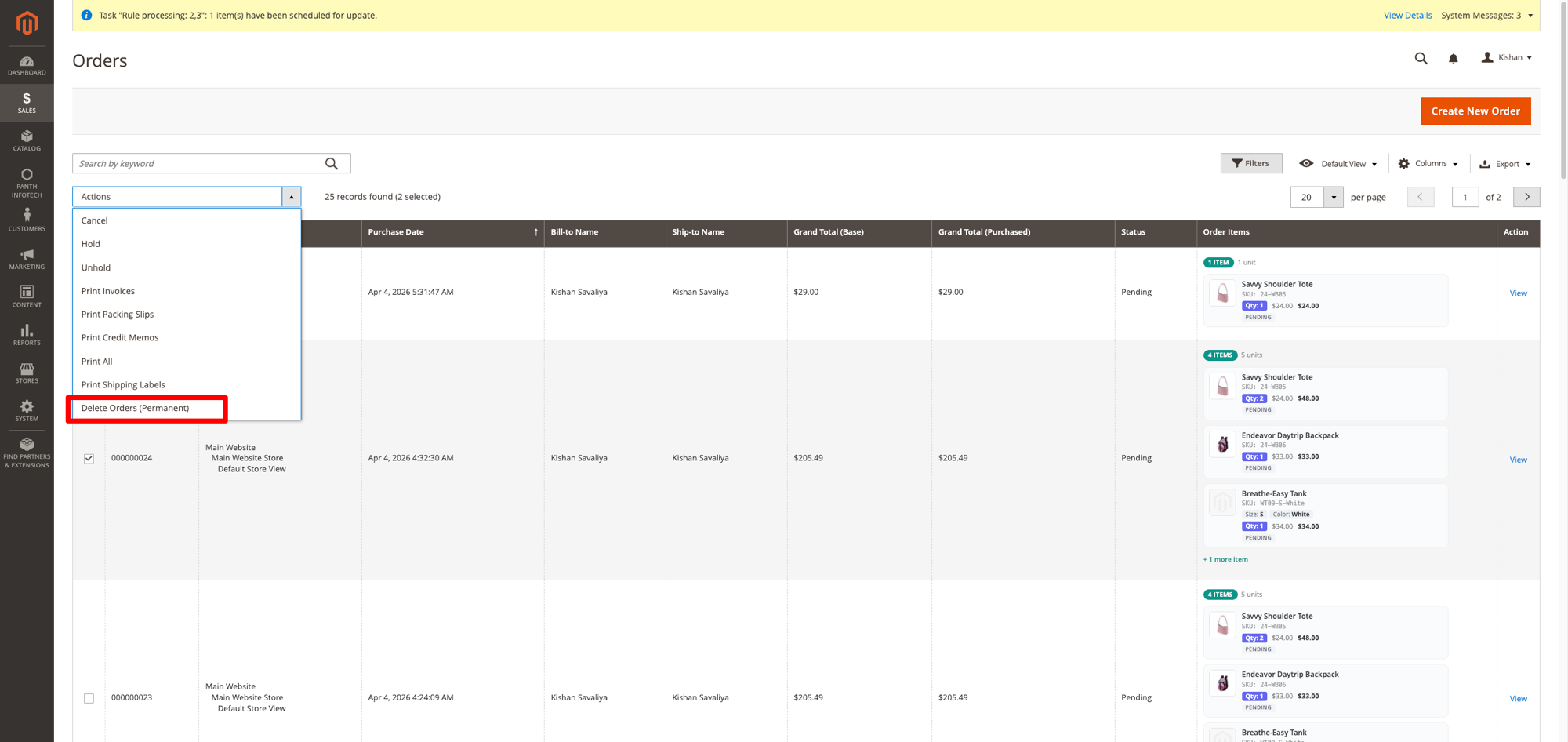
Select multiple orders and choose "Delete Orders (Permanent)" from the mass actions dropdown.
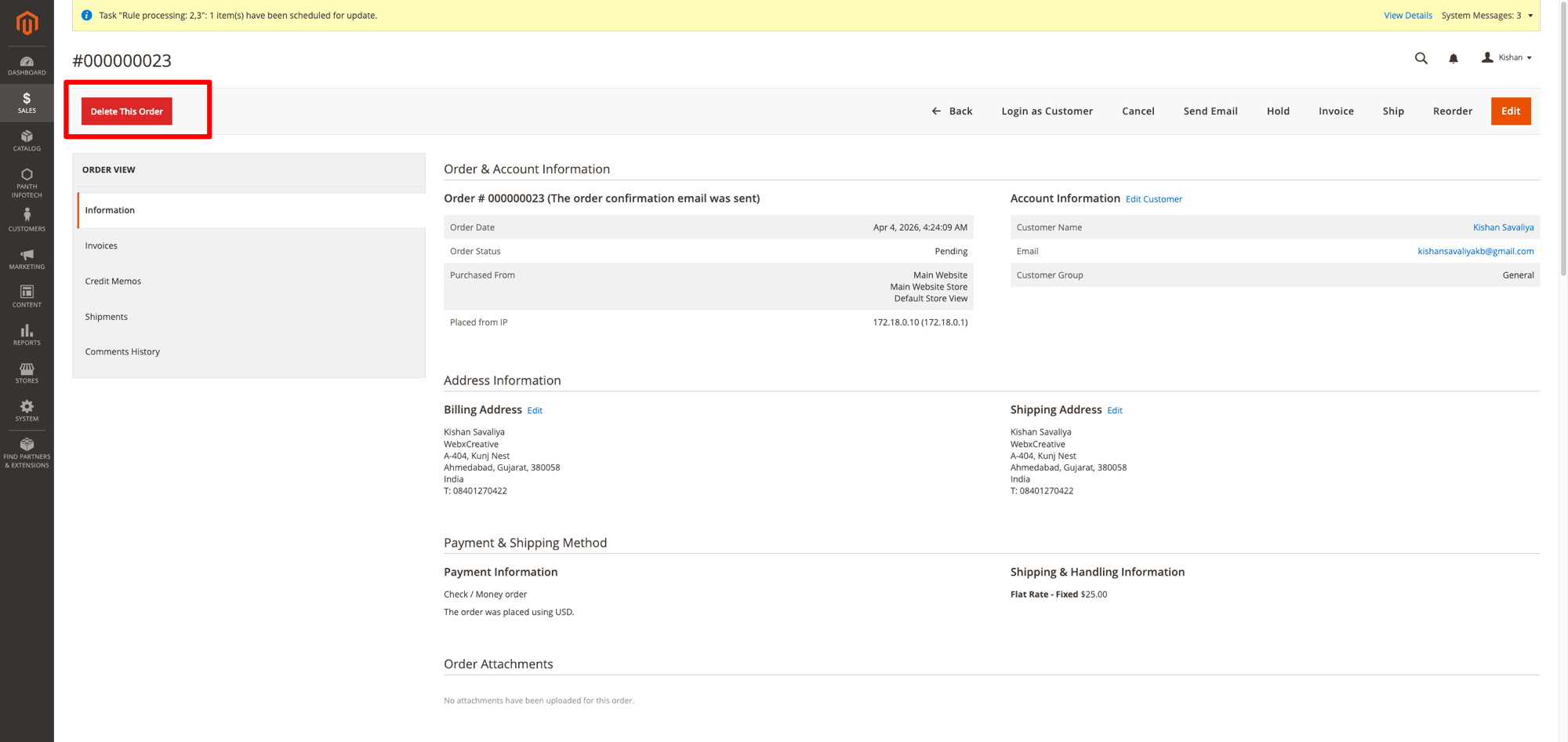
A configurable "Delete This Order" button appears on every order detail page.
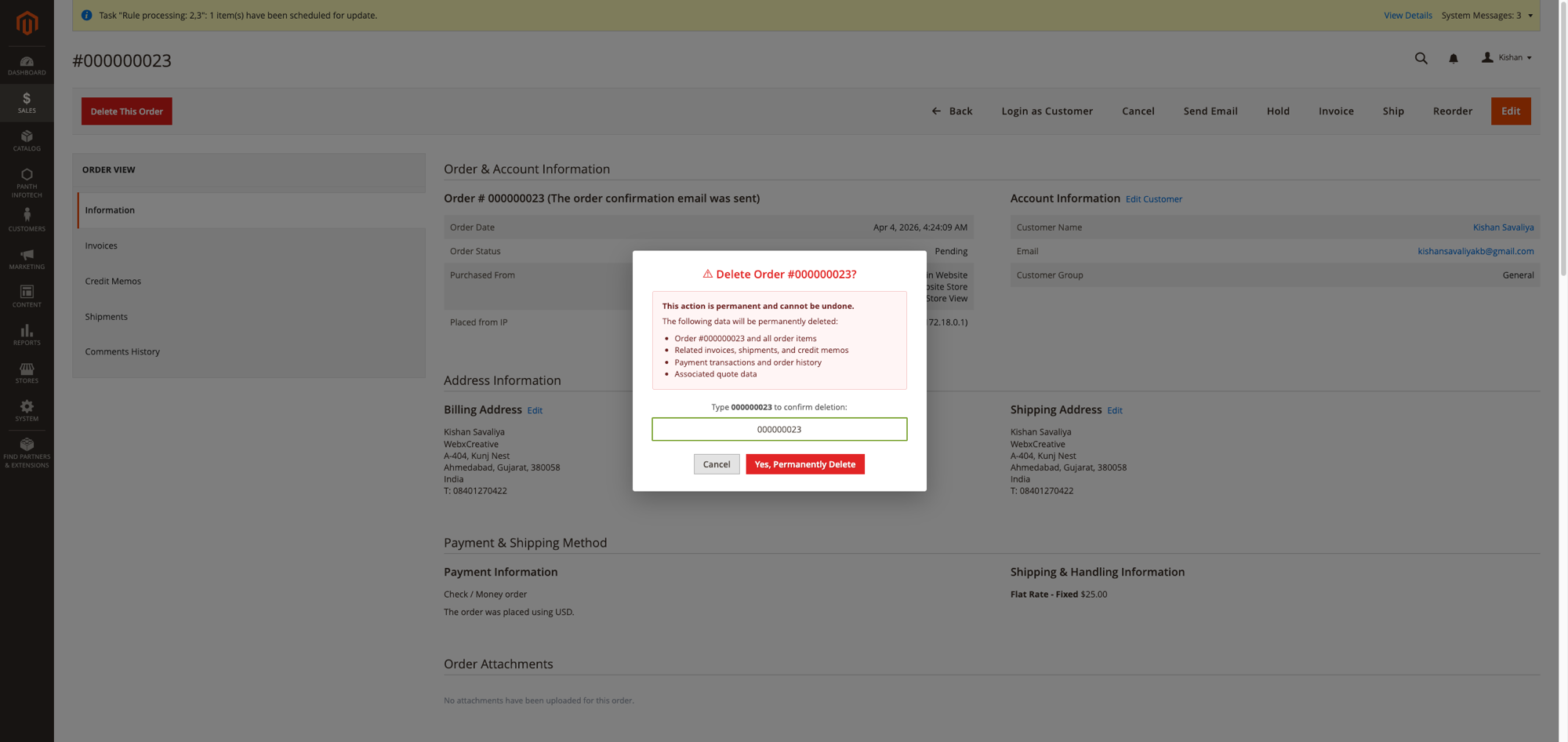
Type the order number to confirm, prevents accidental deletions, inspired by GitHub's repository delete flow.
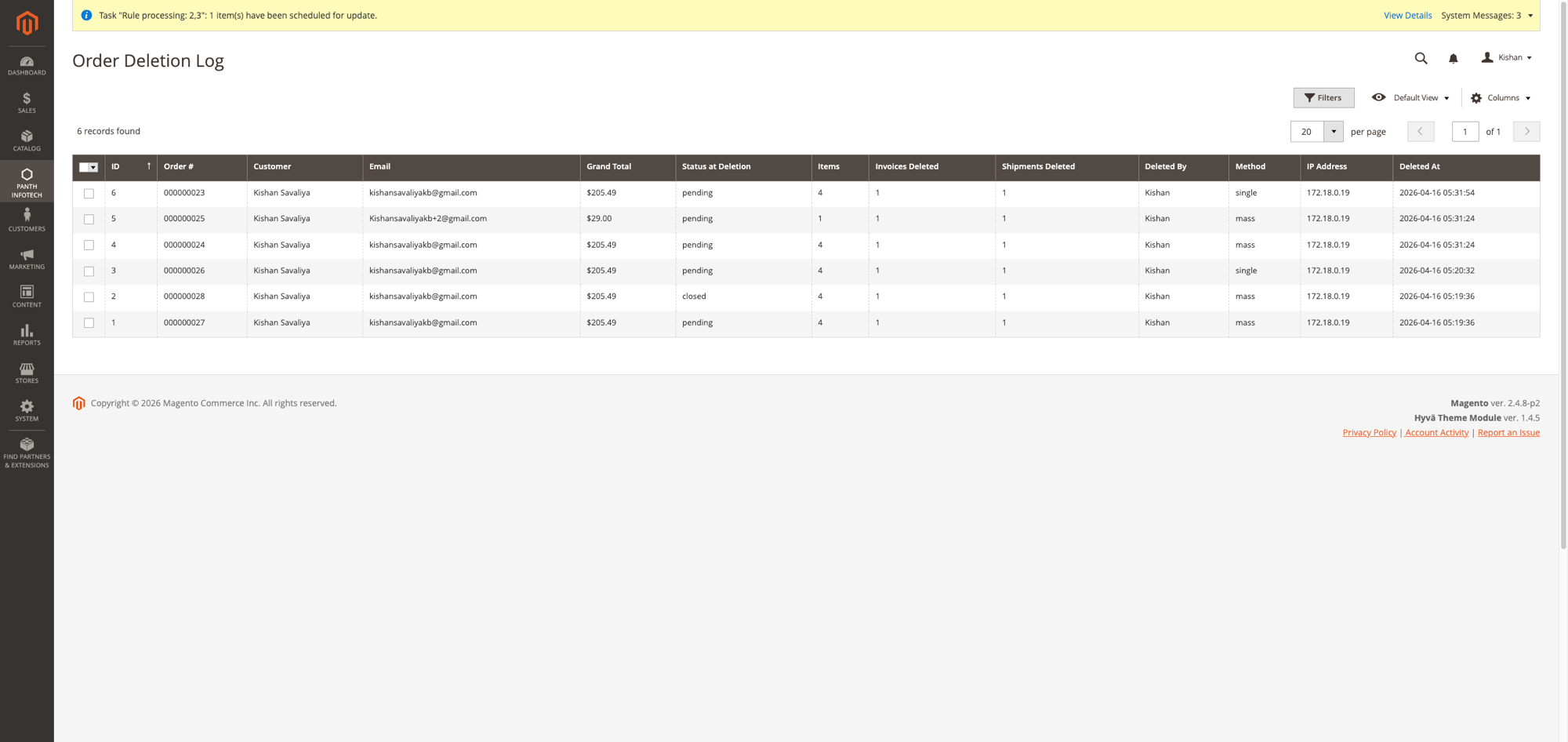
Every deletion is logged with order details, admin user, IP address, method, and timestamp.
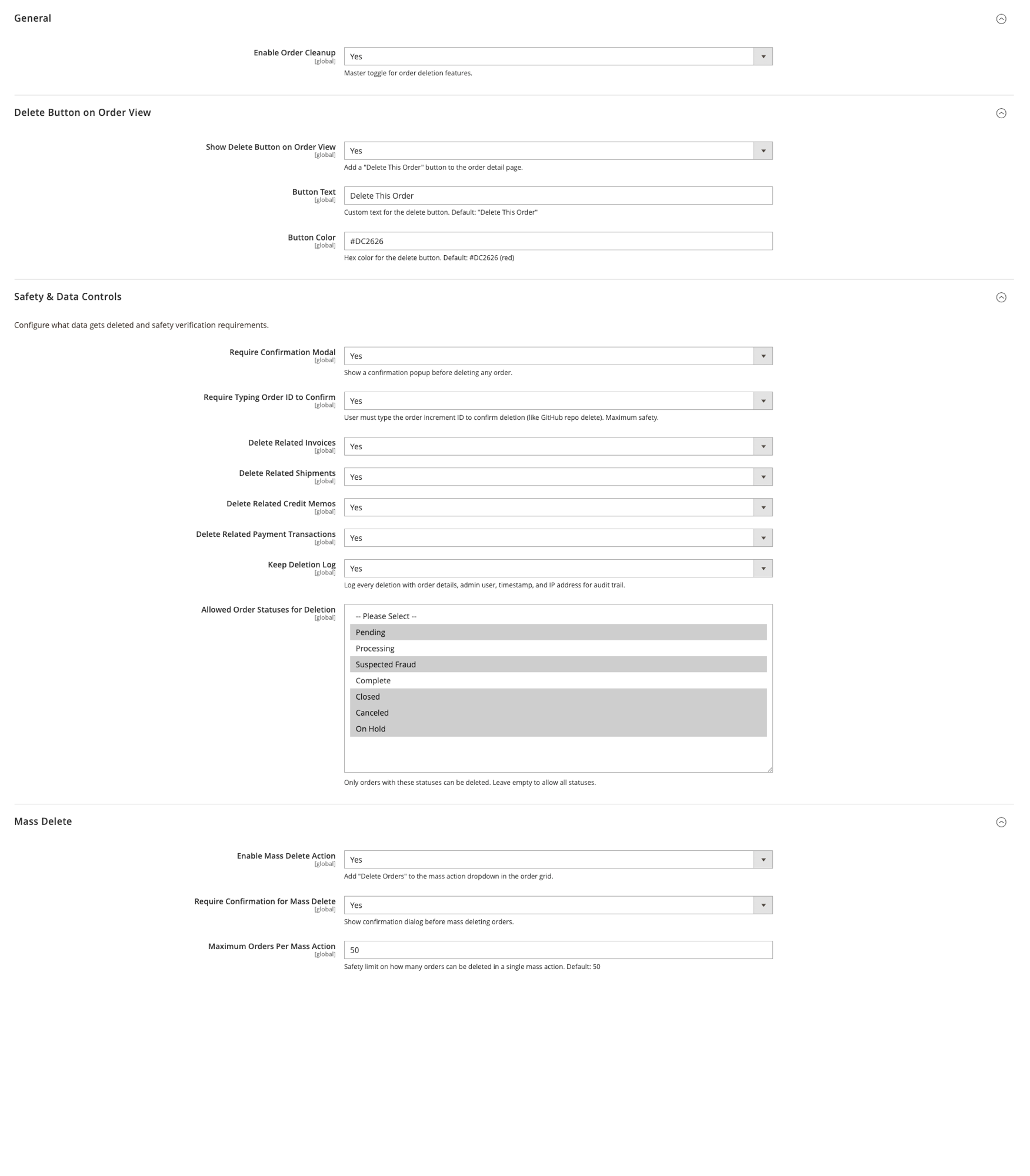
Full control over button appearance, safety requirements, allowed statuses, and mass delete limits.
When you delete an order, the following data is permanently removed (each configurable):
| Data | Table(s) | Configurable |
|---|---|---|
| Order record | sales_order, sales_order_grid |
Always deleted |
| Order items | sales_order_item |
Always deleted |
| Order payments | sales_order_payment |
Always deleted |
| Order addresses | sales_order_address |
Always deleted |
| Status history | sales_order_status_history |
Always deleted |
| Order tax | sales_order_tax |
Always deleted |
| Invoices | sales_invoice, sales_invoice_grid, sales_invoice_item, sales_invoice_comment |
Yes |
| Shipments | sales_shipment, sales_shipment_grid, sales_shipment_item, sales_shipment_comment |
Yes |
| Credit memos | sales_creditmemo, sales_creditmemo_grid, sales_creditmemo_item, sales_creditmemo_comment |
Yes |
| Payment transactions | sales_payment_transaction |
Yes |
| Quote data | quote, quote_item, quote_address, quote_payment, quote_shipping_rate |
Always (if quote exists) |
Panth Order Cleanup is designed with safety first. Multiple layers of protection prevent accidental data loss:
Panth_OrderCleanup::delete_order, required to see and use the delete buttonPanth_OrderCleanup::mass_delete, required for mass delete actionPanth_OrderCleanup::view_log, required to view deletion log000000031) before the delete button becomes activeNavigate to Panth Infotech > Order Cleanup > Deletion Log to view all deletions.
The log captures:
| Field | Description |
|---|---|
| ID | Auto-increment log entry ID |
| Order # | The deleted order's increment ID |
| Customer | Customer name |
| Customer email address | |
| Grand Total | Order total with currency |
| Status at Deletion | Order status when it was deleted |
| Items | Number of items in the order |
| Invoices Deleted | Whether invoices were deleted |
| Shipments Deleted | Whether shipments were deleted |
| Deleted By | Admin username who performed the deletion |
| Method | "single" (from order view) or "mass" (from grid) |
| IP Address | Admin user's IP address |
| Deleted At | Exact timestamp of deletion |
The audit log is stored in the panth_order_deletion_log database table and persists even if the order data is gone, providing a permanent record for accounting and compliance.
| Issue | Solution |
|---|---|
| Delete button not visible | Check: module enabled, button enabled in config, ACL permission granted |
| Clicking delete redirects to dashboard | Clear cache, run setup:di:compile. The block must extend Backend\Block\Template for form key support |
| "Order Cleanup is currently disabled" | Enable it at Stores > Configuration > Panth Extensions > Order Cleanup > General > Enable = Yes |
| "Status not allowed for deletion" | Check Allowed Order Statuses in Safety config, add the order's status or leave empty to allow all |
| "Safety limit exceeded" | Reduce selection or increase Maximum Orders Per Mass Action in config |
| Deletion log shows "Table not found" | Run bin/magento setup:upgrade to create the panth_order_deletion_log table |
| Mass delete not in dropdown | Enable Mass Delete Action in config and check Panth_OrderCleanup::mass_delete ACL permission |
| SQL error on quote_shipping_rate | Update to latest version, fixed in 1.0.0 (shipping rates use address_id via quote_address) |
| Requirement | Versions Supported |
|---|---|
| Magento Open Source | 2.4.4, 2.4.5, 2.4.6, 2.4.7, 2.4.8 |
| Adobe Commerce | 2.4.4, 2.4.5, 2.4.6, 2.4.7, 2.4.8 |
| Adobe Commerce Cloud | 2.4.4-2.4.8 |
| PHP | 8.1, 8.2, 8.3, 8.4 |
| Panth Core | ^1.0 (installed automatically) |
composer require mage2kishan/module-order-cleanup
bin/magento module:enable Panth_Core Panth_OrderCleanup
bin/magento setup:upgrade
bin/magento setup:di:compile
bin/magento cache:flush
app/code/Panth/OrderCleanup/bin/magento module:status Panth_OrderCleanup
# Module is enabled
Navigate to Sales > Orders to see the mass delete action, or open any order to see the delete button.
Navigate to Stores > Configuration > Panth Extensions > Order Cleanup.
| Setting | Default | Description |
|---|---|---|
| Enable Order Cleanup | Yes | Master toggle for all order deletion features |
| Setting | Default | Description |
|---|---|---|
| Show Delete Button on Order View | Yes | Add a "Delete This Order" button to the order detail page |
| Button Text | Delete This Order | Custom text for the delete button |
| Button Color | #DC2626 (red) | Hex color for the delete button background |
| Setting | Default | Description |
|---|---|---|
| Require Confirmation Modal | Yes | Show a confirmation popup before deleting any order |
| Require Typing Order ID to Confirm | Yes | User must type the order increment ID to confirm deletion |
| Delete Related Invoices | Yes | Also delete all invoices related to the order |
| Delete Related Shipments | Yes | Also delete all shipments related to the order |
| Delete Related Credit Memos | Yes | Also delete all credit memos related to the order |
| Delete Related Payment Transactions | Yes | Also delete all payment transactions related to the order |
| Keep Deletion Log | Yes | Log every deletion with order details, admin user, timestamp, and IP address |
| Allowed Order Statuses for Deletion | (empty = all) | Only orders with these statuses can be deleted. Leave empty to allow all statuses |
| Setting | Default | Description |
|---|---|---|
| Enable Mass Delete Action | Yes | Add "Delete Orders" to the mass action dropdown in the order grid |
| Require Confirmation for Mass Delete | Yes | Show confirmation dialog before mass deleting orders |
| Maximum Orders Per Mass Action | 50 | Safety limit on how many orders can be deleted in a single mass action |
Proprietary, see LICENSE.txt. One license per Magento production installation.
| Module Category | Admin Tools |
|---|---|
| Best For | All Sizes |
Talk to Kishan directly: written quote, scope and timeline within 24 hours. No sales call.
Order Cleanup, Safely Delete Orders for Magento 2