One-click access
an AI Content button lives permanently on the PageBuilder toolbar next to the existing content controls
Adds an AI Content button to the Magento 2 Page Builder toolbar and to text fields inside its edit panels. It writes full layouts or single fields with OpenAI or Anthropic Claude, with presets for pages like About or FAQ.
Key Features:
Additional Services
Built-in from day one. No add-ons, no upsell, no licence keys to renew.
an AI Content button lives permanently on the PageBuilder toolbar next to the existing content controls
generate a complete PageBuilder-compatible HTML layout (rows, columns, headings, text, buttons, images) from a single prompt
choose from Homepage, About Us, FAQ, Landing, Category Description, Policy, or 404 to pre-load a tuned system prompt
optionally attach a screenshot, mockup, or inspiration image; the AI uses it to match layout and tone
Panth PageBuilder AI is an AI content generator for Magento 2 PageBuilder that drafts full-page layouts, sections, and field-level copy from a single prompt or reference image.
The Panth PageBuilder AI extension adds an AI Content button to the Magento 2 PageBuilder toolbar and inline AI buttons to every text and textarea field inside PageBuilder edit panels, so merchandisers can generate complete PageBuilder-compatible HTML rows, columns, headings, buttons, and images without leaving the page editor.
It is built for Adobe Commerce and Magento 2 catalog managers, CMS editors, and agency teams who need first drafts of homepages, About, FAQ, Landing, Category, Policy, and 404 templates in seconds. Page-type presets ship tuned system prompts, saved templates speed up repeat work, and a raw-prompt mode lets writers bypass built-in instructions when they need the LLM to follow exact wording.
Reference-image upload, OpenAI and Anthropic Claude provider support, and field-aware prompts that pass slot context (heading, subheading, CTA, paragraph) keep AI output aligned with the layout. A soft dependency on Panth_AdvancedSEO supplies the provider backend, and dedicated SEO panels generate product, category, and CMS meta in one click.
Best for:
Panth PageBuilder AI ships everything Magento 2 content teams need to generate, edit, and refine PageBuilder layouts with AI assistance.
PageBuilder AI adds AI content generation to the Magento admin. Admins can do four things with it:
Two providers are supported: OpenAI (Chat Completions API) and Anthropic (Messages API). When an admin generates content, the module sends the selected provider the prompt, any store or entity data the prompt includes, and any reference images the admin attached. Nothing is sent from the storefront.
Product page: kishansavaliya.com/magento-2-pagebuilder-ai.html
The server and the browser both sanitise the returned HTML: they remove scripts, styles, iframes, objects, forms, SVG, comments, every on... event attribute and javascript:, vbscript:, file: and non-image data: links. The module then rebuilds the Page Builder stage from that HTML, which replaces the existing stage content. The confirmation message has an Undo button that restores the previous stage content.
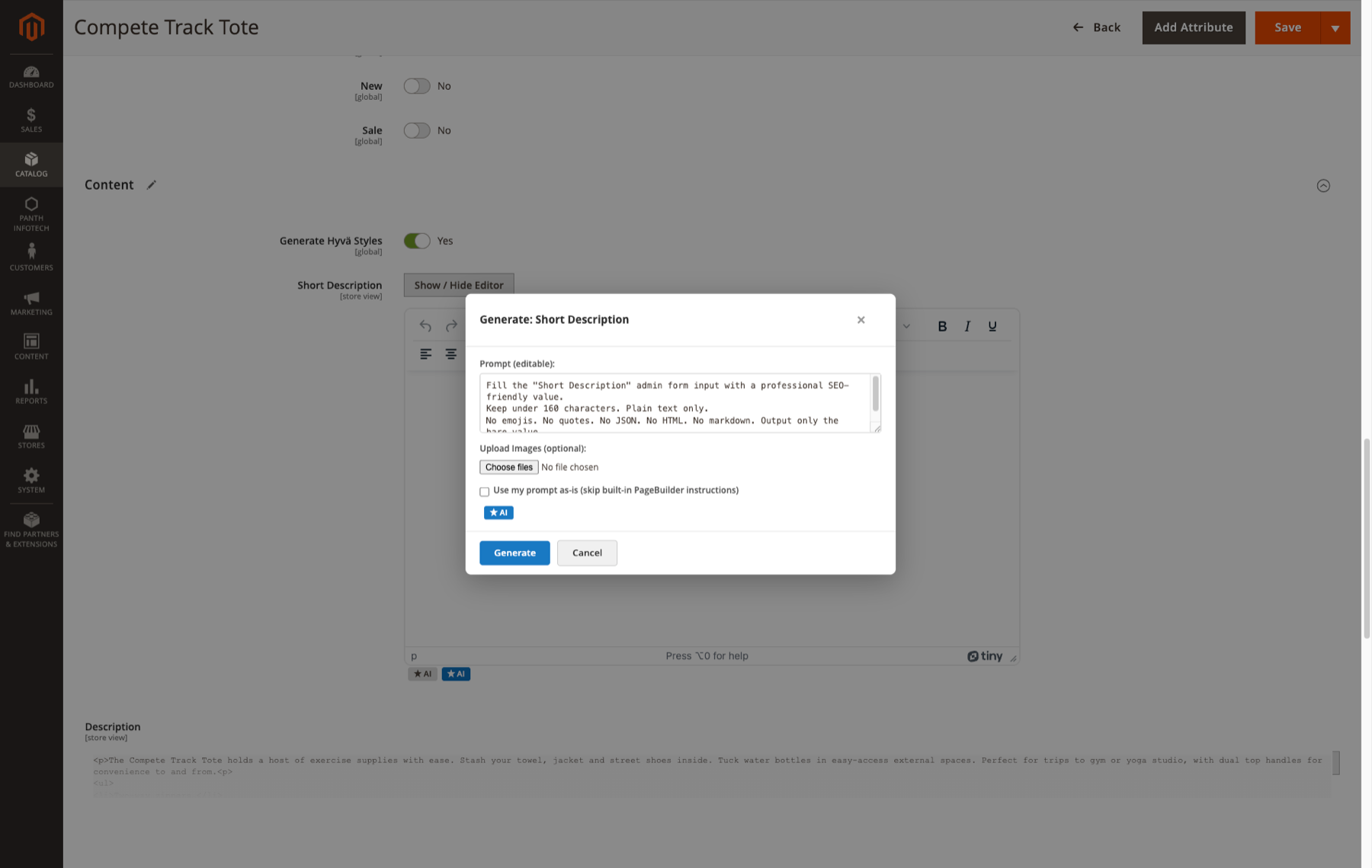
Generate: <field label> (the form label, or the field code in title case when the field has no label), with an editable prompt, Generate and Cancel.panth_seo_custom_canonical table exists.panth_seo_override table exists. Values entered while creating a new page are saved with the page's first save.See Developer Notes for where those values are stored.
{{name}}, {{sku}}, {{price}}, {{category}}, {{description}}, {{short_description}}, {{title}}, {{identifier}}, {{url}}. Any placeholder that cannot be filled is removed.product, category, cms_page, pagebuilder, all), each with default and active flags. Data patches install a set of default templates.api.openai.com and api.anthropic.com.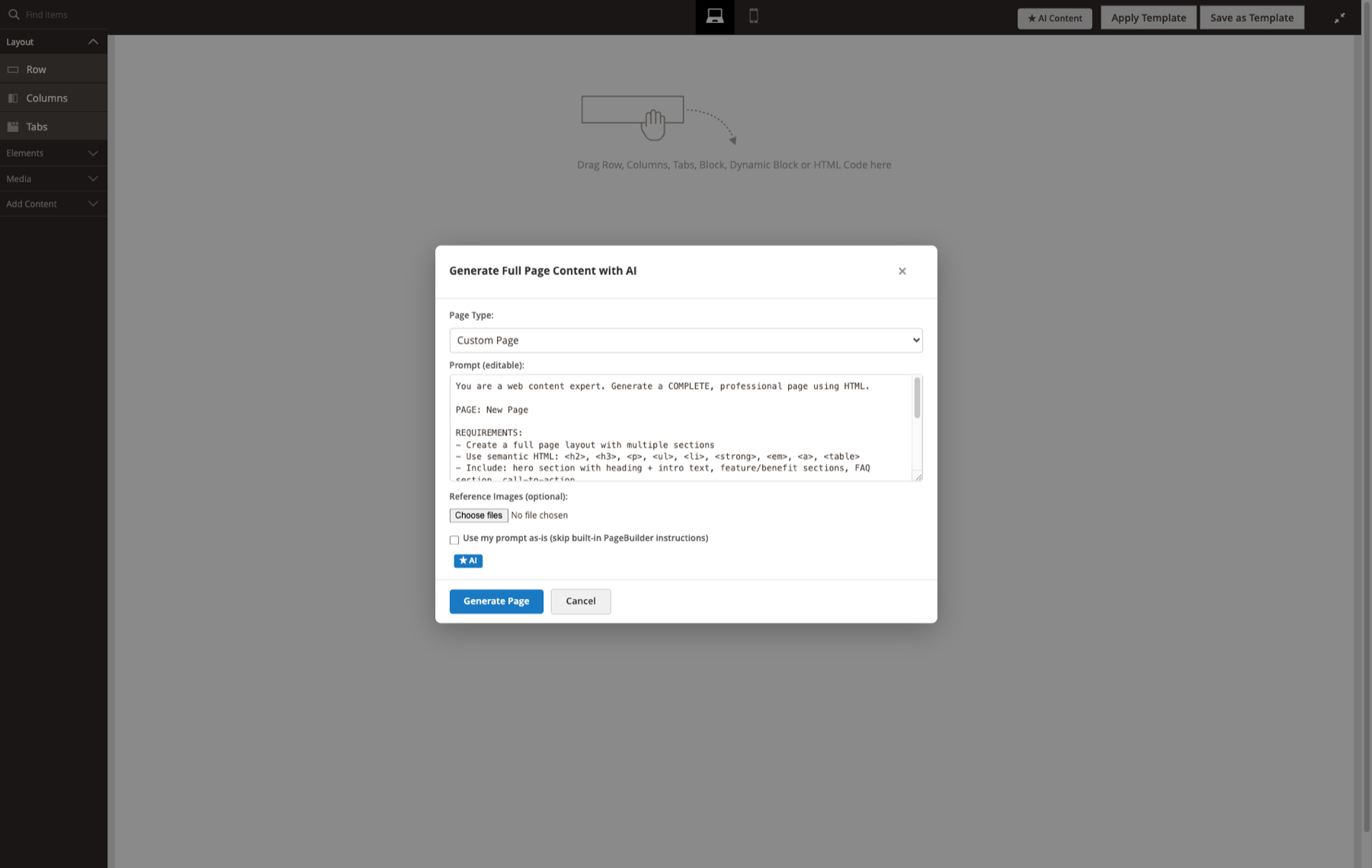
Generate a page in Page Builder
Fill a single field
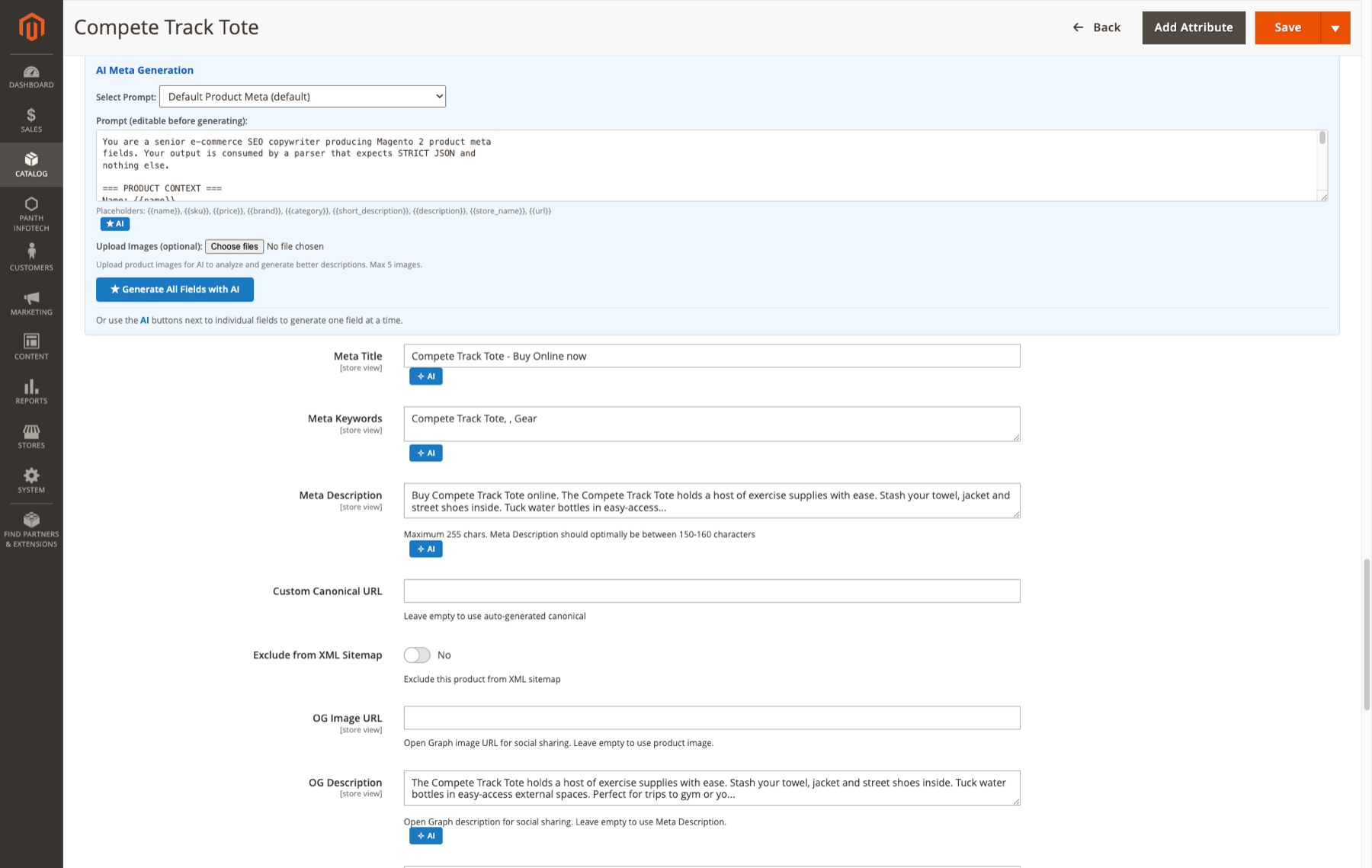
Bulk meta drafts
Panth_Core extensions menu.pending and publishes a message to the topic panth_pagebuilderai.generate_meta.draft, or to failed if no entity produced output. The consumer only processes jobs in pending status. A job found in processing status (interrupted earlier) is set to failed and is not retried.meta_title and meta_description to the entities. Products and categories are saved at the job's store view; CMS pages are saved without a store scope. Only jobs in draft status can be approved.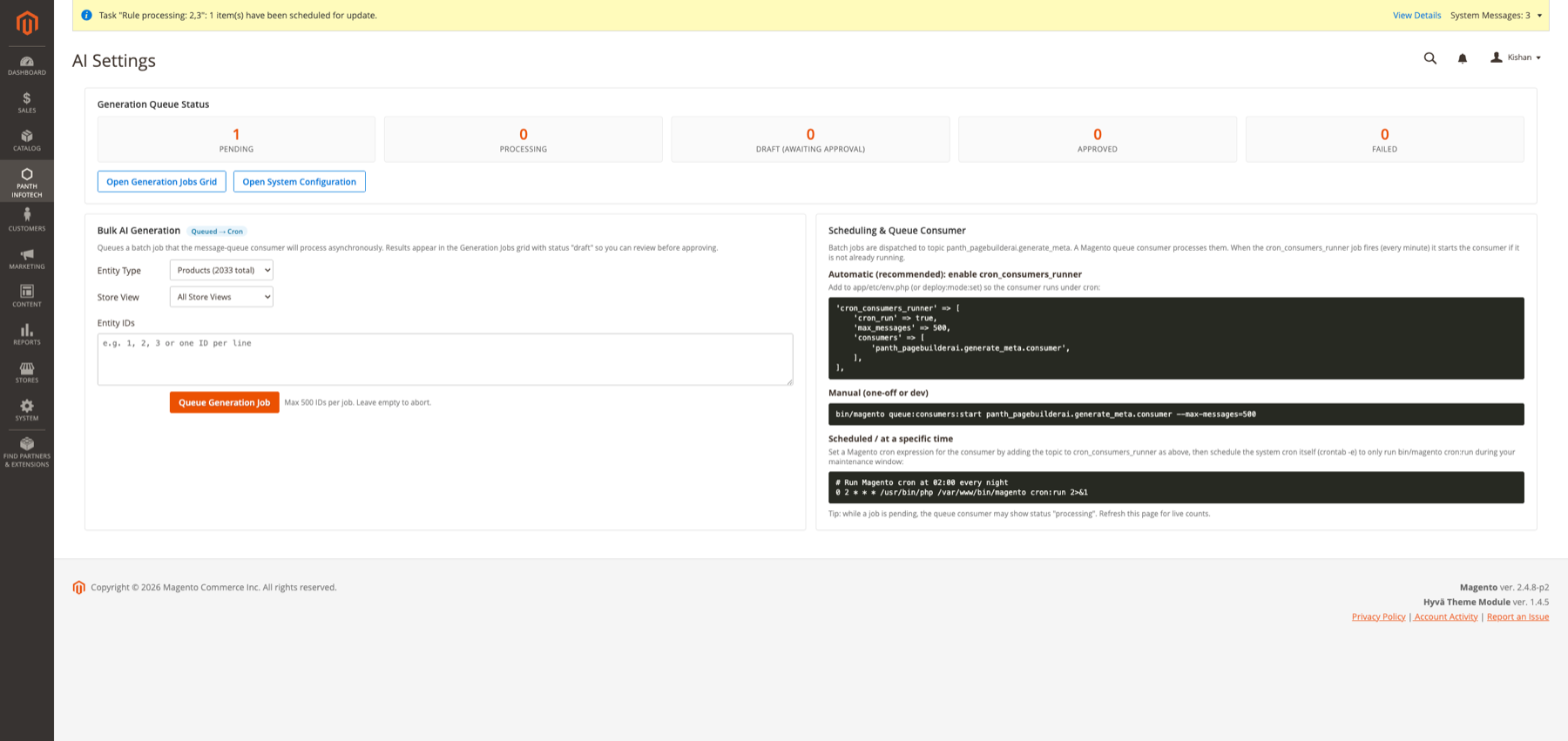
Running the queue
Messages are processed in one of two ways.
cron_consumers_runner in app/etc/env.php. This is the same snippet the AI Dashboard shows:'cron_consumers_runner' => [
'cron_run' => true,
'max_messages' => 500,
'consumers' => [
'panth_pagebuilderai.generate_meta.consumer',
],
],
panth_pagebuilderai_drain_queue runs in group default on the schedule */5 * * * *. Each run:panth_pagebuilderai_drain_queue and exits at once if a previous run still holds it;panth_pagebuilderai.generate_meta.q without waiting for new ones, so it returns as soon as the queue is empty;Console commands
The module adds no console commands of its own. To run the consumer, use Magento's queue:consumers:start panth_pagebuilderai.generate_meta.consumer (see Installation).
Prompts, knowledge base and logs
Requests go directly from the Magento server to the selected provider:
https://api.openai.com/v1/chat/completions, with the key in an Authorization: Bearer header.https://api.anthropic.com/v1/messages, with x-api-key and anthropic-version: 2023-06-01 headers.Nothing is sent until an admin clicks a generate button or the queue consumer processes a job. Every request includes the model, max tokens and temperature. OpenAI bulk requests also ask for logprobs.
Interactive generation (toolbar, field buttons, meta panels) sends:
Bulk jobs send a prompt built from the entity type's default AI prompt template. If no template exists, a built-in meta prompt is used. The prompt contains:
Stored locally
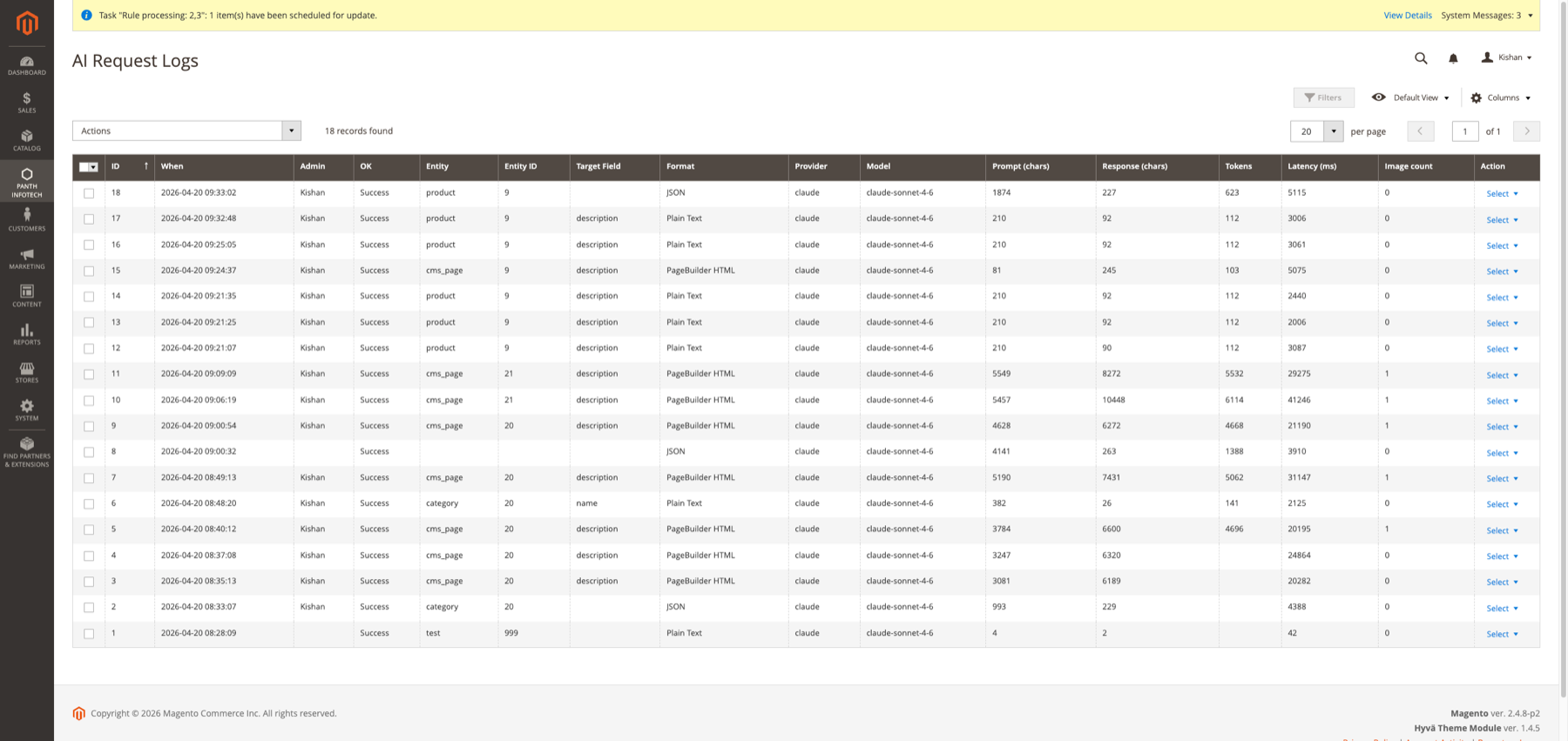
panth_pagebuilderai_request_log):var/panth_pagebuilderai/request-log/<timestamp_bucket>/, with their paths stored in images_json. Only files that decode as PNG, JPEG, GIF or WebP are written, with the extension taken from the detected type.var directory is not served by the web server. The log detail page embeds the images inline.pub/media/panth_pagebuilderai/request-log/. Those files are not moved; the log detail page still links to them. Delete that directory if the images are sensitive.panth_seo_ai_cache): cached bulk responses, keyed by a SHA-256 hash, with an expiry time.panth_seo_ai_usage): tokens per provider per month on the bulk path. The table has a cost_usd column, but the code does not fill it.panth_seo_generation_job): entity IDs, plus the draft titles and descriptions in the options JSON.core_config_data.See USER_GUIDE.md.
See CHANGELOG.md.
| Item | Supported |
|---|---|
| Magento Open Source | 2.4.4 to 2.4.8 |
| Adobe Commerce | 2.4.4 to 2.4.8 |
| PHP | 8.1, 8.2, 8.3, 8.4 |
| Magento Page Builder | Required (Magento_PageBuilder) |
Composer constraints:
~8.1.0||~8.2.0||~8.3.0||~8.4.0magento/framework ^103.0, magento/module-backend ^102.0, magento/module-page-builder ^2.2mage2kishan/module-core ^1.0Magento_PageBuilder).Panth_Core, which Composer installs as mage2kishan/module-core.api.openai.com or api.anthropic.com.panth_pagebuilderai.generate_meta.consumer under cron_consumers_runner (see Usage).Interactive generation in the admin does not need cron.
composer require mage2kishan/module-pagebuilder-ai
bin/magento module:enable Panth_Core Panth_PageBuilderAi
bin/magento setup:upgrade
bin/magento setup:di:compile # production mode only
bin/magento setup:static-content:deploy -f
bin/magento cache:flush
Check that the module is enabled:
bin/magento module:status Panth_PageBuilderAi
The module defines a database queue consumer for bulk jobs. To run it manually:
bin/magento queue:consumers:start panth_pagebuilderai.generate_meta.consumer --max-messages=500
Admin path: Stores > Configuration > Panth Extensions > PageBuilder AI.
Panth_Core.Panth_PageBuilderAi::config.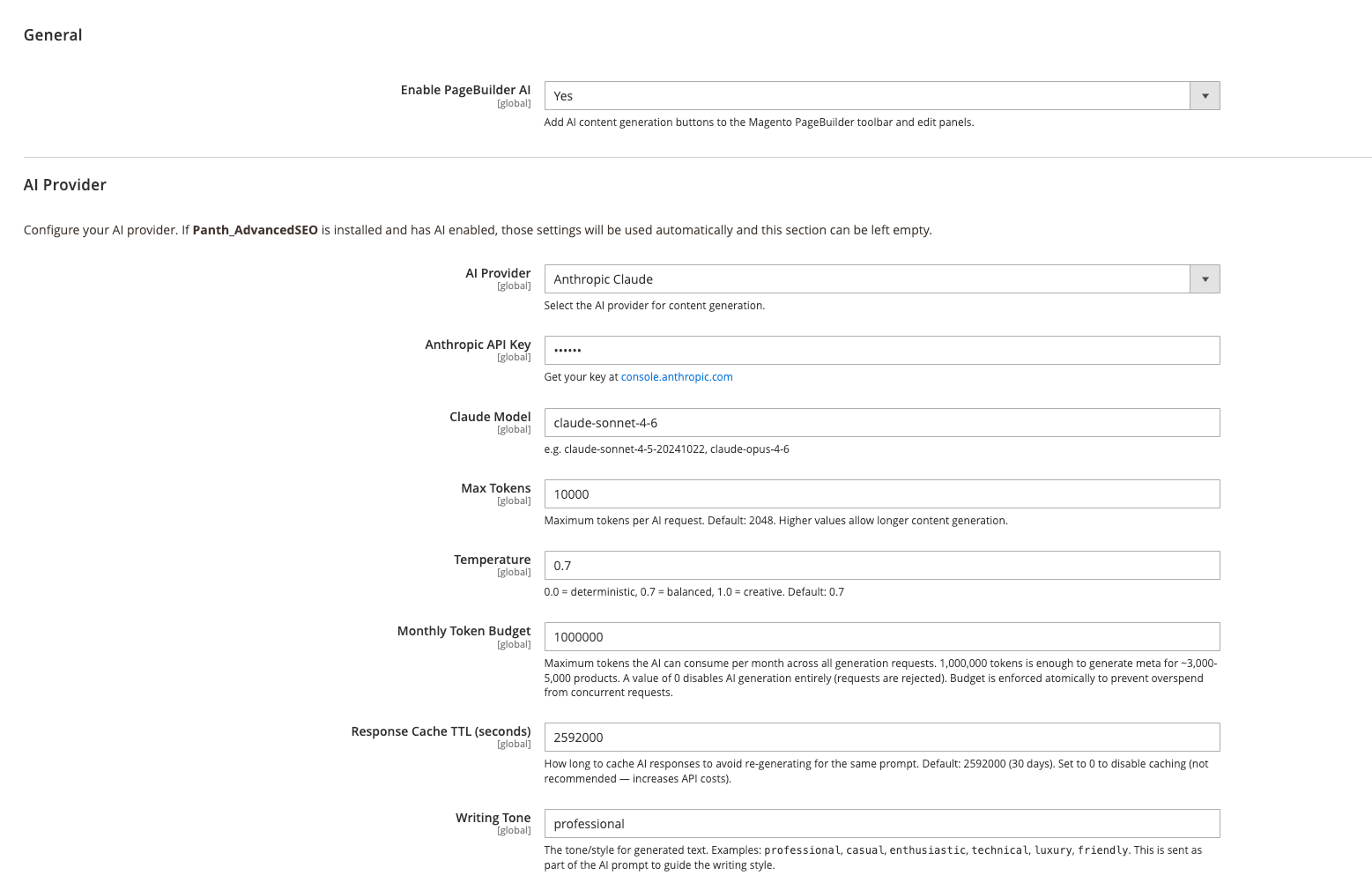
General (panth_pagebuilderai/general)
| Field | Type | Default | Config path | Notes |
|---|---|---|---|---|
| Enable PageBuilder AI | Yes/No | Yes | panth_pagebuilderai/general/enabled |
Adds the AI buttons and the extra SEO fields in the admin. |
AI Provider (panth_pagebuilderai/ai)
| Field | Type | Default | Config path | Notes |
|---|---|---|---|---|
| AI Provider | Select: "OpenAI (GPT-4o)", "Anthropic Claude", "Disabled (None)" | openai |
panth_pagebuilderai/ai/provider |
|
| OpenAI API Key | Obscured, encrypted | (empty) | panth_pagebuilderai/ai/openai_api_key |
Shown when AI Provider is OpenAI. |
| OpenAI Model | Text | gpt-4o |
panth_pagebuilderai/ai/openai_model |
Admin hint: e.g. gpt-4o, gpt-4o-mini, gpt-4-turbo. |
| Anthropic API Key | Obscured, encrypted | (empty) | panth_pagebuilderai/ai/claude_api_key |
Shown when AI Provider is Anthropic Claude. |
| Claude Model | Text | claude-sonnet-4-6 |
panth_pagebuilderai/ai/claude_model |
Admin hint: e.g. claude-sonnet-4-6, claude-opus-4-6. If the field is empty, the code falls back to claude-sonnet-4-6. |
| Max Tokens | Text (digits, greater than 0) | 8192 |
panth_pagebuilderai/ai/max_tokens |
Maximum output tokens per request. |
| Temperature | Text (number from 0 to 1) | 0.7 |
panth_pagebuilderai/ai/temperature |
|
| Monthly Token Budget | Text (digits) | 1000000 |
panth_pagebuilderai/ai/monthly_budget |
Bulk path only. A value of 0 rejects bulk requests. |
| Response Cache TTL (seconds) | Text (digits) | 2592000 |
panth_pagebuilderai/ai/cache_ttl |
Bulk path only. A value of 0 disables the cache. |
| Writing Tone | Text | professional |
panth_pagebuilderai/ai/tone |
Interactive path only. Added to the system prompt as Writing tone: <value>. (letters, digits, spaces, commas and hyphens, up to 60 characters). |
API keys are saved with Magento's Encrypted backend model, so they are stored encrypted in core_config_data. The model fields are free text: enter any model ID that your provider account can use.
The two request paths use these settings differently.
Interactive generation covers the toolbar, the field buttons and the meta panels, all of which go through panth_pagebuilderai/generate/index.
Bulk jobs use the provider adapters.
2 x Max Tokens against the month's budget.bin/magento module:disable Panth_PageBuilderAi
composer remove mage2kishan/module-pagebuilder-ai
bin/magento setup:upgrade
bin/magento cache:flush
The module has no uninstall routine. After removal, the following remain:
panth_seo_ai_prompt, panth_seo_ai_knowledge, panth_seo_ai_usage, panth_seo_ai_cache, panth_seo_generation_job and panth_pagebuilderai_request_log.panth_pagebuilderai/* rows in core_config_data, including the encrypted OpenAI and Anthropic API keys.var/panth_pagebuilderai/request-log/, and under pub/media/panth_pagebuilderai/request-log/ from versions before 1.2.21.panth_pagebuilderai.generate_meta.q queue.Remove these by hand if you no longer need them, but check first whether another Panth module still uses the panth_seo_* tables. Consider also revoking the API keys at the provider.
Commercial software license. See LICENSE.txt in this repository.
Identifiers
Panth_PageBuilderAimage2kishan/module-pagebuilder-aiPanth\PageBuilderAi\Panth_Core and Magento_PageBuilderRelationship to mage2kishan/module-advanced-seo
composer.json lists it under suggest only, not require. etc/module.xml has no sequence entry for it.Helper\Config::isAdvancedSeoAvailable() returns false, and nothing calls into Panth_AdvancedSEO. This module always uses its own provider settings.Api\AiGeneratorInterface replaces the legacy Panth\AdvancedSEO\Api\MetaGeneratorInterface.panth_seo_* names so that rows from earlier Panth_AdvancedSEO installs are reused.panth_seo_override and panth_seo_custom_canonical tables. This module does not create them. When a table is missing, the fields that depend on it are not added to the form.Provider extension point
Api\AiGeneratorInterface defines generate(), getProvider() and getLastUsageTokens(). etc/di.xml binds it to Model\Generator\AdapterFactory.ClaudeAdapter, OpenAiAdapter or NullAdapter from panth_pagebuilderai/ai/provider.Model\Generator\AbstractHttpAdapter holds the shared HTTP, budget, cache, prompt and audit logic.Model\AiService instead.Queue
| Element | Value |
|---|---|
| Topic | panth_pagebuilderai.generate_meta |
| Exchange | panth_pagebuilderai.exchange |
| Queue | panth_pagebuilderai.generate_meta.q |
| Connection | db |
| Consumer | panth_pagebuilderai.generate_meta.consumer |
| Handler | Model\Queue\BulkGenerateConsumer::process |
Plugins (etc/adminhtml/di.xml)
Panth_Faq, Panth_Testimonials, Panth_BannerSlider and Panth_DynamicForms. These plugins are ignored when the target classes do not exist.Admin route and endpoints
The admin route is panth_pagebuilderai. Main endpoints:
generate/index: interactive generation.aigenerate/generate: an adapter-based JSON endpoint. The bundled UI does not call it.aisettings/generateBatch: queues a bulk job.aisettings/approveBatch: approves draft jobs.All POST endpoints, including generate/index and aigenerate/generate, go through Magento's admin form key check. The bundled scripts send form_key in the query string, so JSON request bodies also pass the check. Deleting a request log row is a POST action.
Page Builder integration
view/adminhtml/layout/default.xml adds pagebuilder-ai-init.phtml and web/css/pagebuilder-ai.css to every admin page.web/js/pagebuilder-ai-toolbar.js injects the buttons and rebuilds the stage through Magento_PageBuilder/js/stage-builder.panth:pagebuilder-ai:content-injected DOM event.ACL
Panth_PageBuilderAi::config, under Stores > Settings > Configuration.Panth_PageBuilderAi::ai_manage, with the children ai_generate, ai_settings, ai_jobs, ai_prompts, ai_knowledge and ai_request_logs.Panth_PageBuilderAi::generate, used by generate/index.Admin menu
Under the parent Panth_Core::panth_extensions: AI Dashboard, AI Generation Jobs, AI Prompts, AI Knowledge Base, AI Request Logs.
Tables (etc/db_schema.xml)
panth_seo_ai_prompt, panth_seo_ai_knowledge, panth_seo_ai_usage, panth_seo_ai_cache, panth_seo_generation_job, panth_pagebuilderai_request_log.
Data patches
The data patches install the default AI prompts, upgrade those default prompts, and load the knowledge base entries from Setup/Data/.
Tests
Unit tests in Test/Unit cover the drain cron job (message and time budget, lock, empty queue, rejected messages, interrupted jobs) and the HTTP timeout and host checks of the provider adapters. They use stubs and make no network calls.
| Module Category | Marketing |
|---|---|
| Best For | Mid-Market |
Talk to Kishan directly: written quote, scope and timeline within 24 hours. No sales call.
AI Content Generation for Magento 2 PageBuilder