Content Management
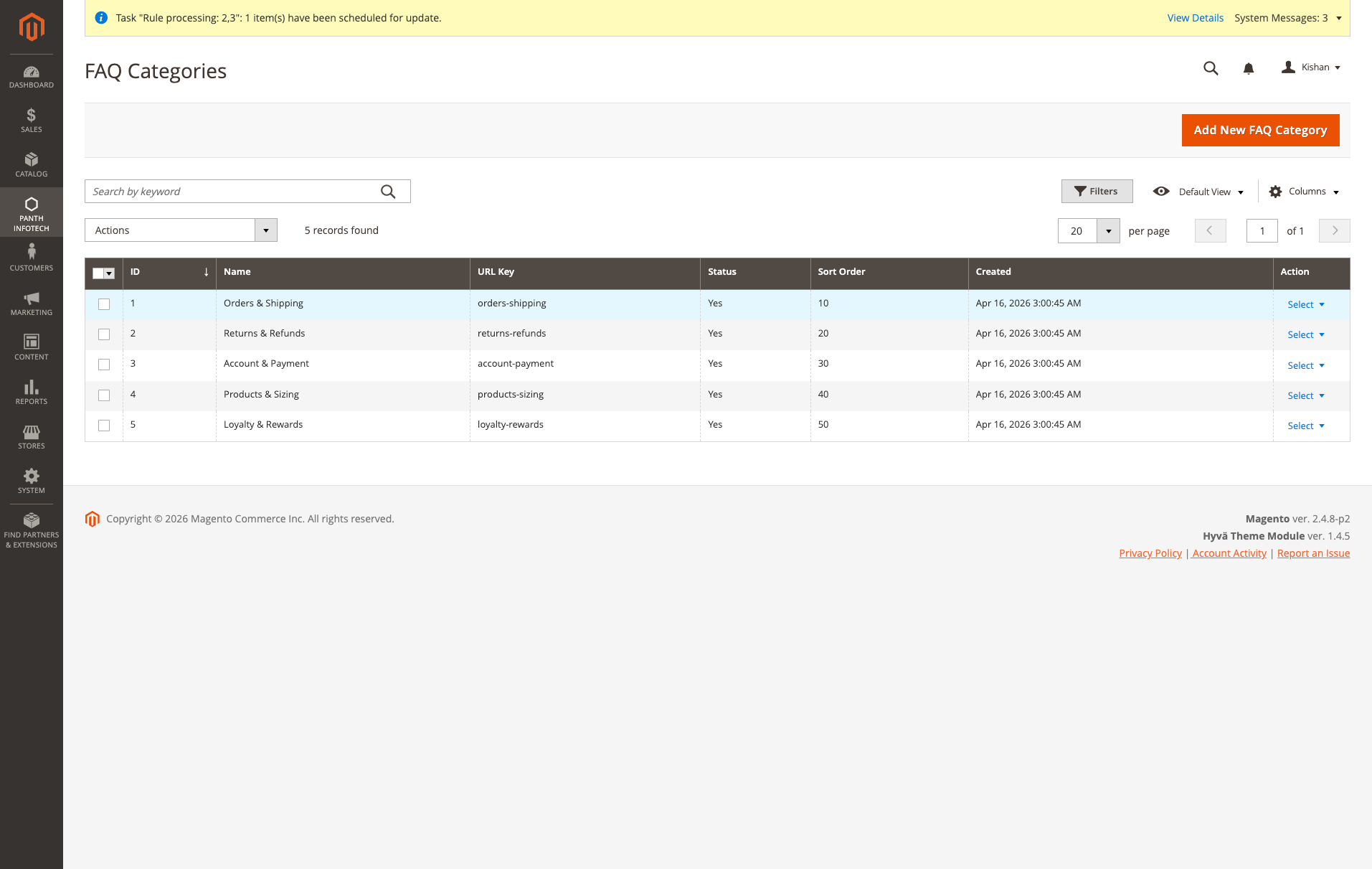
FAQ Categories, organize questions into categories with optional descriptions, category images, and sort order
A Magento 2 FAQ extension with category pages at clean URLs like /faq/orders-shipping. One question can be assigned to many products, categories and CMS pages, and each FAQ page outputs FAQPage JSON-LD for Google.
Key Features:
Additional Services
Built-in from day one. No add-ons, no upsell, no licence keys to renew.
FAQ Categories, organize questions into categories with optional descriptions, category images, and sort order
Accordion UI, smooth collapse/expand on click; optional default-open first item
FAQPage JSON-LD schema, automatic structured data output on every FAQ page for Google rich results
Hyva compatible, Alpine.js templates, no jQuery, passes Hyva's fallback rules
The FAQ Module for Magento 2 adds an FAQ page at /faq, category pages like /faq/orders-shipping and a page per question, all with FAQPage JSON-LD. One question can be assigned to many products, categories and CMS pages at once, so you edit the answer in one place.
Merchants organize questions into categories with images and sort order, then assign them granularly through native Magento UI grids. The storefront ships a smooth accordion UI with debounced client-side filtering plus a dedicated AJAX search endpoint for catalogs with hundreds of FAQs, returning hits in under 100 ms. Helpful voting and view-count tracking reveal which answers actually deflect support tickets, while clean per-FAQ URL rewrites prevent duplicate content across multi-level assignments.
Because the FAQ Module for Magento 2 emits Google-valid FAQPage JSON-LD on every page automatically, your answers become eligible for Google rich results and CTR-boosting snippets. The FAQ widget drops blocks into any Magento layout container, per-FAQ-item meta fields keep SEO clean, and canonical URLs prevent duplicate-content issues across multi-level assignment. Built on Panth Core, MEQP compliant, compatible with Hyva (Alpine.js) and Luma (vanilla JS) on Magento 2.4.4 - 2.4.8 with PHP 8.1 - 8.4.
Best for:
The FAQ Module for Magento 2 packs every surface a serious knowledge base needs:
Panth_Faq adds a FAQ system to Magento 2. Store owners create FAQ categories and question/answer items in the admin, assign items to products, catalog categories and CMS pages, and publish them on a standalone FAQ page, on FAQ category pages, on individual FAQ item pages, inside product, category and CMS pages, or through a widget. Each FAQ page can emit FAQPage JSON-LD structured data.
The module ships two template sets: Alpine.js templates for Hyva and vanilla JavaScript templates for Luma. Item and category content can be overridden per store view.
Product page: kishansavaliya.com/magento-2-faq.html
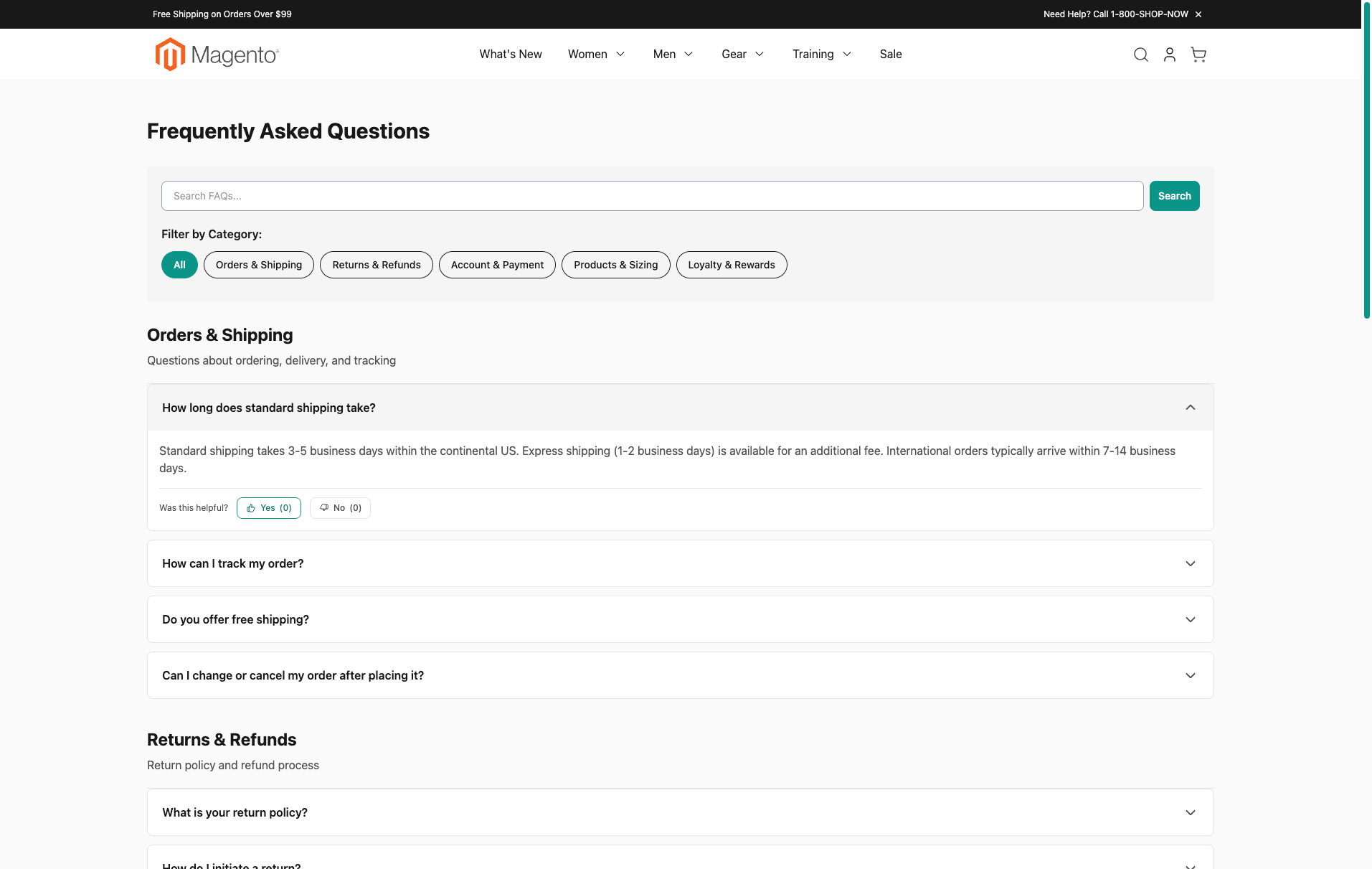
faq), with category filter buttons, a search box and an accordion. Search on the FAQ page runs over AJAX (faq/ajax/search) and matches the question and answer text with a SQL LIKE query.aria-expanded and aria-controls, answers are labelled regions, Enter and Space toggle a question, #faq-<id> links open and scroll to that question, controls are at least 44px tall and motion is reduced when the visitor prefers reduced motion.faq/vote/submit); requests must carry the form key, and repeat votes are blocked in the browser with localStorage and on the server per session, and each client IP may cast a limited number of votes per hour.etc/theme-config.json and exposed as CSS variables through the Panth_Core theme configuration.Open Manage Categories and click Add New. The form has the fields Enable Category, Category Name, URL Key, Description, Category Icon, Sort Order and the SEO fields Meta Title, Meta Description and Meta Keywords. Icons are uploaded to pub/media/panth/faq/category/tmp and moved to pub/media/panth/faq/category when the category is saved; the file name is stored in the icon column and the icon is shown above the heading of the FAQ category page. Only JPG, PNG and GIF images are accepted: the upload checks the file extension, the content type detected on the server and that the file is a real image. SVG files are refused on upload, and a category save that refers to an SVG icon is refused too, because an SVG can carry script. Saving a category dispatches panth_faq_category_save_after, which regenerates its URL rewrites. Use the store switcher above the form to enter store-view specific values; fields left at "Use Default" inherit the default value.
Open Manage Items and click Add New. The form has General Information (Enable FAQ, Question, Answer with the WYSIWYG editor, FAQ Categories, Show on Main FAQ Page, Sort Order), Search Engine Optimization (URL Key, Meta Title, Meta Description, Meta Keywords) and three assignment grids: Assign to Products, Assign to Catalog Categories and Assign to CMS Pages. The grid supports the mass actions Delete, Show on Main Page, Hide from Main Page, Enable and Disable. Saving an item dispatches panth_faq_item_save_after, which regenerates its URL rewrites for every assigned store.
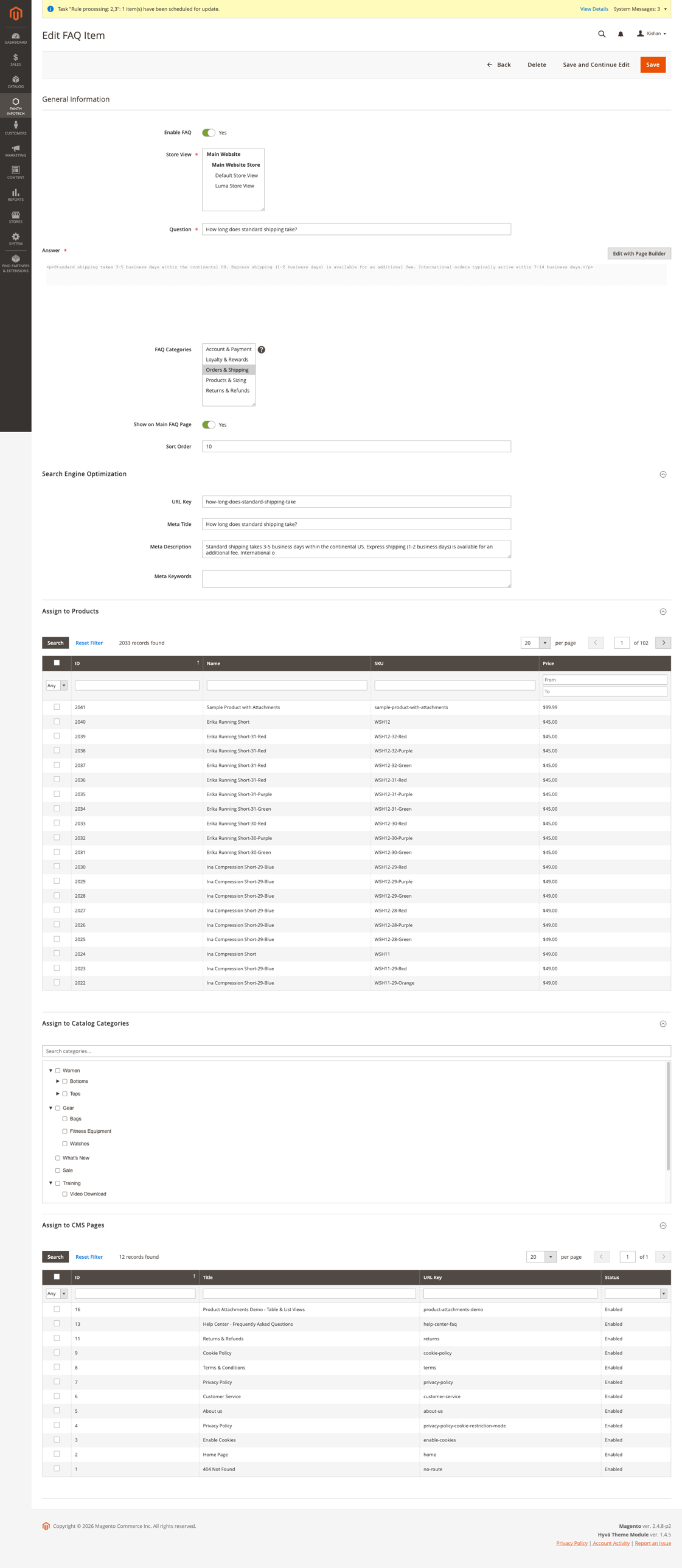
Items can also be assigned from the other side: the product, catalog category and CMS page edit forms each get a collapsible "FAQ Items" fieldset with a selection grid.
| Page | URL | Internal route |
|---|---|---|
| FAQ page | /<faq_route> (default /faq) |
faq/index/index |
| Item detail | /<faq_route>/item/<url_key> |
faq/index/view/id/<item_id> |
| FAQ category | /<faq_route>/category/<url_key> |
faq/category/view/id/<category_id> |
URLs are resolved by Panth\Faq\Controller\Router (registered in the frontend router list with sort order 50) and additionally by URL rewrites written on save. Store-view URL key overrides are respected.
The FAQ page lists active categories with their items, followed by an "Other FAQs" section for active items that belong to no FAQ category. The category filter and the search box work without a page reload: the templates post to faq/ajax/search with the query and the selected category. The search requires at least 2 characters, uses at most the first 200 characters of the query and returns at most 50 items. Answers in the results are passed through the CMS content filter. The Luma template also accepts a ?q= parameter for a server-side search.
The item detail page increments view_count with a single UPDATE query each time the controller runs (full page cache hits are not counted), sets the page title to the question, adds a canonical link and, when no meta description is set, uses the first 155 characters of the answer text.
The helpful / not helpful buttons post item_id and vote (yes or no) to faq/vote/submit, which increments helpful_count or not_helpful_count and returns the new counts as JSON. Votes are accepted only while the module and Enable Helpful Voting are on for the store view, and only for items that are active and assigned to the current store view. Each request must include the storefront form key (form_key, as a POST field or in the JSON body); requests without a valid form key are rejected with HTTP 403. The templates remember a vote in localStorage, and the endpoint also records voted item ids in the visitor session and refuses a second vote on the same item within that session. In addition, each client IP address may cast at most "Votes Allowed Per Client IP (per hour)" votes (default 20) across all items; further votes get the message "Too many votes from your connection. Please try again later." The counter is kept in the Magento cache for one hour.
When the corresponding Page Integration setting is enabled and at least one item is assigned, a block with a title, a client-side search box and an accordion is rendered. On Luma the product, category and CMS templates also append an "Other FAQs" section with active items that are assigned to the current product, category or CMS page, belong to no FAQ category and are not already listed in the main block (for example because of the item limit).
Add the "FAQ List" widget from Content > Widgets, or place it in CMS content with the directive:
{{widget type="Panth\Faq\Block\Widget\Faq" title="Frequently Asked Questions" faq_items="1,2,3" limit="10" show_view_all="1"}}
Parameters: Title (optional heading), FAQ Items (multiselect; empty shows all active items), Number of FAQs to Display (default 10; empty shows all), Show "View All FAQs" Link (default Yes). Selected items are rendered in the order they were selected.
Panth\Faq\Block\Schema renders view/frontend/templates/schema.phtml in before.body.end on the FAQ page (items assigned to a FAQ category), FAQ category pages, item detail pages (that item only), and on product, catalog category and CMS pages that have assigned items and an enabled integration. HTML is stripped from answers. The output follows the schema.org FAQPage type.
Luma templates live under view/frontend/templates/: index/index.phtml, index/view.phtml, category/view.phtml, product/faq.phtml, category/faq.phtml, page/faq.phtml, widget/faq.phtml and schema.phtml. Hyva templates live under view/frontend/templates/hyva/: index/index.phtml, index/view.phtml, category/view.phtml, embedded-faq.phtml (product, category and CMS blocks) and partials/faq-item.phtml. The Hyva templates are applied by the hyva_faq_* and default_hyva layout files. Copy a template to app/design/frontend/<Vendor>/<theme>/Panth_Faq/templates/ to override it.
Styles: view/frontend/web/css/faq.css (loaded on Hyva) and view/frontend/web/css/source/_module.less (compiled into the Luma theme CSS). Scripts: view/frontend/web/js/faq.js and view/frontend/web/js/faq-ajax-search.js. All storefront markup is wrapped in .panth-faq-module.
USER_GUIDE.md covers installation, configuration, managing categories and items, assigning FAQs to products, categories and CMS pages, the widget, schema markup, Hyva and Luma support, troubleshooting and a CLI reference.
See CHANGELOG.md.
| Platform | Versions |
|---|---|
| Magento Open Source | 2.4.4 to 2.4.8 (as published on the product page) |
| Adobe Commerce | 2.4.4 to 2.4.8 (as published on the product page) |
| PHP | 8.1, 8.2, 8.3, 8.4 (`~8.1.0 |
| Themes | Hyva and Luma |
Composer constraints on Magento packages: magento/framework ^103.0, magento/module-backend ^102.0, magento/module-catalog ^104.0, magento/module-cms ^104.0, magento/module-store ^101.0, magento/module-ui ^101.0, magento/module-url-rewrite ^102.0.
mage2kishan/module-core ^1.0.17 (module Panth_Core). It is installed by Composer as a dependency and provides the admin menu group and the theme configuration used for CSS variables.composer require mage2kishan/module-faq
bin/magento module:enable Panth_Core Panth_Faq
bin/magento setup:upgrade
bin/magento setup:di:compile
bin/magento setup:static-content:deploy -f
bin/magento cache:flush
setup:di:compile is only required in production mode. setup:static-content:deploy is needed because the module ships CSS and JavaScript under view/frontend/web.
Check that the module is enabled:
bin/magento module:status Panth_Faq
Go to Stores > Configuration > Panth Extensions > FAQ Settings. All fields can be set at default, website and store view scope. The configuration section is protected by the Panth_Faq::config ACL resource.
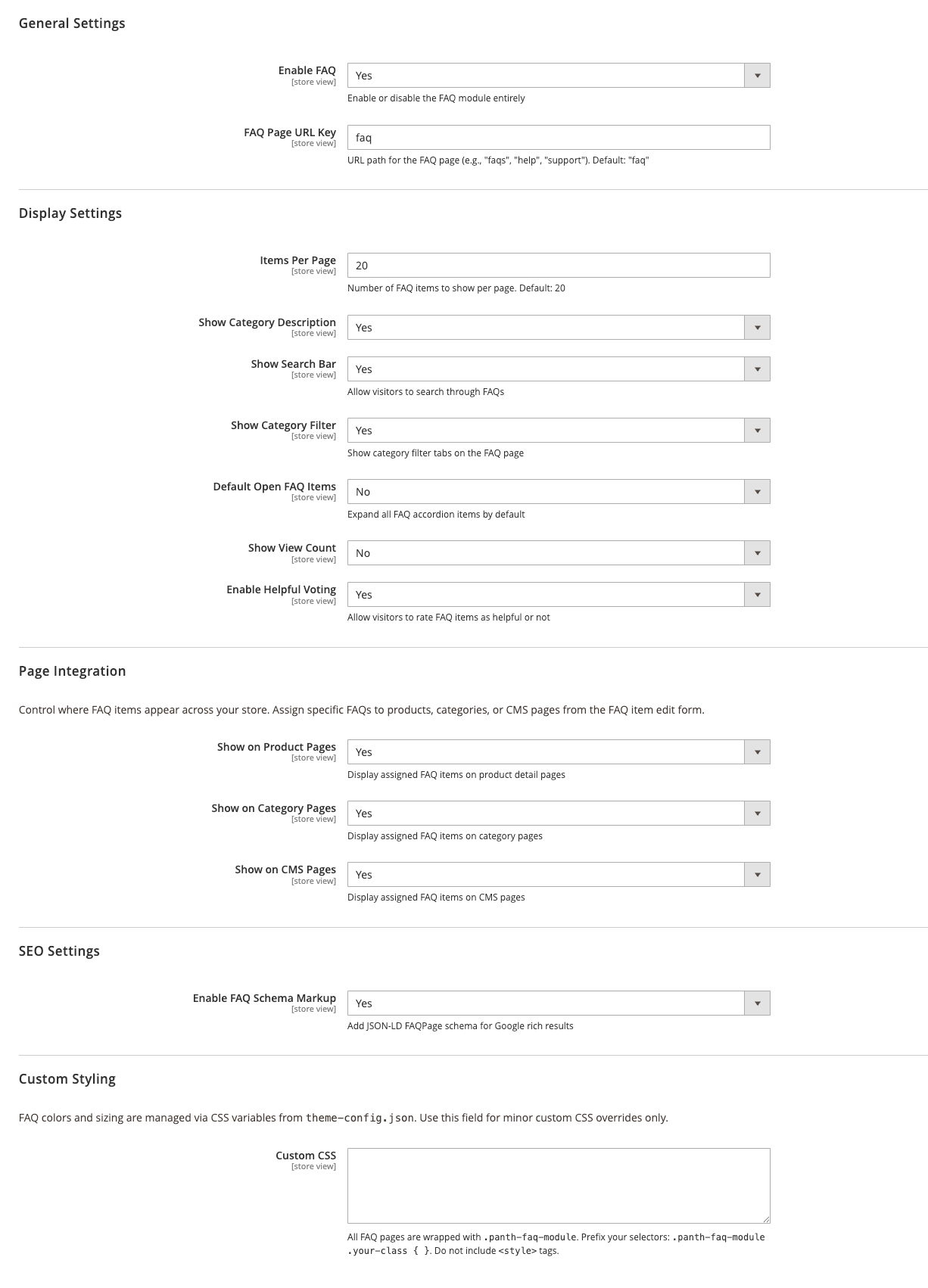
| Setting | Default | What it does |
|---|---|---|
| Enable FAQ | Yes | Master switch. When set to No the router ignores FAQ URLs, the FAQ page returns a 404, item and category pages redirect to the home page, and the embedded blocks, widget and schema output stop rendering. |
| FAQ Page URL Key | faq | Path of the FAQ page. Item and category URLs are built as <key>/item/<url_key> and <key>/category/<url_key>. Requests to /faq are redirected to the configured key when it differs. |
Config paths: panth_faq/general/enabled, panth_faq/general/faq_route. The FAQ page title and meta description are read from panth_faq/general/meta_title (default "Frequently Asked Questions") and panth_faq/general/meta_description; these two paths have defaults in etc/config.xml but no admin field.
| Setting | Default | What it does |
|---|---|---|
| Items Per Page | 20 | Stored at panth_faq/display/items_per_page and read by the FAQ page block. The bundled templates render all items and do not paginate. |
| Show Category Description | Yes | Shows the FAQ category description on the FAQ page and on FAQ category pages. |
| Show Search Bar | Yes | Shows the search box on the FAQ page and on FAQ category pages. |
| Show Category Filter | Yes | Shows the category filter buttons on the FAQ page. |
| Default Open FAQ Items | No | Renders accordion items expanded on the FAQ page and on FAQ category pages. |
| Show View Count | No | Shows the view counter next to items. |
| Enable Helpful Voting | Yes | Shows the helpful / not helpful buttons. |
| Votes Allowed Per Client IP (per hour) | 20 | Votes accepted from one client IP address within an hour, across all items. The IP is read through Magento RemoteAddress. 0 turns the limit off. |
Config paths: panth_faq/display/items_per_page, show_category_description, show_search, show_category_filter, default_open_faqs, show_view_count, enable_helpful_voting, vote_rate_limit.
| Setting | Default | What it does |
|---|---|---|
| Show on Product Pages | Yes | Renders assigned items on product pages. |
| Product Page Position | FAQ tab | FAQ tab adds an "FAQ" tab to the product tabs (product.info.details, group detailed_info). Below the product tabs renders a full-width section at the end of the content container. Product info column renders the list in product.info.main under Add to Cart (the placement used before 1.3.10). Config path panth_faq/product_page/position. |
| Show on Category Pages | Yes | Renders assigned items at the end of the content container of catalog category pages. |
| Show on CMS Pages | Yes | Renders assigned items at the end of the content container of CMS pages. |
Config paths: panth_faq/product_page/enabled, panth_faq/category_page/enabled, panth_faq/cms_page/enabled. Each integration also honours a title and, for product and category pages, an item limit that only exist in etc/config.xml: panth_faq/product_page/title ("Frequently Asked Questions"), panth_faq/product_page/limit (10), panth_faq/category_page/title ("Category FAQs"), panth_faq/category_page/limit (10), panth_faq/cms_page/title ("FAQs"). When more items are assigned than the limit, a "View All FAQs" link to the FAQ page is shown. The position values under these paths are defined but not used by the layouts.
| Setting | Default | What it does |
|---|---|---|
| Enable FAQ Schema Markup | Yes | Outputs a FAQPage JSON-LD block before the closing body tag. |
| Max Questions Per FAQPage | 30 | Caps the number of Question entries in one JSON-LD block. 0 disables the cap. Shown only when schema markup is enabled. |
Config paths: panth_faq/seo/enable_schema, panth_faq/seo/max_questions. The canonical link on the FAQ page, FAQ category pages and item detail pages is controlled by panth_faq/seo/canonical_url (default 1, no admin field).
| Setting | Default | What it does |
|---|---|---|
| Custom CSS | (empty) | Saved to panth_faq/design/custom_css and printed in a <style> tag in the page head on FAQ pages and on product, category and CMS pages (the faq_styles layout handle). Any < character is removed from the value. Colours and sizing come from etc/theme-config.json. |
The module adds a "FAQ" group to the Panth_Core admin menu with three entries: Manage Items (faq/item), Manage Categories (faq/category) and Configuration (opens the section above).
bin/magento module:disable Panth_Faq
composer remove mage2kishan/module-faq
bin/magento setup:upgrade
bin/magento setup:di:compile
bin/magento cache:flush
Disabling and removing the package does not drop the panth_faq_* tables, the panth_faq/* rows in core_config_data, the URL rewrites generated for FAQ items and categories, or the icons uploaded to pub/media/panth/faq/category. Remove them manually if they are no longer needed.
Commercial software license. See LICENSE.txt in this repository.
Panth_Faq; Composer package: mage2kishan/module-faq; PHP namespace: Panth\Faq; version 1.3.2.Panth\Faq\Api\ItemRepositoryInterface and Panth\Faq\Api\CategoryRepositoryInterface (save, getById, getList, delete, deleteById) with the data interfaces Api\Data\ItemInterface and Api\Data\CategoryInterface. Preferences are set in etc/di.xml. No webapi.xml is shipped, so there are no REST endpoints.Panth\Faq\Helper\Data (isEnabled, getFaqRoute, isProductPageEnabled, isCategoryPageEnabled, isCmsPageEnabled, isSchemaEnabled, getConfigValue, renderRichText).Block\Index\Index, Block\Index\View, Block\Category\View, Block\Product\Faq, Block\Category\Faq, Block\Page\Faq, Block\Widget\Faq, Block\Schema, Block\CustomCss.Controller\Index\Index, Controller\Index\View, Controller\Category\View, Controller\Ajax\Search (POST), Controller\Vote\Submit (POST), Controller\Router.Model\ResourceModel\Item\Collection provides addStoreFilter, addActiveFilter, addSearchFilter, addProductFilter, addCatalogCategoryFilter, addPageFilter, addCategoryFilter and addFaqCategoryAssignmentFilter; store-view overrides are merged with COALESCE joins on the value tables.panth_faq_item_save_after (observer Observer\ItemUrlRewriteObserver), panth_faq_category_save_after (observer Observer\CategoryUrlRewriteObserver), admin_system_config_changed_section_panth_faq (observer Observer\ConfigSaveAfter, invalidates full_page and block_html).Plugin\Product\Ui\DataProvider (after getData on Magento\Catalog\Ui\DataProvider\Product\Form\ProductDataProvider) adds the assigned FAQ item ids as faq_items to the product form data.Panth\Faq\CategoryIconImageUploader (category icon uploads), Panth\Faq\Model\ResourceModel\Category\Grid\Collection (category grid data source) and Panth\Faq\Ui\ItemGridDataProvider with ItemGridReporting and ItemGridFilterPool (item grid keyword search through Ui\Component\Listing\LikeFulltextFilter), and Panth\Faq\Ui\CategoryGridDataProvider with CategoryGridReporting, CategoryGridFilterPool and CategoryLikeFulltextFilter (category grid keyword search).Model\Item and Model\Category implement IdentityInterface; item identities include cat_p_*, cat_c_* and cms_p_* tags of the assigned products, catalog categories and CMS pages. Deleting an item or category also deletes its URL rewrites.Logger\Logger writes to var/log/faq.log.Setup\Patch\Data\ConvertTablesToUtf8mb4 converts the module tables to utf8mb4_unicode_ci.Panth_Faq::faq, Panth_Faq::item, Panth_Faq::item_save, Panth_Faq::item_delete, Panth_Faq::category, Panth_Faq::category_save, Panth_Faq::category_delete, Panth_Faq::config.etc/db_schema.xml): panth_faq_category, panth_faq_item, panth_faq_category_store, panth_faq_item_store, panth_faq_item_product, panth_faq_item_catalog_category, panth_faq_item_page, panth_faq_item_value, panth_faq_category_value, panth_faq_item_faq_category.| Module Category | Catalog & Products |
|---|---|
| Best For | All Sizes |
Talk to Kishan directly: written quote, scope and timeline within 24 hours. No sales call.
FAQ Module for Magento 2 with FAQPage Schema