Modern, Accessible UI
Styled text inputs and textareas, clean borders, focus rings, floating hints, character counters
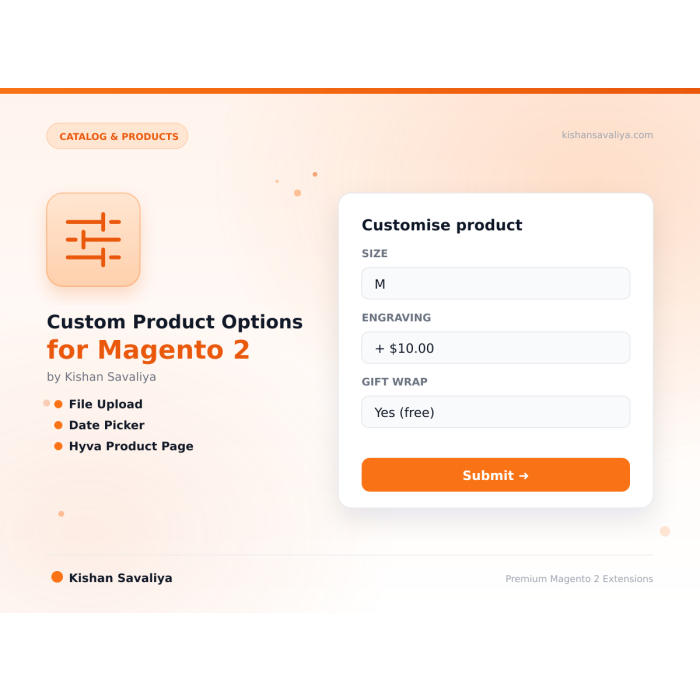
Beautifully styled product custom options for Hyva and Luma Magento 2 storefronts.
Key Features:
Additional Services
Built-in from day one. No add-ons, no upsell, no licence keys to renew.
Styled text inputs and textareas, clean borders, focus rings, floating hints, character counters
CSS custom properties, every color, radius, spacing, and font is a CSS variable - override in one place
Hyva, templates use Alpine.js and Tailwind utility classes, zero external JS
Single master toggle, turn styled rendering on or off from Stores > Configuration > Panth Extensions > Custom Options
Zero external JS dependencies, everything uses Alpine.js (bundled with Hyva) or vanilla CSS
Panth Custom Product Options is a UI upgrade for Magento 2 and Adobe Commerce that re-skins native custom options into accessible, themable form controls. It restyles every option type without changing how Magento stores, prices, or validates the option data, so cart and checkout behavior stays untouched.
The Custom Product Options module ships styled text inputs and textareas with focus rings, floating hints, and character counters; drag-and-drop file upload zones with filename preview, size validation feedback, and a remove button; polished <select> dropdowns with custom chevrons; card-style radio buttons and checkboxes with price-delta badges instead of tiny native radios; and native HTML5 date, time, and datetime-local pickers with no external date libraries.
Accessibility is in by default: real <label> bindings, ARIA attributes, keyboard navigation, and visible focus states on every control. CSS custom properties cover every color, radius, spacing, and font, so brand tokens change in one place per store view. Hyva templates use Alpine.js and Tailwind utility classes with zero external JS, while Luma gets a lightweight CSS layer over default templates. Auto theme detection runs through Panth\Core\Helper\Theme, so the right markup ships without manual switching.
Custom Product Options upgrades the native option behavior on every product type:
datetime-local pickers, zero JS libs.Beautifully styled product custom options for Hyva and Luma Magento 2 storefronts. Replaces Magento's default custom options rendering with a modern, accessible UI - styled text inputs, drag-and-drop file upload zones, elegant dropdowns, card-style radio and checkbox groups, native HTML5 date pickers, and CSS custom properties for easy theming.
Panth Custom Options gives your configurable and simple products with options (monograms, engravings, gift messages, file uploads, date selection, add-ons) a premium look that matches the rest of your Hyva or Luma storefront. Every input type Magento supports is restyled for clarity, accessibility, and conversion. All colors, radii, spacing, and typography are controlled by CSS variables - override them once in your theme and every custom option on every product follows your brand.
Built on Alpine.js for Hyva (no extra JS libraries) and lightweight CSS for Luma. Toggle globally from the admin, or let it stay on out of the box.
<select> elements with chevron, hover and focus states<input type="date">, <input type="time">, and <input type="datetime-local"> - no external date libraries<label> associations, ARIA attributes, keyboard navigation, visible focus statesPanth\Core\Helper\Theme, no manual switchingStores > Configuration > Panth Extensions > Custom OptionsPanth_Core dependency resolved automaticallyAll visual tokens are exposed as CSS custom properties. Override any of these in your child theme's CSS (or in theme-config.json if you use Panth_ThemeCustomizer):
| Variable | Default | Purpose |
|---|---|---|
--custom-options-primary |
#0D9488 |
Primary brand color (buttons, focus, price) |
--custom-options-border |
#E5E7EB |
Input border color |
--custom-options-border-focus |
#0D9488 |
Input border color on focus |
--custom-options-bg |
#FFFFFF |
Container background |
--custom-options-input-bg |
#F9FAFB |
Input background |
--custom-options-text |
#171717 |
Primary text color |
--custom-options-text-muted |
#6B7280 |
Hint and helper text |
--custom-options-label |
#374151 |
Option label color |
--custom-options-price |
#0D9488 |
Price-delta badge color |
--custom-options-required |
#EF4444 |
Required asterisk color |
--custom-options-radius |
10px |
Border radius for inputs and cards |
--custom-options-font |
'DM Sans', sans-serif |
Typography |
/* app/design/frontend/YourVendor/yourtheme/web/css/overrides.css */
:root {
--custom-options-primary: #7c3aed;
--custom-options-border-focus: #7c3aed;
--custom-options-radius: 4px;
}
Panth Custom Options uses Magento's standard layout override system to replace the templates that render product custom options. Specifically:
view/frontend/templates/product/view/options/ that emit Tailwind utility classesPanth\Core\Helper\Theme detects which theme is active per store view and loads the correct layoutMagento_Catalog/js/price-option and priceBox behaviour - no pricing logic is changedNo database schema is modified, no product data is touched, and disabling the module instantly restores default rendering.
| Issue | Cause | Resolution |
|---|---|---|
| Options still show default styling | Cache not flushed | Run bin/magento cache:flush and hard-refresh the product page |
| File upload zone not working | Static content not deployed | Run bin/magento setup:static-content:deploy -f |
| Date picker shows old-style input | Browser does not support HTML5 date input | Update to a modern browser (Chrome, Edge, Firefox, Safari - all support it) |
| CSS variables not applying | Variables defined at a lower-specificity selector | Place overrides inside :root {} or body {} |
| Styling missing on Hyva | Hyva CSS not rebuilt | Run npm run build-prod inside your Hyva theme's web/tailwind directory |
Enable Debug Mode in Panth Extensions > Core Settings for verbose logs in var/log/panth_core.log.
Ready to upgrade your Magento 2 product pages?
SEO Keywords: magento 2 custom options, product options styling, hyva custom options, luma custom options, magento 2 product options, magento 2 styled custom options, magento 2 file upload zone, magento 2 date picker, magento 2 radio buttons cards, magento 2 checkbox cards, hyva product page ui, luma product page ui, magento 2 product configurator, magento 2 customization options, panth custom options, magento 2 hyva module, magento 2 luma module, hyva alpine.js, magento 2 css variables, magento 2 theming, magento 2 accessible ui, magento 2.4.8 custom options, php 8.4 magento module, magento 2 monogram, magento 2 engraving, magento 2 gift options, magento 2 add-ons, mage2kishan, mage2sk, panth infotech, kishan savaliya magento, hire magento developer upwork, top rated plus magento freelancer, magento 2 development agency, custom magento development, magento 2 hyva development, magento 2 luma customization
| Requirement | Versions Supported |
|---|---|
| Magento Open Source | 2.4.4, 2.4.5, 2.4.6, 2.4.7, 2.4.8 |
| Adobe Commerce | 2.4.4, 2.4.5, 2.4.6, 2.4.7, 2.4.8 |
| Adobe Commerce Cloud | 2.4.4 - 2.4.8 |
| PHP | 8.1.x, 8.2.x, 8.3.x, 8.4.x |
| Hyva Theme | 1.1+ |
| Luma Theme | Native support |
| Panth_Core | ^1.0 (required, free) |
Tested on:
composer require mage2kishan/module-custom-options
bin/magento module:enable Panth_Core Panth_CustomOptions
bin/magento setup:upgrade
bin/magento setup:di:compile
bin/magento setup:static-content:deploy -f
bin/magento cache:flush
app/code/Panth/CustomOptions/ in your Magento installationPanth_Core the same way (required dependency)bin/magento module:enablebin/magento module:status Panth_CustomOptions
# Expected output: Module is enabled
Then open any product that has custom options defined - the styled UI will replace the default Magento rendering automatically.
Navigate to Stores > Configuration > Panth Extensions > Custom Options.
| Setting | Default | Description |
|---|---|---|
| Enable Custom Options Styling | Yes | Master toggle. When disabled, Magento falls back to its default templates with zero overhead. |
That's it - the module is designed to work beautifully out of the box. Visual customization happens through CSS variables.
Panth Custom Options is distributed under a proprietary license - see LICENSE.txt. Distribution is restricted to the Adobe Commerce Marketplace and authorized Packagist channels.
| Module Category | Catalog & Products |
|---|---|
| Best For | All Sizes |
No. All price-delta logic continues to flow through Magento's standard priceBox and price-option JS components. This module only replaces the visual rendering.
Yes. All your existing custom options (set up under Admin > Catalog > Products > [Product] > Customizable Options) automatically render in the new styled UI. No migration required.
Yes. Magento's native file type and size validation continues to work, with better visual feedback for the customer (file name preview, size check, remove button, error states).
The master toggle is global. For per-product control, you can override the layout on a single product page using the standard Magento layout update XML.
Yes. The module uses the Hyva theme parent chain - any Hyva child theme automatically inherits the styled templates.
Yes. Custom options on configurable products (the parent product, not the simple variants) render with the new UI. Configurable variant selection remains Magento-native.
Yes. Full source on GitHub at github.com/mage2sk/module-custom-options.
Yes. Settings respect Magento's standard scope hierarchy (default > website > store view). Different store views can have different primary colors or even disable the styling entirely.
No, any valid WhatsApp number works. However, a WhatsApp Business account is strongly recommended for commercial use (auto-replies, labels, catalog).
Yes. When enabled, Panth Footer takes over the footer.container block and renders its own configurable footer. You can disable it any time to restore the default footer.
Native file custom options are tied to the cart quote item and don't persist cleanly as a first-class order record. Panth Order Attachments creates dedicated panth_quote_attachment and panth_order_attachment tables, linked to the sales order item, ensuring files remain accessible for the full order lifetime, including reorders, invoices, and RMAs.
Yes, on the product detail page. When the module is enabled, the default gallery.phtml is replaced with the Panth gallery (one template for Hyva, another for Luma, chosen automatically).
No. It uses Magento's standard layout update mechanism to replace the block under the content container. The controller itself is untouched.
Yes. Both CMS block tabs and attribute tabs support unlimited entries. Add as many as your product requires.
An emerging community standard proposed at llmstxt.org with a growing list of adopters (Anthropic, Perplexity, Vercel, Stripe, Cloudflare docs all publish one). Not an IETF RFC yet, but stable enough that major AI platforms rely on it.
Any reduction in the final displayed price for the store view where the customer subscribed, catalog regular price, special price, catalog price rule discount, tier pricing, or group pricing. The module compares the current final price against the baseline captured at subscription time.
No. Color, font, and radius changes use CSS custom properties and take effect instantly. Only changes to Tailwind-class-driven tokens (custom spacing scales, new breakpoints) require a rebuild via the Rebuild Theme button.
No. The notification feed is cached, assets are lightweight, and the JS runs asynchronously after page load.
Talk to Kishan directly: written quote, scope and timeline within 24 hours. No sales call.
Custom Product Options for Magento 2 (Hyva + Luma)