Clean filter URLs
/women/tops/color-red-size-xl.html instead of /women/tops.html?color=49&size=166. One crawlable URL per filter combination, indexable by…
Layered navigation SEO done right. Turns /women/tops.html?color=49&size=166 into /women/tops/color-red-size-xl.html, a real crawlable URL that Google indexes as its own page. Pair it with per-category, per-store, per-filter meta title /…
Key Features:
Additional Services
Built-in from day one. No add-ons, no upsell, no licence keys to renew.
/women/tops/color-red-size-xl.html instead of /women/tops.html?color=49&size=166. One crawlable URL per filter combination, indexable by…
short (/color-red-size-xl.html) or long (/color/red/size/xl.html). Separator character is admin-configurable.
define the slug for every attribute option once. color=49 → black, size=166 → xs. Store-scoped: the same option can map to black on the E…
when an admin adds a new swatch / dropdown option, the module observes the save event and inserts a slug row automatically. No manual bac…
{category} × {attribute:option} × {store} overrides for <title>, <meta description>, <meta keywords> and breadcrumb priority. "Black Tees…
when no explicit override exists, optionally append active filter names ("Color: Red, Size: XL") to the category title / meta description.
Panth Filter SEO rewrites Magento 2 and Adobe Commerce layered-navigation URLs from ?color=49&size=166 query strings into clean, crawlable paths like /women/tops/color-red-size-xl.html.
Google ignores filter query strings by default, which means every layered-nav combination on your category pages is invisible in organic search. This module rewrites those URLs at the router and URL-builder layer, below the theme, so Hyvä and Luma both serve identical clean paths without template overrides. Each attribute option gets a configurable slug (color=49 → black), and an observer auto-inserts a slug row whenever an admin adds a new swatch or dropdown option.
Per-filter meta overrides extend the same idea to <title>, <meta description>, breadcrumbs, and H1, scoped by {category} × {attribute:option} × {store}. Auto-appended filter labels ("Color: Red, Size: XL") cover the long tail when no explicit override exists, and the module falls back to native query-string URLs if a slug is missing, so existing links never break during rollout.
Two URL formats are supported, short (/color-red-size-xl.html) and long (/color/red/size/xl.html), with an admin-configurable separator character. A View on Storefront action in every admin grid row opens the live filtered URL on the correct store view for instant QA.
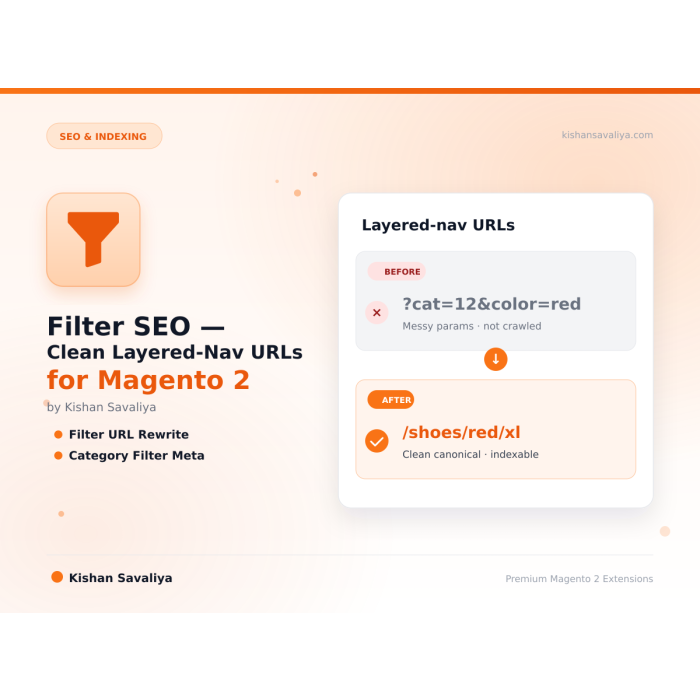
Clean, indexable layered-navigation URLs and per-filter meta overrides for Magento 2 categories.
?color=49&size=166 to /category/color-red-size-xl.html at the router layer

Layered navigation SEO done right. Turns
/women/tops.html?color=49&size=166into/women/tops/color-red-size-xl.html, a real crawlable URL that Google indexes as its own page. Pair it with per-category, per-store, per-filter meta title / description / keywords so every filter combination is a bespoke landing page, not a duplicate-content liability.
Magento ships layered navigation as query-string filters, Google treats ?color=49 and ?color=50 as the same URL and drops them from the index. This module rewrites filter URLs into clean path segments (/color-red.html) and lets you override the <title> and <meta description> of each filtered page from the admin. It's the same pattern every major fashion/electronics retailer uses, now on Magento, theme-agnostic.
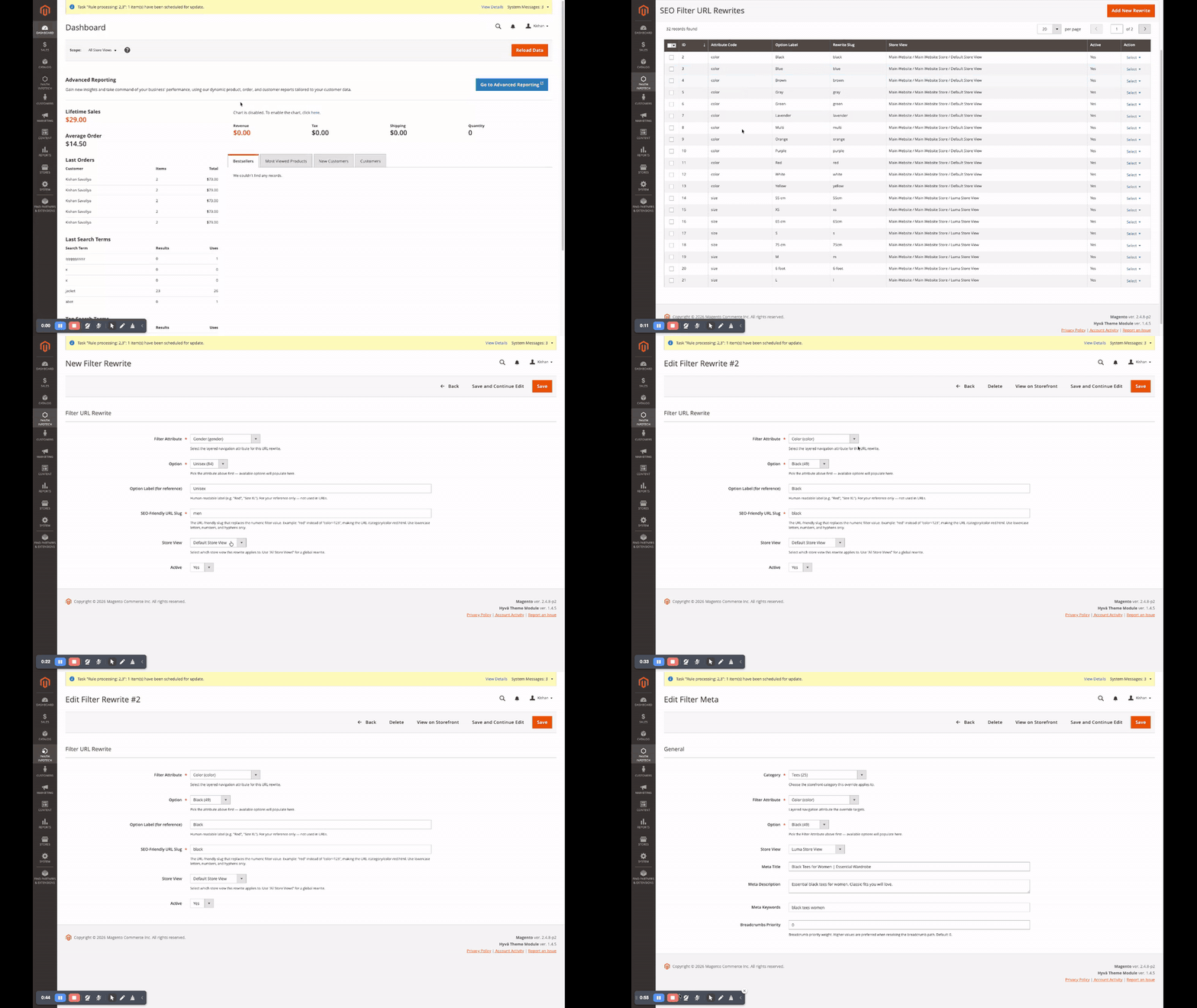
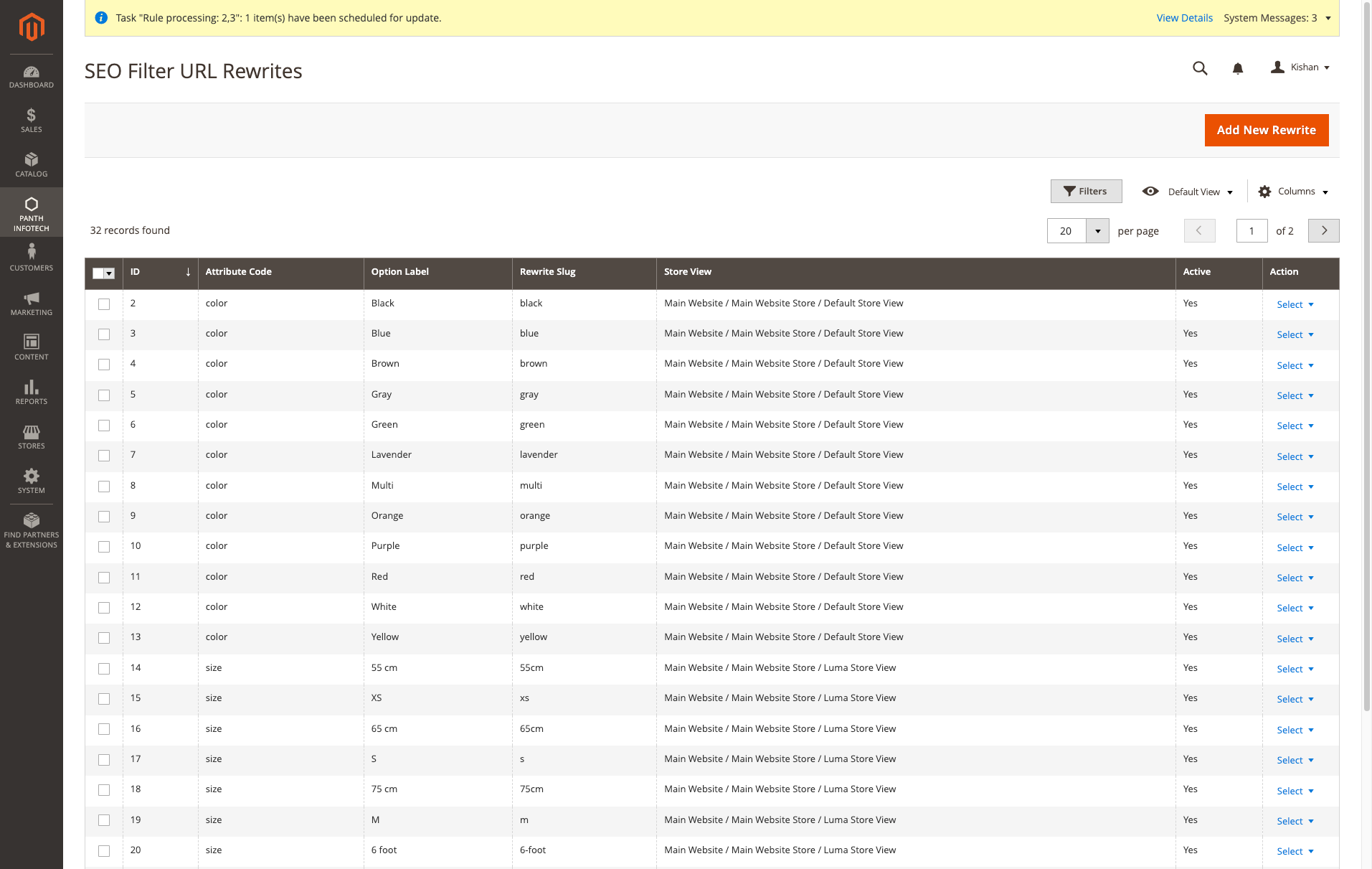
Admin flow: browse the rewrite grid, open a record to tweak the slug / store scope, jump straight to the storefront with View on Storefront (opens in a new tab with the live filtered URL), and repeat for per-category meta overrides.
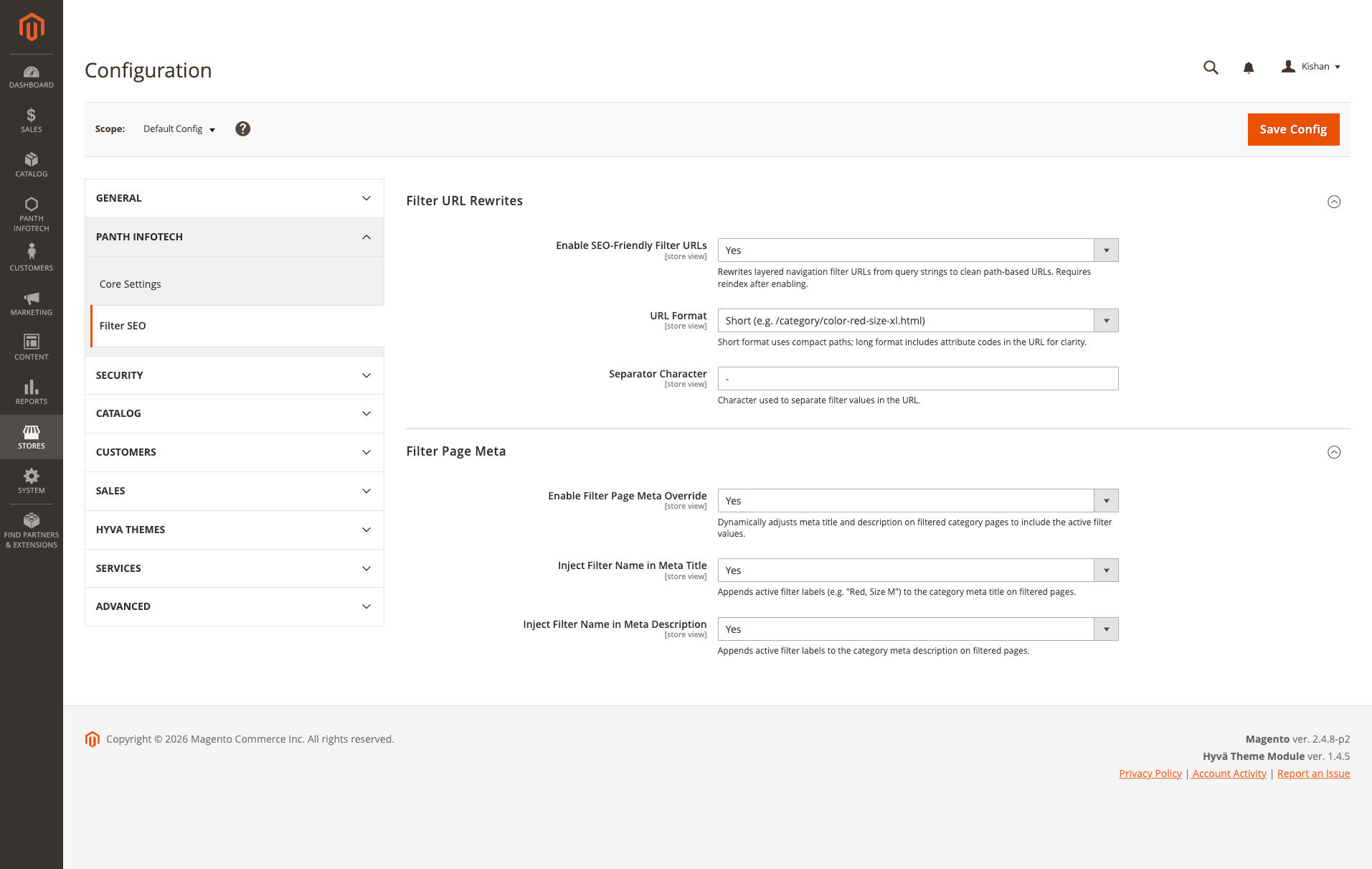
All six toggles at Stores → Configuration → Panth Infotech → Filter SEO, master switch for clean URLs, short vs long URL format, separator character, master switch for filter meta overrides, and whether to auto-append active filter labels to the category title / description when no explicit override exists.
| Rewrite grid, per-attribute, per-option, per-store | Edit form, slug + store scope |
 |
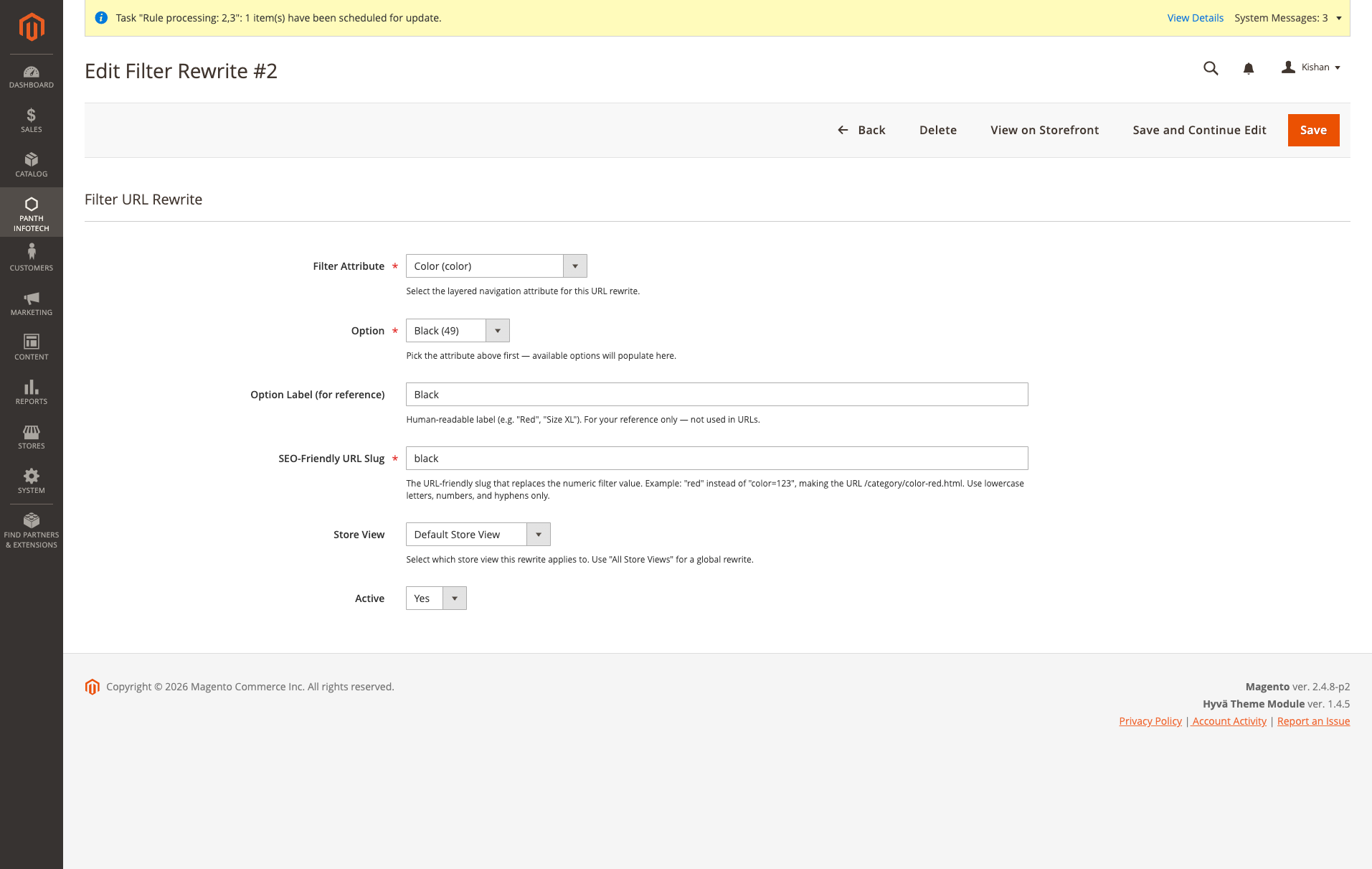 |
The color=49 numeric option becomes the black URL slug, the rewrite is what produces /women/tops/color-black.html instead of /women/tops.html?color=49. Rewrites are scoped per store, so the same option can map to localized slugs on different store views. View on Storefront in the action column opens the live filtered URL in a new tab.
| Meta grid, per-category, per-option, per-store | Edit form, meta title, description, keywords |
 |
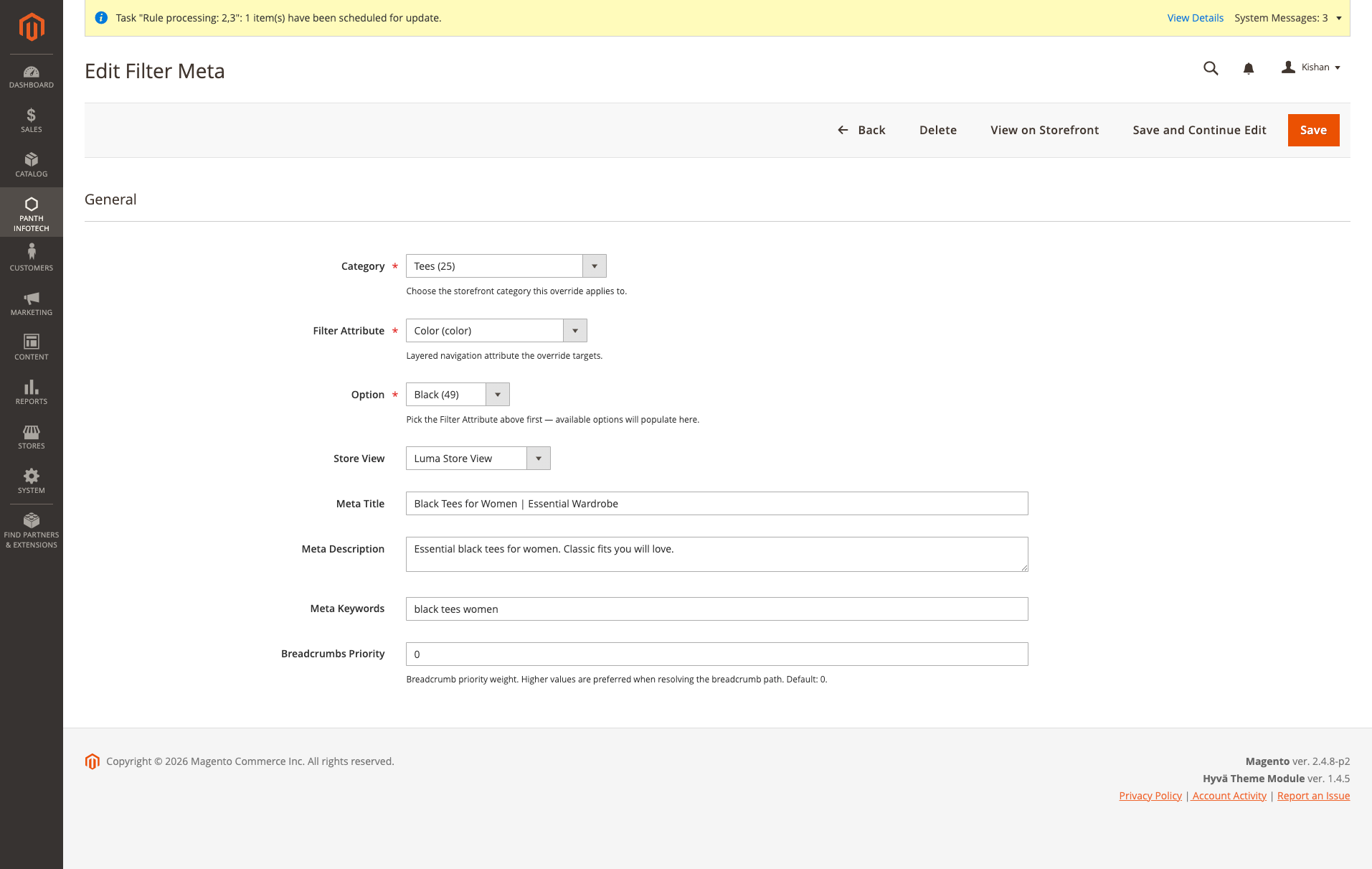 |
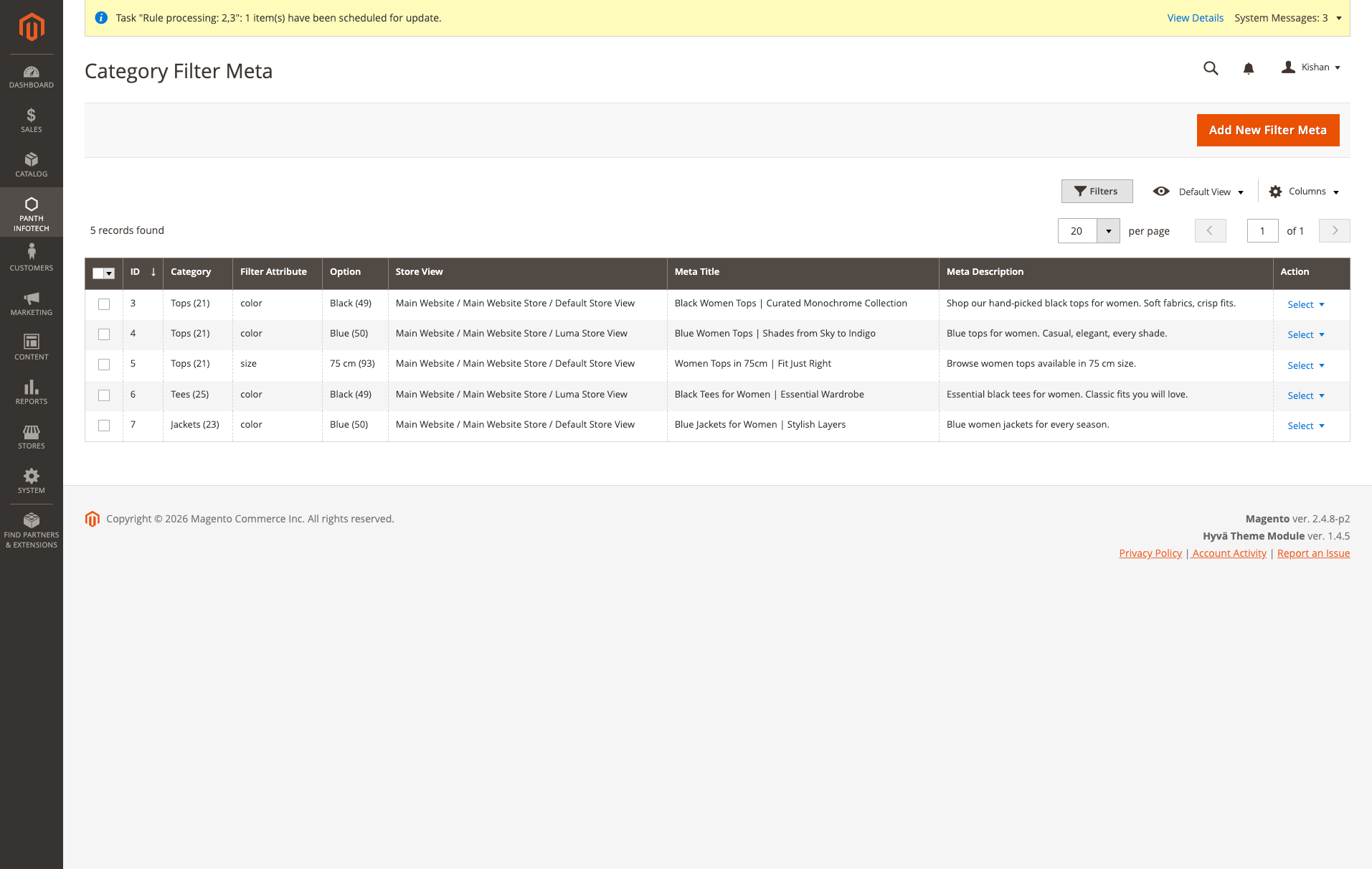
Override <title>, <meta description>, <meta keywords> and breadcrumb priority for every {category} × {filter option} × {store view} combination. "Black Women Tops | Curated Monochrome Collection" is stored against Tops × color:Black × Default Store, so the filtered page gets its own bespoke meta instead of inheriting a generic "Tops" title.
/women/tops/color-red-size-xl.html instead of /women/tops.html?color=49&size=166. One crawlable URL per filter combination, indexable by Google./color-red-size-xl.html) or long (/color/red/size/xl.html). Separator character is admin-configurable.color=49 → black, size=166 → xs. Store-scoped: the same option can map to black on the EN store and schwarz on the DE store.{category} × {attribute:option} × {store} overrides for <title>, <meta description>, <meta keywords> and breadcrumb priority. "Black Tees for Women" instead of inheriting the plain "Tees" title.store_id, with store_id=0 (All Store Views) as a global default and per-store rows overriding it.?color=49 query-string URL so nothing breaks.Panth Infotech → SEO Filter URL Rewrites lists one row per {attribute, option, store}. The module seeds rows for every filterable attribute option automatically on first install, and the attribute-option observer keeps them in sync as admins add new swatches. You only edit the SEO-Friendly URL Slug column.
Slug rules enforced client- and server-side:
(attribute, store) pair.The View on Storefront row action opens the live filtered URL in a new tab on the correct store so you can verify the rewrite instantly.
Panth Infotech → Category Filter Meta is where you upgrade filtered category pages from "duplicate content" to "bespoke landing page". Pick a category + filter attribute + option + store, then set:
Black Women Tops | Curated Monochrome Collection.No override is required, categories without an override behave as before. This is purely opt-in on a per-combination basis, so you can start with your top-converting filter pages and expand from there.
store_id = 0 (All Store Views) is a global default; a row with store_id = 2 (Luma) overrides that default for store 2.https://luma.test/...; for Default store it opens https://hyva.test/.... URL rewrites are looked up per store via UrlFinderInterface, and the module refuses to build a URL pointing at a category outside the target store's root-category tree.?color=49 query-string form, the filter still applies on the storefront, it just isn't "clean" until the slug is defined.?color=49Three things to check, in order:
catalog_url_rewrite_product indexer is independent, but if category URLs themselves are broken, the filter segment has nothing to attach to. Run bin/magento indexer:reindex catalog_url_rewrite_category.404 on a filtered URL that should matchThe router looks up category slugs first, then the filter segment. A mismatched URL suffix (.html vs no suffix) is the usual culprit. Check Stores → Configuration → Catalog → Catalog → Search Engine Optimization → Product URL Suffix / Category URL Suffix and make sure they match the one in the filter URL you're testing.
The button hides when the module can't resolve any valid category for the row (no Filter Meta record, no products with that attribute option in any non-root category, and no storefront-visible categories under the target store's root). Add a product with the option or a Filter Meta record, then refresh.
Ensure Enable Filter Page Meta Override = Yes for the store view, and flush full_page cache. The injector fires from \Panth\FilterSeo\Model\FilterMeta\MetaInjector::inject() via a catalog_controller_category_init_after observer, if a third-party module short-circuits that event (rare), the injector is skipped.
| Requirement | Supported |
|---|---|
| Magento Open Source | 2.4.4, 2.4.5, 2.4.6, 2.4.7, 2.4.8 |
| Adobe Commerce | 2.4.4-2.4.8 |
| PHP | 8.1, 8.2, 8.3, 8.4 |
| Hyva Theme | 1.0+ (theme-agnostic, nothing is rendered directly) |
| Luma Theme | Native support |
| Panth Core | ^1.0 (installed automatically) |
composer require mage2kishan/module-filter-seo
bin/magento module:enable Panth_Core Panth_FilterSeo
bin/magento setup:upgrade
bin/magento setup:di:compile
bin/magento cache:flush
bin/magento module:status Panth_FilterSeo
# Module is enabled
Then navigate to Panth Infotech → SEO Filter URL Rewrites in the admin sidebar.
Stores → Configuration → Panth Infotech → Filter SEO. The section splits into two groups, URL rewriting and meta overrides, so you can adopt one without the other.
| Group | Setting | Default | Purpose |
|---|---|---|---|
| Filter URL Rewrites | Enable SEO-Friendly Filter URLs | No | Master switch. When Yes, layered navigation builds /color-red.html links; when No, native ?color=49 is used. |
| Filter URL Rewrites | URL Format | Short | short = /color-red-size-xl.html, long = /color/red/size/xl.html. |
| Filter URL Rewrites | Separator Character | - |
The char between attribute and slug in short format. |
| Filter Page Meta | Enable Filter Page Meta Override | No | Master switch for the meta grid. When Yes, stored overrides are applied on filtered category pages. |
| Filter Page Meta | Inject Filter Name in Meta Title | No | When no override exists, append "Color: Red, Size: XL" to the category title. |
| Filter Page Meta | Inject Filter Name in Meta Description | No | Same as above for <meta description>. |
Every setting is scope-aware (website / store view) so multi-store catalogs can opt in per store.
Customer clicks: /women/tops/color-red-size-xl.html
Router parses: category = "/women/tops", filter segment = "color-red-size-xl"
Reverse-lookup slugs: "red" → color=49, "xl" → size=170
Layered nav loads: /women/tops.html with color=49 + size=170 applied
Storefront renders: /women/tops/color-red-size-xl.html (customer-facing URL stays clean)
No redirects, no rewrite rules in .htaccess. The module adds:
Model/FilterUrl/UrlParser.php) that extracts the filter segment from the request path,Model/FilterUrl/UrlBuilder.php) that injects the filter segment into outbound category links in the layered navigation,Reverse lookups are memoised per request via RewriteRepository so the router cost is one SELECT per unique store during the lifetime of a request.
| Module Category | SEO & Indexing |
|---|---|
| Best For | Mid-Market |
Talk to Kishan directly: written quote, scope and timeline within 24 hours. No sales call.
Filter SEO, Clean Layered-Nav URLs for Magento 2