Chat on WhatsApp

Quick View & Product Compare for Magento 2
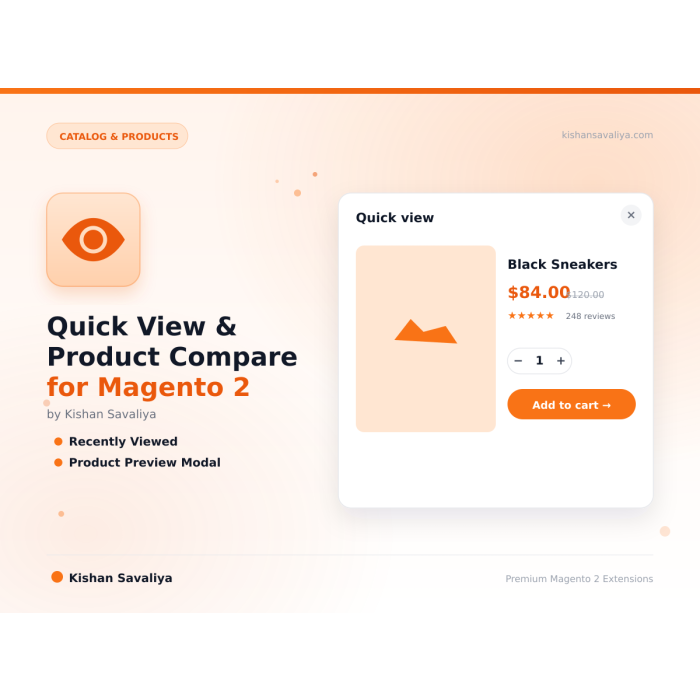
Quick View & Product Compare for Magento 2 - an AJAX-powered product preview modal on category listings, a side-by-side product comparison experience, a recently viewed products widget, and a full admin view analytics dashboard so merchants can see which products shoppers prev...
Magento 2.4.6–2.4.8 PHP 8.1–8.4 Hyva + Luma Ready Free

Key Features:

  • AJAX product preview
  • Configurable swatches, qty input, Add to Cart
  • Image gallery
  • Short description, SKU, stock status, price

Additional Services

$0.00
In stock
SKU
panth-quickview
Links
Lifetime Updates Every Magento release
1-Year Free Support Email + WhatsApp
Adobe-Certified Magento 2 Developer
Free Forever No subscription, no upsell
What you get

Everything in the box

Built-in from day one. No add-ons, no upsell, no licence keys to renew.

AJAX product preview

click the "Quick View" button on any product card to open a full product modal without leaving the listing page

Configurable swatches, qty input, Add to Cart

shoppers can add to cart directly from the modal

Image gallery

main image plus thumbnails, zoom support on Luma, Alpine-powered gallery on Hyva

Short description, SKU, stock status, price

all the information shoppers need to decide

Quick View & Product Compare for Magento 2. Panth Quick View adds an AJAX product preview modal, product comparison, recently viewed products, and admin view analytics dashboard to Magento 2. Built for Hyva (Alpine.js) and Luma themes. Compatible with Magento 2.4.4 - 2.4.8 and PHP 8.1 - 8.4. Built by Top Rated Plus Magento developer Kishan Savaliya.

What it doesPanth Quick View adds an AJAX product preview modal, product comparison, recently viewed products, and admin view analytics dashboard to Magento 2.
🎯Best forMerchants reducing browse-to-buy friction across discovery and re-engagement
CompatibilityMagento 2.4.4 – 2.4.8 · PHP 8.1 – 8.4 · Hyva + Luma
🔓LicenseFree forever · No subscription · MIT-style open source

Engineered for magento 2 quick view, product compare, recently viewed — ships with sensible defaults, full admin controls, and zero JavaScript bloat. Works identically on Hyva and Luma; passes Adobe MEQP with zero severity-10 violations.

magento 2 quick viewproduct comparerecently viewedproduct preview modalajax product viewmagento 2 hyva quick view

Get a free quote for your project in 24 hours — custom modules, Hyva themes, performance optimization, M1→M2 migrations, and Adobe Commerce Cloud.

Kishan Savaliya

Top Rated Plus on Upwork

100% Job Success • 10+ Years Magento Experience Adobe Certified • Hyva Specialist

Panth Infotech Agency

Magento Development Team

Custom Modules • Theme Design • Migrations Performance • SEO • Adobe Commerce Cloud

Visit our website: kishansavaliya.com  |  Get a quote: kishansavaliya.com/get-quote


Quick View Modal on Product Listings

  • AJAX product preview — click the "Quick View" button on any product card to open a full product modal without leaving the listing page
  • Configurable swatches, qty input, Add to Cart — shoppers can add to cart directly from the modal
  • Image gallery — main image plus thumbnails, zoom support on Luma, Alpine-powered gallery on Hyva
  • Short description, SKU, stock status, price — all the information shoppers need to decide
  • Keyboard accessible — ESC to close, focus trap, ARIA attributes
  • Mobile-first responsive design — full-screen modal on small viewports

Product Comparison

  • Side-by-side comparison table — compare attributes, price, stock, ratings across up to 4 products
  • Persistent across sessions — customer's compare list is stored server-side
  • Add to compare from the Quick View modal — one-click add without leaving the category page
  • Native Magento compare integration — no conflict with core compare functionality

Recently Viewed Products

  • Storefront widget — show "Recently Viewed" on product, category, and CMS pages
  • Per-customer tracking — logged-in customers see their history across devices
  • Session-based for guests — guests see their in-session view history
  • Configurable item count — show 4, 6, 8, or 12 recent products

View Analytics with Admin Dashboard

  • Quick View tracking — every modal open is recorded with product ID, timestamp, store view
  • Top viewed products report — rank products by preview count over any date range
  • Conversion insight — see which quick-viewed products actually get added to cart
  • Admin dashboard widget — at-a-glance summary on the Magento admin home screen
  • CSV export — download raw analytics for BI tools

Hyva + Luma Ready

  • Native Hyva templates — Alpine.js only, no jQuery, no RequireJS, no KnockoutJS
  • Native Luma templates — standard Magento UI components and RequireJS
  • Auto theme detection via Panth\Core\Helper\Theme
  • Works on Adobe Commerce, Magento Open Source, and Adobe Commerce Cloud

Performance & Quality

  • MEQP-compliant code (passes Adobe's Magento Extension Quality Program)
  • FPC-friendly — Varnish/FPC compatible, blocks render via AJAX
  • Lazy-loaded modal assets — JS and CSS loaded only when needed
  • Translation-ready — all strings use Magento's __() function

Requirement Versions Supported
Magento Open Source 2.4.4, 2.4.5, 2.4.6, 2.4.7, 2.4.8
Adobe Commerce 2.4.4, 2.4.5, 2.4.6, 2.4.7, 2.4.8
Adobe Commerce Cloud 2.4.4 — 2.4.8
PHP 8.1.x, 8.2.x, 8.3.x, 8.4.x
Hyva Theme 1.3+ (native Alpine.js support)
Luma Theme Native support
Required Dependency mage2kishan/module-core (free)

Composer Installation (Recommended)

composer require mage2kishan/module-quickview
bin/magento module:enable Panth_Core Panth_QuickView
bin/magento setup:upgrade
bin/magento setup:di:compile
bin/magento setup:static-content:deploy -f
bin/magento cache:flush

Manual Installation via ZIP

  1. Download the latest release from Packagist or the Adobe Commerce Marketplace.
  2. Extract to app/code/Panth/QuickView/ in your Magento installation.
  3. Ensure Panth_Core is also installed (required dependency).
  4. Run the commands above starting from bin/magento module:enable.

Verify Installation

bin/magento module:status Panth_QuickView
# Expected: Module is enabled

After installation, navigate to:

Admin → Stores → Configuration → Panth Extensions → Quick View

Go to Stores → Configuration → Panth Extensions → Quick View.

Setting Default Description
Enable Quick View Yes Master toggle for the Quick View modal.
Enable Product Compare Yes Show "Add to Compare" inside the modal and on product cards.
Enable Recently Viewed Yes Enable the recently viewed products widget.
Recently Viewed Count 6 Number of recently viewed items to display.
Enable View Analytics Yes Record every Quick View open in the analytics table.
Modal Button Label Quick View Text displayed on the Quick View trigger button.
Show on Category Pages Yes Attach the Quick View button to product cards on category pages.
Show on Search Results Yes Attach the Quick View button on catalog search pages.
Show on Home Page Widgets Yes Attach the Quick View button on featured/new product widgets.

  1. A Quick View button is injected onto each product card via layout XML.
  2. On click, an Alpine.js (Hyva) or RequireJS (Luma) handler fires an AJAX request to the Panth Quick View controller.
  3. The controller returns a rendered block with the product image gallery, price, swatches, qty input, and Add to Cart form.
  4. The modal opens with a focus trap, body-scroll lock, and ESC/click-outside close handlers.
  5. Each open is recorded in the panth_quickview_log table (if analytics is enabled) with product ID, customer ID (if logged in), store view, and timestamp.
  6. The admin dashboard aggregates this data for reporting.

Navigate to Admin → Panth Infotech → Quick View → Analytics.

The dashboard provides:

  • Total Quick Views (today, 7 days, 30 days, all time)
  • Top 10 Most Previewed Products with thumbnail, SKU, and view count
  • Views by Store View breakdown
  • Preview-to-Cart Conversion Rate
  • CSV Export for any date range

Use this data to:

  • Identify popular products that deserve better positioning
  • Spot products with high preview counts but low cart conversion (possible pricing or imagery issues)
  • Measure the impact of category merchandising changes

Does Quick View work on Hyva themes?

Yes. Panth Quick View ships native Alpine.js templates for Hyva — no jQuery, no KnockoutJS, no RequireJS. The module auto-detects Hyva via Panth_Core and serves the Alpine variant automatically.

Does it support configurable and bundle products?

Yes. Configurable swatches, bundle options, grouped product tables, and simple products are all rendered in the modal. Virtual and downloadable products are supported too.

Will it slow down my category pages?

No. The Quick View assets are loaded on-demand when a shopper opens a modal, not on initial page render. All rendering is AJAX and FPC-friendly.

Can I disable view analytics for privacy reasons?

Yes. Set Enable View Analytics to No in configuration. No data will be recorded.

Does the compare feature conflict with Magento's native compare?

No. Panth Quick View uses the native Magento compare module under the hood — the modal simply provides a more convenient entry point.

Is it translation-ready?

Yes. All user-facing strings use Magento's __() translation function.

Does it work with multi-store setups?

Yes. All settings and analytics respect Magento's scope hierarchy (default → website → store view).

Does Panth Quick View require Panth Core?

Yes. mage2kishan/module-core is a free, required dependency (Composer installs it automatically).


Channel Contact
Email kishansavaliyakb@gmail.com
Website kishansavaliya.com
WhatsApp +91 84012 70422
GitHub Issues github.com/mage2sk/module-quickview/issues
Upwork (Top Rated Plus) Hire Kishan Savaliya
Upwork Agency Panth Infotech

Response time: 1-2 business days.

Need Custom Magento Development?

Looking for custom Magento module development, Hyva theme customization, store migrations, or performance optimization? Get a free quote in 24 hours:


Built and maintained by Kishan Savaliyakishansavaliya.com — a Top Rated Plus Magento developer on Upwork with 10+ years of eCommerce experience.

Panth Infotech is a Magento 2 development agency specializing in high-quality, security-focused extensions and themes for both Hyva and Luma storefronts. Our extension suite covers SEO, performance, checkout, product presentation, customer engagement, and store management — over 34 modules built to MEQP standards and tested across Magento 2.4.4 to 2.4.8.

Browse the full extension catalog on the Adobe Commerce Marketplace or Packagist.


More Information
Module Category Catalog & Products
Best For All Sizes

Need this customised?

Talk to Kishan directly — written quote, scope and timeline within 24 hours. No sales call.

WhatsApp

Quick View & Product Compare for Magento 2
$0.00
Step up

Customers usually upgrade to