Built for Magento 2
Completely disable Magento 2's Wishlist and Compare features across the entire frontend - every button, link, sidebar, cart row action, customer-account tab, widget link, JS handler, and direct URL route.
Turns off Wishlist and Compare in Magento 2 everywhere on the storefront: buttons, links, sidebar blocks, account tabs and the direct URLs. Two admin switches, no theme edits, same result on Hyvä and Luma.
Key Features:
Additional Services
Built-in from day one. No add-ons, no upsell, no licence keys to renew.
Completely disable Magento 2's Wishlist and Compare features across the entire frontend - every button, link, sidebar, cart row action, customer-account tab, widget link, JS handler, and direct URL route.
Adobe Magento Extension Quality Program, passes with zero severity-10 violations.
Vanilla JS, no jQuery dependency. Drop-in compatible with both default Luma and Hyva themes.
Lifetime updates with every Magento release. No subscription, no licence keys, no upsells.
Panth Disable Wishlist & Compare is a kill-switch extension for Magento 2 and Adobe Commerce that removes the Wishlist and Compare features from every storefront surface with four admin toggles.
Magento's built-in configuration flags only cover a handful of surfaces and leave behind broken links, empty sidebars, ghost JS handlers, and 302 redirects to the login page. This extension goes further: header icons, sidebar blocks, product detail buttons, category list add-to-wishlist controls, cart row Move-to-Wishlist actions, customer-account side-nav tabs, widget links, JS handlers, and direct URL routes are all neutralized cleanly on both Hyvä and Luma.
Four admin toggles under Stores → Configuration → Panth Infotech default to Yes and apply immediately after cache flush, so single-SKU brands, B2B catalogs, industrial supply, jewellery, and wholesale stores can hide both features without theme edits or core modifications.
Compatible with Magento 2.4.4–2.4.9 on PHP 8.1–8.4, MEQP-compliant, and reversible at any time by flipping the toggles back to No.
Best for:
Panth Disable Wishlist & Compare removes both features cleanly on Magento 2:
Removes the Wishlist and Compare Products features from the Magento 2 storefront. It hides every wishlist and compare link, button, icon and sidebar that Magento and the Hyva theme render, and answers direct requests to /wishlist/* and /catalog/product_compare/* with a 404. Everything is controlled from the admin configuration, with no theme changes required.
Typical users are stores that sell a small range of products, B2B and wholesale catalogues, and merchants who want to remove unused storefront features cleanly. Works with the Hyva and Luma themes.
Product page: kishansavaliya.com/magento-2-disable-wishlist-compare.html
/wishlist/* and /catalog/product_compare/* (optional). AJAX and POST requests receive a small JSON response instead of an error page.Once installed and enabled, nothing else needs to be done: the storefront no longer shows any wishlist or compare controls on Hyva or Luma, and direct links to the wishlist and compare pages return 404 while "Block Direct URL Access" is on.
How it works:
layout_load_before adds the panth_disable_wc_wishlist layout handle when the wishlist is disabled and the panth_disable_wc_compare handle when compare is disabled. These handles remove the wishlist and compare blocks that Magento and Hyva declare (header links and icons, the Hyva header customer menu link, sidebars, account tab, product page, category and search listings, cart item actions) and set the Hyva header's show_wishlist and show_compare arguments to false.Magento\Wishlist\Helper\Data makes isAllow() and isAllowInCart() return false, so any block that asks the helper before rendering stays hidden.Magento\Catalog\Block\Product\AbstractProduct returns empty add-to-wishlist and add-to-compare URLs, which hides the buttons in Luma widget templates.Hyva\Theme\ViewModel\Wishlist and Hyva\Theme\ViewModel\ProductCompare make their display methods return false. On a Luma-only store these classes are never loaded, so the plugins have no effect there.controller_action_predispatch_wishlist and plugins on Magento\Wishlist\Controller\AbstractIndex, the shared wishlist Allcart and Cart controllers and Magento\Catalog\Controller\Product\Compare turn direct requests into a 404 before the customer login redirect can happen.If a third-party module renders its own wishlist or compare button through a custom block, remove that block with a <referenceBlock name="..." remove="true"/> in your theme's layout, or open an issue on GitHub.
See CHANGELOG.md.
| Magento Open Source / Adobe Commerce | 2.4.4 to 2.4.8 |
| PHP | 8.1, 8.2, 8.3, 8.4 |
| Themes | Hyva and Luma |
The Composer package requires magento/framework ^103.0, magento/module-backend ^102.0, magento/module-catalog ^104.0, magento/module-config ^101.2, magento/module-store ^101.1 and magento/module-wishlist ^101.0.
mage2kishan/module-core (installed automatically by Composer; provides the shared "Panth Extensions" admin tab and menu)composer require mage2kishan/module-disable-wishlist-compare
bin/magento module:enable Panth_Core Panth_DisableWishlistCompare
bin/magento setup:upgrade
bin/magento setup:di:compile
bin/magento cache:flush
setup:di:compile is only needed in production mode. The module ships no static assets, so no static content deployment is required.
Check the result with:
bin/magento module:status Panth_DisableWishlistCompare
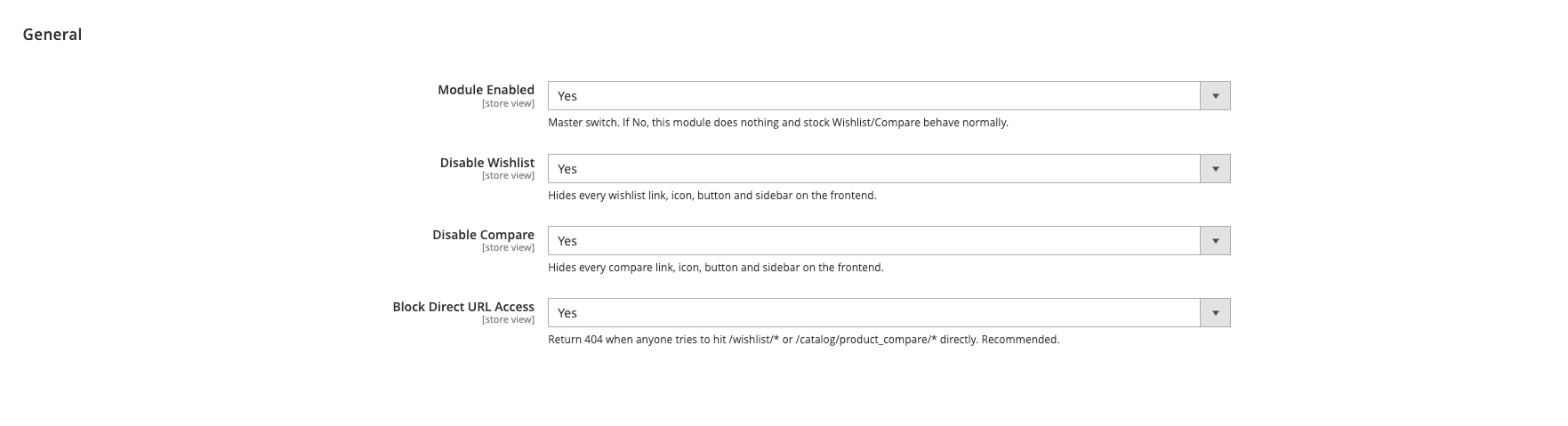
Go to Stores > Configuration > Panth Extensions > Disable Wishlist & Compare.
| Setting | Default | What it does |
|---|---|---|
| Module Enabled | Yes | Master switch. When set to No the runtime plugins and route blocking are off and stock Wishlist and Compare behave normally. |
| Disable Wishlist | Yes | Hides every wishlist link, icon, button and sidebar on the storefront. |
| Disable Compare | Yes | Hides every compare link, icon, button and sidebar on the storefront. |
| Block Direct URL Access | Yes | Returns 404 when /wishlist/* or /catalog/product_compare/* is requested directly. |
All four settings are available at default, website and store view scope. Configuration paths: panth_disable_wc/general/enabled, panth_disable_wc/general/disable_wishlist, panth_disable_wc/general/disable_compare, panth_disable_wc/general/block_routes.
The layout removals follow these settings: the wishlist blocks are removed only while Module Enabled and Disable Wishlist are both Yes, and the compare blocks only while Module Enabled and Disable Compare are both Yes. Setting Module Enabled to No brings back the stock wishlist and compare UI. Clean the layout and full page caches after changing a setting.
To restore the wishlist and compare UI while keeping the package installed, set Module Enabled to No and clean the caches, or disable the module:
bin/magento module:disable Panth_DisableWishlistCompare
bin/magento cache:flush
To remove the package:
bin/magento module:disable Panth_DisableWishlistCompare
composer remove mage2kishan/module-disable-wishlist-compare
bin/magento setup:upgrade
bin/magento setup:di:compile
bin/magento cache:flush
The module creates no database tables, so nothing is left behind.
Free and open source under the MIT License. See LICENSE.txt.
Panth_DisableWishlistComparemage2kishan/module-disable-wishlist-comparePanth\DisableWishlistComparePanth\DisableWishlistCompare\Helper\Config (isEnabled(), isWishlistDisabled(), isCompareDisabled(), isRouteBlockingEnabled())Panth_DisableWishlistCompare::config| Module Category | Theme & UI |
|---|---|
| Best For | All Sizes |
Talk to Kishan directly: written quote, scope and timeline within 24 hours. No sales call.
Disable Wishlist & Compare for Magento 2