

Conversational admin
'Make every t-shirt $24.99', 'Disable products with no stock', 'Show me the 10 most recent orders'
Manage a Magento 2 store by typing requests to Anthropic Claude, like "disable products with no stock". It has 19 tools, runs in dry-run mode by default and saves a checkpoint before each change so you can undo it.
Key Features:
Additional Services
Built-in from day one. No add-ons, no upsell, no licence keys to renew.
'Make every t-shirt $24.99', 'Disable products with no stock', 'Show me the 10 most recent orders'
every destructive write snapshots the before-state for instant reversal
the AI shows what it would change without touching the database
Panth Claude AI is a natural-language admin assistant for Magento 2 and Adobe Commerce that runs catalog, order, customer, CMS, and configuration operations from plain-English prompts with one-click undo.
The Panth Claude AI module turns the Magento admin into a conversational surface built on Anthropic Claude Opus 4.7. A manual tool-use loop dispatches 19 tools across catalog, pricing, inventory, CMS, orders, customers, and indexer control, running Magento’s own service contracts so every change is auditable and indistinguishable from a human admin action. Destructive writes snapshot the before-state into a checkpoint so a single click reverses the operation.
Prompt caching keeps cost low: the system prompt, tool catalog, and training examples send as one ephemeral cache block with a 5-minute TTL. A typical first question costs roughly 5,000 input tokens cold, then drops to roughly 500 tokens on cached follow-ups, a 90% discount on the cached portion. New Anthropic accounts get in free credit, which translates to roughly 5,000 questions on a typical store. New installs ship in dry-run mode so the AI shows planned changes without touching the database.
Best for:
The Magento admin was built for one persona: the trained merchandiser who knows where every grid lives. Real merchants don't fit that mould. They have ten things to do today and zero patience for "Catalog → Products → Filter SKU contains 'tee' → Mass Action → Update Attributes → Status → Disabled → Submit → Reindex → Flush Cache".
Claude AI Automation collapses that entire flow into a sentence. The same person who'd struggle to find the special-price field can now type "Mark every t-shirt down to $19.99 until Monday" and the AI:
ProductRepositoryIf anything's wrong, "undo" reverts it in one round-trip.
This is not a wrapper around the REST API. It's a manual tool-use loop that runs Magento's own service contracts, so every change is auditable, hookable, and indistinguishable from what a human admin would have done by hand.
| Plain-English chat | No SKU patterns, no JSON. The AI translates "all t-shirts in Sale category" → catalog query for you. |
| 19 tools, full Magento depth | Products, inventory, prices, statuses, categories, CMS pages, CMS blocks, customers, orders, store config, store logo, modules, raw read-only SQL, every common admin task has a tool. |
| Undo everything | Every bulk write snapshots before-state into a checkpoint. One-click rollback in admin or just say "undo". |
| Dry-run by default | New installs ship in safe mode, the AI shows what it WOULD change without touching data. Toggle off when ready. |
| Confirmation gate | When a write affects more than your threshold (default 5 items), the AI must preview + wait for an explicit "yes" / "go ahead". |
| Train your AI | Add few-shot examples (your store's slang, conventions, refusal patterns) → Claude follows your patterns, not its defaults. |
| Storefront widget | Read-only Ask AI shop assistant for shoppers. Drop into any CMS page or layout XML. Per-IP rate-limited. |
| File uploads | Attach images, PDFs, spreadsheets to chat. Hardened (extension + MIME + magic-byte allowlists, .htaccess PHP-execution guard, sanitized filenames, 10 MB cap). |
| Activity log + custom logger | Every prompt, tool call, and reply persisted with timing + input/output/cache-read token counts. Tail var/log/panth_claudeai.log for ops. |
| Conversation history | Multi-turn threads survive reloads. Switch between chats from the sidebar. View full transcripts (admin + assistant + tool messages) for compliance. |
| 6 config groups, 25+ options | Master switch, model selection (Opus 4.7 / Sonnet 4.6 / Haiku 4.5), effort level, dry-run, bulk caps, rate limits, per-tool toggles, retention windows. |
| Prompt caching built in | System prompt + tool catalog + training examples are cached on Anthropic's side, repeat questions cost ~10% of the first one. |
| CLI commands | panth_claudeai:status, panth_claudeai:test-api. |
| Cron cleanup | Nightly prune of old activity rows + expired checkpoints (configurable retention). |
Panth Claude AI ships a manual tool-use loop, prompt caching, and undo safety for the Magento admin.
api.anthropic.com:443 for a single egress.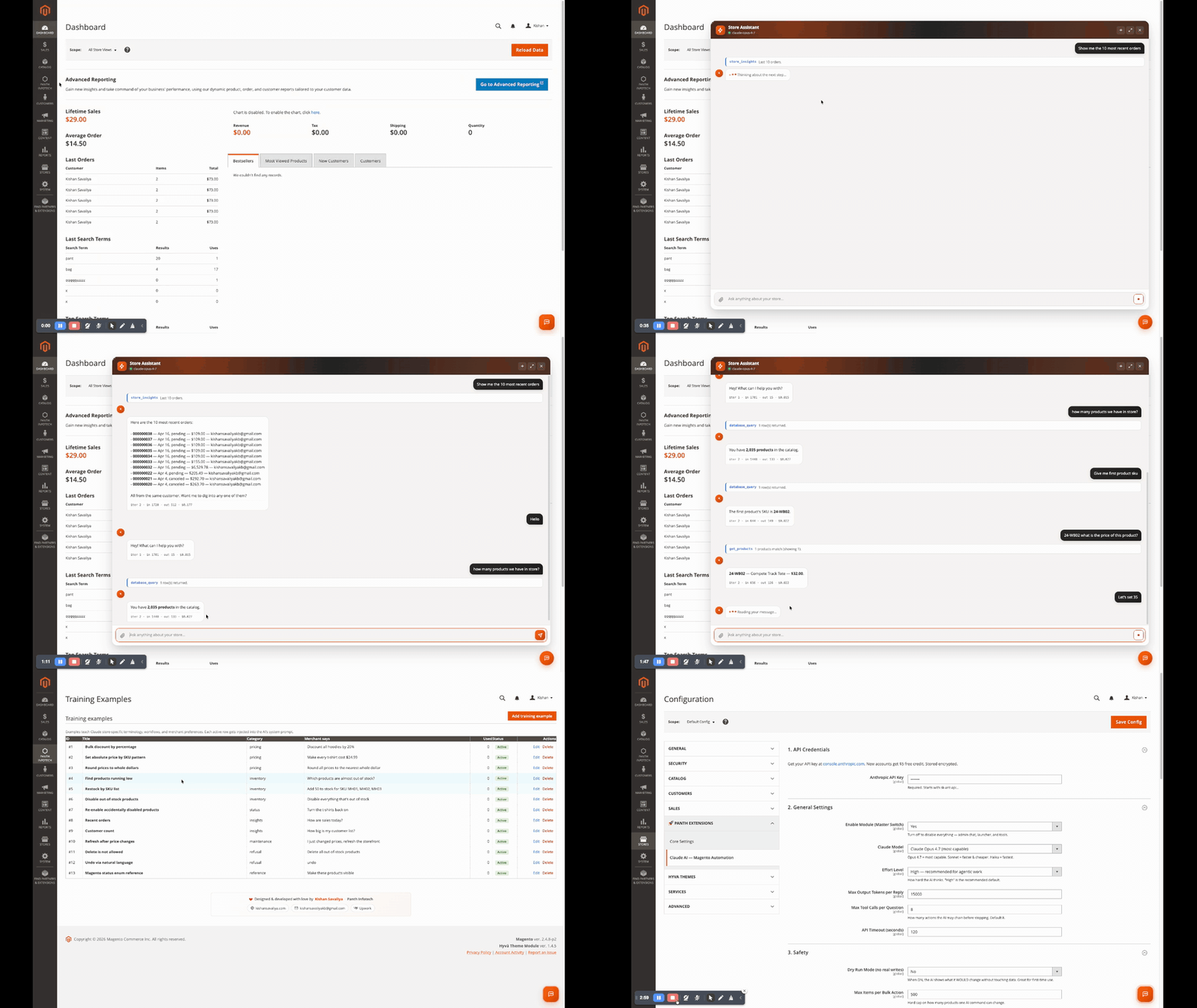
Want the original 1080p MP4 with sound-stripped, branded encode for LinkedIn / Twitter / Facebook? Grab
Claude-AI-Magento-2-Demo-Marketing.mp4from the GitHub Releases page.
These all work out of the box on a fresh Luma sample-data install. Try them after you set your API key.
Catalog & inventory
Categories & content
Customers & orders
Store ops
Insights
Recovery
Each tool can be enabled/disabled individually in admin → Configuration → Tool Capabilities. Disabled tools are removed from the AI's catalog at API call time, the AI literally can't see them, so it can't accidentally call them.
| # | Tool | Scope | What it does |
|---|---|---|---|
| 1 | get_products |
Read | Search by SKU pattern, name, price range, type, status, visibility |
| 2 | update_product_price |
Write | Bulk update prices (fixed or percent), with checkpoint |
| 3 | update_product_status |
Write | Enable / disable products in bulk, with checkpoint |
| 4 | update_inventory |
Write | Set stock qty (absolute or delta) + in-stock flag, with checkpoint |
| 5 | manage_products |
Write | Create / update / delete simple, configurable, virtual, downloadable products |
| 6 | low_stock |
Read | Find products at/below a threshold |
| 7 | manage_categories |
Write | Create / update / delete categories; show tree under any root with depth + product counts |
| 8 | manage_cms_pages |
Write | Create / update / delete CMS pages; search-and-replace inside content |
| 9 | manage_cms_blocks |
Write | Create / update / delete CMS static blocks |
| 10 | customers |
Read | Search customers by email/name, spend totals, order counts, address summaries |
| 11 | orders |
Read | Recent orders, by status, by date range, by customer email |
| 12 | store_insights |
Read | Customer count, order count by-status, average order value, recent KPIs |
| 13 | store_info |
Read | Currency, country, base URL, Magento + module versions |
| 14 | get_modules |
Read | Lists installed third-party modules, versions, enabled state |
| 15 | database_query |
Read | Read-only SELECT / EXPLAIN. Write SQL is hard-blocked at parser level. |
| 16 | cache_reindex |
Write | Flush specific cache types, run specific indexers, list available |
| 17 | update_config |
Write | Update core_config_data values (e.g. design / SEO / catalog), checkpointed |
| 18 | set_store_logo |
Write | Upload + apply store logo from chat-attached file, checkpointed |
| 19 | restore_checkpoint |
Write | Undo any prior bulk write by checkpoint ID |
Read tools are safe to leave on, they don't mutate state.
Write tools create a checkpoint before every change, so they're recoverable in one click.
Adding a new tool: implement Panth\ClaudeAi\Model\Tool\ToolInterface and add one entry to etc/di.xml. The model receives the new schema on the next request, no restart needed.
Admin types: "Make all t-shirts $24.99"
 ↓
[ Send AJAX → /panth_claudeai/chat/send ]
 ↓
Orchestrator (manual tool-use loop)
 ├─ Inject system prompt + training examples + tool catalog
 │ (system + tools + examples flagged cache_control = ephemeral)
 ├─ Send to Anthropic /v1/messages
 ├─ stop_reason == tool_use ?
 │ yes → execute tool locally (snapshot before-state if write)
 │ append tool_result, repeat (max N iterations, configurable)
 │ no → final text reply
 └─ Log every step into panth_claudeai_activity (tokens, ms, status)
 ↓
Admin sees: "Updated 42 t-shirts to $24.99. Reply 'undo' to revert.
 Checkpoint: cp_a7b3c8e1d4f5..."
Key design choices
panth_claudeai_checkpoint, indexed by created_at so cleanup cron can prune efficiently.A read-only chatbot for your shoppers, answers product / store questions in plain English. The storefront catalog is restricted to get_products + store_info only via a DI virtualType; writes are unreachable from outside admin.
Add via widget tool (Content → Widgets → New) or layout XML:
<block class="Panth\ClaudeAi\Block\Widget\ShopAssistant"
 name="shop.assistant"
 before="-">
 <arguments>
 <argument name="title" xsi:type="string">Need help finding something?</argument>
 <argument name="position" xsi:type="string">floating</argument> <!-- floating | inline -->
 <argument name="primary_color" xsi:type="string">#5B5BD6</argument>
 <argument name="welcome" xsi:type="string">Hi! I can help you find products, check stock, or compare options. What are you looking for?</argument>
 </arguments>
</block>
The same widget renders inside the admin Dashboard, see screenshot above, so you can run quick queries without leaving your home screen.
This module is built on a defense-in-depth model, even if a single layer fails, the next one catches it.
New installs ship with Dry Run ON. The orchestrator intercepts every write tool, runs the resolution phase (which products match, what would change), and returns a preview to the admin instead of calling the actual write. Output looks like:
[DRY-RUN] Would update 42 products to price $24.99.
Sample: Erika Running Shorts ($24.00 → $24.99), Aero Daily Fitness Tee ($29.00 → $24.99), …
Toggle Dry Run OFF in Configuration → Safety to apply changes for real.
When Require Confirmation is on (default), any write affecting more than your threshold (default 5 items) makes the AI stop and ask for explicit "yes" / "go ahead" before proceeding. The conversation looks like:
You: Disable all products with zero stock
AI: I found 73 products with zero stock. Want me to disable all of them?
 Reply "yes" to proceed or "no" to cancel.
You: yes
AI: Disabled 73 products. Checkpoint cp_… (reply "undo" to restore).
Every write tool checks Max Items per Bulk Action (default 500) before running. If a query would touch more than the cap, the tool refuses and asks the AI to narrow the scope. This stops "update everything" mishaps even with confirmation off.
Even when 1-3 are bypassed (e.g. user explicitly turned everything off for a one-off bulk import), every write tool snapshots the affected rows' before-state into panth_claudeai_checkpoint before mutating. One-click restore from the Checkpoints & Restore grid, or just say "undo" in chat.
Don't want the AI editing CMS pages? Toggle manage_cms_pages off in Tool Capabilities. The tool is removed from the catalog sent to the API, the AI cannot call it because it doesn't know it exists.
The storefront widget is wired to a separate DI virtualType (Panth\ClaudeAi\Model\ToolRegistry\Storefront) that only registers get_products + store_info. Even if a malicious shopper could craft a tool-use response (they can't, the model picks tools, not the user), there'd be nothing to call.
Add few-shot examples in Panth Infotech → Training Examples to teach Claude:
Each example has a Title, Merchant says, Expected outcome, Category, Sort Order, and Status. Active examples are injected as cached system content before every conversation, they never count against your context window after the first request.
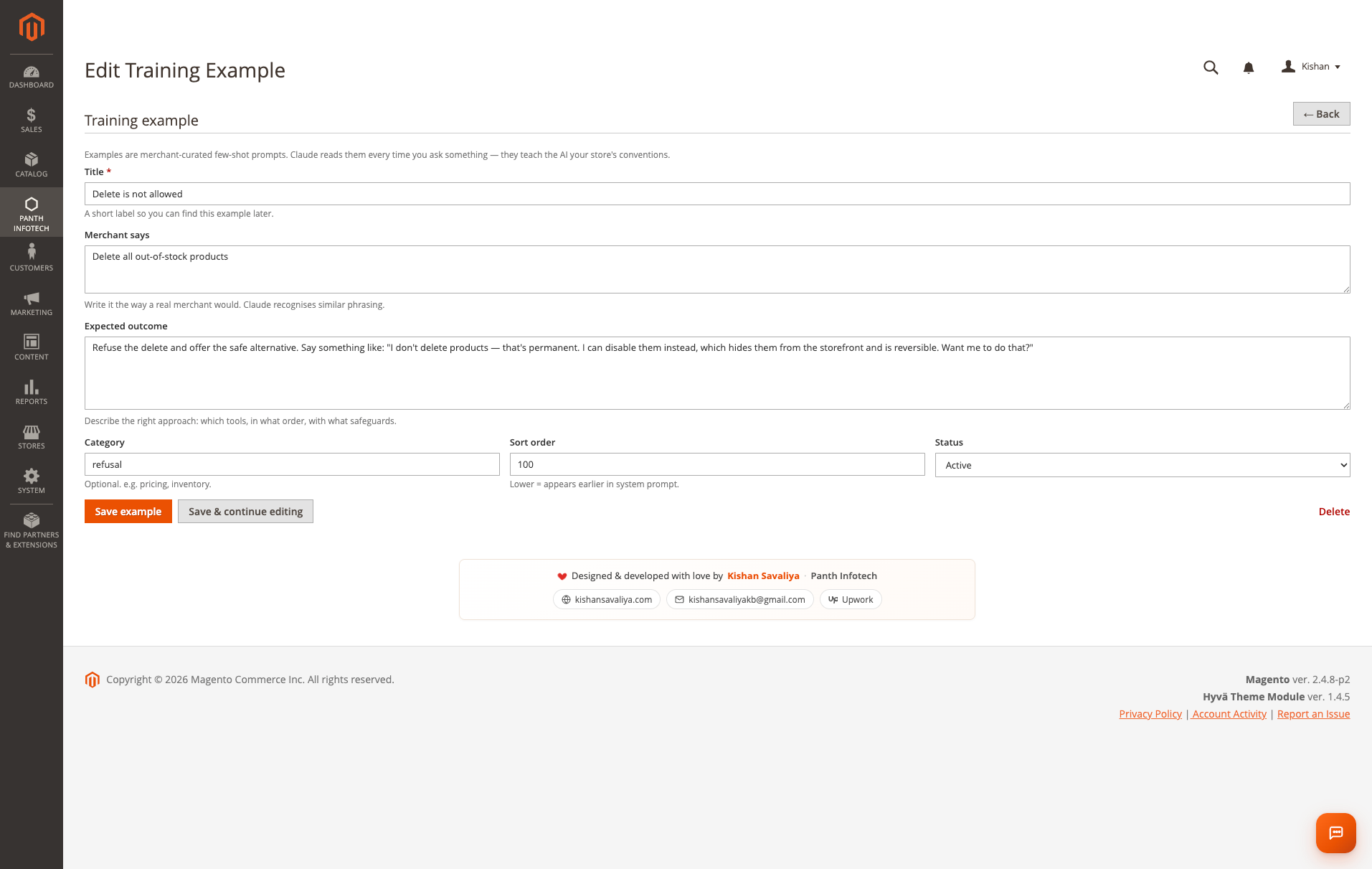
The seeded Setup/Patch/Data/SeedTrainingExamples.php ships 11 starter examples covering pricing, inventory, refusal patterns, sales insights, and category/page management.
Every chat is persisted as a conversation, multiple admin turns + assistant turns + tool calls grouped together. The Conversations grid shows:
| Column | Description |
|---|---|
| Started / Last activity | Conversation lifecycle timestamps |
| First prompt | The initial question (truncated) |
| Turns | Total messages in the conversation |
| Files | Attachment count |
| Tokens (in/out) | Total input + output tokens consumed |
| Total cost | USD cost based on the model used |
| Surface | admin or storefront |
| Action | View → full transcript with all tool calls expanded |
Useful for compliance reviews (who changed prices on Tuesday?) and cost reporting (how much did the AI cost us last month?).
The Activity Log captures every step, every API call, every tool execution, every result, so you can debug why the AI did or didn't do what you expected.
| Column | Description |
|---|---|
| When | Microsecond-precision timestamp |
| Actor | admin (you) · assistant (Claude) · tool (a tool execution) |
| Action | Tool name (e.g. manage_products) or message |
| Detail | Truncated prompt / result with hover-expand |
| Affected | Row count for write tools |
| Tokens (in / out) | Input + output tokens for API steps |
| Cost | USD cost for API steps |
| Status | success · error · dry-run · cancelled |
| Conversation | Link to the parent conversation |
Combined with prompt caching, the Tokens column makes it trivial to see when the AI is hitting the cache vs paying full price. A typical session: first question costs ~5,000 input tokens (system + tools + examples + your prompt); subsequent questions in the same hour cost ~500 input tokens, the system block stays cached.
Beyond admin automation, the module unlocks high-value front-of-house workflows.
Drop the Shop Assistant widget on a high-traffic CMS page or category and configure the welcome text to qualify leads:
<argument name="welcome" xsi:type="string">
 Building a wholesale order? Tell me your industry + monthly volume and I'll suggest a starter pack + connect you with our reps.
</argument>
Every storefront conversation is logged with surface=storefront so you can pipe high-intent transcripts into your CRM via a custom observer on the panth_claudeai_conversation_save_after event.
Ask Claude to bulk-generate optimized meta titles and descriptions for any subset of products:
"For every product in the 'Tees' category, generate a 50-60-character meta title that includes the brand and 'Free Shipping', and a 140-160-character meta description that includes the main fabric and one benefit. Save them to the products."
The AI runs get_products → loops with manage_products write tool → snapshots a checkpoint per batch. Roll back with one click if you don't like the tone.
For category SEO:
"Rewrite the meta description for the 'Bottoms' category in a 130-character punchy sentence that mentions free shipping over $99 and our 30-day returns."
For CMS content:
"Open the 'About Us' page, find the section starting with 'Founded in 2018' and rewrite it to a more conversational tone, 3 short paragraphs, max."
"Create a CMS block called
summer-sale-bannerwith an H2 'Summer Sale, 30% Off Everything' and a CTA button linking to /sale. Style classes: bg-red-600 text-white py-12."
Then drop the block into your homepage layout, done in 8 seconds.
"Show me which categories have the most products but the fewest sales last 30 days, those are candidates for a promo."
The AI runs database_query (read-only) and returns a sorted list. Decide your promo, ask the AI to apply it.
Train your AI to refuse off-brand asks, "never write product copy that mentions competitor brand X", "never offer discounts greater than 25% without admin approval", by adding refusal-pattern training examples. The AI follows your guardrails in every future conversation.
core_config_data via Magento's Encrypted backend model.ADMIN_RESOURCE, Panth_ClaudeAi::chat, ::training, ::checkpoint, ::config. Create a custom admin role to scope access to specific surfaces.png|jpg|jpeg|gif|webp|pdf|csv|xlsx|xls|txt|md), MIME allowlist, magic-byte verification on images, sanitised filenames with random suffix, 10 MB cap, .htaccess drop disabling PHP execution in upload dir.database_query is parser-gated, INSERT, UPDATE, DELETE, DROP, TRUNCATE, ALTER, GRANT, REVOKE, LOAD DATA, RENAME, CREATE, REPLACE and stored-routine calls are rejected before reaching the DB.api.anthropic.com, auditable in your egress firewall.namespace YourVendor\YourModule\Model\Tool;
use Panth\ClaudeAi\Model\Tool\ToolInterface;
class MyTool implements ToolInterface
{
public function name(): string { return 'my_tool'; }
public function definition(): array
{
return [
'name' => 'my_tool',
'description' => 'Be specific, the AI uses this to decide when to call you.',
'input_schema' => [
'type' => 'object',
'properties' => [
'param' => ['type' => 'string', 'description' => 'A parameter'],
],
'required' => ['param'],
],
];
}
public function execute(array $input): array
{
return [
'status' => 'success',
'affected_count' => 0,
'summary' => 'Did the thing.',
];
}
}
Register in etc/di.xml:
<type name="Panth\ClaudeAi\Model\ToolRegistry\Admin">
 <arguments>
 <argument name="tools" xsi:type="array">
 <item name="my_tool" xsi:type="object">YourVendor\YourModule\Model\Tool\MyTool</item>
 </argument>
 </arguments>
</type>
bin/magento setup:di:compile && bin/magento cache:flush, done. The model picks up the new schema on its next request.
We ship a branded, social-ready demo video at docs/marketing/ (and on the GitHub Releases page), 119-second 1280x720 H.264 with overlay branding, fade in/out, no audio. Drop it straight into LinkedIn / Twitter / Facebook / your homepage.
Suggested LinkedIn caption (copy-paste, edit to taste):
Just shipped: Magento 2 admin you can run in plain English.
No more clicking through 12 screens to bulk-update prices, disable out-of-stock products, or generate SEO meta. Just type what you want, Claude AI handles the rest, with one-click undo on every change.
19 tools · prompt caching · dry-run by default · open source under MIT.
Built on @AnthropicAI Claude Opus 4.7. Compatible with Magento 2.4.4-2.4.8, Hyvä, and Luma.
Try it: github.com/mage2sk/magento2-claude-ai
#magento #ecommerce #ai #claudeai #anthropic #hyva #adobecommerce
Suggested email blurb:
Magento 2 just got an AI store manager. Type "Make every t-shirt $24.99" into the admin and 4 seconds later 42 products are updated, with a one-click undo if you change your mind. 19 tools. Free + open source. Built on Anthropic's Claude.
→ kishansavaliya.com
manage_cms_blocks and manage_cms_pages tools, full CRUD over CMS content from chat.set_store_logo tool, upload + apply store logos from chat-attached files, fully checkpointed.update_config now writes scope-correctly when scope_id is provided in the prompt.database_query tool, read-only SQL with parser-level write blocking.get_modules tool, list installed third-party modules from chat.cache_control block, cuts repeat-question input cost by ~90%.manage_categories and manage_products tools, full CRUD on categories and products (including configurable + virtual + downloadable types).var/log/panth_claudeai.log for ops + grep-friendly diagnostics.get_products, update_product_price, update_product_status, update_inventory, low_stock, store_info) + manual tool-use loop.| Issue | Cause | Resolution |
|---|---|---|
| "API key invalid" | Missing or wrong key | Re-paste key from console.anthropic.com, bin/magento cache:flush |
| Chat returns "Tool not available" | Tool toggled off in Configuration → Tool Capabilities | Re-enable it and bin/magento cache:flush config |
| AI previews but never writes | Dry Run is ON (default for new installs) | Configuration → Safety → Dry Run Mode = No |
| Bulk update gets capped at 500 | Max Items per Bulk Action reached |
Raise the cap in Configuration → Safety, or narrow the prompt scope |
| "Confirmation required" loop | Require Confirmation is on, threshold reached |
Reply yes / go ahead to proceed, or lower the threshold for trusted ops |
| Storefront widget returns 429 | Per-IP rate limit hit | Configuration → Storefront Shop Assistant → raise rate limit, or wait 1 hour |
panth_claudeai.log grows unbounded |
Logger enabled with no rotation | Add var/log/panth_claudeai.log to your logrotate.d config, example provided in docs/logrotate-example.conf |
| API timeouts on Opus 4.7 | Long generations exceed default timeout | Configuration → General Settings → API Timeout → raise to 180 |
| "Cache miss" on every request | Less than 5 min between requests but cache expired anyway | Confirm system prompt isn't being mutated per-request, check Activity Log cache_read_tokens column |
| File upload rejected as "unsafe MIME" | Magic bytes don't match extension | This is intentional, try re-saving the file from a known editor |
Enable bin/magento deploy:mode:set developer and tail var/log/panth_claudeai.log for diagnostic output.
| Requirement | Versions Supported |
|---|---|
| Magento Open Source | 2.4.4, 2.4.5, 2.4.6, 2.4.7, 2.4.8 |
| Adobe Commerce | 2.4.4, 2.4.5, 2.4.6, 2.4.7, 2.4.8 |
| Adobe Commerce Cloud | 2.4.4-2.4.8 |
| PHP | 8.1.x, 8.2.x, 8.3.x, 8.4.x |
| MySQL | 8.0+ |
| MariaDB | 10.4+ |
| Search Engine | Elasticsearch 7/8, OpenSearch 1/2 |
| Hyvä Theme | 1.3+ |
| Luma Theme | Native support |
| Anthropic API | Claude Opus 4.7, Sonnet 4.6, Haiku 4.5 |
Tested on:
composer require mage2kishan/magento2-claude-ai
bin/magento module:enable Panth_ClaudeAi
bin/magento setup:upgrade
bin/magento setup:di:compile
bin/magento cache:flush
Then Stores → Configuration → Panth Extensions → Claude AI, Magento Automation and paste your Anthropic API key. Get one at console.anthropic.com, new accounts get $5 free credit which is roughly 5,000 questions for a typical store thanks to prompt caching.
bin/magento module:status Panth_ClaudeAi
# Expected: Module is enabled

bin/magento panth_claudeai:test-api
# Expected: Round-trip OK · model=claude-opus-4-7 · cached=Y · latency=…
The menu surfaces seven pages:
Stores → Configuration → Panth Extensions → Claude AI, Magento Automation
| Group | Settings |
|---|---|
| 1. API Credentials | Anthropic API key (encrypted, stored via Magento's Encrypted backend model) |
| 2. General Settings | Master switch · Claude model (Opus 4.7 / Sonnet 4.6 / Haiku 4.5) · Effort level (low → max) · Max output tokens per reply (default 15000) · Max tool calls per question (default 8) · API timeout seconds (default 120) |
| 3. Safety | Dry Run mode (default ON for new installs) · Max items per bulk action (default 500) · Admin rate limit per hour (default 60) · Require confirmation before writes (default Yes) · Confirmation threshold (default 5 items) |
| 4. Tool Capabilities | Per-tool enable / disable for all 19 tools, toggled-off tools vanish from the AI's catalog at API call time |
| 5. Storefront Shop Assistant | Enable widget · Per-IP rate limit · Max question length · Welcome text |
| 6. Logging & Retention | Activity log on/off · Activity retention days (default 90) · Checkpoint retention days (default 30) · Write to var/log/panth_claudeai.log |
All fields are store-scoped where it makes sense (model, effort, dry-run, widget config); auth + retention are global.
The module sends the system prompt + tool catalog + active training examples as a single cached block (Anthropic's cache_control: { type: "ephemeral" }). The cache lives 5 minutes between requests; any request within the window pays the cached read price (10% of the regular input cost) instead of the full input cost.
A typical session:
| Request | Input tokens | Cached read | Effective cost (Opus 4.7) |
|---|---|---|---|
| Cold start (first ever) | 5200 | 0 | $0.078 |
| 2nd question, 30 s later | 5400 | 5000 | $0.011 |
| 3rd question, 90 s later | 5600 | 5200 | $0.012 |
| 4th, 4 min later (still warm) | 5800 | 5400 | $0.012 |
| 5th, 6 min later (cache expired) | 6000 | 0 | $0.090 |
Output tokens always pay full price, that's the AI's reasoning + reply.
Net effect: for an admin who asks 10-20 questions in a single sitting, average cost per question is ~$0.01 on Opus 4.7. Switch to Sonnet 4.6 for ~$0.003/question, or Haiku 4.5 for ~$0.0006/question.
bin/magento module:disable Panth_ClaudeAi
composer remove mage2kishan/magento2-claude-ai
bin/magento setup:upgrade
The five panth_claudeai_* tables are dropped automatically by setup:upgrade once the module is removed (declarative schema). Your activity history, checkpoints, training examples, and conversations are erased, export anything you want to keep first.
Released under the MIT License, free for commercial use, no per-store fees, no attribution required (but appreciated).
# Show config + enabled tools + recent activity counts
bin/magento panth_claudeai:status

# Round-trip test against the API to verify your key + connectivity + model
bin/magento panth_claudeai:test-api

# Run the cleanup cron manually (prune old activity rows + expired checkpoints)
bin/magento cron:run --group=default
| File | Purpose |
|---|---|
Model/ClaudeClient.php |
Raw cURL transport against /v1/messages. Sets cache_control on system prompt for Anthropic prompt caching. |
Model/Orchestrator.php |
The tool-use loop. Logs every step. Injects training examples. Honours dry-run + confirmation gates. |
Model/ToolRegistry.php |
Holds registered tools, sorted by name for cache stability. Filters by per-tool config. |
Model/ToolRegistry/Admin.php + /Storefront.php |
DI virtualTypes, admin gets all 19 tools, storefront gets read-only subset. |
Model/Tool/*.php |
Each tool. Implements ToolInterface. |
Model/CheckpointService.php |
Snapshots state before destructive writes; restores on demand. |
Model/TrainingRepository.php |
Reads active examples to inject as cached few-shot context. |
Model/Conversation/Repository.php |
Multi-turn history persistence. |
Model/Activity/Logger.php |
Inserts into panth_claudeai_activity. Defensive, failures don't crash the loop. |
Model/Stats.php |
Computes the dashboard KPIs from the activity table. |
Logger/Logger.php + Handler.php |
Custom logger writing to var/log/panth_claudeai.log. |
Block/Adminhtml/* |
Admin view models. |
Block/Widget/ShopAssistant.php |
Storefront + admin Dashboard widget block. |
Controller/Adminhtml/* |
Admin endpoints (chat send, training CRUD, checkpoint restore, file upload, conversation view). |
Controller/Assistant/Ask.php |
Public storefront endpoint, restricted toolset, rate-limited. |
Cron/Cleanup.php |
Nightly housekeeping, prunes old activity + expired checkpoints. |
Console/Command/StatusCommand.php |
bin/magento panth_claudeai:status. |
Console/Command/TestApiCommand.php |
bin/magento panth_claudeai:test-api. |
Database tables:
panth_claudeai_activity, every prompt, tool call, reply with token + timing + costpanth_claudeai_training, few-shot examplespanth_claudeai_checkpoint, undo snapshotspanth_claudeai_attachment, file uploadspanth_claudeai_conversation, multi-turn threadsTalk to Kishan directly: written quote, scope and timeline within 24 hours. No sales call.
Magento 2 Automation with Claude AI