
Hide any backend menu item per role, view, or globally
keep merchandisers focused, hide Marketing for catalog-only accounts
Make the Magento 2 admin feel like *your* admin. Hide, rename, re-icon, recolor, reorder and reparent any backend menu item, grouped into named views you can flip between in one click. Includes an optional click-to-open drilldown rendering style with full-viewport-height chrom...
Key Features:
Additional Services
Built-in from day one. No add-ons, no upsell, no licence keys to renew.
keep merchandisers focused, hide Marketing for catalog-only accounts
'Stores' to 'Store Settings', 'Catalog' to 'Products', 'Customers' to 'Members', whatever fits your business vocabulary
find the menu you want in two milliseconds
per-item accent so the eye lands on the active item instantly
Panth Admin Menu Manager is a backend customization extension for Magento 2 and Adobe Commerce that lets admins rename, reorder, hide, and pin items in the native admin sidebar from a single grid.
The Admin Menu Manager module exposes Magento’s compiled backend menu as an editable table where each row represents one item. Inline-edit labels, change parent grouping, set sort order, toggle visibility, and pin items so they stay open beside whatever grid you happen to be working in, useful for keeping Admin Menu Manager itself, Configuration, or Cache Management one click away while you live in the product grid.
Saved views capture entire menu configurations and apply per admin user, so a merchandiser, a developer, and a marketing manager each see exactly the menu shape their role needs. A drilldown panel previews the rendered menu before the configuration is applied, eliminating the “did I just hide my own settings page” problem that plagues admin customization on Magento. Every override writes to a dedicated table and never patches Magento’s compiled menu source, so a clean uninstall restores the native sidebar exactly as it shipped.
Best for:
Magento's backend menu was designed for someone who installs Magento and stops. The reality on a typical merchant's account:
Panth Admin Menu Manager fixes the symptom without forking core: the database row of overrides applies after Magento has compiled its menu, so every extension's menu remains discoverable and the overrides survive every setup:upgrade.
Admin Menu Manager turns the Magento sidebar into an editable, per-user surface.
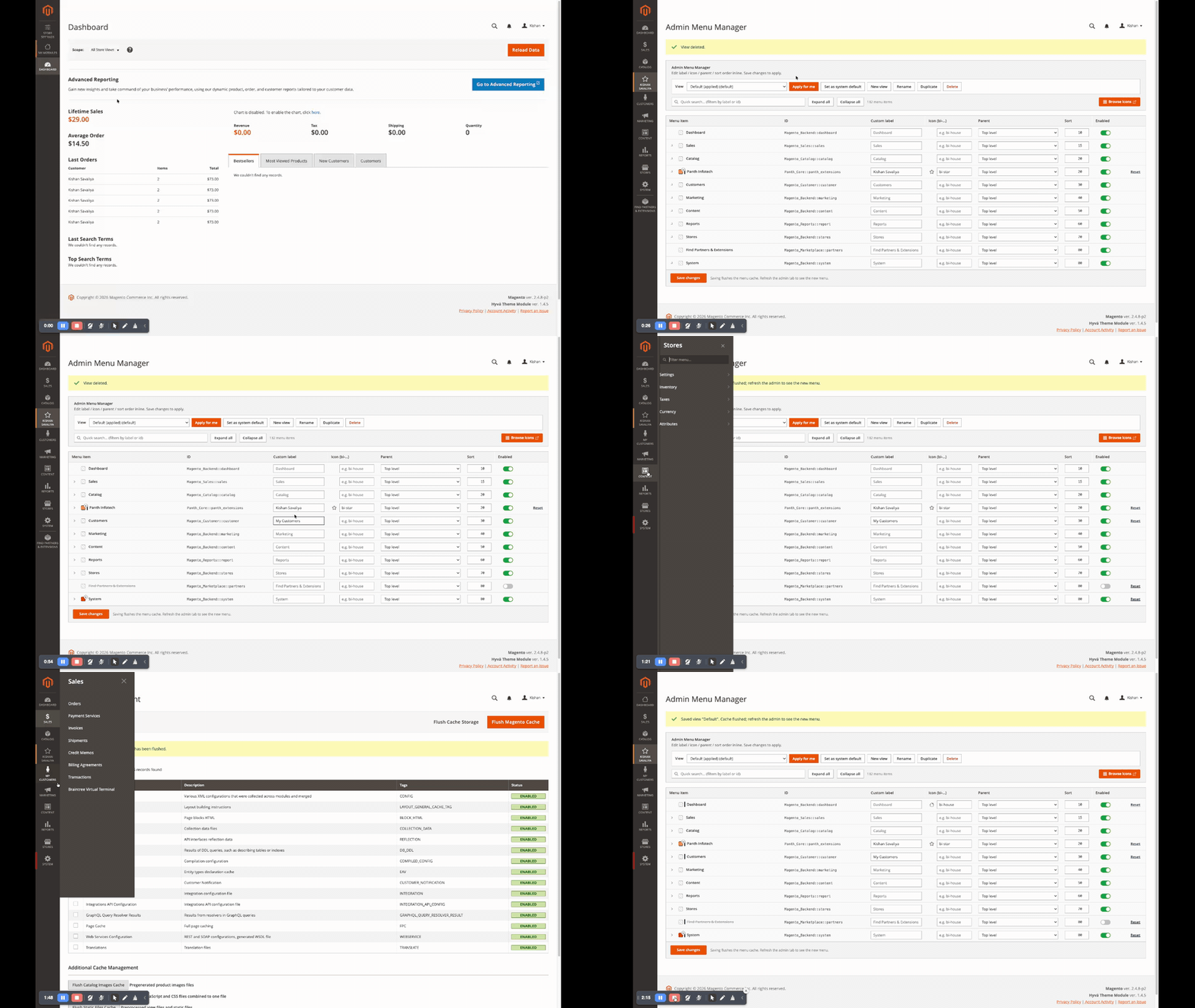
A 2-minute walk-through of the full workflow, open the manager, edit a few rows, save a view, apply it, click into the drilldown panel:
bi-gear, bi-house, …), an emoji, or a url(...) to a SVG/PNG#1F2E44, #eb5202, …) renders as a thin left stripe so the item stands outpanth_admin_menu_view per view, one default seeded by SeedDefaultView data patch#4a4542 panel fills top-to-bottom matching Magento's stock submenu palettePanth_* L0 menu is always in the drilldown set regardless of admin selectionpanth_drilldown/general/new_tab_targets (one per line)target="_blank", rel="noopener", an updated title and a small external-link icon next to the labelThe MenuBuilderPlugin tracks a small SELF_PROTECT_IDS set:
Panth_AdminMenuManager::menu_managerMagento_Backend::storesMagento_Backend::stores_settingsMagento_Config::configA disable override on any of these is silently ignored at apply time, so even if a backup of panth_admin_menu_override accidentally hides the manager, the merchant can still navigate to it and undo.
#eb5202 primary buttons matching Magento's stock Save Config style#4a4542 panel, #fcfcfc text, #403934 hover, #322c29 activeAfter install you'll find Admin Menu Manager in two places:
The Configuration link points at Stores → Configuration → Panth → Admin Menu Manager for the drilldown-related toggles (master switch, target L0 menus, "open in new tab" list).
Each row represents one item in Magento's compiled backend menu. Editable columns:
| Column | What it does |
|---|---|
| Menu item | Indented tree label with an icon preview + chevron to expand children. Read-only here, edit in Custom label. |
| ID | Stock Magento menu ID (Magento_Sales::sales, Panth_Faq::group, …). Read-only. |
| Custom label | Override the visible text. Blank = use stock label. |
| Icon (bi-…) | Bootstrap Icon class (bi-house, bi-graph-up), or any Unicode emoji, or url(…) for a custom image. Click Browse icons (top-right) to open the Bootstrap Icons gallery in a new tab. |
| Parent | Move under a different parent. Highlighted when the row's parent is overridden. |
| Sort | Numeric override; lower numbers float to the top of their level. |
| Enabled | On = the item shows. Off = hidden. Self-protected items (Admin Menu Manager itself, Stores, Configuration, the global Backend node) reject Off. |
| Reset | Removes this row's override only. Other overrides for the same view stay. |
A Quick search box filters by label or ID; Expand all / Collapse all toggles every level at once; the Save changes button at the bottom flushes the menu cache so a refresh of the admin tab shows the new layout.
Views are presets of overrides that you can switch between with one click.
is_active flag on a view; everyone who hasn't picked their own falls back to itCommon patterns:
The hover-to-open mega-menu Magento ships with works for ~15 menu items. Past that, an L0 panel becomes a wall of text and the wrong panel keeps opening when you mouse past it.
This module ships an opt-in drilldown rendering style:
_show class is preserved; only the click target changes. Hover does nothing.100vh, dark #4a4542 background, no white bleed.Configure under Stores → Configuration → Panth → Admin Menu Manager → Apply to top-level menus, multiselect of every L0 menu Magento knows about. Unselected menus keep Magento's default hover behaviour. All Panth_* L0 menus are auto-included so the drilldown experience is consistent across every Panth module.
Some menu items pair best with a second tab, Cache Management open beside your product grid, the Admin Menu Manager open beside the page you're customising for. Add their IDs (one per line) to Stores → Configuration → Panth → Admin Menu Manager → Open in a new tab, Menu IDs:
Panth_AdminMenuManager::menu_manager
Panth_AdminMenuManager::configuration
Inside the drilldown panel, matching <a> tags get target="_blank", rel="noopener", an updated title ("… opens in new tab") and a small external-link SVG appended next to the label so the user knows the click will spawn a new tab.
The MenuBuilderPlugin will never honour a disable override on:
Panth_AdminMenuManager::menu_manager (the manager screen itself)Magento_Backend::storesMagento_Backend::stores_settingsMagento_Config::configThis is hard-coded in the plugin's SELF_PROTECT_IDS set so even a corrupted import of panth_admin_menu_override rows can't lock the merchant out of the four pages they need to recover.
The Targets backend model also auto-injects every Panth_* L0 menu into the drilldown target list on save, so a merchant who unchecks all targets still gets the drilldown on Panth modules they install in the future.
 request hits admin
 │
 ▼
 ┌────────────────────────────────────┐
 │ Magento\Backend\Model\Menu\Builder│
 │ ::getResult() │
 │ (compiles the stock menu tree) │
 └────────────────────────────────────┘
 │
 ▼
 afterGetResult plugin (our MenuBuilderPlugin)
 │
 ┌──────────────────┴───────────────────┐
 │ load active view's overrides │
 │ (per-user cookie wins; else system) │
 └──────────────────┬───────────────────┘
 │
 ┌──────────────────┴───────────────────┐
 │ Pass 1, apply label / icon / colour │
 │ / disable, recurse the tree │
 │ Pass 2, execute parent moves │
 │ Pass 3, re-sort touched levels │
 └──────────────────┬───────────────────┘
 │
 ▼
 return mutated Menu to Magento
Two database tables back the feature:
panth_admin_menu_view, view_id, label, is_active, is_default, timestamps. One row per saved preset.panth_admin_menu_override, view_id, menu_item_id, is_disabled, custom_label, custom_icon, custom_color, custom_parent_menu_item_id, sort_order, timestamps. One row per overridden menu item.The drilldown UI is layered on top of Magento's compiled adminhtml, no default.xml override, no replacement of the global navigation block. The JS subscribes to Magento's existing _show/_hide class changes via MutationObserver so any future change to mage/adminhtml/globalNavigation is automatically inherited.
The new menu doesn't appear after I clicked Save. Magento's backend menu is cached. Saving flushes the menu cache automatically, but the admin tab you're already on still has the old DOM. Refresh the admin tab (or click any other menu item) and the new layout shows up.
I disabled an item but it's still visible. Check whether you're editing the active view. The dropdown next to the View label shows the per-user active view (or the system default). If you edit Default but you've personally activated Merchandiser, your edits won't show until you switch back or apply the changed view.
The drilldown won't open on hover anymore. That's by design. The drilldown is click-to-open; hover does nothing on opted-in L0 menus. Click the L0 label or icon to open the panel.
A menu item I rely on disappeared after I imported a backup.
Truncate panth_admin_menu_override for the active view to wipe its overrides, or DELETE FROM panth_admin_menu_view and re-run bin/magento setup:upgrade to reseed the Default view.
| Magento Open Source / Adobe Commerce | 2.4.4-2.4.8 |
| PHP | 8.1-8.4 |
| Themes | Admin (Magento backend), theme-agnostic on the admin side; the module never touches your storefront theme |
| Other modules | No collisions known, the plugin is afterGetResult on \Magento\Backend\Model\Menu\Builder and only mutates the existing tree |
composer require mage2kishan/module-admin-menu-manager
bin/magento module:enable Panth_AdminMenuManager
bin/magento setup:upgrade
bin/magento setup:di:compile
bin/magento cache:flush
The SeedDefaultView data patch creates the Default view automatically so the manager grid is never empty.
Stores → Configuration → Panth → Admin Menu Manager (or the Configuration shortcut under Panth Infotech → Admin Menu Manager in the menu).
| Field | Path | Default | Notes |
|---|---|---|---|
| Open Admin Menu Manager | n/a | n/a | Quick-jump button to the manager grid |
| Enable drill-down | panth_drilldown/general/enabled |
1 |
Master switch. When off, every admin menu uses Magento's default hover behaviour. |
| Apply to top-level menus | panth_drilldown/general/targets |
(empty + Panth_* always-on) | Multiselect of L0 menus to drilldown. Unselected = stock hover. |
| Open in a new tab, Menu IDs | panth_drilldown/general/new_tab_targets |
(empty) | One menu ID per line. Items get target="_blank" + an external-link icon. |
bin/magento module:disable Panth_AdminMenuManager
composer remove mage2kishan/module-admin-menu-manager
bin/magento setup:upgrade
To wipe stored views/overrides:
DROP TABLE IF EXISTS panth_admin_menu_override;
DROP TABLE IF EXISTS panth_admin_menu_view;
DELETE FROM core_config_data WHERE path LIKE 'panth_drilldown/%';
Talk to Kishan directly: written quote, scope and timeline within 24 hours. No sales call.
Panth Admin Menu Manager