Modern Storefront Form
Vanilla JavaScript AJAX submission, zero jQuery, zero page reload, native Luma speed
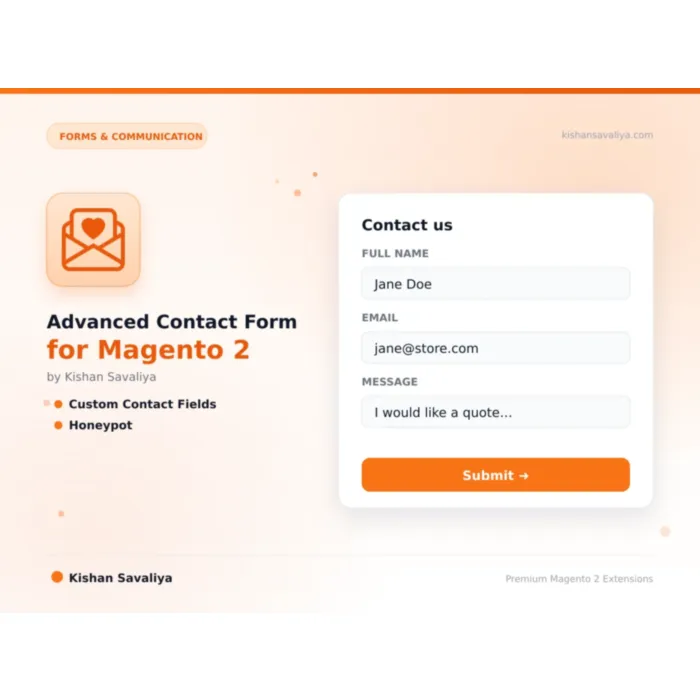
Replace Magento 2's default contact form with a conversion-optimized AJAX contact page.
Key Features:
Additional Services
Built-in from day one. No add-ons, no upsell, no licence keys to renew.
Vanilla JavaScript AJAX submission, zero jQuery, zero page reload, native Luma speed
7 field types, text, textarea, select, radio, checkbox, email, tel
Honeypot field, hidden input invisible to users but filled by bots
Dedicated submission grid, view all contact submissions under Panth Extensions → Contact Submissions
Admin notification email, sent to configurable recipient on every submission
MEQP compliant, passes Adobe's Magento Extension Quality Program
The Advanced Contact Form for Magento 2 is a conversion-optimized AJAX contact page replacement for Magento 2 and Adobe Commerce that captures every submission to a searchable admin grid. It swaps Magento's full-reload native contact form for a vanilla JavaScript experience with inline validation, status tracking, and silent layered anti-spam.
Merchants get unlimited custom fields across seven types (text, textarea, select, radio, checkbox, email, tel) stored as JSON per submission. Three independent spam defences - honeypot, time-based trap with configurable minimum fill time, and per-IP rate limiting (default five per hour) - stop bots without forcing real customers through CAPTCHAs. A three-state status workflow (New orange / Read blue / Replied green) keeps your team organized, with auto-mark-as-read on open, bulk actions, and customer-aware Reply-To headers for one-click email replies.
The Advanced Contact Form for Magento 2 ships a clean contact-info sidebar (email, phone, address, business hours), logged-in customer pre-fill, customizable admin and customer email templates, MEQP compliance, CSRF protection, XSS-safe rendering, and SQL-injection-safe repository patterns. Tested across Magento 2.4.4 - 2.4.8 and PHP 8.1 - 8.4 on stock Luma and any Luma child theme.
Best for:
Magento 2's native contact form is a lowest-common-denominator feature: full page reload on submit, no custom fields, no anti-spam beyond basic form keys, no admin-side record of submissions, and no status tracking. Merchants routinely lose leads because contact emails land in spam folders or get buried in inboxes with no way to know which messages have been answered.
Panth Advanced Contact Us fixes every one of those problems:
The Advanced Contact Form for Magento 2 gives you a contact page that actually converts:
Replace Magento 2's default contact form with a conversion-optimized AJAX contact page. Vanilla JS (zero jQuery dependency) for native Luma speed, unlimited custom fields, 3-layer anti-spam (honeypot + time-based trap + IP rate limiting), full admin submission grid with status tracking, and transactional email notifications for both admin and customer.
Panth Advanced Contact Us transforms Magento 2's stock contact page into a feature-rich, modern, conversion-ready contact experience. Customers get an AJAX-submitted form (no page reloads) with real-time validation, a clean contact-info sidebar, and auto-prefill for logged-in users. Admins get a proper submission grid with New/Read/Replied status tracking instead of lost emails, plus three independent spam defences that stop bots without CAPTCHAs frustrating real customers.
Built on pure vanilla JavaScript for native Luma themes, fully MEQP compliant, and tested across Magento 2.4.4-2.4.8 with PHP 8.1-8.4.
Panth Extensions → Contact SubmissionsNew (orange), Read (blue), Replied (green)Marketing → Email TemplatesAdd unlimited custom fields to capture exactly the data you need, subject dropdowns, inquiry-type radios, consent checkboxes, reference numbers, and more.
To add a custom field:
text, textarea, select, radio, checkbox, email, or telInquiry Type)select / radio / checkbox, enter Options as comma-separated values (e.g. Sales, Support, Billing, Partnership)bin/magento cache:flushSubmissions store all custom-field values as JSON in the panth_contact_submission table. The admin submission detail view renders each field with its label and value, and the admin notification email includes them in the message body.
Navigate to Panth Extensions → Contact Submissions in the admin sidebar.
New / Read / Replied badge| Status | Colour | When Set |
|---|---|---|
| New | Orange | Automatically on submission |
| Read | Blue | Automatically when opened in admin |
| Replied | Green | Manually by admin after responding |
Filter by any column, export to CSV / XML, and search across name, email, and subject.
Panth Advanced Contact Us uses a silent, layered defence strategy, no CAPTCHA friction for real customers, but three independent bot-detection mechanisms:
A hidden input field (display:none via CSS) is added to the form. Real users never see it or fill it. Automated bots parse the HTML and fill every input, any non-empty honeypot value causes the submission to be rejected silently (the bot sees a "success" response but no record is created).
When the form loads, a hidden timestamp is set. On submission, the server calculates elapsed time. If the form was submitted faster than the configured threshold (default 2 seconds), the submission is rejected, no human can read a form, type a name, email, and message in under 2 seconds.
The module tracks submission counts per IP address per rolling hour window. If an IP exceeds the configured threshold (default 5 / hour), further submissions return a friendly "too many requests" message. This stops distributed spam from a single source without locking out legitimate users.
All three layers can be independently enabled / disabled and tuned in configuration.
Sent to the configured Recipient Email on every successful submission. Contains:
The Reply-To header is set to the customer's email address, so clicking reply in your mailbox goes straight to the customer, no copy-paste needed.
When Send Customer Confirmation is enabled, the customer receives an auto-reply immediately after submission. Useful for:
Both templates are editable at Marketing → Email Templates, load the default, customize the HTML and text versions, and assign in the module's Email Settings.
| Issue | Cause | Resolution |
|---|---|---|
Form not appearing on /contact |
Module disabled or cache not flushed | bin/magento module:enable Panth_AdvancedContactUs && bin/magento cache:flush |
| Submissions not saving | Setup upgrade not run | bin/magento setup:upgrade to install the database schema |
| Admin emails not arriving | Magento SMTP not configured | Verify Stores → Configuration → Advanced → System → Mail Sending Settings or install an SMTP module |
| Customer auto-reply not sending | Customer confirmation toggle off | Enable Send Customer Confirmation in Email Settings |
| Bot protection blocking real users | Thresholds too tight | Increase Max Per Hour, lower Minimum Fill Time, or disable individual layers |
| Custom fields not showing | Cache not flushed after field add | bin/magento cache:flush after saving configuration |
| AJAX submission returns 403 | Form key expired | Reload the page or ensure full-page cache is properly serving form keys |
Panth_Core not found error |
Dependency missing | composer require mage2kishan/module-core && bin/magento setup:upgrade |
For persistent issues, enable debug mode in Panth Extensions → Core Settings and check var/log/panth_advanced_contact_us.log.
| Requirement | Versions Supported |
|---|---|
| Magento Open Source | 2.4.4, 2.4.5, 2.4.6, 2.4.7, 2.4.8 |
| Adobe Commerce | 2.4.4, 2.4.5, 2.4.6, 2.4.7, 2.4.8 |
| Adobe Commerce Cloud | 2.4.4-2.4.8 |
| PHP | 8.1.x, 8.2.x, 8.3.x, 8.4.x |
| MySQL | 8.0+ |
| MariaDB | 10.4+ |
| Luma Theme | Native support (vanilla JS) |
| Panth_Core | ^1.0 (required) |
Tested on:
composer require mage2kishan/module-advanced-contact-us
bin/magento module:enable Panth_Core Panth_AdvancedContactUs
bin/magento setup:upgrade
bin/magento setup:di:compile
bin/magento setup:static-content:deploy -f
bin/magento cache:flush
Panth_Core is pulled in automatically as a dependency.
app/code/Panth/AdvancedContactUs/bin/magento module:enablebin/magento module:status Panth_AdvancedContactUs
# Expected: Module is enabled
Then visit the frontend /contact URL, you should see the new form. In admin, the new menu entry lives at Panth Extensions → Contact Submissions.
All settings live at Stores → Configuration → Panth Extensions → Advanced Contact Us.
| Setting | Default | Description |
|---|---|---|
| Enable Module | Yes | Master toggle. When off, Magento's native contact form is used. |
| Page Title | Contact Us | Heading shown on the contact page. |
| Success Message | Thanks, we'll get back to you soon. | Inline confirmation shown after successful submission. |
| Show Contact Info Sidebar | Yes | Display the sidebar with email / phone / address / hours. |
| Setting | Description |
|---|---|
| Public contact email shown in sidebar (click-to-email) | |
| Phone | Public phone number (click-to-call) |
| Address | Physical / mailing address, multi-line |
| Business Hours | Plain text operating hours |
| Setting | Default | Description |
|---|---|---|
| Show Phone Field | Yes | Display the phone input on the form. |
| Phone Required | No | Make phone a mandatory field. |
| Show Subject Field | Yes | Display the subject input. |
| Subject Required | No | Make subject a mandatory field. |
| Custom Fields | , | Dynamic row grid to define unlimited custom fields. |
| Setting | Description |
|---|---|
| Recipient Email | Where admin notifications are sent. |
| Sender Identity | General / Sales / Support / Custom, matches Stores → Configuration → General → Store Email Addresses. |
| Send Customer Confirmation | Send auto-reply to the customer after successful submission. |
| Admin Email Template | Transactional template for admin notification. |
| Customer Email Template | Transactional template for the customer auto-reply. |
| Setting | Default | Description |
|---|---|---|
| Enable Honeypot | Yes | Add a hidden trap field that only bots fill. |
| Enable Rate Limiting | Yes | Throttle submissions per IP. |
| Max Per Hour | 5 | Max submissions accepted per IP per hour. |
| Minimum Fill Time (seconds) | 2 | Reject submissions faster than this threshold. |
Panth Advanced Contact Us is distributed under a proprietary license, see LICENSE.txt. Single-store use per installation; contact us for multi-store enterprise licensing.
| Module Category | Forms & Communication |
|---|---|
| Best For | All Sizes |
Yes. When the module is enabled, the /contact URL is handled by Panth Advanced Contact Us and the stock Magento_Contact form is bypassed. Disable the module to revert to the native form, no data loss.
This specific module ships a Luma-compatible vanilla JS frontend. It will render and function on Hyva, but for the Alpine.js + Tailwind native Hyva experience, use the Hyva-specific variant in the Panth suite. Both share the same admin grid and backend logic.
No. Panth Advanced Contact Us uses its own silent anti-spam. You can additionally enable Magento's native Google reCAPTCHA v3 on the contact form for a fourth layer of protection, the module respects the standard reCAPTCHA hook.
Yes. The admin submission grid supports Magento's standard Export to CSV / XML action. Bulk select submissions and choose Export from the mass-action dropdown.
The module stores only what the customer submitted. To support data-subject deletion requests, use the Bulk Delete mass action or call the repository's deleteById() method from a custom GDPR handler. Submission retention duration is unrestricted, add a cron job to purge old entries if needed.
Not in the base module. For file attachments, use Panth Order Attachments (for orders) or Panth Dynamic Forms (for general form builder with file uploads). Custom file fields can be added via a small extension plugin.
Copy the template from view/frontend/templates/form.phtml into your theme at app/design/frontend/<Vendor>/<theme>/Panth_AdvancedContactUs/templates/form.phtml and edit. All styling is via standard CSS, no build step required.
Yes. All settings respect Magento's scope hierarchy (default → website → store view), and all user-facing strings pass through Magento's __() translation function. Translate the module to any language via i18n/<locale>.csv.
Yes. When the module is enabled, the /contact URL is handled by Panth Advanced Contact Us and the stock Magento_Contact form is bypassed. Disable the module to revert to the native form, no data loss.
No. Google does not participate in IndexNow and has stated they maintain their own crawl schedule. For Google indexing, use a proper XML sitemap and Google Search Console. This module is specifically for the IndexNow ecosystem (Bing, Yandex, Seznam, Naver, Yep).
Minimally. The column loads order items for each visible row (typically 20-50 orders). For very large catalogs, you can disable thumbnails to reduce image loading.
No. Panth Core is completely free and will remain free forever. It is the foundation library that other (paid) Panth extensions depend on.
Yes. The module ships dedicated Hyva templates built with Alpine.js and Tailwind CSS. Theme detection is automatic via Panth_Core.
Yes, guests can subscribe with their email address. You can optionally require login via admin config.
Yes. Create as many sliders as you want in the admin and place each one via its own widget or layout block. Each slider maintains independent configuration and slides.
It enhances them. Magento's native meta fields still work, Panth Advanced SEO adds template-based defaults, tokens, hreflang groups, JSON-LD, SEO scoring, and dozens of other features Magento ships without.
No. The head block is cacheable="true" so the full JSON-LD payload is baked into full-page cache. Providers only run on uncached renders; cached hits serve the pre-rendered <script> tag with zero PHP evaluation.
Yes. The module ships Hyva-native templates using Alpine.js and Tailwind. No jQuery required.
Talk to Kishan directly: written quote, scope and timeline within 24 hours. No sales call.
Advanced Contact Form for Magento 2