One Block, One Graph, Zero Duplicates
Own blocks are explicitly skipped, scripts carrying data-panth-seo are preserved.
Outputs one JSON-LD block per Magento 2 page with Product, Offer, BreadcrumbList, Organization, FAQPage and other schema.org types, and removes Magento's own duplicate markup. Configurable products get an AggregateOffer price range.
Key Features:
Additional Services
Built-in from day one. No add-ons, no upsell, no licence keys to renew.
Own blocks are explicitly skipped, scripts carrying data-panth-seo are preserved.
Simple → Product + scalar Offer (price / availability / itemCondition / seller / priceValidUntil / shippingDetails).
Organization, name / url / logo / legalName / contactPoint (phone + email) / PostalAddress / sameAs array merging the 7 dedicated social…
BreadcrumbList, full category hierarchy for products (Home → Gear → Bags → Product), not just Home + Product. Respects admin-configured…
MerchantReturnPolicy, applicableCountry (ISO 3166-1), merchantReturnDays (int), returnMethod, returnFees (properly mapped to the schema.…
Brand, standalone Brand node using the configured product attribute (default manufacturer) + admin-configurable default fallback brand.
Panth Structured Data is a JSON-LD schema markup extension for Magento 2 and Adobe Commerce that emits one validated rich-result graph per page.
The module replaces the scattered structured data Magento ships natively with a single deduplicated application/ld+json block per URL. An Aggregator deep-merges every contributor (Product, AggregateOffer, BreadcrumbList, Organization, WebSite, FAQPage) by @id, then a native-markup strip plugin removes the duplicate JSON-LD that Magento's product, breadcrumb, and price blocks otherwise inject, the source of most Google Search Console "duplicate field" errors. Existing blocks carrying data-panth-seo are preserved automatically.
The module covers all six Magento product types, simple, configurable, bundle, grouped, virtual, downloadable, with correct AggregateOffer lowPrice / highPrice math and per-variant child offers carrying their own SKU, price, and availability. Identity nodes pull from existing Magento config (logo, legal name, postal address, contact phone, the seven social-profile fields), so going from install to a clean Rich Results Test pass typically takes under 15 minutes on a stock catalog.
Specialist nodes, FAQPage, WebSite SearchAction for Sitelinks Search Box, optional ProductGroup with hasVariant and variesBy, ship behind admin toggles, so each rich-result type is opt-in instead of forced on.
Schema.org JSON-LD emission for every Magento 2 page type, deduplicated by @id and validated against Google Rich Results.
application/ld+json block per page, native Magento markup auto-strippedPanth Structured Data (Panth_StructuredData) adds schema.org JSON-LD to the Magento 2 storefront. It covers product pages (Product, Offer or AggregateOffer, AggregateRating, Review, Brand, VideoObject and optional merchant, variant and label properties), category pages (ItemList, BreadcrumbList), CMS pages (WebPage or Article, BreadcrumbList, FAQPage) and site-wide nodes (Organization, WebSite with SearchAction). All nodes for a page are merged into a single <script type="application/ld+json"> tag in the page head.
It is intended for merchants and developers who want structured data generated from catalog data and admin settings instead of hand-written markup. The block is added to the standard head.additional container with layout XML and uses no JavaScript, so it works on Luma, Hyva and other themes that render that container.
Product page: kishansavaliya.com/magento-2-structured-data.html
@id are deep-merged, nodes without an @id are kept separate, Offers and AggregateOffers without a price are removed, and the result is output as a single node or as an @graph.mpn, gtin, brand, audience, offers and aggregateRating.applicationCategory, operatingSystem, publisher, dateModified, datePublished and an Offer without shipping or return policy.itemCondition, seller and priceValidUntil.hasMerchantReturnPolicy and shippingDetails on each Offer, configured in the admin. The shipping rate comes from the active Magento table rate or flat rate carrier when one is configured.hasVariant and variesBy for configurable products, output in place of the Product node.sameAs profile URLs; WebSite with SearchAction pointing to the catalog search results page.hasCertification, hasEnergyConsumptionDetails, positiveNotes / negativeNotes, custom JSON properties.The JSON-LD is added to every frontend page through the head.additional block and is rendered with the page, so it is stored in the full page cache with the rest of the page. Each part is only output when its setting is enabled and the data exists.
@id base URL + #organization): name, url, legalName, logo, contactPoint (customer support), address, founder, sameAs.@id base URL + #website): name, url, publisher (the Organization), and a potentialAction SearchAction with the target catalogsearch/result/?q={search_term_string}.@id product URL + #product) with the properties listed under Features. The description is taken from the meta description, short description or description (tags removed, up to 5000 characters). audience comes from a gender or target_audience value.panth_is_software, global, in the Search Engine Optimization group) is Yes and SoftwareApplication for Software Products is enabled. It keeps the #product @id, so reviews and the other product nodes still attach to it. It has name, url, image, description, applicationCategory ("Software Application Category", default DeveloperApplication), operatingSystem ("Software Operating System", default Magento 2), softwareVersion when a panth_software_version value exists, publisher (Organization, from the brand value), audience, offers, aggregateRating, dateModified and datePublished. sku, mpn, gtin and brand are left out. The Offer has only url, price, priceCurrency and availability; no inline return policy or shipping details, and no separate MerchantReturnPolicy or multi-region shipping node, are output for the product.price is the product final price converted to the current store currency, formatted with two decimals; priceCurrency is the current store currency code. The same conversion applies to child, bundle, variant and special prices.availability: Discontinued when the product is disabled or not visible; PreOrder when news_from_date is in the future; BackOrder when backorders are enabled and the item is out of stock or has no quantity; OutOfStock when out of stock; LimitedAvailability when quantity is above 0 and below Limited Stock Threshold; otherwise InStock.priceValidUntil: a future special_to_date, else Default Price Valid Until, else one year from today.seller references the Organization @id.hasMerchantReturnPolicy and shippingDetails when the merchant fields are enabled. Virtual and downloadable products get MerchantReturnNotPermitted and a zero-cost, zero-day shipping entry. A Return Policy Days value of 0 also gives MerchantReturnNotPermitted. Physical products use the carrier rate described under Configuration, or Default Shipping Rate.lowPrice, highPrice, offerCount, priceCurrency and one Offer per enabled child product with a price above 0 (price, priceCurrency, availability InStock or OutOfStock, sku, url). Children that are not visible individually use the parent product URL.#product @id and its type becomes ProductGroup, so no second Product node is output for the same product. It has the Product properties, productGroupID (parent SKU), variesBy and hasVariant with one Product per enabled child (each with its own priced Offer and isVariantOf pointing to the group). The group itself has no offers and no AggregateOffer is added.ratingValue (review summary converted to a 1 to 5 scale), bestRating, worstRating, reviewCount. Output only when the product has at least one approved review.@id product URL + #review-<review id>): up to 5 of the latest approved reviews for the store, with author, datePublished, name, reviewBody, reviewRating and itemReviewed pointing to the Product. reviewRating is left out when the review has no rating votes. Output only when product reviews are enabled in the catalog settings.brand uses the brand attribute, then a brand value, then Default Brand Name, then the store name (when the fallback is enabled). The Enable Brand setting also outputs a separate Brand node.@id product URL + #video-<n>): for each gallery entry with video content: name, description, thumbnailUrl (from the store media URL), uploadDate, contentUrl, embedUrl.validFrom and a priceSpecification (UnitPriceSpecification with the special price and its validFrom / validThrough dates). Configurable, bundle and grouped products are skipped.acceptedPaymentMethod on the product Offer. Recognised names (case-insensitive): cash, cash on delivery, cod, check, cheque, check in advance, bank transfer, wire transfer, invoice, paypal, google pay, google checkout, direct debit, visa, mastercard, master card, amex, american express, discover, jcb, diners club (GoodRelations payment method URLs), credit card (a CreditCard object) and debit card (a PaymentCard object). Other names are ignored. When the product has no priced Offer, nothing is output.energy_scale_min and energy_scale_max attributes for the scale.hasMerchantReturnPolicy.@id category URL + #item-list, category view pages only): name, url, numberOfItems and itemListElement with position, url and name. The list holds up to 20 enabled products that are visible in the catalog and assigned to the category, sorted by their category position and then by product ID. This matches the category listing when it is sorted by position; it does not follow a different sort order chosen by the shopper, later pages or layered navigation filters.sale_event_name, sale_from_date, sale_to_date and sale_event_description values when set. Otherwise the dates are derived from the special price dates of up to 50 products in the category; without an event name, the name is the category name followed by "Sale".The module registers the CMS page being rendered as cms_page in the Magento registry (observer on the cms_page_render event), and the nodes below are built from it. The home page gets only the site-wide nodes and FAQPage.
@id page URL + #webpage) for other pages: name, url, description (meta description), isPartOf (the WebSite), publisher (the Organization) and dateModified.blog/, news/ or articles/, or the meta keywords contain "article": headline, description, url, mainEntityOfPage, author and publisher (the Organization), articleBody, datePublished, dateModified.On Mageplaza (mpblog_post_view), Magefan and Mirasvit (blog_post_view) blog post pages, a BlogPosting node with headline, description, articleBody, image, datePublished, dateModified, author and publisher.
The FAQ extractor reads h2, h3 and h4 headings that end with a question mark and uses the text of the following element as the answer. At least two question and answer pairs are needed. When Panth_Faq is enabled and the page is its FAQ route, or its FAQ schema block has output, the extractor produces no output.
With Remove Native Magento JSON-LD Markup enabled, JSON-LD scripts and microdata attributes inside the product.info.main, breadcrumbs and product.price.final blocks are removed. The module's own script (marked data-panth-seo="jsonld") is kept. On product pages, while Enable Product is Yes, microdata attributes are also removed from the whole page and from the body tag (Magento and Hyva add itemtype="https://schema.org/Product" there), so only the JSON-LD Product remains. Inline scripts, styles, textareas and comments are never changed. JSON-LD that a theme or another extension outputs in other blocks is not changed, so check the page for duplicate Product or BreadcrumbList markup after installation.
Open a page, view the source and find the script tag with data-panth-seo="jsonld", or enter the page URL in Google's Rich Results Test. Property definitions are on schema.org. If the output does not change after editing a product or setting, flush the full page cache.
See CHANGELOG.md.
| Component | Supported |
|---|---|
| Magento Open Source | 2.4.4 to 2.4.8 |
| Adobe Commerce | 2.4.4 to 2.4.8 |
| PHP | 8.1, 8.2, 8.3, 8.4 |
| Themes | Luma, Hyva, and other themes that render the head.additional block |
Magento composer constraints: magento/framework ^103.0, magento/module-store ^101.1, magento/module-catalog ^104.0, magento/module-catalog-inventory ^100.4, magento/module-configurable-product ^100.4, magento/module-bundle ^101.0, magento/module-grouped-product ^100.4, magento/module-offline-shipping ^100.4, magento/module-eav ^102.1, magento/module-cms ^104.0, magento/module-review ^100.4, magento/module-config ^101.2.
mage2kishan/module-core ^1.0 (Panth_Core), installed automatically by Composer.composer require mage2kishan/module-structured-data
bin/magento module:enable Panth_Core Panth_StructuredData
bin/magento setup:upgrade
bin/magento setup:di:compile
bin/magento cache:flush
setup:di:compile is only required when the store runs in production mode. The module has no frontend static assets, so no static content deployment is needed for it.
Check that the module is enabled:
bin/magento module:status Panth_StructuredData
setup:upgrade runs three data patches: one adds the breadcrumbs_priority category attribute, one adds the panth_is_software, panth_software_category and panth_software_os product attributes, the other moves any existing values from the old panth_seo/structured_data/, panth_seo/social_profiles/, panth_seo/organization/ and panth_seo/breadcrumbs/ config paths to the panth_structured_data/ paths.
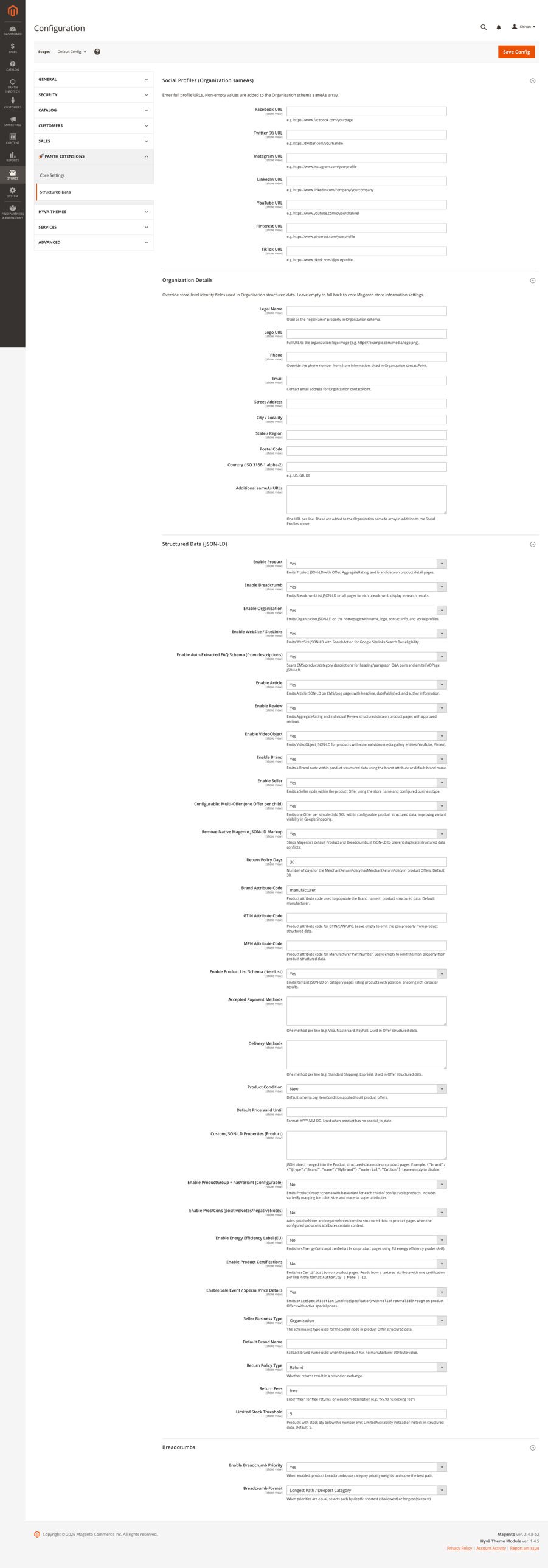
Admin path: Stores > Configuration > Panth Extensions > Structured Data
All settings below can be set at default, website and store view scope. Config paths are panth_structured_data/<group>/<field>, where the group and field IDs are given with each table.
Output is also controlled by a master switch at panth_seo/general/enabled (default 1) and a debug flag at panth_seo/general/debug (default 0). This module does not add admin fields for these paths; when mage2kishan/module-advanced-seo is installed, its admin settings control the same paths. Without it they can be changed with bin/magento config:set. When the debug flag is on, validation issues found in the generated JSON-LD (missing required properties, invalid URLs) are written to the log.
Group ID: social_profiles. Non-empty values that are valid http or https URLs are added to the Organization sameAs array.
| Setting | Default | What it does |
|---|---|---|
Facebook URL (facebook_url) |
empty | Facebook page URL |
Twitter (X) URL (twitter_url) |
empty | Twitter / X profile URL |
Instagram URL (instagram_url) |
empty | Instagram profile URL |
LinkedIn URL (linkedin_url) |
empty | LinkedIn page URL |
YouTube URL (youtube_url) |
empty | YouTube channel URL |
Pinterest URL (pinterest_url) |
empty | Pinterest profile URL |
TikTok URL (tiktok_url) |
empty | TikTok profile URL |
Group ID: organization.
| Setting | Default | What it does |
|---|---|---|
Legal Name (legal_name) |
empty | legalName of the Organization |
Logo URL (logo) |
empty | Full URL of the logo image, output as an ImageObject |
Phone (phone) |
empty | ContactPoint telephone. When empty, the Store Information phone is used |
Email (email) |
empty | ContactPoint email (a mailto: prefix is removed) |
Street Address (street) |
empty | PostalAddress streetAddress |
City / Locality (locality) |
empty | PostalAddress addressLocality |
State / Region (region) |
empty | PostalAddress addressRegion |
Postal Code (postcode) |
empty | PostalAddress postalCode |
Country (ISO 3166-1 alpha-2) (country) |
empty | PostalAddress addressCountry |
Additional sameAs URLs (same_as) |
empty | One URL per line, added to sameAs together with the Social Profiles |
Founder @id Reference (founder_id) |
empty | Adds founder with this @id. A value that does not start with http is appended to the store base URL, for example #founder |
The Organization name comes from Stores > Configuration > General > Store Information (store name), falling back to the store view name.
Group ID: structured_data.
| Setting | Default | What it does |
|---|---|---|
Enable Product (product) |
Yes | Product node on product pages. Also required for the bundle and grouped offer output |
Enable Breadcrumb (breadcrumb) |
Yes | BreadcrumbList on product, category and CMS pages |
Enable Organization (organization) |
Yes | Organization node on every page. Also required for the Seller output |
Enable WebSite / SiteLinks (website) |
Yes | WebSite node with SearchAction on every page |
Enable Auto-Extracted FAQ Schema (from descriptions) (faq) |
Yes | FAQPage built from question headings in descriptions |
Enable Article (article) |
Yes | WebPage or Article on CMS pages and BlogPosting on blog post pages |
Enable Review (review) |
Yes | Review nodes from approved product reviews |
Enable VideoObject (video) |
Yes | VideoObject for external videos in the product gallery |
Enable Brand (brand) |
Yes | Separate Brand node from the brand attribute or Default Brand Name |
Enable Seller (seller) |
Yes | On product pages, sets the Organization node type to the Seller Business Type; for Local Business and Store it adds the Store Information address and phone |
Configurable: Multi-Offer (one Offer per child) (configurable_multi_offer) |
Yes | AggregateOffer with child offers for configurable and grouped products, and bundle offers |
Remove Native Magento JSON-LD Markup (remove_native_markup) |
Yes | Removes other JSON-LD scripts and itemscope / itemprop / itemtype attributes from the product.info.main, breadcrumbs and product.price.final blocks; on product pages (while Enable Product is Yes) also removes every itemscope / itemprop / itemtype / itemid / itemref attribute from the page and the body tag |
Return Policy Days (return_policy_days) |
30 | merchantReturnDays of the return policy |
Brand Attribute Code (brand_attribute) |
manufacturer | Product attribute used for the brand name |
GTIN Attribute Code (gtin_attribute) |
empty | Product attribute for gtin. When empty, the gtin, gtin13 or ean product data is used if present |
MPN Attribute Code (mpn_attribute) |
empty | Product attribute for mpn. When empty, the mpn product data is used if present |
Enable Product List Schema (ItemList) (enable_product_list_schema) |
Yes | ItemList on category pages |
Accepted Payment Methods (accepted_payment_methods) |
empty | One method per line; see Usage for the recognised names |
Delivery Methods (delivery_methods) |
empty | One shipping option per line, output as shippingDetails on the Offer. Format Label | Transit Min | Transit Max | Cost or Label | Handling Min | Handling Max | Transit Min | Transit Max | Cost (days). Lines starting with # are ignored. Lines without handling days use Handling Time Min / Max |
Product Condition (product_condition) |
New | Offer itemCondition: New, Used, Refurbished or Damaged |
Default Price Valid Until (price_valid_until_default) |
empty | priceValidUntil (YYYY-MM-DD) when the product has no future special_to_date. When empty, one year from today is used |
Custom JSON-LD Properties (Product) (custom_properties) |
empty | JSON object merged into the Product node. Invalid JSON is logged and ignored |
Enable ProductGroup + hasVariant (Configurable) (product_group_enabled) |
No | ProductGroup node for configurable products |
Enable Pros/Cons (positiveNotes/negativeNotes) (pros_cons_enabled) |
No | Adds positiveNotes / negativeNotes to the Product |
Pros Attribute Code (pros_attribute) |
product_pros | Attribute with one pro per line. Shown when Pros/Cons is enabled |
Cons Attribute Code (cons_attribute) |
product_cons | Attribute with one con per line. Shown when Pros/Cons is enabled |
Enable Energy Efficiency Label (EU) (energy_label_enabled) |
No | Adds hasEnergyConsumptionDetails to the Product |
Energy Class Attribute Code (energy_class_attribute) |
energy_class | Attribute holding the grade. Shown when the energy label is enabled |
Enable Product Certifications (certification_enabled) |
No | Adds hasCertification to the Product |
Certification Attribute Code (certification_attribute) |
certifications | Attribute with one Authority | Name | ID entry per line. Shown when certifications are enabled |
Enable Sale Event / Special Price Details (sale_event_enabled) |
Yes | Special price priceSpecification on the product Offer and SaleEvent on category pages |
Seller Business Type (business_type) |
Organization | Organization, Local Business, Store or Online Store |
Default Brand Name (default_brand) |
empty | Brand name when the product has no brand attribute value |
Return Policy Type (return_policy_type) |
Refund | Refund or Exchange. Used by the standalone return policy node only |
Return Fees (return_policy_fees) |
free | free gives FreeReturn. ReturnFeesCustomerResponsibility, ReturnShippingFees and RestockingFees map to those values; any other text gives ReturnFeesCustomerResponsibility |
Limited Stock Threshold (limited_stock_threshold) |
5 | Quantity below which a simple product offer shows LimitedAvailability |
Enable Merchant Listing Offer Fields (merchant_fields_enabled) |
Yes | Master switch for the inline return policy, inline shipping details and store name brand fallback |
Emit Inline Return Policy (merchant_return_enabled) |
Yes | Adds hasMerchantReturnPolicy to the Offer. Shown when merchant fields are enabled |
Return Applicable Country (ISO 3166-1 alpha-2) (return_applicable_country) |
empty | Return policy country. Empty uses general/country/default |
Return Method (return_method) |
Return by mail | Return by mail, Return in store or Return at kiosk. Used by the inline and the standalone return policy |
Emit Inline Shipping Details (merchant_shipping_enabled) |
Yes | Adds shippingDetails to the Offer. Delivery Methods lines replace these defaults when set; otherwise the active table rate or flat rate carrier sets the rate |
Default Shipping Rate (shipping_default_rate) |
0 | Shipping rate value used when no table rate or flat rate carrier rate applies; 0 means free shipping |
Handling Time Min (days) (shipping_handling_min) |
0 | Handling time minimum |
Handling Time Max (days) (shipping_handling_max) |
1 | Handling time maximum |
Transit Time Min (days) (shipping_transit_min) |
1 | Transit time minimum |
Transit Time Max (days) (shipping_transit_max) |
5 | Transit time maximum |
Shipping Destination Country (ISO 3166-1 alpha-2) (shipping_country) |
empty | Shipping destination country. Empty uses general/country/default |
Fall Back Brand to Store Name (brand_use_store_name_fallback) |
Yes | Uses the Store Information name as brand when no other brand value exists |
SoftwareApplication for Software Products (software_application_enabled) |
Yes | Products with "Is Software" set to Yes are output as SoftwareApplication. Products without it are not affected |
The return and shipping sub-settings are shown only when their parent switches are set to Yes.
config.xml also sets panth_structured_data/structured_data/multiRegionShipping to 1. This path has no admin field. When it is 1 and Delivery Methods is empty, the inline shipping rate is read from Magento carrier settings: an active table rate carrier first (the row for the configured condition whose threshold matches the product price, weight or a quantity of 1, one entry per destination country, region and postcode rows ignored), otherwise an active flat rate carrier price. The carrier title is used as shippingLabel and the rate is converted to the current store currency. Set it to 0 to always use Default Shipping Rate. No separate shipping Offer node is output.
Group ID: breadcrumbs.
| Setting | Default | What it does |
|---|---|---|
Enable Breadcrumb Priority (enable_breadcrumb_priority) |
No | Uses the category "Breadcrumb Priority" values to choose the category path for product breadcrumbs, both in the visible breadcrumb and in BreadcrumbList |
Breadcrumb Format (breadcrumb_format) |
Longest Path / Deepest Category | Tie-breaker when priorities are equal: Shortest Path or Longest Path / Deepest Category. Shown when priority is enabled |
The "Breadcrumb Priority" field is in the Search Engine Optimization section of the category edit form. Higher values are preferred; 0 means no preference.
After changing settings, flush the configuration and full page caches.
bin/magento module:disable Panth_StructuredData
composer remove mage2kishan/module-structured-data
bin/magento setup:upgrade
bin/magento cache:flush
In production mode, also run bin/magento setup:di:compile. If another installed package requires this module, remove that package first. The breadcrumbs_priority category attribute, the three software product attributes and the panth_structured_data/* rows in core_config_data are not removed automatically.
Proprietary, as declared in composer.json. The package is published on Packagist and can be installed with Composer; see the product page for the terms of use.
Panth_StructuredDatamage2kishan/module-structured-dataPanth\StructuredData\Panth_Core, Magento_Catalog, Magento_Cms, Magento_ReviewPanth\StructuredData\Block\Head\StructuredData with template Panth_StructuredData::head/structured_data.phtml, added to head.additional in view/frontend/layout/default.xml, using the view model Panth\StructuredData\ViewModel\StructuredData.Panth\StructuredData\Api\StructuredDataProviderInterface (isApplicable(), getJsonLd(), getCode()). They are registered in the providers argument of Panth\StructuredData\Model\StructuredData\Composite and Panth\StructuredData\Model\StructuredData\Aggregator in etc/di.xml. A new provider can be added to both lists with a di.xml type configuration. Before a provider runs, its code is checked against panth_structured_data/structured_data/<code> (see Helper\Config::isStructuredDataEnabled() for the code to path mapping).Composite, so StructuredDataProviderInterface can be requested from the object manager to get the full page graph as an array.@id; nodes without an @id are merged by @type. Nested arrays are merged recursively and later providers overwrite scalar values. The JSON is encoded with JSON_HEX_TAG and JSON_HEX_AMP, so <, > and & are output as \u003C, \u003E and \u0026. A failing provider is logged as a warning and skipped.RemoveNativeMarkupPlugin (after toHtml) on Magento\Framework\View\Element\AbstractBlock.BreadcrumbPlugin (after getBreadcrumbPath) on Magento\Catalog\Helper\Data.CategoryFormPriorityPlugin on Magento\Catalog\Model\Category\DataProvider, which adds the Breadcrumb Priority field to the category form.AddBreadcrumbPriorityAttribute (category attribute breadcrumbs_priority, store scope), AddSoftwareProductAttribute (product attributes panth_is_software, panth_software_category and panth_software_os, global scope) and MigrateConfigPaths.Panth_StructuredData::config, defined in etc/acl.xml under Stores > Settings > Configuration.core_config_data.mage2kishan/module-advanced-seo lists this package as a suggested package in its composer.json; it does not require it.Test/Unit and cover Helper\Config, OfferMerchantFieldsBuilder, ProductListProvider and ProductProvider.| Module Category | SEO & Indexing |
|---|---|
| Best For | All Sizes |
No. The head block is cacheable="true" so the full JSON-LD payload is baked into full-page cache. Providers only run on uncached renders; cached hits serve the pre-rendered <script> tag with zero PHP evaluation.
The module only emits data already public on your storefront, product details, store identity, and aggregate review stats. It does not render personally identifiable data in structured-data form.
Yes. Every provider has a Yes/No toggle under Stores → Configuration → Panth Extensions → Structured Data, Product, Breadcrumb, Organization, WebSite, FAQ, Article, Review, VideoObject, Brand, Seller, Product List (ItemList), ProductGroup, Pros/Cons, Energy Label, Certifications, Sale Event, Remove Native Markup.
Yes. No JS, no RequireJS, no x-magento-init. The head block attaches via view/frontend/layout/default.xml to the head.additional container which every Magento theme exposes. Identical output on Hyva, Luma, Breeze, and any custom theme.
Yes. Every admin field is [store view]-scoped, so different store views can ship different Organization data, social profiles, toggles, and attribute codes. URLs in the JSON-LD are scoped to the current store's base URL.
Three ways, in increasing order of effort:
meta_description, short_description, manufacturer, gender, populate those for per-product overrides.StructuredDataProviderInterface, register in di.xml under the providers argument of Panth\StructuredData\Model\StructuredData\Composite (and Aggregator). The aggregator will pick it up automatically.Yes, declare a virtualType in your own module's di.xml with the same class name as the provider you want to replace, or use a preference on Panth\StructuredData\Api\StructuredDataProviderInterface with a type constraint.
Yes, friendly:
Panth_AdvancedSEO: shares the panth_seo/general/enabled master switch when installed; defaults are set locally so standalone installs still work.Panth_Faq: FaqExtractor defers to Panth_Faq on its own routes and when the faq.schema block is mounted and producing data.Panth_Testimonials: ReviewProvider defers on the testimonials route when the module is enabled.Yes. mage2kishan/module-core is a required dependency and is pulled in automatically by Composer.
No, only JSON-LD. Microdata is legacy and mixing the two often produces duplicate-structured-data warnings in Search Console. The RemoveNativeMarkupPlugin actively strips native Magento microdata from the target blocks.
2.4.4. For earlier Magento versions, contact Panth Infotech, we can backport on request.
Talk to Kishan directly: written quote, scope and timeline within 24 hours. No sales call.
Structured Data JSON-LD for Magento 2