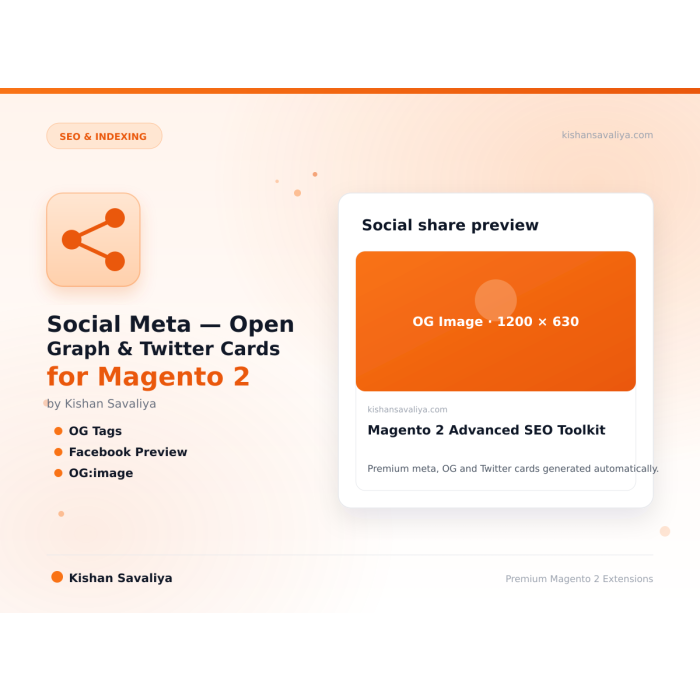
Built for Magento 2
Out of the box Magento emits five og: tags on product pages and zero on categories or CMS pages - and on Hyva the core product/view/opengraph/general.phtml template happily duplicates whatever a theme, a third-party S...
*Out of the box Magento emits five og: tags on product pages and zero on categories or CMS pages, and on Hyva the core product/view/opengraph/general.phtml template happily duplicates whatever a theme, a third-party SEO module, or a man…
Key Features:
Additional Services
Built-in from day one. No add-ons, no upsell, no licence keys to renew.
Out of the box Magento emits five og: tags on product pages and zero on categories or CMS pages - and on Hyva the core product/view/opengraph/general.phtml template happily duplicates whatever a theme, a third-party S...
Adobe Magento Extension Quality Program, passes with zero severity-10 violations.
Vanilla JS, no jQuery dependency. Drop-in compatible with both default Luma and Hyva themes.
Lifetime updates with every Magento release. No subscription, no licence keys, no upsells.
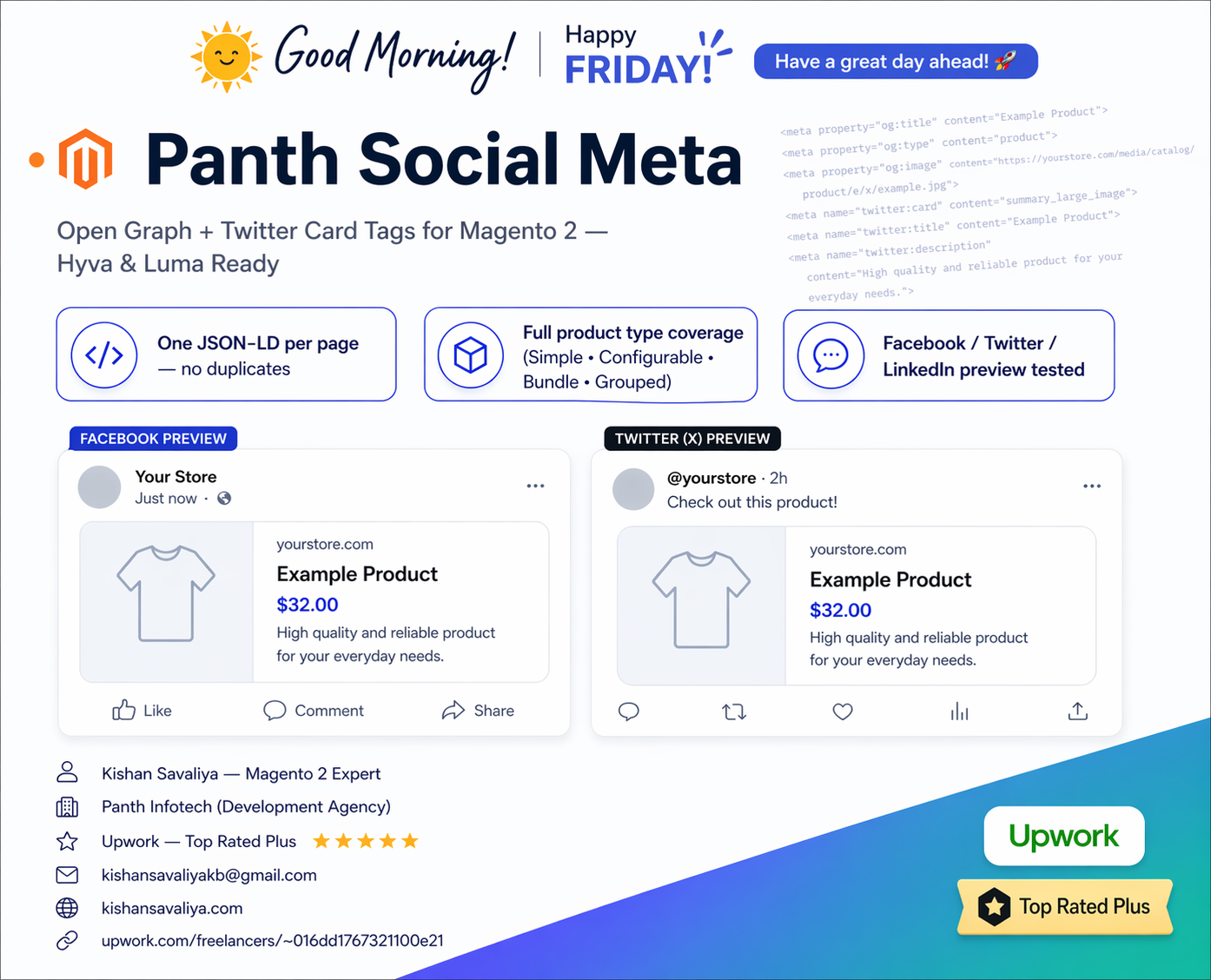
Panth Social Meta is an Open Graph and Twitter Card extension for Magento 2 and Adobe Commerce that emits one clean social-preview block per page.
Out of the box, Magento either skips Open Graph entirely or relies on theme partials that emit conflicting og:image values, which is why the Facebook Sharing Debugger and the X Card Validator so often surface the wrong thumbnail. This module centralizes social meta emission behind a layout observer that strips theme-level duplicates, then renders a single canonical OG + Twitter Card block for product, category, and CMS pages, so the preview your buyers see in feeds matches the asset you actually want.
Five store-scoped admin toggles control OG locale, default OG image, product availability meta, Twitter card type, and per-page overrides. The resolver pulls product images, short descriptions, and prices straight from existing EAV data, no extra attribute setup, so previews stay synced when SKUs are edited, images are swapped, or stock state changes. Multi-store hosts work without extra configuration: each store view emits the right host, the right locale, and the right OG image.
A CI smoke-test pattern is documented for catching regressions before deploy, and Hyvä / Luma share identical resolver output so the same admin config drives both frontends.
Clean single-emission Open Graph and Twitter Card meta tags across Magento 2 product, category, and CMS pages.
og:* and twitter:* block per page
Out of the box Magento emits five og: tags on product pages and zero on categories or CMS pages, and on Hyva the core
product/view/opengraph/general.phtmltemplate happily duplicates whatever a theme, a third-party SEO module, or a manual layout snippet has already added.* The visible result is a Facebook preview that picks the wrong image, a Twitter card that omits the@handle, and view-source output with entity-encoded@where you wrote@yourstore. Panth Social Meta fixes the stack end-to-end: one resolver computesog:*andtwitter:*from the current entity (product / category / CMS) with progressive image / title / description fallbacks, an observer onlayout_generate_blocks_afterstrips Magento and Hyva's native OG blocks so duplicates can never render, and the templates useescapeUrl()for URL-valued attributes andescapeHtml()(ENT_QUOTES | ENT_HTML5), not Zend Escaper, for text-valued ones so@yourstorestays readable while still being XSS-safe. Five store-scoped admin fields cover the entire configuration surface. Zero JS, zero theme overrides, identical output on Hyva and Luma.
Product pages additionally emit product:price:amount, product:price:currency, product:availability (derived from $product->isSalable() → instock | oos) and product:brand (from the manufacturer attribute) so Facebook Shop and every major product-feed ingester pick up pricing and stock state without a separate feed plugin. og:locale tracks each store's general/locale/code, so a UK store view ships en_GB while the US store view ships en_US from the same codebase.
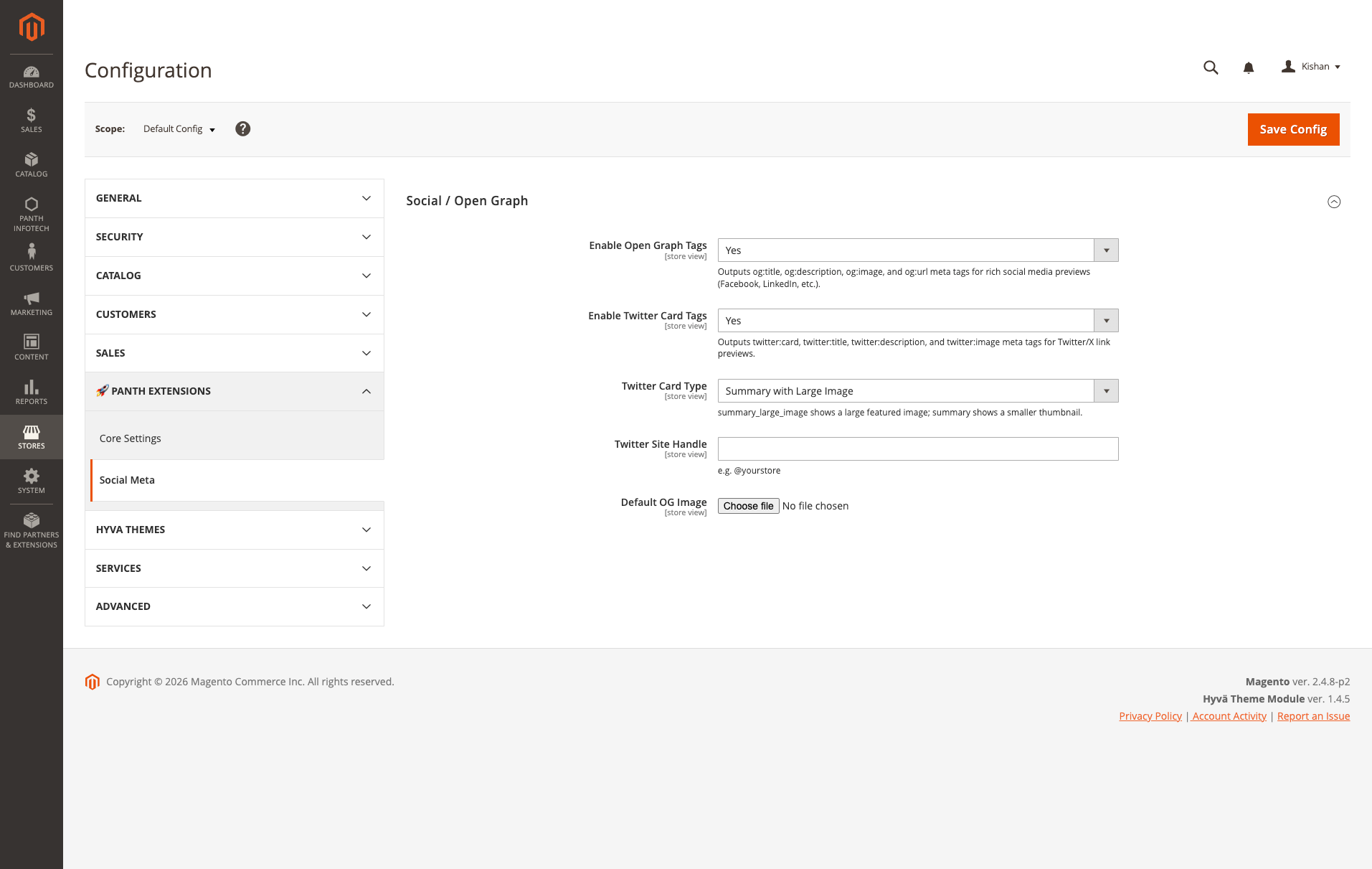
System configuration, Stores → Configuration → Panth Extensions → Social Meta. Five store-scoped fields: Enable Open Graph Tags, Enable Twitter Card Tags, Twitter Card Type (summary | summary_large_image), Twitter Site Handle (@yourstore), and Default OG Image (uploaded under media/panth_seo/og/). Every field is [store view]-scoped so a multi-store install can ship a different handle, card type and fallback image per storefront.
| Feature | Description |
|---|---|
| Single-emission OG + Twitter | Observer\Social\RemoveNativeOgObserver runs on layout_generate_blocks_after and unsets every native OG block it can find, the four well-known names (opengraph.general, opengraph.product, opengraph.category, opengraph.cms) plus anything matching opengraph (substring) or og. (prefix). The module's own blocks (prefixed panth_social_meta.) are explicitly skipped. Net result: exactly one og:title, one og:image, one og:url per page, never a duplicate pair from a theme + module collision. |
| Disable = silence | When og_enabled = No, the observer still runs so Magento core's product/view/opengraph/general.phtml (which ships 5 og:* tags on every PDP) does not silently leak through. Flipping the toggle off means zero og:* on the storefront, which is what the admin label actually implies. |
| Entity-aware resolver | Model\Social\OpenGraphResolver::resolve() detects the current entity via current_product / current_category in the Magento registry. Products get og:type=product plus product:price:*, product:availability, product:brand. Categories and CMS pages get og:type=website. Title / description / image / URL each have their own progressive fallback chain so the tags never blank out. |
| Title fallback chain | Product: meta_title → name. Category: meta_title → name. CMS / other: PageConfig->getTitle() (set by the CMS controller from the page's own meta_title) → store name. |
| Description fallback chain | Product: meta_description → short_description. Category: meta_description → description. CMS / other: PageConfig->getDescription() → design/head/default_description. Every description is truncated at 200 characters using a single-character ellipsis … (not three dots) so Facebook's preview card renders cleanly. |
| Image fallback chain | Product image → category image → first in-stock product image in that category → admin-configured Default OG Image (panth_social_meta/social/default_og_image, stored under media/panth_seo/og/) → store logo (design/header/logo_src) → Magento's product placeholder. Never blank unless the store has no logo and no placeholder either. |
| URL canonicalisation | og:url uses the entity's own URL model ($product->getProductUrl(false) / $category->getUrl()), query string stripped. CMS / other pages use $store->getCurrentUrl(false) with ? and # trimmed. Rendered through escapeUrl() so : and / stay intact in view-source. |
og:site_name prefers brand over store label |
Reads general/store_information/name first, falling back to $store->getName(). So a merchant with "Acme Store" in Store Information ships that as the site name even if the Magento store view label is still the factory default "Default Store View". |
og:locale per store view |
Reads general/locale/code at store scope and emits it verbatim (en_US, en_GB, fr_FR, …). Multi-store installs get correct per-region og:locale with no admin work. |
| Product stock state | product:availability is derived from $product->isSalable(), instock when salable, oos when not. Flipping stock status in the admin immediately changes the emitted tag on the next uncached render, so Facebook Shop and catalog ingesters see accurate stock state. |
| Product brand | product:brand reads the manufacturer attribute's dropdown label via getAttributeText('manufacturer'). Optional, only emitted when the attribute is set. |
| Product price tags | product:price:amount and product:price:currency on PDP when the final price is positive. Price is formatted with exactly two decimals and a period separator, matching the OpenGraph product vocab. |
| Twitter Card wraps OG | TwitterCardResolver reuses the OG output, twitter:title, twitter:description, twitter:image all mirror their og:* counterparts, twitter:card is the admin-configured type, and twitter:site carries the configured handle (emitted only when non-empty). Turn OG off and Twitter auto-switches off; turn OG on and Twitter on independently. |
| Escape-safe rendering | URL-valued attributes (og:url, og:image, og:image:secure_url, og:video, og:audio, twitter:image, twitter:image:src, twitter:player) go through escapeUrl() which preserves : and /. Text-valued attributes go through escapeHtml() which uses htmlspecialchars() with `ENT_QUOTES |
| EAV OG attributes on product + category | Setup\Patch\Data\AddOgAttributes installs og_title, og_description, og_image on every product and category attribute set, under the "Search Engine Optimization" fieldset. Populate them per-entity when you want to override what the meta_title / meta_description fallback would emit. |
| Theme-agnostic head rendering | view/frontend/layout/default.xml attaches both head blocks to head.additional. Templates are plain PHP <meta> output, no Alpine directives, no RequireJS, no x-magento-init. Identical output on Hyva, Luma, Breeze, custom themes. |
| Fully cacheable | Both head blocks declare cacheable="true". Output ends up in full-page cache alongside the rest of <head> and costs nothing per-request after the first uncached render. The observer fires only during layout generation, not on cached hits. |
Four cooperating pieces, one request:
Observer\Social\RemoveNativeOgObserver runs on layout_generate_blocks_after in the frontend area. Before any block is rendered it walks the layout tree twice, once by well-known block names (opengraph.general, opengraph.product, opengraph.category, opengraph.cms), once by pattern (opengraph substring, og. prefix), and unsetElement()s each match. This module's own blocks start with panth_social_meta. and are skipped by name, so only native Magento / Hyva / third-party OG blocks disappear. The observer runs unconditionally: when a merchant disables the module's OG output they expect zero og:* on the storefront, not Magento core's 5-tag native template filling the vacuum.Model\Social\OpenGraphResolver::resolve() is the read path. It detects the current entity from the Magento registry, walks the title / description / image / URL fallback chains, pulls og:site_name from general/store_information/name, pulls og:locale from general/locale/code, and, when the entity is a product, adds product:price:amount, product:price:currency, product:availability (from isSalable()) and product:brand (from the manufacturer attribute). Returns a flat ['og:property' => 'value'] array with empty values filtered out.Model\Social\TwitterCardResolver::resolve() wraps the OG result. twitter:title / twitter:description / twitter:image mirror the OG equivalents so the two preview cards always agree. twitter:card is the admin-configured type, twitter:site is the configured handle (omitted when empty). Returns an empty array if the OG resolver returns empty, so disabling OG silently disables Twitter too.view/frontend/templates/head/opengraph.phtml + .../twittercard.phtml) iterate the resolved array and emit one <meta> tag per entry. URL-valued attribute names (hardcoded allowlist) go through $escaper->escapeUrl(), everything else goes through $escaper->escapeHtml(). The property / name value itself is always escaped with escapeHtml() because the allowlist is fixed to ASCII. When the resolver returns empty (module disabled, no entity, etc.) the template early-returns and writes nothing.The EAV patch (Setup\Patch\Data\AddOgAttributes) is a one-shot install that runs during setup:upgrade, it adds og_title, og_description, og_image to every product and category attribute set, under the "Search Engine Optimization" group. The attributes are read by the resolver via the standard getData() path when set.
bin/magento module:status Panth_SocialMeta
# Module is enabled
# Any product page should emit exactly one og:* block + one twitter:* block
curl -ks https://hyva.test/example-product.html | grep -oE '<meta (property|name)="(og|twitter|product):[^"]+"[^>]*>'
# <meta property="og:type" content="product" />
# <meta property="og:title" content="Example Product" />
# <meta property="og:description" content="Soft combed cotton, straight hem, made for everyday wear." />
# <meta property="og:image" content="https://hyva.test/media/catalog/product/t/i/example-product.jpg" />
# <meta property="og:url" content="https://hyva.test/example-product.html" />
# <meta property="og:site_name" content="Acme Store" />
# <meta property="og:locale" content="en_US" />
# <meta property="product:price:amount" content="29.00" />
# <meta property="product:price:currency" content="USD" />
# <meta property="product:availability" content="instock" />
# <meta property="product:brand" content="Example Brand" />
# <meta name="twitter:card" content="summary_large_image" />
# <meta name="twitter:title" content="Example Product" />
# <meta name="twitter:description" content="Soft combed cotton, straight hem, made for everyday wear." />
# <meta name="twitter:image" content="https://hyva.test/media/catalog/product/t/i/example-product.jpg" />
# <meta name="twitter:site" content="@yourstore" />
# Category page, same flow minus the product:* block
curl -ks https://hyva.test/men/tops-men.html | grep -oE '<meta property="og:[^"]+"[^>]*>'
# <meta property="og:type" content="website" />
# <meta property="og:title" content="Men's Tops" />
# <meta property="og:description" content="Everyday tees, long-sleeve, fleece and performance fabrics." />
# <meta property="og:image" content="https://hyva.test/media/catalog/category/men-tops-hero.jpg" />
# <meta property="og:url" content="https://hyva.test/men/tops-men.html" />
# <meta property="og:site_name" content="Acme Store" />
# <meta property="og:locale" content="en_US" />
# Luma store view, identical output from a different domain
curl -ks https://luma.test/example-product.html | grep -oE '<meta property="og:url"[^>]+>'
# <meta property="og:url" content="https://luma.test/example-product.html" />
# Confirm no duplicates, this count should always be 1 per property per page
curl -ks https://hyva.test/example-product.html | grep -c '<meta property="og:title"'
# 1
Visit Stores → Configuration → Panth Extensions → Social Meta to see the admin panel.
view/frontend/layout/default.xml attaches both head blocks to head.additional:
<referenceBlock name="head.additional">
<block class="Panth\SocialMeta\Block\Head\OpenGraph"
name="panth_social_meta.opengraph"
template="Panth_SocialMeta::head/opengraph.phtml"
cacheable="true">
<arguments>
<argument name="view_model" xsi:type="object">Panth\SocialMeta\ViewModel\OpenGraph</argument>
</arguments>
</block>
<block class="Panth\SocialMeta\Block\Head\TwitterCard"
name="panth_social_meta.twittercard"
template="Panth_SocialMeta::head/twittercard.phtml"
cacheable="true">
<arguments>
<argument name="view_model" xsi:type="object">Panth\SocialMeta\ViewModel\TwitterCard</argument>
</arguments>
</block>
</referenceBlock>
<meta property="og:type" content="product" />
<meta property="og:title" content="Example Bag" />
<meta property="og:description" content="Lightweight tote for gym and track, waterproof lining, expandable side pocket." />
<meta property="og:image" content="https://hyva.test/media/catalog/product/w/b/wb04-black-0.jpg" />
<meta property="og:url" content="https://hyva.test/example-bag.html" />
<meta property="og:site_name" content="Acme Store" />
<meta property="og:locale" content="en_US" />
<meta property="product:price:amount" content="32.75" />
<meta property="product:price:currency" content="USD" />
<meta property="product:availability" content="instock" />
<meta property="product:brand" content="Example Brand" />
<meta name="twitter:card" content="summary_large_image" />
<meta name="twitter:title" content="Example Bag" />
<meta name="twitter:description" content="Lightweight tote for gym and track, waterproof lining, expandable side pocket." />
<meta name="twitter:image" content="https://hyva.test/media/catalog/product/w/b/wb04-black-0.jpg" />
<meta name="twitter:site" content="@yourstore" />
<meta property="og:type" content="website" />
<meta property="og:title" content="Men's Tops" />
<meta property="og:description" content="Every seasonal men's top in one place, tees, hoodies, performance fabrics." />
<meta property="og:image" content="https://hyva.test/media/catalog/category/men-tops.jpg" />
<meta property="og:url" content="https://hyva.test/men/tops-men.html" />
<meta property="og:site_name" content="Acme Store" />
<meta property="og:locale" content="en_US" />
<meta property="og:type" content="website" />
<meta property="og:title" content="About Us" />
<meta property="og:description" content="Who we are, where we ship from and how to reach us." />
<meta property="og:image" content="https://hyva.test/media/panth_seo/og/default-og-1200x630.jpg" />
<meta property="og:url" content="https://hyva.test/about-us" />
<meta property="og:site_name" content="Acme Store" />
<meta property="og:locale" content="en_US" />
<meta property="og:url" content="https://luma.test/example-bag.html" />
<meta property="og:site_name" content="Acme Store Outlet" />
<meta property="og:locale" content="en_GB" />
Because the resolver is driven entirely by store-scope config (general/locale/code, general/store_information/name, panth_social_meta/social/*) and the registry-detected entity, two store views on the same install produce correct-per-store output without any per-store layout XML. The EAV fallback (og_title / og_description / og_image) is also store-scoped via the standard ScopedAttributeInterface.
When both master switches are off, the page ships zero social meta, not a fallback to Magento core's native OG template:
curl -ks https://hyva.test/example-product.html | grep -c '<meta property="og:'
# 0
curl -ks https://hyva.test/example-product.html | grep -c '<meta name="twitter:'
# 0
A working setup requires the tags to be (a) present, (b) unique (one per property per page), (c) rendered with readable values (URLs not entity-encoded, @ handles not over-escaped) and (d) preview-correct in the scraper tools. Validate all four.
The authoritative tools, paste any URL from the storefront:
og:* values Facebook ingested, and lets you "Scrape Again" to force a cache refresh after deploying changes.Open any storefront URL and run in DevTools console:
// Enumerate every social meta tag on the page
[...document.querySelectorAll('meta[property^="og:"], meta[property^="product:"], meta[name^="twitter:"]')]
.map(m => `${m.getAttribute('property') || m.getAttribute('name')} → ${m.content}`)
// Duplicate detection, any count > 1 is a bug
const names = [...document.querySelectorAll('meta[property], meta[name]')]
.map(m => m.getAttribute('property') || m.getAttribute('name'))
.filter(n => n.startsWith('og:') || n.startsWith('twitter:') || n.startsWith('product:'));
const dupes = names.filter((n, i) => names.indexOf(n) !== i);
console.log('Duplicates:', dupes.length ? dupes : 'none ');
A minimal curl-based test you can wire into deploy:
for url in / /example-product.html /men/tops-men.html /about-us; do
og=$(curl -ks "https://hyva.test${url}" | grep -c '<meta property="og:')
tw=$(curl -ks "https://hyva.test${url}" | grep -c '<meta name="twitter:')
dup=$(curl -ks "https://hyva.test${url}" | grep -c '<meta property="og:title"')
if [ "$og" -lt 5 ] || [ "$dup" -ne 1 ]; then
echo "FAIL ${url} og=${og} og:title×${dup} twitter=${tw}"; exit 1
fi
echo "OK ${url} og=${og} twitter=${tw}"
done
Run on both Hyva and Luma hosts after every deploy that touches social meta, theme layout, or the RemoveNativeOgObserver.
# With og_enabled=No, Magento core's product/view/opengraph/general.phtml would normally ship 5 native og:* tags on a PDP
bin/magento config:set panth_social_meta/social/og_enabled 0
bin/magento cache:flush config full_page
curl -ks https://hyva.test/example-product.html | grep -c '<meta property="og:'
# 0 ← observer stripped the native blocks; no silent fallback
bin/magento config:set panth_social_meta/social/og_enabled 1
bin/magento cache:flush config full_page
If this returns anything other than 0 when disabled, either a third-party module is re-adding an OG block under a name that doesn't match the opengraph / og. patterns, or FPC is still serving a cache entry from before the flush. Hard-flush with bin/magento cache:clean and re-test.
og:* or twitter:* tags on the storefrontThree things to check, in order:
config + full_page caches after flipping.bin/magento cache:flush config full_page and re-test. The resolver is only invoked on uncached renders.head.additional, a custom theme's layout XML can null out the head.additional container. Search your theme package for <referenceBlock name="head.additional" remove="true"/> and remove it. The same layout XML is what hosts Magento's native OG tags, so removing it breaks those too.og:title or og:image rendering twiceA third-party SEO / Hyva module is re-adding an OG block under a name that doesn't match the observer's patterns. Check with:
curl -ks https://hyva.test/example-product.html | grep -oE '<meta property="og:title"[^>]*>' | sort -u
# Should show exactly one line
If two different lines appear, identify the offending module (bin/magento module:status + grep -r "og:title" vendor/<vendor>/) and either (a) open an issue with the offending module to adopt a predictable block name (opengraph.* or og.*), or (b) add its block name to Observer\Social\RemoveNativeOgObserver::NATIVE_OG_BLOCKS and PR upstream.
twitter:site shows @yourstore instead of @yourstoreYour theme is shipping an override of view/frontend/templates/head/twittercard.phtml that uses $escaper->escapeHtmlAttr() instead of $escaper->escapeHtml(). Magento's escapeHtmlAttr() runs Zend\Escaper which aggressively encodes every non-ASCII-safe byte, so the @ sign becomes @. Social scrapers decode entities so the handle still works, but it looks wrong in view-source and some linters flag it. Fix: remove the theme override, or mirror the module's escape strategy (escapeUrl() for URL-valued names, escapeHtml() for everything else).
product:availability always instock even for out-of-stock productsThe resolver reads $product->isSalable(). If this returns true for an out-of-stock product, you have a stock configuration issue, not a social meta one, check Stores → Configuration → Catalog → Inventory → Stock Options → Display Out of Stock Products and the product's own stock status. Confirm by loading the product in a bin/magento script:
php -r '
require __DIR__ . "/app/bootstrap.php";
$bs = \Magento\Framework\App\Bootstrap::create(BP, []);
$om = $bs->getObjectManager();
$om->get(\Magento\Framework\App\State::class)->setAreaCode("frontend");
$p = $om->create(\Magento\Catalog\Model\ProductRepository::class)->get("example-product");
var_dump($p->isSalable());
'
If this prints true but the frontend shows Out of Stock, the resolver is reporting isSalable() correctly and the storefront display is driven by stock inventory, bring the two in line via the product's Stock Status.
og:site_name = "Default Store View"Nothing has been set in Stores → Configuration → General → Store Information → Store Name. The resolver prefers that value (the merchant-facing brand name) and only falls back to the Magento store view label when it's empty. Set the Store Name per store view and re-flush caches.
og:image returning an absolute URL for the placeholder even though a Default OG Image is uploadedThe uploaded file must live under media/panth_seo/og/, the backend model Magento\Config\Model\Config\Backend\Image stores it there automatically when uploaded via the admin form. If you moved the file by hand, move it back or re-upload via the admin. The resolver also rejects values containing .., backslashes, leading /, or null bytes as a path-traversal guard.
Facebook aggressively caches OG data. Open the Sharing Debugger, paste the URL, and click Scrape Again. Twitter/X and LinkedIn have equivalent controls. The resolver does not cache OG data itself, the stale preview is server-side on the scraper, not the store.
| Requirement | Supported |
|---|---|
| Magento Open Source | 2.4.4, 2.4.5, 2.4.6, 2.4.7, 2.4.8 |
| Adobe Commerce | 2.4.4-2.4.8 |
| PHP | 8.1, 8.2, 8.3, 8.4 |
| Hyva Theme | 1.0+ (fully compatible, no theme overrides) |
| Luma Theme | Native support |
| Panth Core | ^1.0 (installed automatically) |
composer require mage2kishan/module-social-meta
bin/magento module:enable Panth_Core Panth_SocialMeta
bin/magento setup:upgrade
bin/magento setup:di:compile
bin/magento cache:flush
Navigate to Stores → Configuration → Panth Extensions → Social Meta.
| Setting | Path | Default | What it controls |
|---|---|---|---|
| Enable Open Graph Tags | panth_social_meta/social/og_enabled |
Yes | Master switch for og:*. When No the resolver returns empty, the OpenGraph template writes nothing, and the observer still strips Magento's native OG blocks, so the page ships with zero og:* instead of falling back to core's 5-tag native template. |
| Enable Twitter Card Tags | panth_social_meta/social/twitter_enabled |
Yes | Master switch for twitter:*. Independent of OG, you can ship OG only (disable Twitter), Twitter only (disable OG), both, or neither. |
| Twitter Card Type | panth_social_meta/social/twitter_card_type |
summary_large_image |
summary_large_image shows a large featured image in Twitter/X preview cards; summary shows a smaller square thumbnail. Source model: Panth\SocialMeta\Model\Config\Source\TwitterCardType. |
| Twitter Site Handle | panth_social_meta/social/twitter_site_handle |
(empty) | The @yourstore handle emitted as twitter:site. When empty, the tag is omitted entirely, not emitted as an empty attribute. Plain-text, the template escapes via escapeHtml() so the @ sign stays readable in view-source. |
| Default OG Image | panth_social_meta/social/default_og_image |
(empty) | Image uploaded under media/panth_seo/og/. Used as the penultimate fallback in the image chain, after product image, category image and first-product-in-category, before the store logo and Magento placeholder. Recommended size: 1200 × 630 (Facebook / Twitter summary_large_image aspect ratio). |
Every field is [store view]-scoped. Ship a different twitter_site_handle, card type and Default OG Image per storefront to match each brand's social presence.
After saving, flush the config and full_page caches, the observer output is baked into FPC so a cached page keeps whichever configuration was active when it was cached:
bin/magento cache:flush config full_page
| Module Category | SEO & Indexing |
|---|---|
| Best For | All Sizes |
Talk to Kishan directly: written quote, scope and timeline within 24 hours. No sales call.
Social Meta, Open Graph & Twitter Cards for Magento 2