

Robots SEO, robots.txt & X-Robots-Tag for Magento 2
Manage Magento robots.txt policies, robots meta and X-Robots-Tag response headers by store view. Review crawler toggles and indexing rules as separate decisions.
- Free
- Themes listed: Hyvä + Luma
composer require mage2kishan/module-robots-seo
- Package requirementsRead the source documentation
- Developer profileView Upwork profile
- Themes listedHyvä + Luma
- PHP versions listed8.1, 8.2, 8.3, 8.4
- Installation questionsDiscuss your store setup
What it does for your store
The main features, as listed in the module documentation.
-
Store-scoped robots.txt
Generate a robots.txt body from policies or use a configured replacement body.
-
Indexing directives
Configure robots meta and X-Robots-Tag rules for supported frontend responses.
-
Crawler policies
Manage named crawler toggles and user-agent path policies.
-
Policy validation
Validate supported directive tokens, user agents and paths before output.
Installation
Example commands from the Magento root. Follow the package instructions and your staging and deployment process.
- 1Check the releaseMatch Magento, PHP, theme and dependency requirements.
- 2Install on stagingReview Composer changes and follow the package instructions.
- 3Configure and verifyUse the documented settings and test the affected features.
$ composer require mage2kishan/module-robots-seo
$ bin/magento setup:upgrade
$ bin/magento setup:di:compile
$ bin/magento setup:static-content:deploy -f
$ bin/magento cache:clean
Listed requirements
These are the details supplied in this listing. Confirm the selected release supports your Magento edition, PHP and storefront.
| Magento versions listed | 2.4.6, 2.4.7, 2.4.8 |
|---|---|
| PHP versions listed | 8.1, 8.2, 8.3, 8.4 |
| Themes listed | Hyvä, Luma |
| Composer package | mage2kishan/module-robots-seo |
Documentation
Product details and setup guidance. Check the package repository for release-specific instructions.
Overview
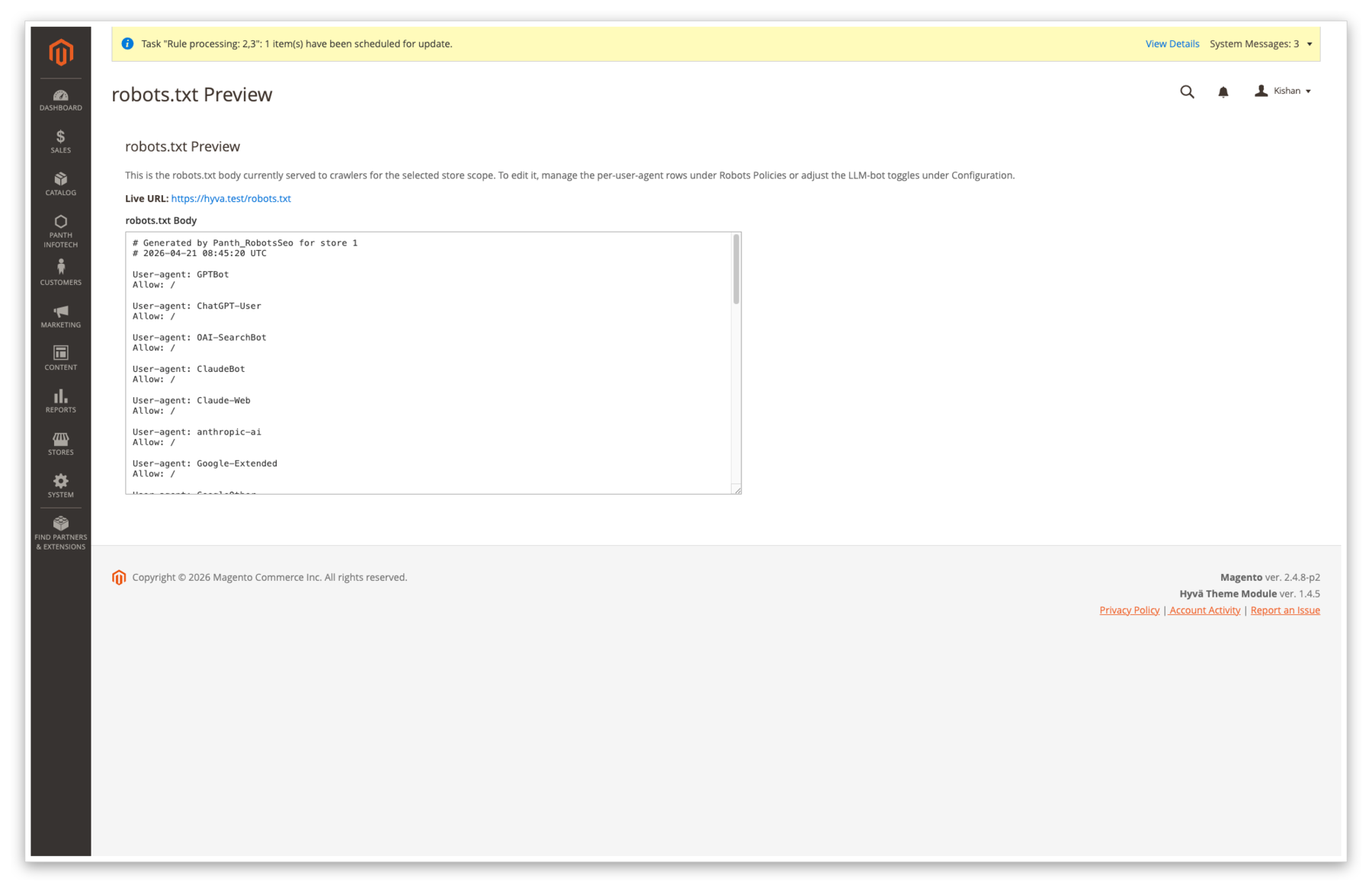
Panth Robots SEO gives you separate controls for crawl requests and page indexing instructions. Manage a store-scoped robots.txt body, robots meta and X-Robots-Tag settings, then inspect what the public URL actually serves.
What you get
- Generated or replacement robots.txt content per store view.
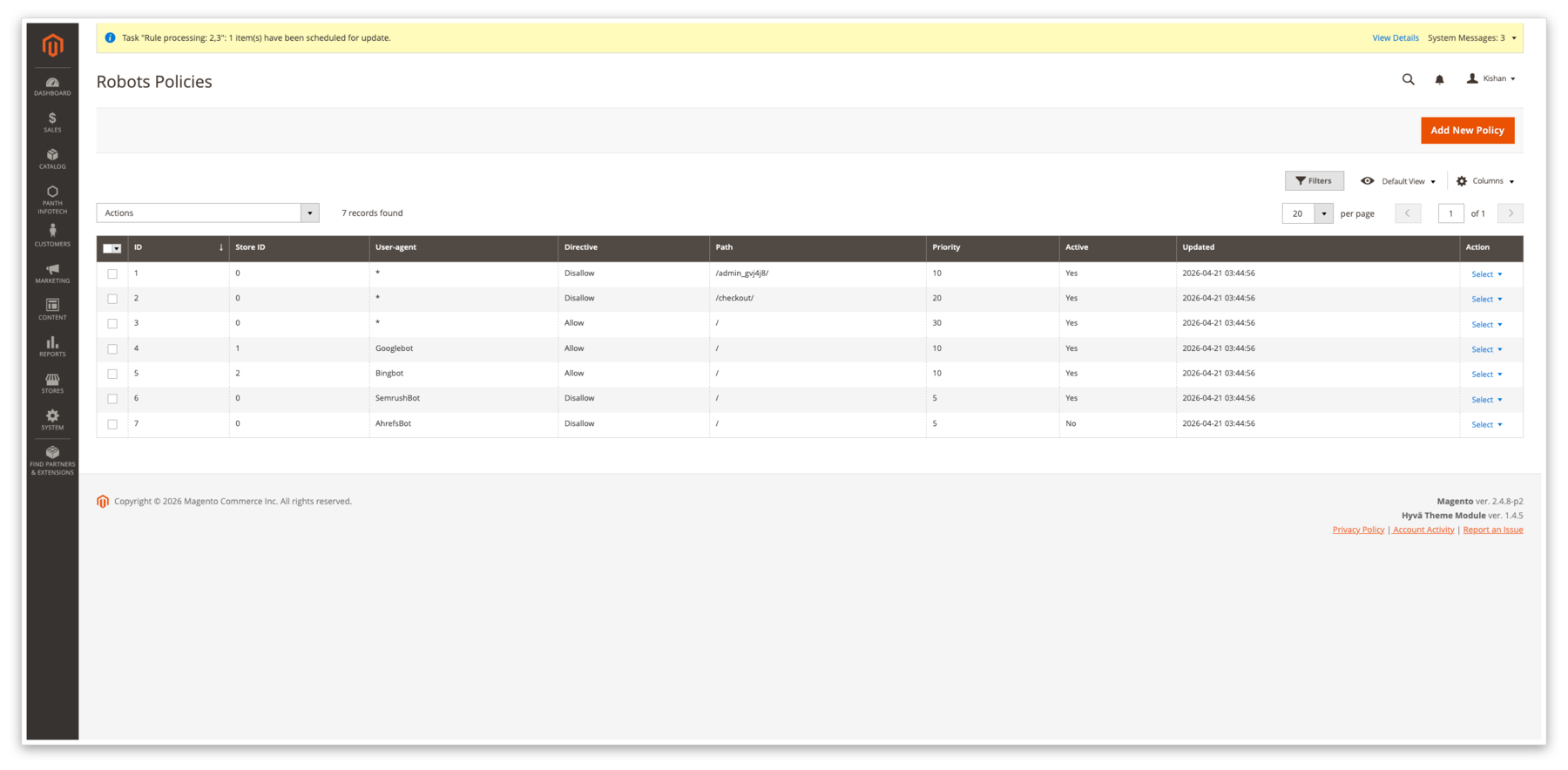
- Robots Policies grid with user-agent, path, store scope and priority.
- Named crawler toggles.
- Meta and response-header directive handling with validation.
Magento 2 Robots SEO
This page describes mage2kishan/module-robots-seo 1.3.7. robots.txt controls crawling for cooperating crawlers; it is not access control. Use authentication for private content. A crawlable noindex directive controls Google indexing.
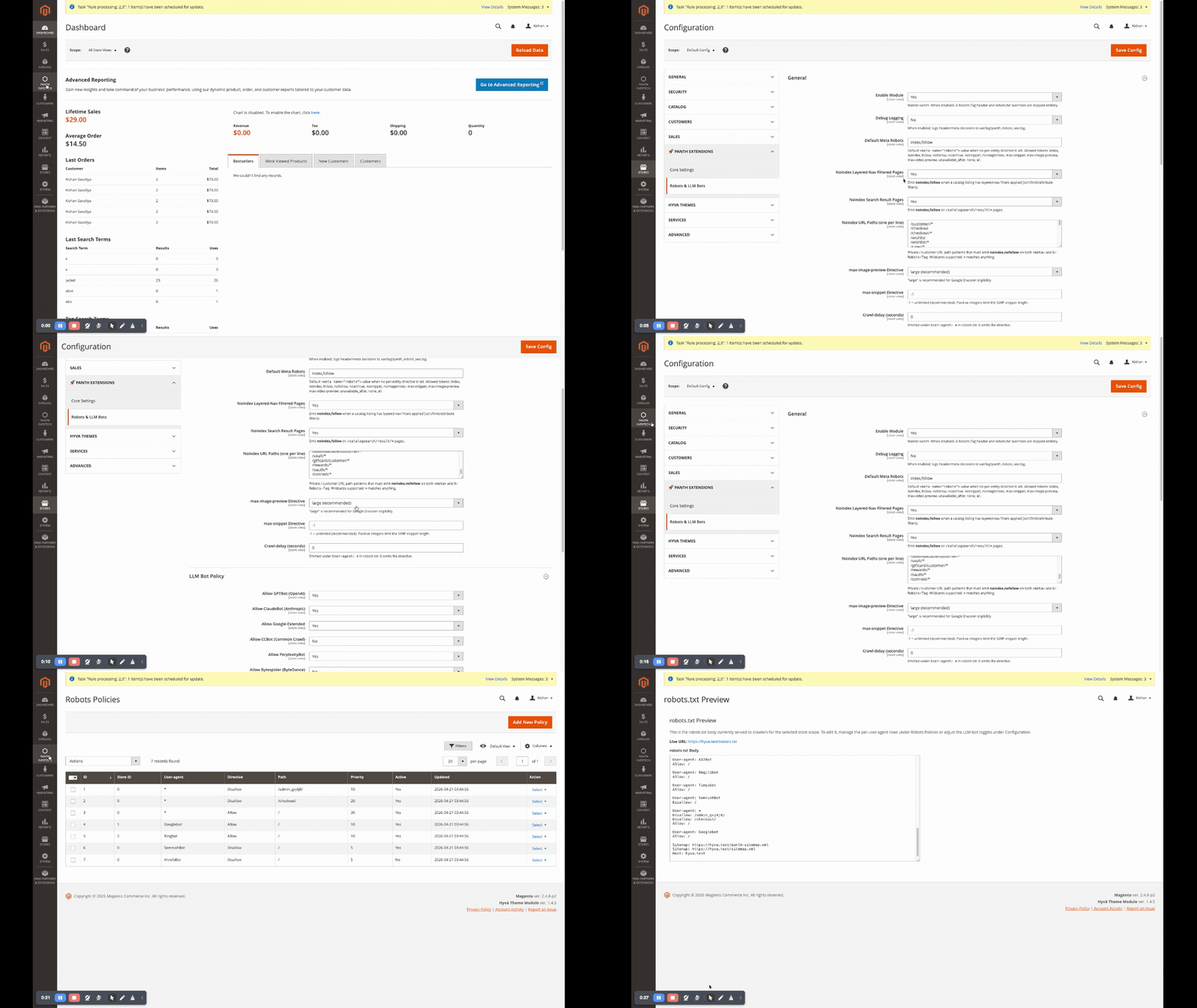
Features
Review generated policies, the default directive and path patterns before enabling them. The release includes broad default noindex path patterns, including contact paths, so check whether each default matches your site's intended public pages.
Usage
Start with a small representative set of pages or records. Check the enabled and disabled states, store scope and interaction with existing SEO output before widening the change.
robots.txt
Fetch the public /robots.txt after a change. A static file, web server rule, CDN or another module can affect the response before Magento handles it. Check every relevant store host. The Admin preview alone does not prove the public response.
X-Robots-Tag header
The frontend response plugin resolves and merges directives for supported status codes, paths, file extensions and filtered or search URLs. Static files served directly by the web server do not pass through the Magento response plugin; configure their headers at the serving layer when needed.
Meta robots tag
The page-config plugin validates and merges robots directives. A stricter instruction from another implementation can remain effective. Confirm the rendered meta tag and HTTP header together, and keep the URL crawlable when a search engine needs to discover noindex.
Admin
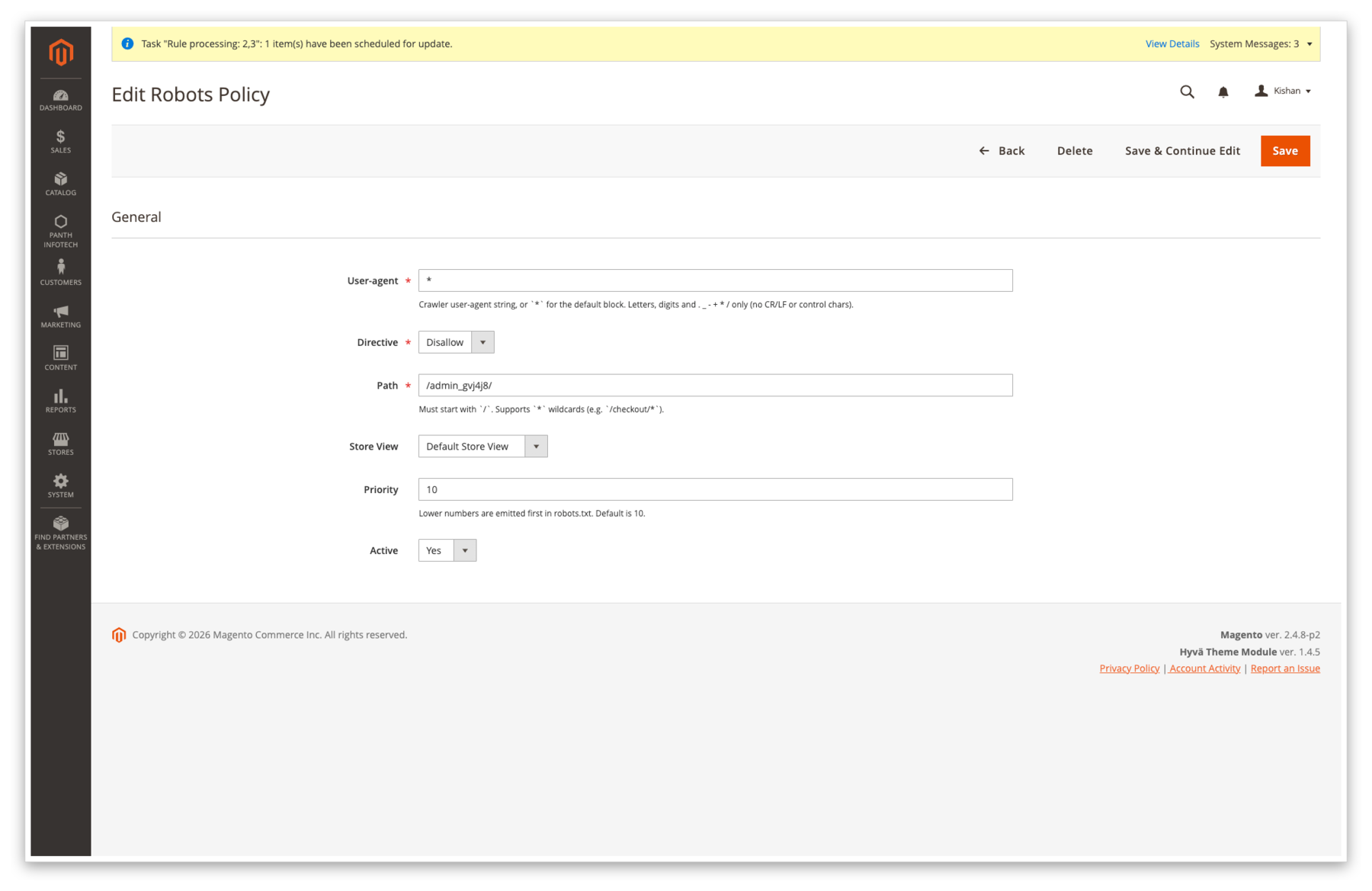
Manage policies under Panth Extensions and select the intended scope. Review default rows and generated output before saving a broad wildcard policy.
Changelog
Read the package changelog before an upgrade. Compare the entry with the exact installed version and source reference.
Compatibility
The inspected release declares PHP ~8.1.0||~8.2.0||~8.3.0||~8.4.0 and specific Magento component constraints in its Composer manifest. These are dependency requirements. They do not establish that every PHP, Magento edition, patch release and theme combination has been tested. Match your platform to Adobe's system requirements and validate the package on a staging copy with your installed extensions.
Requirements
Composer requires mage2kishan/module-core:^1.0 and the Magento components listed in this release's composer.json. Resolve the full project dependency set before installation. Check your PHP version, deployment mode and store scope, and back up the application and database before a change.
Installation
Install on a development or staging copy first. The Composer package token below identifies this module; choose the version you intend to deploy. Run setup, compilation and static asset steps according to your deployment mode and project process. Adobe's extension installation guide explains the release workflow. The commands shown here are examples to review for your environment.
composer require mage2kishan/module-robots-seo
bin/magento module:enable Panth_Core Panth_RobotsSeo
bin/magento setup:upgrade
bin/magento setup:di:compile
bin/magento cache:clean
bin/magento module:status Panth_RobotsSeo
# STORE_URL is the base URL of the store view, without a trailing slash
curl -s "$STORE_URL/robots.txt"
curl -sI "$STORE_URL/customer/account/login" | grep -i x-robots-tag
Configuration
Choose the intended store scope before editing settings. Review the release-specific sections below, enable one capability at a time and compare the saved values with the resulting storefront or generated file.
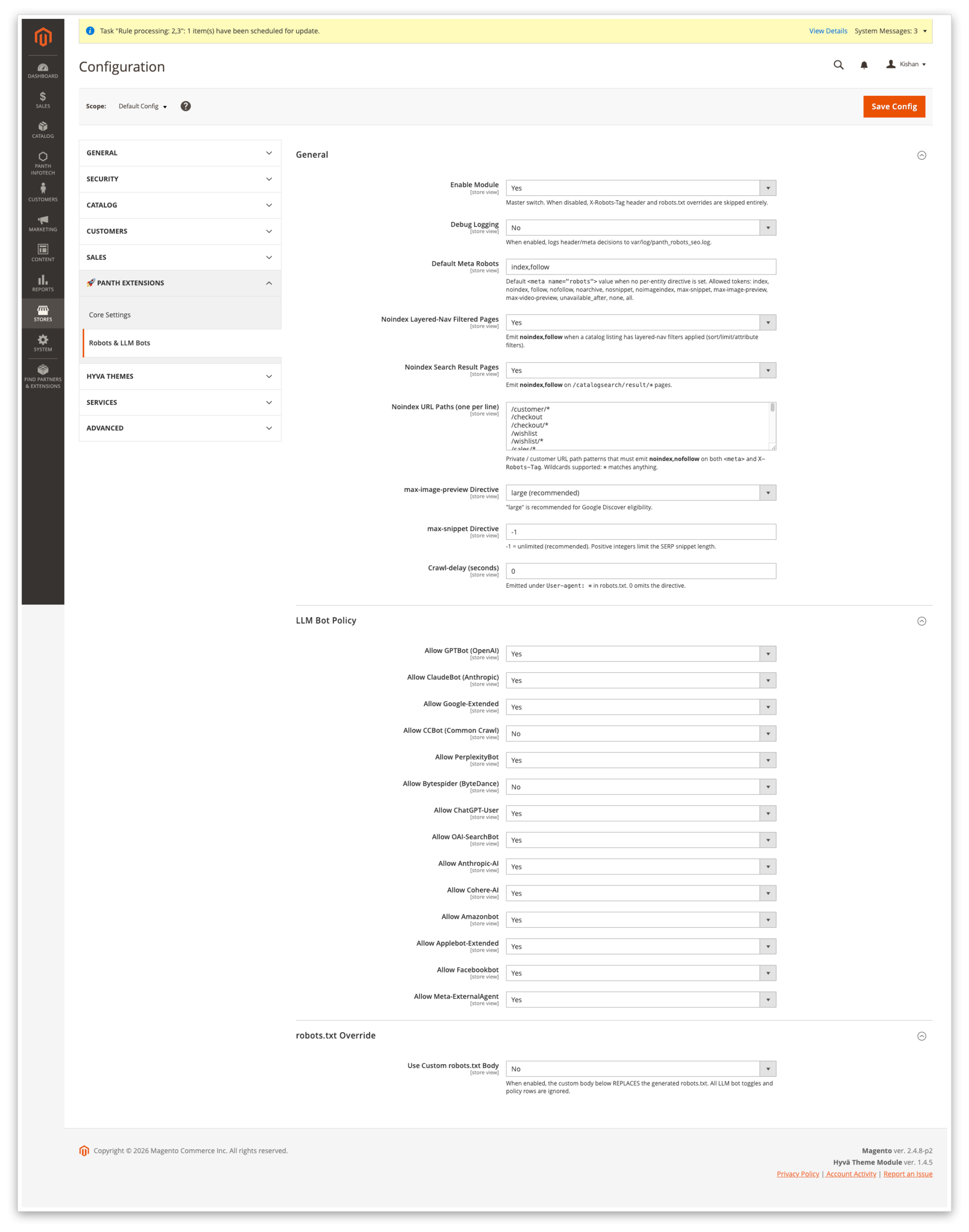
General (panth_robots_seo/general/*)
Set the module switch, default directive, filtered-page and search-page handling, ignored query parameters, noindex paths and preview directives. The filtered-page rule treats unknown query parameters differently from ignored tracking parameters; test campaign and navigation URLs.
LLM Bot Policy (panth_robots_seo/llm_bots/*)
Each named toggle contributes user-agent directives to the generated robots.txt body. It expresses a policy to crawlers that read and honour it. It does not guarantee a crawler will comply, remove previously collected content or include your pages in AI answers.
robots.txt Override (panth_robots_seo/robots_txt/*)
A replacement body takes over from the generated policy output. Review that body whenever changing crawler toggles or policy rows; those generated rules are not a substitute for the active override.
Uninstallation
Review installed dependants before removing this package. Back up the database, configuration and generated files first. Disabling or removing the code does not by itself remove every stored setting or table. Check the release README for retained data and use a reviewed removal plan.
bin/magento module:disable Panth_RobotsSeo
composer remove mage2kishan/module-robots-seo
bin/magento setup:upgrade
bin/magento setup:di:compile
bin/magento cache:clean
License
This inspected release is free and open source under the MIT License. Keep the copyright and permission notice when redistributing it. See the release licence. The licence does not establish a support term, a refund promise or future-version compatibility.
Developer Notes
The module is Panth_RobotsSeo. Model/Robots/PolicyResolver handles robots.txt policies, while MetaResolver and the response plugin handle indexing directives. The Filter SEO package has a separate facet-count rule. LLMs.txt is a separate content-discovery package and cannot override robots instructions.
| Module Category | SEO & Indexing |
|---|---|
| Best For | All Sizes |
Changelog
-
1.0.2
- X-Robots-Tag plugin DI wiring. XRobotsTagPlugin::__construct declared ?MetaResolver = null and ?NoindexPathMatcher = null, so Magento's ObjectManager silently injected null for both and the plugin fell through to the "default, index,follow" branch for every request. Consequences: /customer/, /checkout, /wishlist, etc. never received noindex, nofollow; max-image-preview and max-snippet were never appended to any response. The defaults have been removed so the dependencies are now required, matching the intent in the original design. Flush caches + regenerate DI after upgrading (bin/magento cache:flush && bin/magento setup:di:compile).
- /robots.txt self-overriding X-Robots-Tag. The controller sets X-Robots-Tag: noindex on its own response, but the beforeSendResponse plugin ran afterwards and always overwrote it with the default index,follow,max-image-preview:large,max-snippet:-1. The plugin now short-circuits when the request path is /robots.txt so the controller's directive wins.
- Stale url_rewrite on upgrade from Panth_AdvancedSEO. The original InstallRobotsTxtRewrite patch was idempotent on insert (skipped when a row for robots.txt already existed) so upgrading sites that had Panth_AdvancedSEO's legacy rewrite (target_path=seo/robots/index) kept their stale row and /robots.txt returned a 404 HTML page. New RefreshRobotsTxtRewrite data patch upserts the target to seo_robots/robots/index regardless of current state.
- Admin CRUD, the missing half. The previous release shipped the listing UI component + controllers but no layout files, so the panth_robots_seo/policy/index and .../edit pages rendered empty. This release adds:
-
1.0.1
- ACL XML duplicate resource-id error that prevented the admin config page from loading (Panth_X::config was declared under both Panth_Core::panth_extensions and Magento_Config::config). The redundant declaration under Panth_Core::panth_extensions has been removed; the menu link continues to gate on the real system-config resource.
-
1.0.0, 2026-04-20
- Initial release, extracted from Panth_AdvancedSEO.
- Panth\RobotsSeo\Api\RobotsPolicyInterface with meta / header / robots.txt body / LLM-bot policy methods.
- Panth\RobotsSeo\Model\Robots\PolicyResolver, aggregates LLM-bot toggles + panth_seo_robots_policy rows + sitemap references into a per-store robots.txt body.
- Panth\RobotsSeo\Model\Robots\MetaResolver, per-entity robots meta resolver with URL-pattern overrides (layered nav, search results).
Works well with
Separate free modules. Install only what you need.
-

Advanced SEO Extension for Magento 2
Manage Magento product, category and CMS metadata with templates, rules, bulk editing and canonical controls... -

Crosslinks, Auto Internal Linking for Magento 2
Rule-based internal linking for Magento 2. Map a keyword to a URL, a product SKU or a category ID, and it... -

Filter SEO, Clean Layered-Nav URLs for Magento 2
Create path-based URLs for Magento layered-navigation options, manage filter-page metadata and set a... -

HTML Sitemap for Magento 2
Add a customer-facing /sitemap page with selected category, product and CMS links. Configure category depth... -

Hreflang Manager for Magento 2
Map equivalent Magento product, category and CMS pages across language or regional store views, then emit... -

Image SEO, Alt & Title Generator for Magento 2
Generate rendered product-image labels from store-scoped name, SKU, store and category templates. Review...

Questions before you install?
Send me your composer.json and I will check for conflicts first. Free. Installation is +$45, custom work is quoted first.