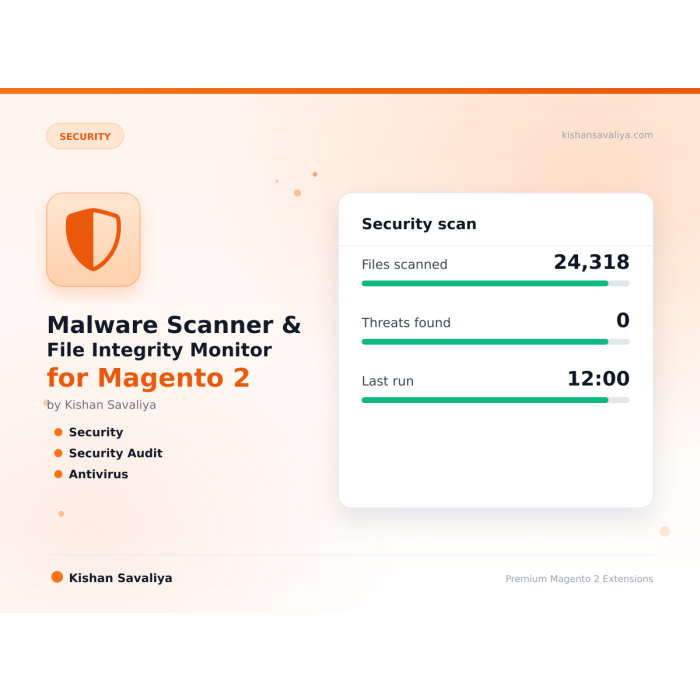

Signature-Based Malware Scanning
Four signature types — regex patterns, literal byte sequences, suspicious filenames, and pathglob matchers
Signature-based malware scanner and file integrity monitor for Magento 2 — detects webshells, PolyShell payloads, PHP object-injection attacks, and polyglot files using regex, literal, filename, and pathglob signatures.
Key Features:
Additional Services
Built-in from day one. No add-ons, no upsell, no licence keys to renew.
Four signature types — regex patterns, literal byte sequences, suspicious filenames, and pathglob matchers
Baseline hashing — fingerprints every PHP file in core Magento and your custom modules
Zero-touch containment — critical severity findings inside writable upload zones (pub/media, var/import, custom options) are moved to a q…
Findings grid — filter, sort, and bulk-action every detection
Cron-based scheduling — nightly, weekly, or custom cron expression
MEQP compliant — passes Adobe's Magento Extension Quality Program
Malware Scanner & File Integrity Monitor for Magento 2. Signature-based malware scanner and file integrity monitor for Magento 2. Detects webshells, PHP object-injection payloads, and polyglot files using regex, literal, filename, and pathglob signatures. Auto-quarantines critical findings, ships with admin dashboard, scheduled scans, and email notifications. Compatible with Magento 2.4.4 - 2.4.8 and PHP 8.1 - 8.4.
Engineered for magento 2 security, magento malware scanner, file integrity monitor magento — ships with sensible defaults, full admin controls, and zero JavaScript bloat. Works identically on Hyva and Luma; passes Adobe MEQP with zero severity-10 violations.
Signature-based malware scanner and file integrity monitor for Magento 2 — detects webshells, PolyShell payloads, PHP object-injection attacks, and polyglot files using regex, literal, filename, and pathglob signatures. Ships with quarantine support, an admin dashboard, scheduled scans, and email notifications so store owners know within minutes if their codebase has been tampered with.
Panth Malware Scanner is a production-grade security extension for Magento 2 and Adobe Commerce that combines a signature-driven malware scanner with a file integrity monitor. It recursively walks your Magento document root, matches every file against a curated signature catalog (regex patterns, literal byte sequences, suspicious filenames, and path globs), and flags any file that looks like a webshell, backdoor, cryptominer, or injection payload. Critical findings are automatically quarantined inside writable upload zones, a detailed admin grid surfaces every detection with file path, signature match, severity, and first-seen timestamp, and email notifications alert your team the moment a scheduled scan finds something suspicious.
Whether you are hardening a freshly migrated Magento 2.4.8 store, running a post-breach security audit, or just want continuous peace of mind, Panth Malware Scanner gives you enterprise-grade malware detection without the enterprise price tag.
The screenshots below were captured on a production Magento 2.4.8 install running Panth Malware Scanner, during the active PolyShell (APSB25-94) exploitation wave that started March 17, 2026. Every row is a real attacker request that hit the store and got shut down at the framework layer — no webshell ever executed.
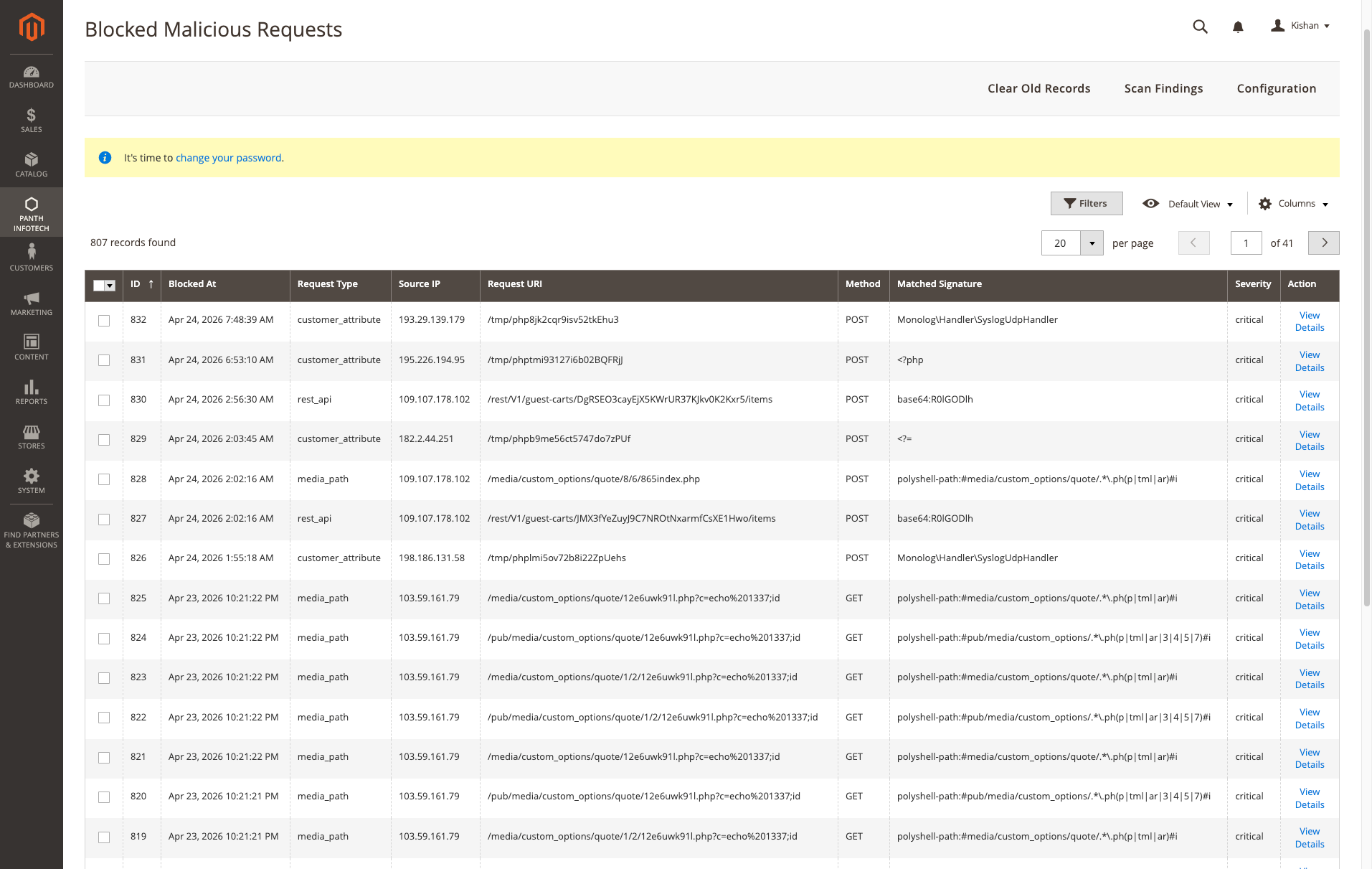
What you're seeing: 807 blocked malicious requests across 41 pages — attackers probing /media/custom_options/quote/*.php, /pub/media/custom_options/quote/..., POST bodies starting with <?php, base64 GIF-header polyglot payloads (base64:R0lGODlh), and customer-attribute upload abuse via /tmp/phpXXX filenames. Every one blocked at the controller layer before the payload ever reached disk.
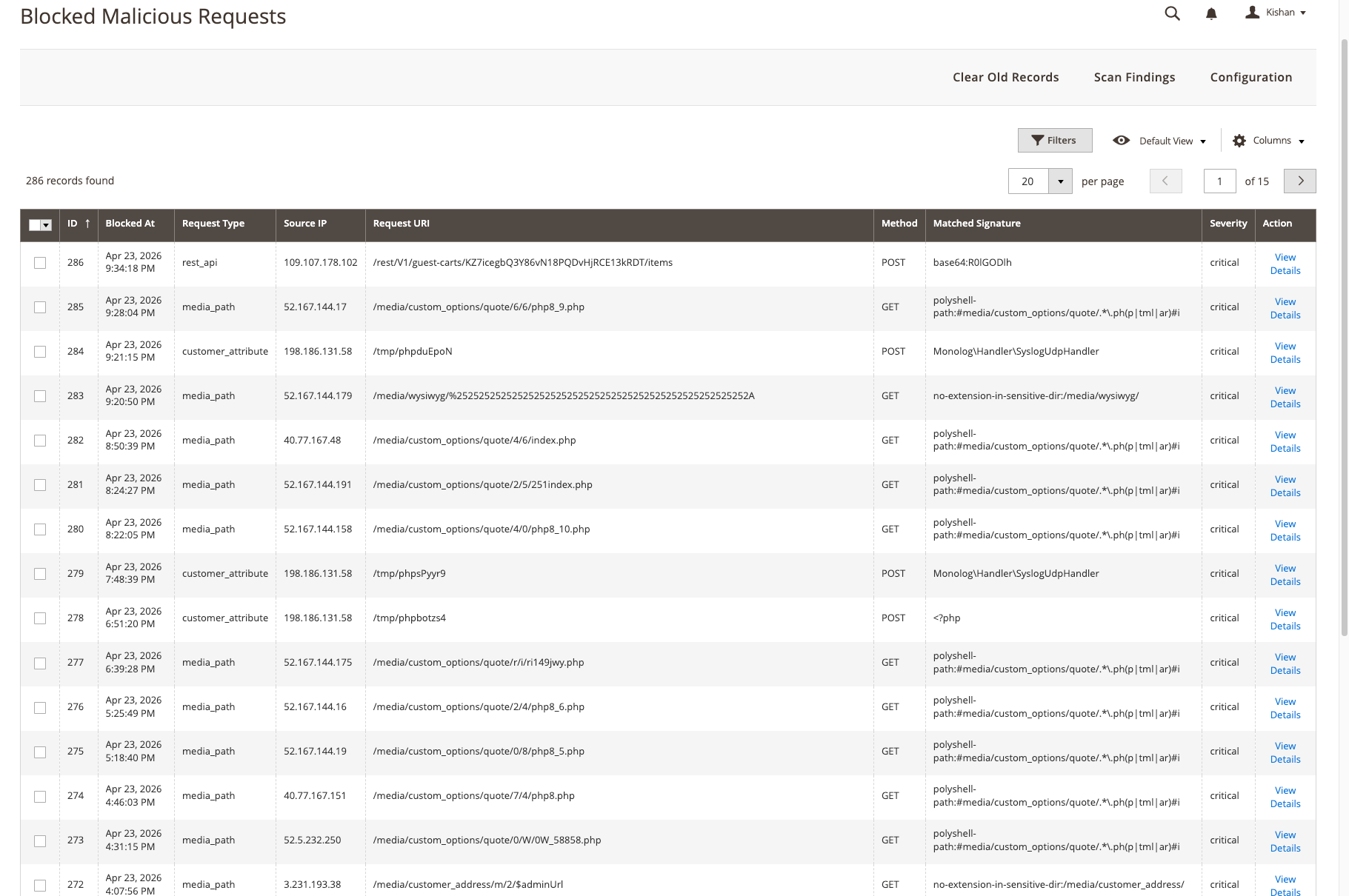
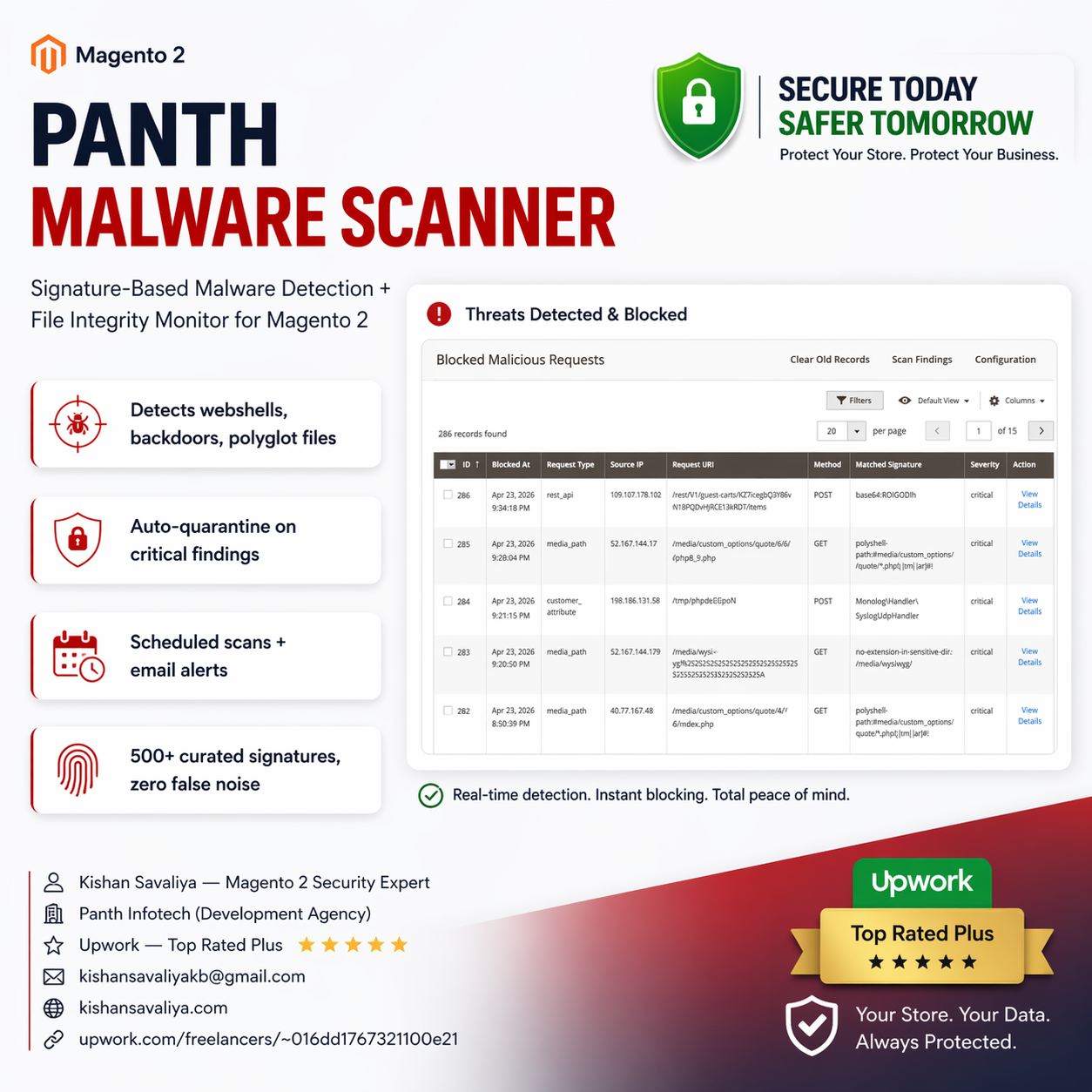
Earlier snapshot — 286 blocked requests. Same attack shapes: PolyShell polyglot uploads, rest_api base64 webshell uploads, customer_attribute tmpfile abuse. Each match has a source IP, the exact URI, the matched signature rule, and a severity flag — everything you need to trace an incident, file an abuse report, or block the IP at the WAF.
Get a free quote for your Magento security audit in 24 hours — malware removal, file integrity hardening, WAF setup, penetration testing, and ongoing security monitoring.
Kishan SavaliyaTop Rated Plus on Upwork 100% Job Success • 10+ Years Magento Experience Adobe Certified • Security Specialist |
Panth Infotech AgencyMagento Security & Development Team Malware Removal • Security Audits • Hardening Performance • SEO • Adobe Commerce Cloud |
Visit our website: kishansavaliya.com | Get a quote: kishansavaliya.com/get-quote
vendor/ composer dependenciesvar/, generated/, pub/static/, and other noise directoriespub/media, var/import, custom options) are moved to a quarantine folder automatically1. Cron trigger (or manual admin scan)
2. Recursive walker enumerates files (skips noise dirs)
3. Each file matched against signature catalog
- regex | literal | filename | pathglob
4. Vendor allowlist filters known-safe composer packages
5. Findings recorded to database with severity + match
6. Critical findings in writable zones auto-quarantined
7. Email notification sent if threshold exceeded
8. Admin grid updated with latest scan results
Panth Malware Scanner ships with 11 active guard plugins that run in-line during request dispatch and file upload — each one closes a different part of the PolyShell attack chain. Guards are registered via etc/*/di.xml and are ALWAYS ON while the module is enabled. Every guard is fail-open: any internal error logs a warning and lets the request proceed, so a guard bug can never take the site offline.
| # | Guard | Hooks | What it blocks |
|---|---|---|---|
| 1 | Upload Guard | Magento\Framework\File\Uploader::save |
Universal upload hook — catches WYSIWYG, product image, swatch, theme, customer attachment, import, and GraphQL file uploads. Inspects the first 64 KiB of every risky-extension upload against the centralised IOC needle list. |
| 2 | REST API Guard | Magento\Webapi\Controller\Rest::dispatch |
Scans POST/PUT/PATCH bodies on every REST request (scoped to webapi_rest) for raw + base64-encoded IOCs. Skips sensitive auth/checkout routes to avoid false positives. |
| 3 | GraphQL Guard | Magento\Framework\GraphQl\Query\QueryProcessor::process |
Scans GraphQL mutation source + variables JSON for PolyShell payloads (scoped to graphql area). Queries are skipped — they cannot inject files. |
| 4 | Custom Option Guard | Magento\Catalog\Model\Product\Option\Type\File\ValidatorFile::validate |
Inspects every file uploaded as a Magento product custom-option BEFORE it is moved into pub/media. Rejects polyglots (image header + <?php) and any IOC match. |
| 5 | Media Path Guard | Magento\MediaStorage\App\Media::launch (pub/get.php) |
Returns a bare 404 when pub/get.php is asked to serve an executable extension (.php/.phtml/.phar/etc.) inside /media/customer_address/, /media/custom_options/, /media/downloadable/, /media/wysiwyg/, or /media/catalog/product/. |
| 6 | Frontend Path Guard | Magento\Framework\App\FrontController::dispatch |
Intercepts frontend HTTP dispatch and returns a bare 404 for any URI matching a known PolyShell victim path (e.g. /option_id/<n>/index.php, /media/custom_options/*.phtml). |
| 7 | Customer File Guard | Magento\Customer\Model\FileProcessor::saveTemporaryFile + ::moveTemporaryFile |
Validates filenames + content for uploads targeting the customer, customer_address, and customer_addresses entity types — the primary PolyShell drop zone. |
| 8 | Customer Attribute Guard | Magento\Framework\App\Action\Action::execute (frontend) |
Controller-level file-upload guard. Engages only for controllers whose class name indicates an upload action (Upload/File/Attachment/Avatar/Address\Edit) so the cost on every other frontend request is negligible. |
| 9 | Image Content Guard | Magento\Catalog\Model\ImageUploader::saveFileToTmpDir |
Enforces a strict image extension allowlist (jpg, jpeg, gif, png, webp, svg) for admin catalog image uploads. Rejects no-extension files, double-extension files, and polyglots. |
| 10 | Webapi File Guard | Magento\Framework\Api\Uploader::save (webapi_rest) |
Catches REST service-contract file uploads routed through the Webapi-specific uploader subclass. Enforces the executable-extension blocklist before bytes land in pub/media. |
| 11 | Cart Custom Option Guard | Magento\Catalog\Model\CustomOptions\CustomOptionProcessor::convertToBuyRequest |
The PolyShell primary entry point. Scans file_content / file_data / base64_encoded_data keys inside cart-item custom options at add-to-cart time and rejects any payload containing an IOC needle (raw, base64-encoded, or base64-decoded). |
Every blocked request is persisted to the panth_malware_blocked_request audit table with source IP, user agent, method, URI, matched signature, payload SHA-256, and a 500-character excerpt. Browse them under Admin → Panth Infotech → Malware Scanner → Blocked Requests.
Active guards can be reviewed read-only under Stores → Configuration → Panth Extensions → Malware Scanner → Active Protections.
| Type | Description | Example Use Case |
|---|---|---|
| regex | PCRE pattern matched against file contents | eval\s*\(\s*base64_decode\s*\( — classic eval backdoor |
| literal | Exact byte sequence search | PolyShell magic header bytes |
| filename | Matches file basename | shell.php, c99.php, r57.php known webshells |
| pathglob | Glob pattern against full relative path | pub/media/*.php — PHP files in media directory |
Each signature declares a severity (critical, high, medium, low) and a human-readable description that appears in the findings grid.
| Requirement | Versions Supported |
|---|---|
| Magento Open Source | 2.4.4, 2.4.5, 2.4.6, 2.4.7, 2.4.8 |
| Adobe Commerce | 2.4.4, 2.4.5, 2.4.6, 2.4.7, 2.4.8 |
| Adobe Commerce Cloud | 2.4.4 — 2.4.8 |
| PHP | 8.1.x, 8.2.x, 8.3.x, 8.4.x |
| MySQL | 8.0+ |
| MariaDB | 10.4+ |
| Hyva Theme | 1.0+ (compatible) |
| Luma Theme | Native support |
| Required Dependency | mage2kishan/module-core (free) |
Tested on:
composer require mage2kishan/module-malware-scanner
bin/magento module:enable Panth_Core Panth_MalwareScanner
bin/magento setup:upgrade
bin/magento setup:di:compile
bin/magento setup:static-content:deploy -f
bin/magento cache:flush
app/code/Panth/MalwareScanner/Panth_Core dependencybin/magento module:enablebin/magento module:status Panth_MalwareScanner
# Expected: Module is enabled
After installation navigate to: Admin → Panth Infotech → Malware Scanner
Settings live under Stores → Configuration → Panth Extensions → Malware Scanner.
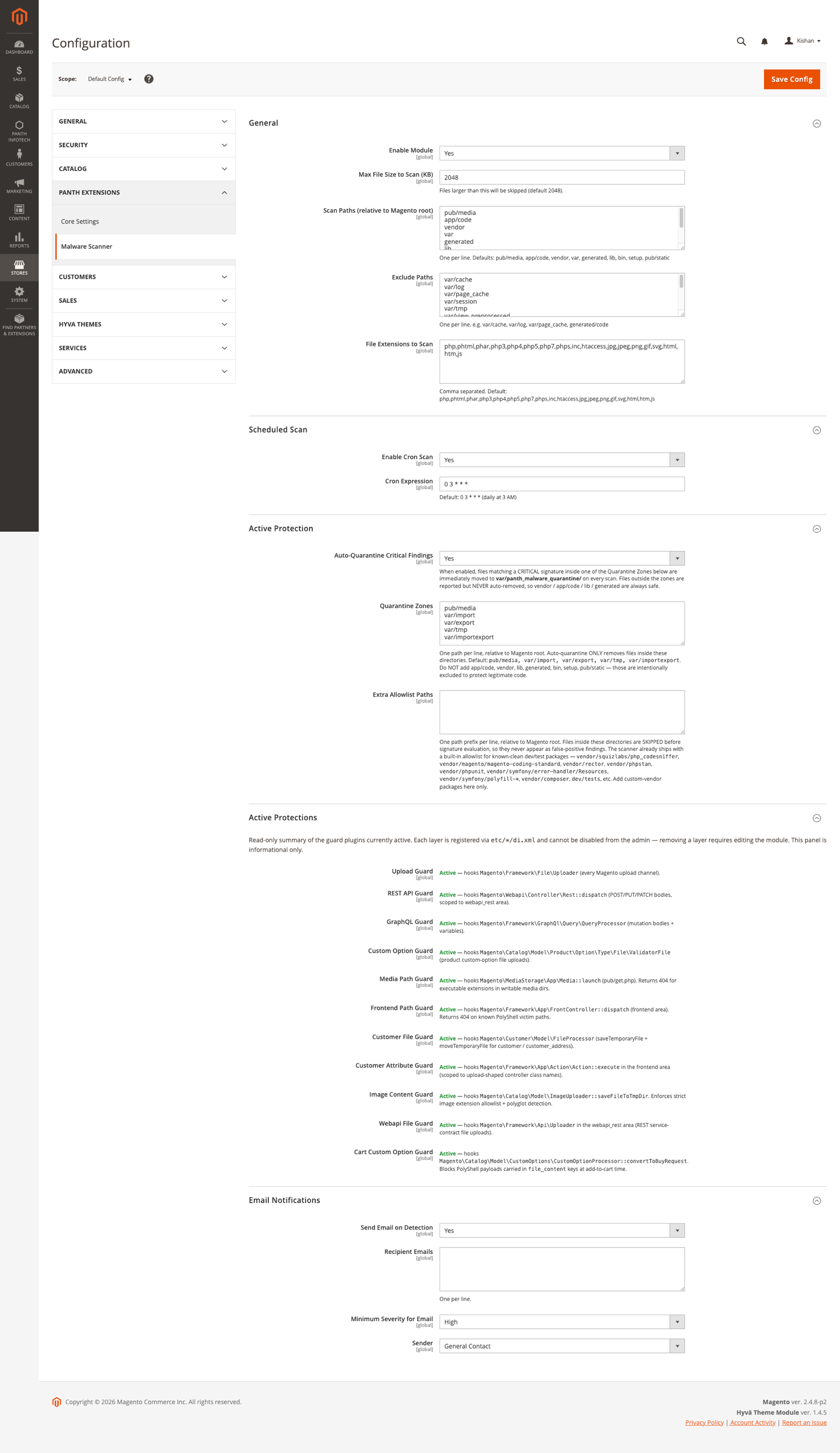
Full admin surface in one screen — scan paths, exclude paths, file-extension allowlist, cron schedule, auto-quarantine toggle, Quarantine Zones (only these directories can have files auto-removed — app/code, vendor, lib, generated are always safe), Extra Allowlist Paths, the read-only Active Protections panel showing all 10 guard plugins wired through DI (Upload Guard, REST API Guard, GraphQL Guard, Custom Option Guard, Media Path Guard, Frontend Path Guard, Customer File Guard, Customer Attribute Guard, Image Content Guard, Webapi File Guard, Cart Custom Option Guard), and Email Notifications with severity threshold + sender.
| Setting | Default | Description |
|---|---|---|
| Enable Scanner | Yes | Master toggle for the module |
| Scan Schedule | 0 2 * * * |
Cron expression — default runs daily at 02:00 |
| Scan Root | BP (Magento base path) |
Directory to scan recursively |
| Skip Directories | var,generated,pub/static,node_modules,.git |
Comma-separated directory names to skip |
| Enable Quarantine | Yes | Move critical findings in writable zones to quarantine |
| Quarantine Path | var/panth_quarantine |
Destination folder for quarantined files |
| Notification Emails | store owner | Comma-separated recipients for scan alerts |
| Notification Threshold | high |
Minimum severity to trigger email |
| Enable Vendor Allowlist | Yes | Skip files under vendor/ that match the allowlist |
The Panth Infotech → Malware Scanner admin area provides:
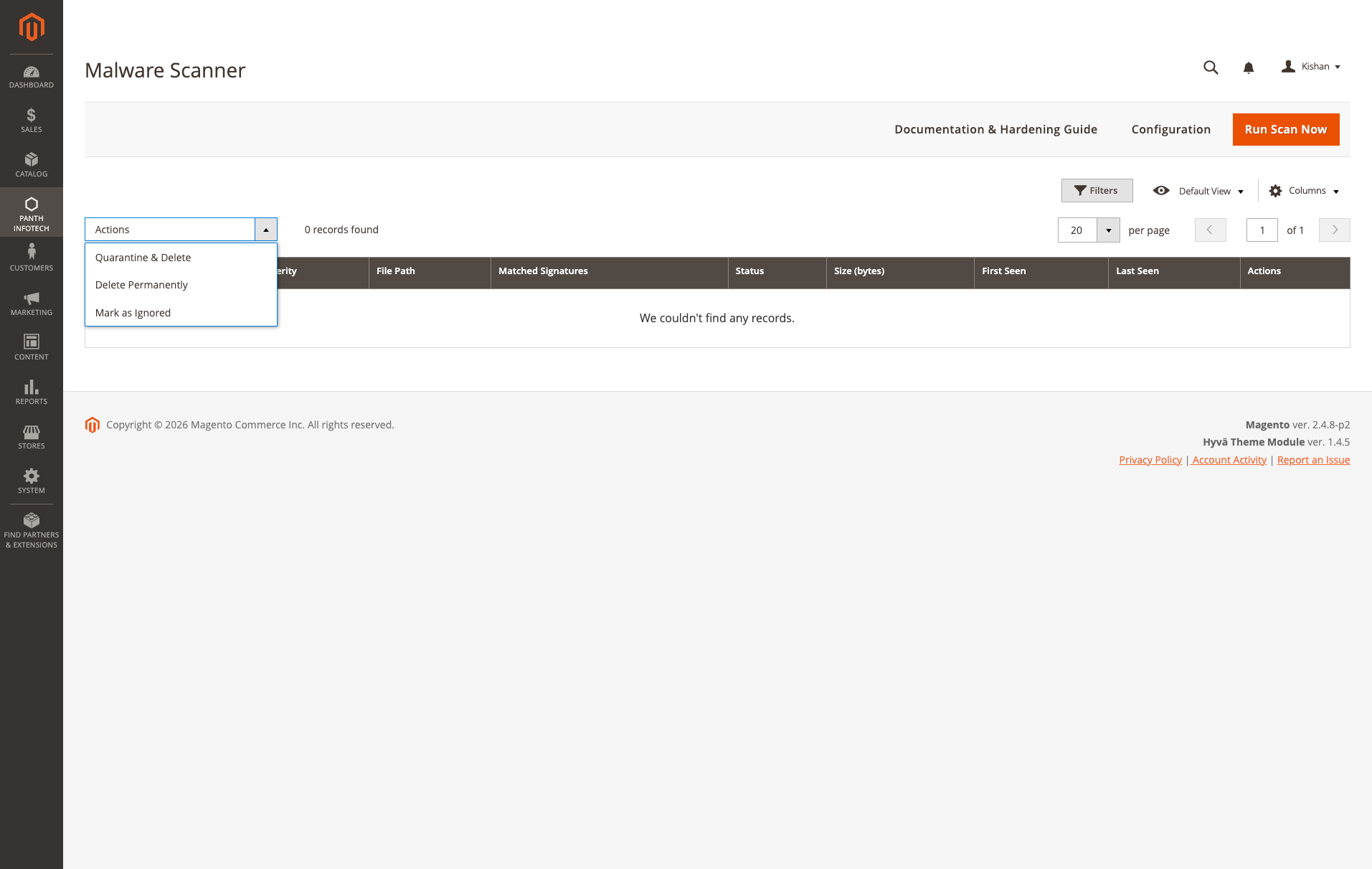
Scan Findings grid — the single place every detection surfaces. Columns are Severity (critical / high / medium / low), File Path (with click-through to the full finding detail), Matched Signatures (all rules that flagged this file, comma-separated), Status (active / quarantined / ignored), Size (bytes), First Seen, Last Seen, and Actions. The mass-actions dropdown at the top supports Quarantine & Delete (move the file into var/panth_malware_quarantine/ and drop from scan index), Delete Permanently (hard unlink — use after confirming the finding is malicious), and Mark as Ignored (keep it in the grid but stop alerting — for known-clean false positives). Run Scan Now in the header triggers an ad-hoc scan; the empty "0 records found" state shown here is what a hardened store should look like.
The module registers a Magento cron job that honours the Scan Schedule configuration. Default schedule runs every night at 02:00 server time. For manual triggering:
bin/magento panth:malware:scan
(Console command scaffolding ships with the module for CI pipelines.)
When a critical finding is detected inside a writable upload zone (for example pub/media, var/import, or custom options attachments), the file is moved — not copied — to the configured quarantine folder. Metadata is preserved so an authorised admin can:
Files outside writable zones (for example files in app/code or vendor) are flagged only — never modified automatically — because changing them could break the store.
Admins have two removal options per finding:
| Action | Behavior | Use When |
|---|---|---|
| Quarantine & Delete (default) | Moves the file to var/panth_malware_quarantine/ with timestamp prefix. Original is removed. Evidence is preserved. |
Standard handling. Allows forensic review and restore. |
| Delete Permanently | Unlinks the file completely. No recovery possible. | When malware is confirmed and evidence is no longer needed (saves disk space, removes re-infection risk). |
Both actions are available as mass actions in the Findings grid — select one or more rows, choose your action from the dropdown. The permanent delete is behind a confirmation dialog to prevent accidents.
When a scheduled scan finishes with findings at or above the configured severity threshold, an email is sent to every recipient in Notification Emails. The email includes:
Panth Malware Scanner is built specifically for Magento 2 filesystems — it understands the directory layout, knows which folders are writable from the frontend, and ships signatures tuned for Magento-targeted threats (Magecart skimmers, PolyShell webshells, admin-layout injection). Traditional AV tools scan everything with generic signatures and produce noise.
The Scanner module focuses on detection, quarantine, and alerting. For active prevention (upload guards, REST API filters) Panth Infotech also ships integrated firewall guards described in the module composer description.
No. Scans run via cron in the background. The file walker uses streaming reads and skips known-noise directories so a full scan of a typical 2.4.8 store completes in minutes, not hours.
Yes. Signatures are declared in XML and merged across modules — add your own via an etc/panth_malware_signatures.xml file in a custom module.
They are moved to var/panth_quarantine with full metadata. Nothing is deleted automatically — review and delete manually once confirmed malicious.
Yes. The module is compatible with Adobe Commerce Cloud — quarantine path is configurable to a writable mount.
Yes. Source is on GitHub at github.com/mage2sk/module-malware-scanner.
Yes. Panth_Core is a free required dependency — Composer installs it automatically.
| Channel | Contact |
|---|---|
| kishansavaliyakb@gmail.com | |
| Website | kishansavaliya.com |
| +91 84012 70422 | |
| GitHub Issues | github.com/mage2sk/module-malware-scanner/issues |
| Upwork (Top Rated Plus) | Hire Kishan Savaliya |
| Upwork Agency | Panth Infotech |
Response time: 1-2 business days.
Looking for malware removal, post-breach cleanup, security hardening, or penetration testing for your Magento 2 store? Get a free quote in 24 hours:
Panth Malware Scanner is licensed under a proprietary license — see LICENSE.txt. You may install and use it on Magento installations you own or operate per your purchase agreement.
Built and maintained by Kishan Savaliya — kishansavaliya.com — a Top Rated Plus Magento developer on Upwork with 10+ years of eCommerce experience and a strong security focus.
Panth Infotech is a Magento 2 development agency specialising in high-quality, security-focused extensions and themes for both Hyva and Luma storefronts. Our extension suite covers security, SEO, performance, checkout, product presentation, customer engagement, and store management — over 34 modules built to MEQP standards and tested across Magento 2.4.4 to 2.4.8.
Browse the full extension catalog on the Adobe Commerce Marketplace or Packagist.
Ready to secure your Magento 2 store?
SEO Keywords: magento 2 security, malware scanner, file integrity monitor, magento security audit, magento malware detection, magento 2 webshell scanner, magento antivirus, magento security extension, magento file monitor, magento polyglot detection, magento php object injection, magento magecart detection, magento 2.4.8 security, panth malware scanner, panth infotech security, magento hardening, magento post-breach cleanup, magento penetration testing, magento cron security scan, magento quarantine, magento signature scanner, regex malware signatures, literal signature scanning, filename webshell detection, pathglob malware detection, magento vendor allowlist, magento admin security dashboard, magento email security alerts, magento scheduled security scan, hire magento security expert, top rated plus magento freelancer, kishan savaliya magento, mage2kishan, mage2sk
| Module Category | Security |
|---|---|
| Best For | Mid-Market |
Panth Malware Scanner is built specifically for Magento 2 filesystems — it understands the directory layout, knows which folders are writable from the frontend, and ships signatures tuned for Magento-targeted threats (Magecart skimmers, PolyShell webshells, admin-layout injection). Traditional AV tools scan everything with generic signatures and produce noise.
The Scanner module focuses on detection, quarantine, and alerting. For active prevention (upload guards, REST API filters) Panth Infotech also ships integrated firewall guards described in the module composer description.
No. Scans run via cron in the background. The file walker uses streaming reads and skips known-noise directories so a full scan of a typical 2.4.8 store completes in minutes, not hours.
Yes. Signatures are declared in XML and merged across modules — add your own via an etc/panth_malware_signatures.xml file in a custom module.
They are moved to var/panth_quarantine with full metadata. Nothing is deleted automatically — review and delete manually once confirmed malicious.
Yes. The module is compatible with Adobe Commerce Cloud — quarantine path is configurable to a writable mount.
Yes. Source is on GitHub at github.com/mage2sk/module-malware-scanner.
Yes. Panth_Core is a free required dependency — Composer installs it automatically.
Panth Malware Scanner is built specifically for Magento 2 filesystems — it understands the directory layout, knows which folders are writable from the frontend, and ships signatures tuned for Magento-targeted threats (Magecart skimmers, PolyShell webshells, admin-layout injection). Traditional AV tools scan everything with generic signatures and produce noise.
Yes. The module ships dedicated Hyva templates built with Alpine.js and Tailwind CSS. Theme detection is automatic via Panth_Core.
No. Panth Core is completely free and will remain free forever. It is the foundation library that other (paid) Panth extensions depend on.
No. Merchant-authored labels (anything other than empty, the product name, Image, main product photo, or the raw filename) are preserved. Only Magento's default placeholders get upgraded to template output.
No — any valid WhatsApp number works. However, a WhatsApp Business account is strongly recommended for commercial use (auto-replies, labels, catalog).
Yes, on the product detail page. When the module is enabled, the default gallery.phtml is replaced with the Panth gallery (one template for Hyva, another for Luma — chosen automatically).
Unlimited. Each form has a unique identifier and its own submissions scope.
No. The head block is cacheable="true" so the full JSON-LD payload is baked into full-page cache. Providers only run on uncached renders; cached hits serve the pre-rendered <script> tag with zero PHP evaluation.
Yes. The module ships with two purpose-built templates — Alpine.js + Tailwind for Hyva and vanilla JS for Luma — and auto-switches based on your active storefront theme.
Yes. When enabled, Panth Footer takes over the footer.container block and renders its own configurable footer. You can disable it any time to restore the default footer.
Talk to Kishan directly — written quote, scope and timeline within 24 hours. No sales call.
Malware Scanner & File Integrity Monitor for Magento 2