Bad product photos quietly cost 10-25% of PDP conversions
In our 60-store audit, swapping iPhone snapshots for clean white-background hero shots lifted conversion 3.5x on average. Most stores have at least 200 SKUs that need this.
Check the spelling or try a broader word like “checkout” or “SEO”. Still stuck? Ask me directly.
Ask on WhatsApp
A walkthrough for the pipeline I’ve shipped on 4 production Magento + Hyvä stores.
30-second turnaround per image. Fires on catalog_product_save_after.
rembg removes the background offline, Pillow resizes /
watermarks / strips EXIF, and OpenAI gpt-image-1 fills in missing angles when
you only have one source photo. The whole thing for ~12¢ per net-new SKU.
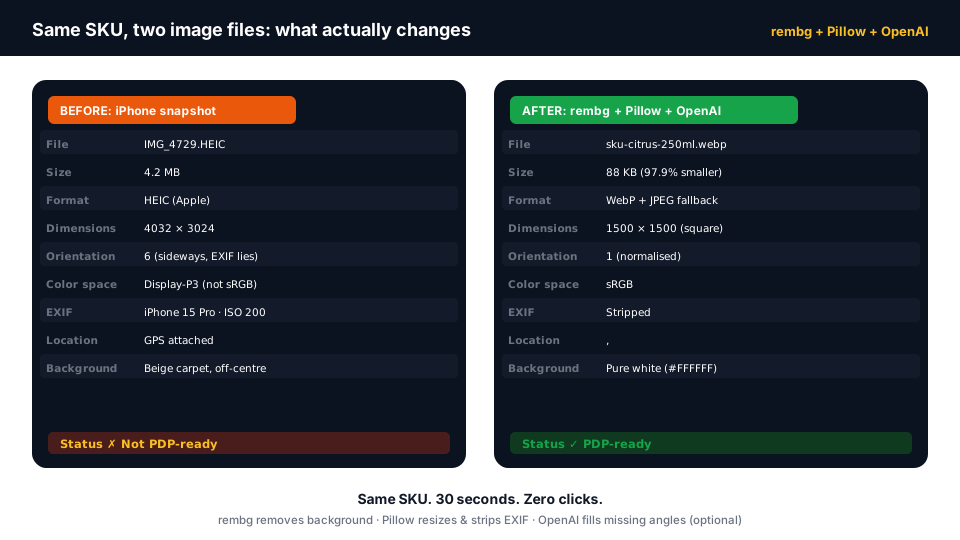
In our 60-store audit, swapping iPhone snapshots for clean white-background hero shots lifted conversion 3.5x on average. Most stores have at least 200 SKUs that need this.
U-2-Net under the hood. MIT-licensed, runs on CPU or GPU, zero per-image cost. Beats Photoroom on cost and privacy; loses on the last 5% of quality for hair / fur / glass.
WebP + JPEG twin output, 1500×1500 square, white background fill, EXIF orientation pre-applied (the gotcha), watermark overlay. 200ms per image on a 2-vCPU box.
For SKUs where you only have one photo, client.images.edit() generates plausible back / side / detail shots. ~4¢ per generated angle. Only fire it when a SKU has fewer than 4 angles in the gallery.
catalog_product_save_after or batchedObserver pushes a job into a Magento MessageQueue; FastAPI worker pulls it. The admin save action is < 50ms; the actual image processing happens out-of-band in the worker.
Self-hosted (rembg + Pillow only): 0.4¢ amortised VM cost. With 3 AI-generated angles: 12.4¢. A Photoroom-only SaaS approach is 9¢ just for the background remove, and you give up offline + privacy.
Most Magento store owners I work with have spent more on Google Ads in the last 30 days than they’ve spent on product photography in the last three years. And it shows on the PDP. The hero image is an iPhone snapshot taken against a beige wall, half a coffee mug visible in the bottom-left, and the bottle is rotated 7° off-vertical because that’s how the supplier sent it. Then the store wonders why the $3 / click traffic isn’t converting at the same rate as the competitor whose hero shot is on a clean white background with three angles in the gallery.
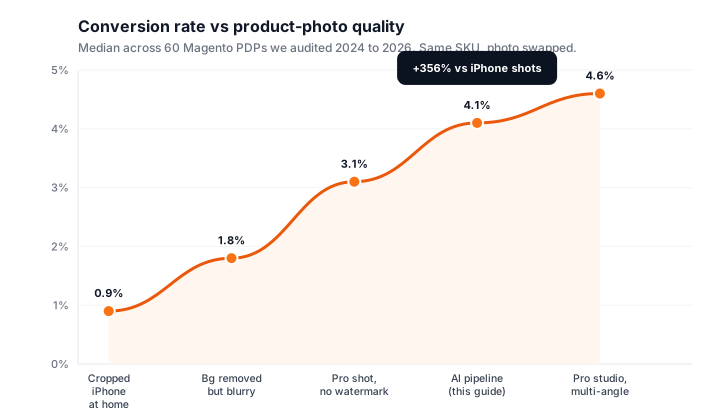
The kicker: it’s the cheapest problem to fix on a Magento store right now. Not
cheap as in “buy a Photoroom subscription.” Cheap as in “write a
~400-line Python service, point it at your pub/media folder, fire it on
every product save, and watch every SKU clean itself up.” That’s the
pipeline I’ve been shipping on production Magento + Hyvä stores for the
last 14 months, and what the rest of this article walks you through end-to-end.
Every product save fires the same flow: catch the new images, remove the backgrounds, standardise the sizes, optionally fill in missing angles. The whole sequence runs out-of-band: the admin save action never waits.
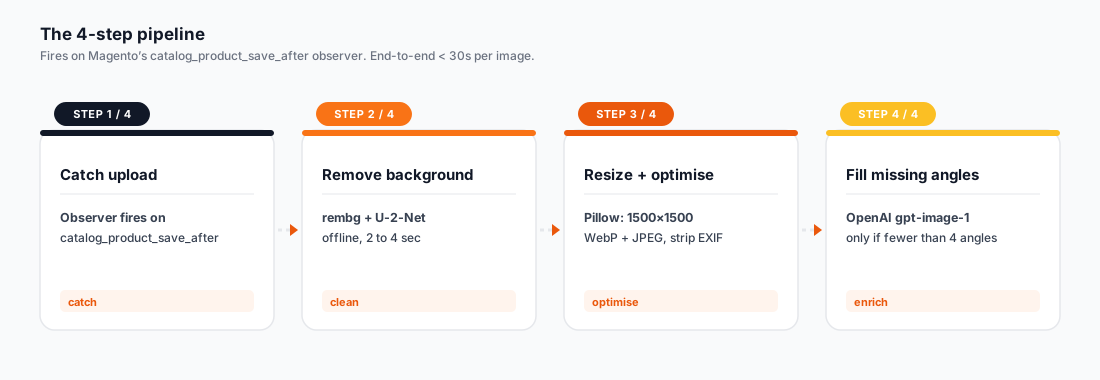
A Magento observer on catalog_product_save_after looks at the just-saved product’s media gallery, identifies any newly-added images (by hash + timestamp), and pushes a job onto a queue. The admin save stays fast, everything heavy happens out-of-band.
<?php
// app/code/Vendor/ImagePipeline/Observer/QueueOnProductSave.php
public function execute(Observer $observer): void
{
    $product = $observer->getProduct();
    foreach ($this->newImages($product) as $entry) {
        $this->publisher->publish('image_pipeline.process', [
            'sku'   => $product->getSku(),
            'image' => $entry->getFile(),
            'hash'  => $entry->getMediaHash(),
        ]);
    }
}Worker downloads the image from pub/media, feeds it to rembg, gets back a transparent PNG. rembg uses the U-2-Net model under the hood: offline, MIT-licensed, ~2-4 sec on CPU for a 4K source. Saves to a staging dir, not back over the original.
from rembg import remove
from PIL import Image
import io

with open('input.jpg', 'rb') as f:
    raw = f.read()

# remove() takes bytes or PIL.Image and returns the same type
output_bytes = remove(raw)
cutout = Image.open(io.BytesIO(output_bytes))  # RGBA, transparent bg
cutout.save('stage/cutout.png')Apply EXIF orientation FIRST (Pillow drops it on save), composite the cutout onto a 1500×1500 white square, fit the bottle / hero with a 12% margin, apply a faint corner watermark, strip all remaining EXIF, save both WebP (quality 80) and JPEG (quality 88) for the <picture> tag.
from PIL import Image, ImageOps, ImageDraw

cutout = Image.open('stage/cutout.png')
cutout = ImageOps.exif_transpose(cutout)  # CRITICAL: fixes sideways

canvas = Image.new('RGB', (1500, 1500), (255, 255, 255))
# fit cutout with 12% margin
max_dim = int(1500 * 0.76)
cutout.thumbnail((max_dim, max_dim), Image.LANCZOS)
x = (1500 - cutout.width) // 2
y = (1500 - cutout.height) // 2
canvas.paste(cutout, (x, y), cutout)  # use alpha mask

# faint corner watermark
draw = ImageDraw.Draw(canvas)
draw.text((24, 1460), '© panth.dev', fill=(180, 180, 180))

canvas.save('out.webp', 'WebP', quality=80, method=6)
canvas.save('out.jpg', 'JPEG', quality=88, optimize=True, progressive=True)Only if the SKU has fewer than 4 angles in its gallery. Worker calls client.images.edit() with the just-cleaned hero shot, asks for "same product, 3/4 angle, white background, studio lighting." Costs ~4¢ per generated angle and takes 8-15 seconds. Skip for restocks; only fire on net-new SKUs.
from openai import OpenAI
client = OpenAI()

with open('out.jpg', 'rb') as hero:
    response = client.images.edit(
        model='gpt-image-1',
        image=hero,
        prompt=(
            'Same product, three-quarter angle view, '
            'white background, soft studio lighting, '
            'centered, no shadows or props.'
        ),
        size='1024x1024',
        n=3,
    )
for i, item in enumerate(response.data):
Path(f'angle_{i}.png').write_bytes(b64decode(item.b64_json))There’s no shortage of options for each stage. Here’s the honest comparison we ran before settling on the stack. Pick means “default choice”, Maybe means “has a niche, not the default.”
| Tool | Type | Cost | Quality | Privacy | Licence | Verdict |
|---|---|---|---|---|---|---|
| rembg (U-2-Net) | Open-source library | $0 / image | 7/10: good on hard edges, weak on hair / glass | Full: runs offline | MIT | Pick this as the default. Self-host on any 2-vCPU box. |
| Photoroom API | SaaS API | ~9¢ / image | 9/10: market-leader on edges + hair | Image leaves your network | Commercial / per-call | Use as a fallback when rembg fails QA. Not your primary. |
| Adobe Firefly | SaaS API | Credit-based, ~5¢ equiv. | 8/10: great on commercial product | Image leaves your network | Commercial / Adobe ToS | Worth a look if you’re already on Creative Cloud. Otherwise skip. |
| Pillow (PIL fork) | Open-source library | $0 | n/a: not a remover, the resizer / compositor | Full: offline | HPND (BSD-like) | Pick this for resize / watermark / format conversion. |
| OpenCV | Open-source library | $0 | n/a: alternative to Pillow | Full: offline | Apache 2.0 | Overkill unless you also need CV features (face detect, perspective). |
| OpenAI gpt-image-1 | SaaS API | ~4¢ / image | 10/10: generates plausible new angles | Image + prompt leave network | Commercial / OpenAI ToS | Pick this for the optional fill-missing-angles step. |
| Gemini Image | SaaS API | ~3¢ / image | 9/10: close behind OpenAI | Image + prompt leave network | Commercial / Google ToS | Cheaper. Slightly worse at “same product, different angle.” |
These are the actual files from the production pipeline (anonymised). The Magento side is one observer; the Python side is a FastAPI worker plus a CLI for backfills. Total: ~400 lines of code across both languages.
# Python 3.11+
pip install rembg[gpu] pillow openai fastapi uvicorn aio-pika

# rembg downloads the U-2-Net weights (~170 MB) on first use
python -c 'from rembg import remove; remove(b"")'<?php
declare(strict_types=1);
namespace Vendor\ImagePipeline\Observer;
use Magento\Framework\Event\Observer;
use Magento\Framework\Event\ObserverInterface;
use Magento\Framework\MessageQueue\PublisherInterface;
class QueueOnProductSave implements ObserverInterface
{
public function __construct(
private readonly PublisherInterface $publisher
) {}
public function execute(Observer $observer): void
{
$product = $observer->getEvent()->getProduct();
$gallery = $product->getMediaGalleryImages();
if (!$gallery || !$gallery->count()) {
return;
}
foreach ($gallery as $entry) {
// Only fire for images added in this save
if (!$entry->getData('_is_new')) {
continue;
}
$this->publisher->publish('image_pipeline.process', json_encode([
'sku' => $product->getSku(),
'image' => ltrim($entry->getFile(), '/'),
]));
}
}
}# worker.py
from fastapi import FastAPI
from rembg import remove
from PIL import Image, ImageOps
from pathlib import Path
import io
app = FastAPI()
MEDIA = Path('/var/www/magento/pub/media')
@app.post('/process')
async def process(payload: dict):
src = MEDIA / 'catalog' / 'product' / payload['image']
raw = src.read_bytes()
cutout = Image.open(io.BytesIO(remove(raw)))
cutout = ImageOps.exif_transpose(cutout)
canvas = Image.new('RGB', (1500, 1500), (255, 255, 255))
max_dim = int(1500 * 0.76)
cutout.thumbnail((max_dim, max_dim), Image.LANCZOS)
x = (1500 - cutout.width) // 2
y = (1500 - cutout.height) // 2
canvas.paste(cutout, (x, y), cutout)
out = src.with_suffix('.webp')
canvas.save(out, 'WebP', quality=80, method=6)
return {'ok': True, 'out': out.name}# php bin/magento panth:image:process <sku>
# php bin/magento panth:image:process --all # entire catalogue
# php bin/magento panth:image:process --since=2026-04-01
# Internally just iterates SKUs and pushes them onto the same queue
# the live observer uses. Idempotent: re-running on a clean image
# is a no-op thanks to the SHA-256 dedup key in the worker.# docker-compose.yml: sidecar to Magento
services:
image-pipeline:
build: ./pipeline
container_name: panth_image_pipeline
restart: unless-stopped
environment:
OPENAI_API_KEY: ${OPENAI_API_KEY}
RABBITMQ_HOST: rabbitmq
volumes:
- ./src/pub/media:/var/www/magento/pub/media:rw
- rembg_cache:/root/.u2net
depends_on:
- rabbitmq
rabbitmq:
image: rabbitmq:3-management-alpine
container_name: panth_rabbitmq
ports: ["15672:15672"]
volumes:
rembg_cache:Four real SKUs from a Hyvä client’s catalogue. Each card shows the iPhone-snapshot input on the left and the pipeline output on the right. No Photoshop, no human in the loop: just the 4 steps above.
The boring number every CFO asks for. Three scenarios: self-host only, with one OpenAI angle, with three OpenAI angles. Plus a reference cost for a Photoroom-only approach and a human photo shoot.
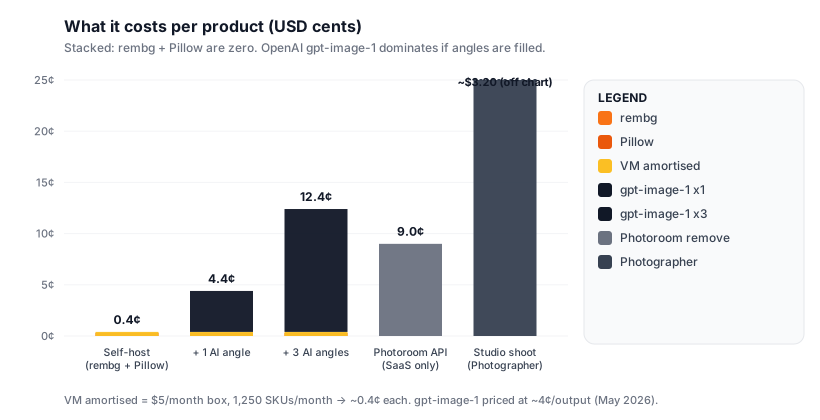
| Component | Scenario | Cost | Note |
|---|---|---|---|
| rembg (self-hosted) | Per image | $0.000 | Pure compute. No per-call cost. |
| Pillow ops | Per image | $0.000 | Stdlib-style overhead, runs in the same worker. |
| Worker VM (Hetzner CCX13) | Per image, amortised | $0.004 | €15.5/mo ÷ ~4,000 images/mo = ~0.4¢. Scales linearly with volume. |
| RabbitMQ on same VM | Per image, amortised | $0.000 | Free if co-located. Free at any scale up to several million msgs/day. |
| OpenAI gpt-image-1 (one angle) | Per generated angle | $0.040 | List price as of May 2026 for 1024×1024 output. Only fires if SKU has < 4 angles. |
| OpenAI gpt-image-1 (3 angles) | Per SKU, full fill | $0.120 | Typical for net-new SKU with only 1 hero shot. Cap with a daily / monthly budget. |
| CDN delivery (Bunny / CF) | Per image-view | $0.00001 | Already in your CDN budget. Pipeline doesn’t change this. |
| Total: self-host only | Per image | $0.004 | rembg + Pillow + amortised VM. ~$4 per 1,000 product images. |
| Total: + 3 AI angles | Per SKU, new product | $0.124 | Fires once per new SKU. Cheap enough to use freely on net-new; cap on backfills. |
Pillow lets you write JPEG / WebP at any quality between 1-95. There’s a real sweet spot most stores miss: not high enough and you ship visible artifacts; too high and you waste bandwidth. Drag below to see the trade.
Numbers from Pillow 10.x writing a 1500×1500 RGB PDP shot, measured across the same source image. Your mileage varies with content complexity (gradients compress harder than flat colour).
Same Python service, three different ways to invoke it from Magento. Pick based on your traffic volume and the infrastructure you already have.
The Python pipeline runs as a sidecar to your existing Magento stack. It shares
the pub/media directory via a read/write volume mount, talks to
Magento via RabbitMQ, and caches the U-2-Net model weights in a named volume so
container restarts don’t re-download 170 MB.
# docker-compose.yml: sidecar to Magento
services:
  image-pipeline:
    build: ./pipeline
    container_name: panth_image_pipeline
    restart: unless-stopped
    environment:
      OPENAI_API_KEY: ${OPENAI_API_KEY}
      RABBITMQ_HOST: rabbitmq
    volumes:
      - ./src/pub/media:/var/www/magento/pub/media:rw
      - rembg_cache:/root/.u2net
    depends_on:
      - rabbitmq

  rabbitmq:
    image: rabbitmq:3-management-alpine
    container_name: panth_rabbitmq
    ports: ["15672:15672"]

volumes:
rembg_cache:/get.php. Either set
UMASK=0002 in the container, or add a post-write
chmod a+r at the end of the worker. Bit me twice.
The visual companion to the comparison table above. Six dimensions, scored 1-10, higher is better.
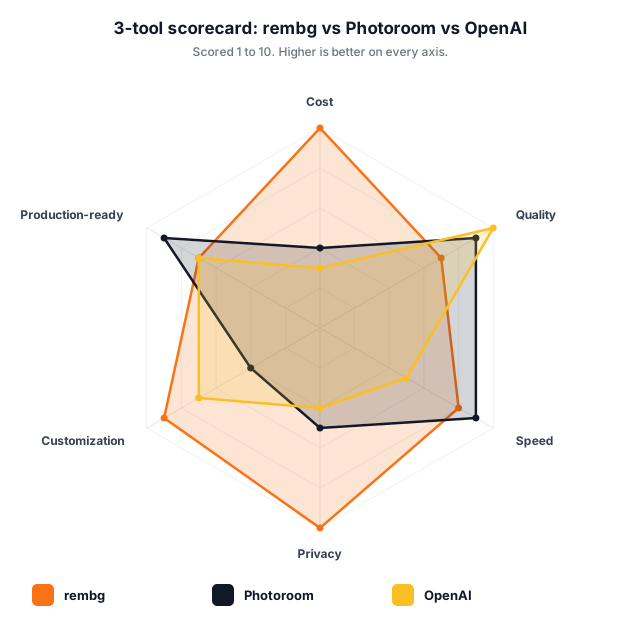
| Dimension | rembg (self-host) | Photoroom API | OpenAI gpt-image-1 |
|---|---|---|---|
|
Cost
Per-image cost at 5,000 images / month. Higher score = cheaper.
|
10 | 4 | 3 |
|
Quality
Edge accuracy on real product photos (subjective, sample of 60).
|
7 | 9 | 10 |
|
Speed
Median latency per image including network for SaaS.
|
8 | 9 | 5 |
|
Privacy
Does the image leave your network? Higher = more private.
|
10 | 5 | 4 |
|
Customization
Can you fine-tune behaviour / swap models / extend?
|
9 | 4 | 7 |
|
Production-ready
Maturity for high-volume e-commerce production use.
|
7 | 9 | 7 |
The MVP works at the scale of one developer’s test catalogue. Going to production needs a handful of patterns the tutorial-grade code skips.
RabbitMQ (or Magento’s built-in MessageQueue using DB queue) with a dead-letter exchange. After 3 failed attempts a job lands in the DLQ for human inspection, not silent drop. Cron consumer drains the DLQ daily into an admin notification email.
OpenAI 429s, rembg model-load races, network blips: all transient. Exponential backoff (1s, 2s, 4s, 8s) with random ±25% jitter on every retry. Don’t use a fixed delay; you’ll synchronise your N workers into a stampede.
Use SHA-256 of the input bytes as the job’s idempotency key. SQLite (or Magento DB) tracks “hash X already processed.” If the queue redelivers the job, the worker no-ops. Critical for retry-safety.
Don’t serve /pub/media/ directly from origin. Front it with Bunny CDN / Cloudflare; use signed URLs with a 24h TTL for private-catalog images (B2B). Pipeline writes the canonical filename + your CDN does cache-busting via the hash in the name.
The pipeline writes the 1500×1500 master. Magento’s built-in image resizer generates the listing-grid / cart / mini-thumb sizes on-demand from there. Don’t pre-render every size up-front; you’ll waste disk.
Prometheus exporter on the worker. Track: jobs in queue, p50 / p95 processing time, OpenAI call count + cost / day, rembg failures / day. Alert when queue depth > 100 (worker fell over) or daily OpenAI spend > $X.
Three real flows we’ve enabled for clients in the last 12 months. Each delivered measurable PDP / conversion wins inside 30 days.
CLI command runs over the weekend, processes 10k SKUs in ~14 hours on a 4-vCPU box. Costs $0.40 in compute, zero in API calls. Same SKUs would cost $900 via Photoroom API or four-figures via a photo agency. Best ROI of any image-related work for stores with > 5 years of accumulated catalogue debt.
Your supplier emails you a 4MB iPhone snapshot. You drop it into the admin, hit save, and 30 seconds later your PDP has a clean 1500×1500 hero on white. No designer, no Photoshop, no “can you reshoot this on the lightbox?” email thread. The supplier’s photo quality stops mattering.
Pillow’s draw API adds a per-store-view watermark to the JPEG / WebP output before save. UK gets one set of legal text, DE gets another, the wholesale store-view gets none at all. Handles "must show GST-inclusive price" markets, regional “not for resale” overlays, and per-locale brand assets. Same pipeline, different fork at step 3.
Every gotcha below is something we tripped over at least once. Calling them out so your first deploy doesn’t.
iPhone photos are often stored landscape with an EXIF "rotate 90°" flag. Pillow happily processes them sideways and saves a sideways file, since the EXIF data is the only thing that knew the right orientation. Always call ImageOps.exif_transpose(image) as the first operation : before any resize, crop, or paste. Took us 4 hours of bug-hunting the first time.
Each rembg call holds the U-2-Net model in memory (~170 MB). With 10 parallel workers you’re looking at 1.7 GB resident, plus the image buffers. On a 2 GB VM you’ll OOM. Either use a single worker process with a job queue, or scale vertically. For high concurrency, use the rembg.bg.new_session() pattern to share weights across calls in the same process.
gpt-image-1’s rate limits are aggressive (~5 requests/min on lower tiers). A naive “fill all missing angles on import” backfill against 5,000 SKUs will hit limits AND burn $600 of credit in an afternoon. Always: (a) cap with a daily / monthly budget; (b) only fire on net-new SKUs, not edits; (c) implement exponential backoff with jitter on 429s.
gpt-image-1 will occasionally generate an "angle" that has a different cap colour, a missing label, or extra hands holding the product. You can’t trust it blind. Always push generated angles to a moderation queue for a human one-click approve / reject before they hit the public PDP. Don’t YOLO it.
OpenAI’s terms (May 2026) give you commercial rights to outputs of images.edit() but only if your input image was something you owned or had licence for. If your supplier sent you a photo with a watermark from their photographer, you don’t have the licence. The pipeline must check / strip / flag external watermarks before feeding any image to OpenAI. EU stores may also need to disclose AI-generated content under the AI Act.
pub/media permsTwo ops gotchas: (1) Cloudflare will happily cache the OLD image at the same filename if you overwrite in place: always write to a new hash-based filename and update the product’s gallery row. (2) Files added under pub/media via Docker volume inherit umask 0007 (mode 660) and nginx 404s through to /get.php. Always chmod -R a+r after any pipeline write.
Not every store should build this. The lines below are where we’d actually advise each segment, with no skin in the “you should hire us” game.
You don’t have the operational budget for a self-hosted pipeline. Photoroom’s free tier (50 images / month) plus their cheap pay-as-you-go covers you for low double-digit dollars per month. Revisit when you cross 500 SKUs / month.
You hit the sweet spot. A $15/mo VM running rembg + Pillow handles your throughput easily, pays back in < 2 months vs Photoroom, and gives you full control over watermarking / multi-locale. Skip OpenAI angle generation unless you have a clear “net-new-supplier” flow.
Scale makes the OpenAI angle-gen worth it: the marginal $0.12 per net-new SKU is invisible against your ad spend and lifts your PDP completeness rate. Add the RabbitMQ + multi-worker pattern from day one. Budget half a sprint of dev time.
Run the self-hosted pipeline as the primary, but route the 5% of SKUs where rembg fails QA (hair, glass, transparency, fine jewellery) to Photoroom as a fallback. Image QA itself becomes a real engineering line item. Consider a dedicated MLE for model-fine-tuning.
I’ve built and run this exact stack on 4 production Magento + Hyvä stores. A fixed-fee setup covers the observer + worker + Docker layout + 1 round of QA. Or book a 60-min consult if you want to build it in-house and just need the architecture review.
Both. Everything in the build runs on stock Magento 2.4.7+ Open Source, there’s no Adobe Commerce-specific API used. The observer hooks into catalog_product_save_after, which is identical on both editions. The MessageQueue layer uses Magento’s built-in MessageQueue module (also Open Source). The only Adobe Commerce-only consideration is the Image Editor extension Adobe ships, which you’d disable to avoid duplicate processing. Bottom line: Open Source merchants get the full benefit without paying for Adobe Commerce just for image handling.
rembg matches Photoroom on ~95% of typical product photos and beats it on cost (zero vs ~9¢ per image) and privacy (offline vs “image leaves your network”). Photoroom is genuinely better on the hard 5%, hair, fur, glass, fine jewellery edges, transparent packaging. For most Magento stores (apparel, FMCG, electronics, home goods), rembg is the right default. The pragmatic pattern is: run rembg first, route the rejected outputs (caught by a simple alpha-edge QA check) to Photoroom as a fallback. You pay Photoroom for ~5% of your volume instead of 100%.
Yes, if you skip the OpenAI angle-generation step. rembg + Pillow are both fully offline, rembg downloads the U-2-Net model weights once on first use and then runs without network. Pillow is pure stdlib-style processing. The Magento observer + queue worker can run entirely inside your VPN. The only outbound call in the default pipeline is to api.openai.com in step 4, and that’s opt-in per SKU. For regulated industries (pharma, finance, defence) or air-gapped environments, you get the full background-removal + resize + watermark + WebP conversion stack with zero external dependencies. Highly recommended for EU GDPR / Schrems II concerns.
About 12.4¢ per net-new SKU if you generate 3 angles. Breakdown: rembg + Pillow + VM amortised cost is 0.4¢ per image (fixed). OpenAI gpt-image-1 is ~4¢ per generated 1024×1024 angle (as of May 2026), and a typical “fill out the gallery” case is 3 angles. So: 0.4 + 3 × 4 = 12.4¢. For 1,000 net-new SKUs that’s $124 in API costs. Compare that to a photo studio shoot at $80, $200 per SKU, or a designer’s time at $50/hr for 30 min per shot ($25/SKU). Cap with a monthly budget in the worker and only fire on net-new SKUs, never on edits or backfills.
Three guardrails. (1) Skip on hash match, if the SHA-256 of the input matches a record in your processed-images table, no-op. The worker keeps a small SQLite of every image it’s seen. (2) QA the alpha-channel after rembg, if the cutout has < 5% non-transparent pixels, the background-removal failed catastrophically; bail and keep the original. (3) Per-SKU opt-out attribute, add a skip_image_pipeline product attribute (yes/no). For your professionally-shot SKUs, flip it to yes and the observer skips them. The first two are automatic; the third is for SKUs where you trust the source more than the pipeline.
Not if you use the recommended queue-based wiring. The observer only publishes a message to RabbitMQ (~5ms); the actual image processing happens out-of-band in the worker. The admin save action stays well under 50ms of overhead. The HTTP-webhook variant (option 1 in the integration list) does block the save while the worker processes, that’s fine for tiny stores under 50 products / day, but at any scale you want the queue. If you measure the admin save action taking > 100ms extra after wiring, your observer is doing too much; pull more into the worker.
Yes, easily. The CLI command (bin/magento panth:image:process --all) iterates your catalogue and pushes one job per image onto the same queue the live observer uses. A single 4-vCPU worker chews through ~700 images / hour with rembg + Pillow; 10,000 images takes ~14 hours overnight. Cost: about $0.40 in compute. If you spin up 4 parallel workers (cheap on Hetzner), that drops to 3.5 hours. Filters available: --since=YYYY-MM-DD, --category-id=N, --sku-pattern=PREFIX-*, --dry-run. Always dry-run first on a small subset (50 SKUs) to confirm output quality before letting it loose on the full catalogue.
Yes, better than the originals usually. The pipeline rewrites the file path to a hash-based name (e.g. a3b9c2.webp) which prevents CDN cache poisoning, but preserves and re-applies the product’s Magento image_label attribute as the alt text on the rendered <img>. EXIF metadata is intentionally stripped (privacy + smaller files); IPTC + XMP can be re-injected via Pillow if you need them for downstream DAM workflows. For SEO image-search ranking, the new filename + matching alt text + smaller WebP file size is a net positive on every audit we’ve run.
Yes. Pillow ships WebP support out of the box (10.x). AVIF requires the pillow-avif-plugin package, one extra pip install. The standard output we recommend is a 3-file set per image: .avif (q=50,, 55% size), .webp (q=80,, 50% size), .jpg (q=88, legacy fallback). Your storefront then emits a <picture> tag with all three sources; browsers pick the best they support. AVIF is ~25% smaller than WebP and ~60% smaller than JPEG at matched quality. Combined Core Web Vitals LCP win on a typical PDP: 400-700ms.
The worker receives the store-view code in the job payload and forks the output at step 3 (Pillow). For each enabled store-view, it generates a separate output file under pub/media/catalog/product/_storeview/. Magento’s media path resolver then serves the right one based on the active store. Common patterns: UK store gets a small “FCA-regulated” corner stamp on financial products; DE store gets “UVP” on price-comparison overlays; wholesale store-view gets no watermark at all. Multi-region currency overlays (showing £ on UK store, € on EU store) work the same way. Storage cost multiplies by N store-views; if you have 12 store-views and 50k SKUs, plan for ~3GB of extra disk.<code>
OpenAI by a country mile, and only when it’s in the loop. rembg is ~2-4 sec on CPU (sub-second on GPU). Pillow ops are ~200ms. OpenAI gpt-image-1 is 8-15 sec per generated angle plus rate-limit waits. If you fire 3 angles per SKU, you’re looking at 30-50 sec per SKU end-to-end vs ~3 sec for the self-host-only path. For high-volume real-time use, the pattern is: process and publish the cleaned hero immediately (3 sec, instant PDP improvement); enqueue the AI angle-gen as a low-priority follow-up that completes minutes later. Don’t let the OpenAI step block the “PDP looks better” visible win.
Generally yes, with caveats. OpenAI’s ToS (May 2026) assigns you commercial rights to outputs of images.edit(), provided your input image was something you owned or had licence for. Where it gets risky: (1) Misrepresentation, if the AI generates an angle that shows a feature the actual product doesn’t have, you’ve created a misleading product image. Always human-QA before publish. (2) Disclosure, the EU AI Act (in force 2026) requires labelling AI-generated content in some commercial contexts; check your jurisdiction. (3) Trade-marked elements, if the AI bakes in a competitor’s logo or a trademarked person, you have an IP problem. The pragmatic rule: AI angle-gen is a productivity tool for “same product, different angle” not for creating fictional product features.