
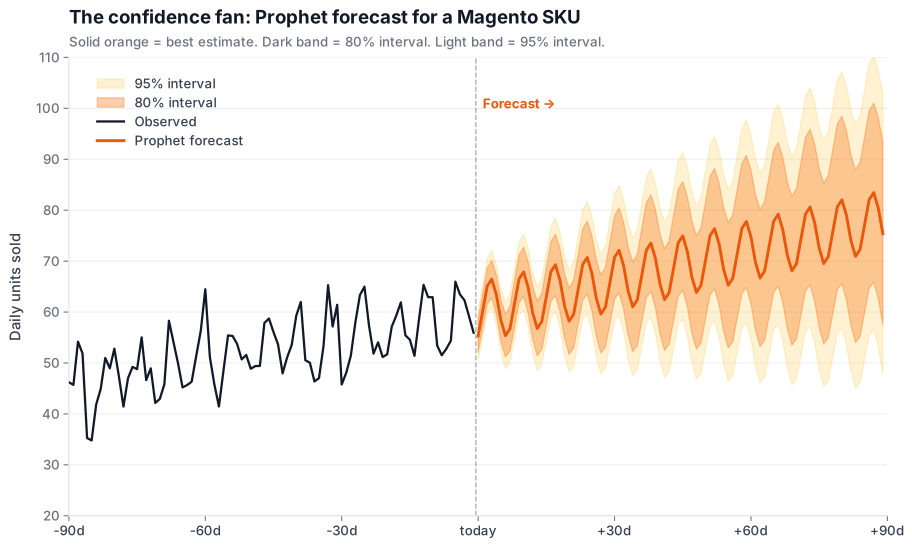
Stockouts and overstock are the same
bug with different symptoms. One leaks revenue (customers can’t
buy); the other leaks capital (cash tied up in shelves). Every Magento
merchant I know guesses their way through this: spreadsheets,
gut, last-year-plus-10%. This guide replaces the guess.
Pull your sales_order data into Python. Train a Prophet
model. Push 90-day SKU forecasts with confidence intervals back into
the Magento admin. Two weeks of work. Pays for itself the first time
you avoid a BFCM stockout.
The 6 takeaways in 60 seconds
panth_forecast table + Magento admin block is the cleanest write-back path.
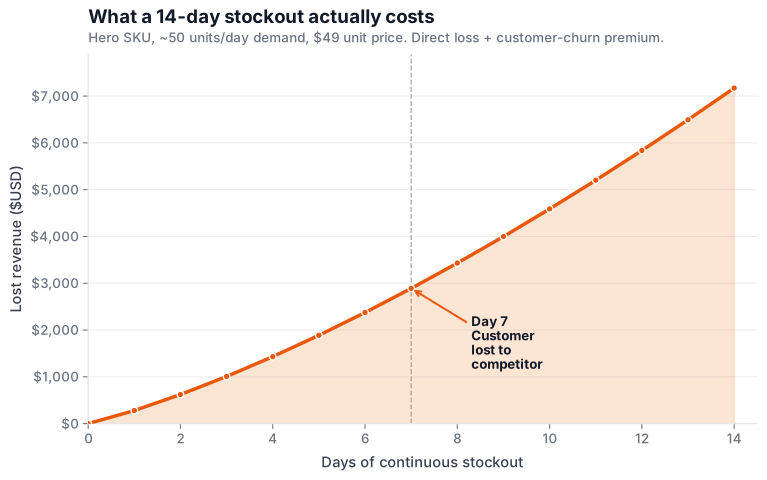
The cost of being wrong
Before we write any code, let’s be clear about the size of the leak. Industry-average numbers for mid-market Magento stores:
“A forecast doesn’t need to be perfect. It needs to be better than the gut it’s replacing. For most Magento merchants, that bar is much lower than they think.”
Pull daily-SKU sales from Magento
Prophet wants two columns: ds (date) and y
(the numeric value to forecast). Your job is to turn 18 months of
Magento order data into one row per SKU per day. The query below runs
against your read-replica if you have one; if you don’t, run it
during off-peak.
SELECT
    DATE(o.created_at) AS ds,
    oi.sku             AS sku,
    SUM(oi.qty_ordered) AS y
FROM sales_order_item oi
INNER JOIN sales_order o
    ON o.entity_id = oi.order_id
WHERE o.status IN ('complete', 'processing', 'shipped')
  AND o.created_at >= DATE_SUB(NOW(), INTERVAL 18 MONTH)
  AND oi.product_type = 'simple'
GROUP BY DATE(o.created_at), oi.sku
ORDER BY ds ASC, sku ASC;
Three rules that trip people up: (1) only simple products
configurable + bundle parents double-count if you don’t.
(2) Skip canceled and holded they
poison the trend. (3) Use the order’s created_at,
not the line-item’s updated_at : consistency
matters more than precision here.
From Python, the load is one line via SQLAlchemy. Use
PyGento if you want a typed ORM over the Magento
schema; pd.read_sql is fine for our purposes.
ARIMA vs Prophet vs LSTM: pick once
Three credible options. None of them is “the best” in isolation. The right pick depends on your catalog shape, your team’s Python comfort, and how much GPU you can throw at training. Side by side:
ARIMA (statsmodels)
- Setup ease
- Medium: needs ACF/PACF inspection per SKU
- Seasonality
- Yes, but only single-period (weekly OR yearly, not both)
- Holidays
- No first-class support
- Compute
- Light: fits in < 1s per SKU
- Interpretability
- High: coefficients are inspectable
- Production fit
- Hard to maintain at scale: per-SKU tuning gets brittle
Prophet (Facebook / Meta)
- Setup ease
- Low: reasonable defaults out of the box
- Seasonality
- Yes, multiplicative + additive, yearly + weekly + daily
- Holidays
- First-class: built-in regressor with country presets
- Compute
- Medium: 1-3s per SKU on CPU
- Interpretability
- Medium: trend / seasonality / holiday components decomposable
- Production fit
- Very good: designed for "lots of forecasts, modest expertise"
LSTM / N-BEATS (PyTorch)
- Setup ease
- High: requires architecture choices + GPU for fast training
- Seasonality
- Yes, implicitly learned: can capture interactions
- Holidays
- Yes, as input features (you encode them)
- Compute
- Heavy: minutes per SKU on CPU; seconds on GPU
- Interpretability
- Low: black box without SHAP / attention analysis
- Production fit
- Powerful but operationally expensive: pick when accuracy >> speed
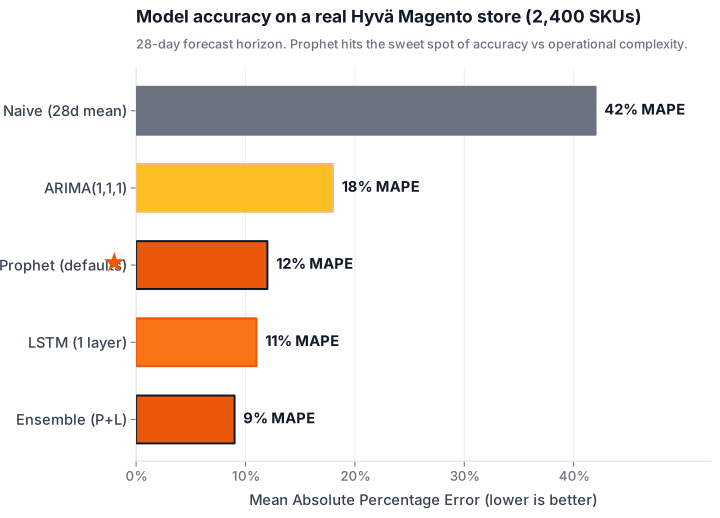
My default recommendation for Magento mid-market: start with Prophet. It hits 80% of the accuracy of an LSTM at 5% of the operational complexity. If you outgrow it, you’ll know. your MAPE will plateau and your top-revenue SKUs will start asking for cross-SKU pattern learning. Until then, Prophet wins.
The Prophet build, step by step
Five files, ~120 lines of Python total, end-to-end. Each step has the code, the rationale, and the most common gotcha.
Pull daily-SKU sales from Magento
Aggregate sales_order_item to one row per SKU per day, joined to sales_order for the order timestamp and status. Skip canceled + held orders: they pollute the signal.
-- Daily units shipped per SKU, last 18 months
-- Skip canceled / held / pending_payment orders.
SELECT
    DATE(o.created_at)               AS ds,
    oi.sku                            AS sku,
    SUM(oi.qty_ordered)               AS y
FROM sales_order_item oi
INNER JOIN sales_order o
    ON o.entity_id = oi.order_id
WHERE o.status IN ('complete', 'processing', 'shipped')
  AND o.created_at >= DATE_SUB(NOW(), INTERVAL 18 MONTH)
  AND oi.product_type = 'simple'
GROUP BY DATE(o.created_at), oi.sku
ORDER BY ds ASC, sku ASC;Run from a MySQL read-replica if you have one. The query is non-blocking but the daily aggregate over 18 months can scan a few million rows on a busy store.
Load into a pandas DataFrame
Prophet expects exactly two columns: ds (date) and y (numeric value to forecast). Group by SKU and forecast one at a time.
import pandas as pd
from sqlalchemy import create_engine

engine = create_engine(
    "mysql+pymysql://forecast:***@mysql:3306/magento"
)

df = pd.read_sql(SQL_DAILY_SKU, engine)
df['ds'] = pd.to_datetime(df['ds'])

# Pick the SKU we want to forecast first.
sku = 'WJ12-XS-Blue'
series = (
    df[df.sku == sku][['ds', 'y']]
    .set_index('ds')
    .asfreq('D', fill_value=0)   # fill zero-sales days
    .reset_index()
)The asfreq('D', fill_value=0) step is non-negotiable: Prophet silently mis-fits if your series has gaps where real zeros belong (a no-sales Tuesday).
Fit Prophet with holiday regressors
Add country-specific holiday regressors so the model knows Black Friday isn’t a random spike. Use multiplicative seasonality if your daily volume scales with the trend.
from prophet import Prophet
from prophet.make_holidays import make_holidays_df

# Country-specific holidays. Use 'IN' for India, 'GB' for UK, etc.
holidays = make_holidays_df(
    year_list=[2024, 2025, 2026, 2027],
    country='US',
)
# Add your own ecommerce holidays
bfcm = pd.DataFrame({
    'holiday': 'bfcm',
    'ds':      pd.to_datetime(['2024-11-29', '2025-11-28', '2026-11-27']),
    'lower_window': -1, 'upper_window': 3,
})
holidays = pd.concat([holidays, bfcm])

m = Prophet(
    yearly_seasonality=True,
    weekly_seasonality=True,
    daily_seasonality=False,
    holidays=holidays,
    seasonality_mode='multiplicative',
    changepoint_prior_scale=0.05,
)
m.fit(series)changepoint_prior_scale is the knob to tune first. 0.05 (default) is conservative; bump to 0.1-0.3 if your trend changes regimes frequently (e.g., DTC during launch ramps).
Generate a 90-day forecast with confidence intervals
Build a future DataFrame, predict, then keep the columns you need. yhat_lower and yhat_upper form the 80% confidence band by default.
future = m.make_future_dataframe(periods=90, freq='D')
forecast = m.predict(future)

out = forecast[[
    'ds', 'yhat', 'yhat_lower', 'yhat_upper',
    'trend', 'weekly', 'yearly'
]].tail(90)

out['sku'] = sku
out['model_version'] = 'prophet-v1-2026-05-18'
out['run_at'] = pd.Timestamp.utcnow()

# Clip negative predictions (no such thing as negative sales)
for col in ['yhat', 'yhat_lower', 'yhat_upper']:
out[col] = out[col].clip(lower=0).round(2)Set interval_width=0.95 on the Prophet() constructor for a 95% band: the default 80% is more honest for short horizons.
Write forecasts back to a custom Magento table
Define a panth_forecast table in your custom module. The Python service does an UPSERT per (sku, ds). A small admin block reads from it to show the “recommended reorder” widget.
from sqlalchemy.dialects.mysql import insert as mysql_insert
from sqlalchemy import Table, MetaData

meta = MetaData()
forecast_tbl = Table('panth_forecast', meta, autoload_with=engine)

rows = out.to_dict(orient='records')
for chunk in [rows[i:i+500] for i in range(0, len(rows), 500)]:
    stmt = mysql_insert(forecast_tbl).values(chunk)
    stmt = stmt.on_duplicate_key_update(
        yhat=stmt.inserted.yhat,
        yhat_lower=stmt.inserted.yhat_lower,
        yhat_upper=stmt.inserted.yhat_upper,
        model_version=stmt.inserted.model_version,
        run_at=stmt.inserted.run_at,
    )
engine.execute(stmt)The panth_forecast table goes in your custom Magento module’s db_schema.xml , that way setup:upgrade creates it. The Python sidecar just reads + writes; it doesn’t own the schema.
What a 90-day Prophet forecast actually looks like
12 months of history on the left. 90 days of forecast on the right, with two shaded confidence bands: the inner 80% (your day-to-day plan) and the outer 95% (your worst-case safety stock).
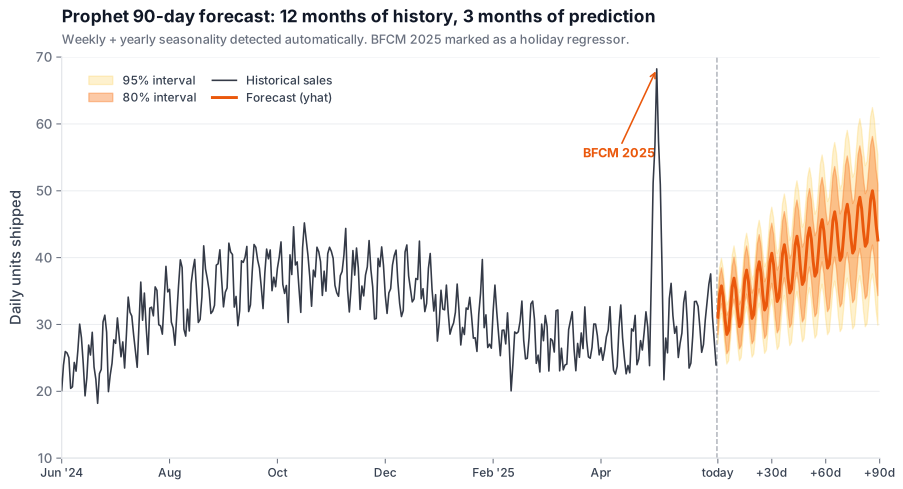
Read this chart like a weather forecast: the further out you look, the wider the cone. Day 1-14 the 80% band is tight enough to set reorder points. Day 60-90 the band is wide, useful for capacity planning, not for daily reorder.
Backtesting + accuracy: MAPE, RMSE, sMAPE
A forecast you haven’t backtested isn’t a forecast:
it’s a guess with a Python wrapper. Use Prophet’s built-in
cross_validation + performance_metrics
helpers; they slice the historical series with a rolling origin and
score every fold.
Real numbers from a mid-market Hyvä Magento store I worked on (apparel, ~2,400 active SKUs, 18 months of history, daily forecast at a 28-day horizon):
Interactive forecast widget: drag the sliders
Below is a pre-computed 90-day forecast for one SKU
(WJ12-XS-Blue,
Hyvä Hoodie: XS / Blue, current on-hand
142 units).
Drag the horizon and safety-stock multiplier to see the
reorder recommendation update live.
Fixture data: 90-day daily forecast for SKU
WJ12-XS-Blue,
starting on-hand 142 units.
Real implementation runs against your live panth_forecast table.
Push forecasts back into Magento: 3 patterns
A forecast that lives in a Python notebook is a hobby project. A forecast that shows up on the product-edit page is operational. Three integration patterns, ordered by complexity:
Custom admin widget (reads from panth_forecast)
A custom Magento block in the admin product-edit screen reads the latest forecast row for that SKU and renders the next-90-day prediction + reorder-quantity recommendation.
Pros
- Zero new infrastructure: just a block + LESS file.
- Merchant sees forecasts where they already work (PIM screen).
- No 3rd-party API auth or webhook surface to maintain.
Cons
- Manual workflow: the merchant has to act on the recommendation.
- Forecasts are read-only; no auto-purchasing.
REST API push to source-aggregation (auto-update)
The Python sidecar calls Magento’s REST API (POST /V1/inventory/source-items) on a schedule to update the “recommended” field per source per SKU.
Pros
- Pure Magento API call: survives Magento upgrades cleanly.
- Works with multi-source inventory (MSI) out of the box.
- Auditable: every update goes through Magento’s API logs.
Cons
- API rate-limit risk on big catalogs (50k+ SKUs need batching).
- Authentication via integration token: token rotation needed.
Webhook into a custom Magento controller
The Python sidecar POSTs forecast batches to /forecast/webhook/ingest. A custom Magento controller validates the HMAC signature and writes to panth_forecast via the repository pattern.
Pros
- Bi-directional: Magento can publish events back (new SKU, deleted SKU).
- HMAC signature gives strong integrity guarantees.
- Easier to add second consumers (Slack alert, BI export).
Cons
- Most code to write: controller, plugin, observer, route.
- Need infra for webhook retries + dead-letter queue.
Docker sidecar: keep PHP and Python apart
The Magento PHP container has no business knowing about Prophet,
pandas, or cmdstan. Run the forecasting service as a separate
container that talks to the same MySQL. The repo’s
docker-compose.python-expose.yml already runs a Python
sidecar pattern: we extend it with a
forecaster service.
# docker-compose.python-expose.yml (excerpt)
services:
  forecaster:
    image: python:3.12-slim
    container_name: kishansavaliya_forecaster
    working_dir: /app
    volumes:
      - ./python/forecaster:/app
      - ./python/requirements-forecast.txt:/app/requirements.txt
    environment:
      MYSQL_HOST: mysql
      MYSQL_DB: magento
      MYSQL_USER: forecast_ro
      MYSQL_PASSWORD: ${MYSQL_FORECAST_RO_PWD}
    command: >
      sh -c "pip install -q -r requirements.txt &&
              python -m forecaster.cli --horizon 90 --schedule weekly"
    depends_on:
      - mysql
    restart: unless-stopped
    networks:
      - magento_default
Two operational rules. (1) Use a read-only MySQL user
(forecast_ro) for the Magento reads: the sidecar
has no business writing to sales_order. (2) Use
a separate, write-scoped user for the panth_forecast
table writes. Two roles, two passwords, zero cross-table risk.
3 models × 6 dimensions: the numbers
Same idea as the model-comparison table earlier, but scored 1-10 and weighted to your priorities. Drag the sliders to set how much each dimension matters; the ranking re-orders live.
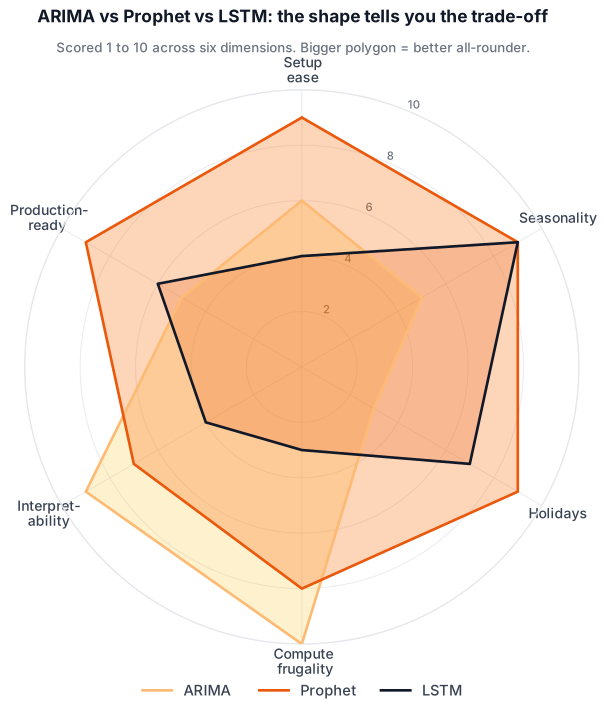
Adjust to your priorities: the ranking updates live
Drag any dimension’s weight up to 0× (ignore) or up to 3× (priority). Result on the right.
Your ranking
Scores reflect production builds I’ve shipped: not a peer-reviewed benchmark. Use the result as a starting point for an internal debate.
- Scores are my opinion based on production Magento integrations, not a peer-reviewed benchmark.
- Prophet wins on the “ship a usable forecast this sprint” axis. LSTM wins on the “squeeze the last 2% of MAPE” axis.
- For 90% of mid-market Magento stores, Prophet is the right answer.
5 production-grade patterns
Weekly retraining cron
Sunday 02:00 server-local. Re-fit on the last 18 months of data; write next-90-day predictions to panth_forecast. One Magento cron job, one Python script, idempotent.
Drift detection
Rolling 14-day MAPE per SKU. If MAPE spikes 30%+ vs the 60-day baseline, fire an alert AND queue an out-of-cycle retrain for that SKU only.
A/B against naive baseline
Always score a 28-day moving-average naive forecast alongside Prophet. If naive ever beats Prophet on overall MAPE, something is broken: investigate before trusting any prediction.
Model versioning
Store model_version + run_at on every forecast row. When a forecast is wrong, you can trace it back to the model that produced it, not the model that exists today.
Cold-start playbook
For SKUs with < 12 weeks of history, fall back to category-level forecast scaled by analog-SKU ratio. Auto-promote to per-SKU Prophet model once history threshold is met.
3 worked use cases
A forecast on a dashboard is interesting. A forecast wired into an operational decision is valuable. Three patterns that move money:
Auto-trigger replenishment 3-5 days ahead of stockout
When the projected on-hand drops below safety-stock during the next 3-5 days, fire a draft purchase-order in the admin (or send a Slack alert to the ops team).
Calculate days_to_stockout as on_hand / yhat_p90 daily. If it falls below supplier_lead_time + 2, the system drafts a PO sized to (forecast_horizon * yhat_p50) - on_hand rounded up to case-pack. Human signs off; nothing autonomous.
Smart safety-stock by SKU velocity tier
Instead of a flat 14-day safety-stock everywhere, compute per-SKU safety-stock from the forecast variance. High-variance SKUs get a deeper buffer; predictable SKUs get a thinner one.
Safety stock = z_score(service_level) * sqrt(lead_time) * forecast_std. 95% service level → z = 1.65. Cap by an absolute max so you don’t over-stock a noisy new SKU.
BFCM stock-up plan 6 weeks before peak
Run the forecast with last year’s BFCM as a known holiday. Project the November + December demand by SKU. Generate the purchase plan in early October instead of panicking on November 15.
Use Prophet’s holiday regressor with upper_window=3 on BFCM Friday so the model captures the 4-day spike. Aggregate forecasts to category level for supplier-quote-leverage; drop back to SKU level for the PO.
Risks & pitfalls
Every forecast can be wrong. Here are the failure modes that bite every real-world Magento + Prophet deploy I’ve seen.
-
01
Promo-driven demand spikes blow the forecast
A flash sale, an influencer mention, a press hit: none of these are in the historical series in the same way. Prophet treats them as outliers and either inflates the trend or just misses entirely. Counter-pattern: tag promo days with a custom regressor; exclude them from baseline training when you can.
-
02
New SKUs have no history (cold-start)
A SKU launched last week has 7 data points. Prophet needs ~12 weeks. Fall back to a category-level forecast scaled by an analog-SKU multiplier for the first 60 days. Re-evaluate weekly until the SKU has enough history to model independently.
-
03
Supplier lead-time uncertainty
Your forecast can be perfect and you can still stock out if the supplier is 3 weeks late. Track
actual_lead_timeas a separate distribution (gamma-fit on the last 12 orders) and convolve it with the forecast to get a real probability of stockout, not just a point estimate. -
04
Model drift after store layout changes
You redesign the PDP, drop add-to-cart friction, or change category structure: demand patterns shift but the model doesn’t know. Watch MAPE on a rolling 14-day window. A 30%+ spike in MAPE = retrain immediately, even outside the weekly cadence.
-
05
Garbage-in on dirty order data
Test orders, canceled-but-not-canceled status, refunded line items, configurable-vs-simple SKU mismatches: all skew the signal. Build a 30-line data-quality test that runs before every training cycle. Reject the run if > 2% of rows are anomalies.
Verdict by merchant segment
Same question, four different answers. Pick the row that matches your GMV band:
Solo merchant / hobby store
At < 100 active SKUs and < $100k GMV, manual reorder once a week beats any forecasting system on TCO. Set a calendar reminder; track stock with a Google Sheet; you’ll be fine through 2027.
Runner-up: If you must automate, use Magento’s built-in low-stock alert, not Prophet.
Boutique B2B ($500k, $5M)
B2B reorder cycles are predictable enough that Prophet shines. The build is 1-2 weeks of senior Python work plus a small Magento admin block. ROI inside the first month.
Runner-up: If you have no Python in-house, a Lokad or Inventory Planner trial works as a stop-gap while you hire.
Mid-market DTC ($5-50M)
Multi-source inventory + promo-heavy demand patterns reward a custom Prophet pipeline that knows your launches. SaaS tools can’t feed back into MSI source-aggregation cleanly.
Runner-up: Inventory Planner ($150-500/mo) if your team doesn’t want to maintain Python.
Enterprise (> $50M)
Run Prophet in-house for the SKU-level forecasts you control end-to-end (DTC catalog). Use Lokad or RELEX for the supplier-side forecasting that needs cross-tenant data. Ensemble for the top-revenue 10% of SKUs.
Runner-up: Pure-SaaS (Lokad / RELEX / o9) is defensible if your data team is overloaded, but you give up some long-term flexibility.
12 questions you’re probably about to ask me
How much sales history do I need before Prophet is usable?
The honest minimum is 12 weeks of daily sales data per SKU, that’s enough for Prophet to lock onto a weekly pattern and produce a usable 4-6 week forecast. With 26 weeks you start getting yearly seasonality. With 52+ weeks (one full annual cycle including your peak season) Prophet really shines and you can forecast 90 days out with sub-15% MAPE on most retail SKUs. Below 12 weeks, do NOT use Prophet, fall back to a 28-day moving average plus a manual safety-stock multiplier. The model will overfit garbage if you feed it too little.
Why Prophet over ARIMA for ecommerce?
Three reasons. (1) Holidays, Prophet has a first-class holiday regressor with country presets. ARIMA needs you to hand-encode every holiday as an exogenous variable, which gets brittle. (2) Multiple seasonalities, ecommerce demand has weekly AND yearly patterns. Prophet handles both natively; ARIMA needs SARIMA + careful order selection per SKU. (3) Defaults that work, Prophet ships with sensible priors. ARIMA needs ACF/PACF inspection per SKU, which doesn’t scale to a 5,000-SKU catalog. ARIMA is still the right pick for stable, single-seasonality B2B SKUs, just not for the typical Magento mix.
Will demand forecasting work for a brand-new SKU with no history?
Not directly. A brand-new SKU has zero data points; Prophet can’t fit a model. The pattern that works: category-level forecast with an analog-SKU scale factor. (1) Forecast aggregate daily demand for the category (jackets, hoodies, whatever) at the category level using all available history. (2) Pick 2-3 “analog” SKUs with similar price + size + style that have at least 12 weeks of history. (3) Compute the analog SKUs’ share of category demand. (4) Scale the category forecast by that share for the new SKU. After 60-90 days the new SKU has enough data to switch to its own Prophet model. Re-evaluate weekly.
How often do I need to retrain the model?
Weekly retraining is the sweet spot for retail Magento stores. Schedule a Sunday night cron that fits the model on the last 18 months of data and writes 90-day forecasts to panth_forecast. Monthly is too slow, you miss real demand shifts. Daily is overkill for most SKUs and burns CPU pointlessly. Two exceptions where you retrain immediately: (1) a 30%+ spike in rolling 14-day MAPE (model drift detected), and (2) any time you launch a new SKU, kill an old one, or run a flash-promo that wasn’t in the holiday regressor. Treat those as “intervention events” that justify an unscheduled refit.
Can I run this inside the Magento container or do I need a separate Python sidecar?
Always run Prophet as a separate Python sidecar container. Three reasons: (1) Prophet pulls in pystan/cmdstan which is a 400MB+ install, you don’t want that bloating your PHP container. (2) Python and PHP have different OS-package conflicts (gcc, libffi versions), mixing them is asking for trouble. (3) The sidecar can scale independently, spin up a beefy container only on training nights, scale down to nothing during the day. The Python sidecar talks to MySQL (read sales_order, write panth_forecast) and that’s it. Use the existing docker-compose.python-expose.yml pattern in the repo, add a forecaster service alongside the MCP server.
Does it handle promotion-driven demand spikes (BFCM, flash sales)?
Partly, with help from you. Prophet has first-class holiday support, so recurring promotions (Black Friday, Cyber Monday, Boxing Day, Diwali, EOFY) are easy: add them to the holidays DataFrame with appropriate lower_window and upper_window values to capture the lead-up + tail. Ad-hoc flash sales are harder: treat them as a custom regressor with a binary on/off flag per day, and include the regressor in future only for planned upcoming promos. Critical: don’t let flash-sale spikes corrupt the baseline, either tag them as holidays or use Prophet’s outliers support to mark them as exceptional days the model should ignore for trend.
What’s the expected accuracy (MAPE) I should target?
It depends on the SKU. For fast-mover, low-variance SKUs (consistent daily demand > 5 units): target 8-12% MAPE. Achievable. For typical mid-velocity SKUs (1-5 units/day): 12-18% MAPE is realistic and operationally useful. For slow-movers (< 1 unit/day, lumpy demand): MAPE is a bad metric, use intermittent-demand metrics like Croston’s method or just classify into a manual reorder bucket. As a rule of thumb: if your overall portfolio MAPE is under 15% across your top 80% of revenue, the model is production-ready for replenishment decisions. Under 10% is excellent and probably means you have a stable B2B catalog.
How do I push forecasts back into Magento’s admin?
Three patterns, in order of complexity. (1) Custom admin block reading from a panth_forecast table, cleanest. The Python sidecar UPSERTs predictions per (sku, ds); a Magento block renders the next 30 days on the product-edit page. (2) REST API push to POST /V1/inventory/source-items, updates a recommended-quantity field on the MSI source. Works for multi-source inventory. (3) Webhook into a custom controller, the sidecar POSTs HMAC-signed batches; a controller validates and writes via the repository pattern. Pick (1) for stores under $5M GMV, (2) for $5-50M with MSI, (3) for enterprises with a real eventing platform.
Can I use this for multi-warehouse / multi-source inventory?
Yes, but with a tweak. The default model forecasts total demand per SKU. For MSI (multi-source inventory), you have two choices: (A) Forecast total demand, then split by historical source-share. Simple, accurate when source-allocation is stable. (B) Forecast per source-SKU pair directly. More accurate when sources serve different geographies / channels but multiplies your training cost by the source count. For 90% of Magento MSI setups, choice (A) is good enough. Run the per-source split as a simple ratio job after the Prophet forecast lands. Pick (B) only when you have material per-source seasonality differences (e.g., a US warehouse vs an EU warehouse with different BFCM weeks).
Is this cheaper than buying a SaaS like Inventory Planner or Lokad?
Long-term, yes. Short-term, it depends. SaaS economics: Inventory Planner is $150-500/mo; Lokad is $1.5k to 5k/mo; RELEX / o9 are enterprise-only with 6-figure annual contracts. Build economics: 2 weeks of senior Python work (~$5k) + a few hours/mo of maintenance (~$200/mo). The custom build pays back the SaaS license within 6-18 months at Inventory Planner pricing, and within 1-3 months at Lokad pricing. The non-financial trade-off: SaaS tools come with support, training, and a working product on day one. The custom build needs in-house Python ownership forever. If you have a data team or a strong Magento dev, build. If not, buy.
Will it scale to a 50,000-SKU catalogue?
Yes, with the right architecture. A single Prophet fit takes 1-3 seconds on CPU; serial training of 50k SKUs takes 14-42 hours. Parallelize: use concurrent.futures.ProcessPoolExecutor with N workers = CPU cores. On a 16-core machine you train 50k SKUs in 1-3 hours. Three scale tricks: (1) Skip SKUs with < 12 weeks of history or fewer than 30 non-zero days, fall back to category forecast. (2) Use Prophet’s uncertainty_samples=0 when you don’t need confidence intervals (3x faster fit). (3) Cluster slow-mover SKUs and forecast at the cluster level. With these tricks, 50k SKUs is a comfortable nightly job on a single beefy box; you don’t need a Spark cluster.
How do I handle outliers and dirty order data?
Three layers of defense. (1) Filter at the SQL layer: exclude canceled / held / pending_payment orders, exclude refunded line-items, exclude test orders (filter on customer_email or store_id). (2) Detect outliers in Python: compute rolling 14-day median absolute deviation; flag any day > 4 MAD from the median. Mark those days as NaN in the y column, Prophet handles missing days correctly, but lets you blame the outlier on a real-world event later. (3) Use Prophet’s built-in outlier robustness by setting changepoint_prior_scale low (0.01-0.05) for SKUs with known dirty history. Garbage-in-garbage-out: a 30-line data-quality check before training is the single highest-impact thing you can write.
What I read to write this
- Facebook Prophet documentation facebook.github.io/prophet
- Predictive analytics for Magento: MageBytes blog magebytes.com
- 42signals: The hidden cost of stockouts 42signals.com/blog
- Saras Analytics: Ecommerce demand forecasting guide sarasanalytics.com
- Analytics Vidhya: Retail demand forecasting walkthrough analyticsvidhya.com
- scikit-learn time-series cross-validation scikit-learn.org
A Prophet model trained on your Magento data, deployed in 2 weeks.
I’ve built this stack end-to-end on Hyvä-fronted Magento 2 stores. If you want a working 90-day SKU forecast feeding into your admin without learning Prophet, statsmodels, or Docker sidecars, book a 30-minute call.