
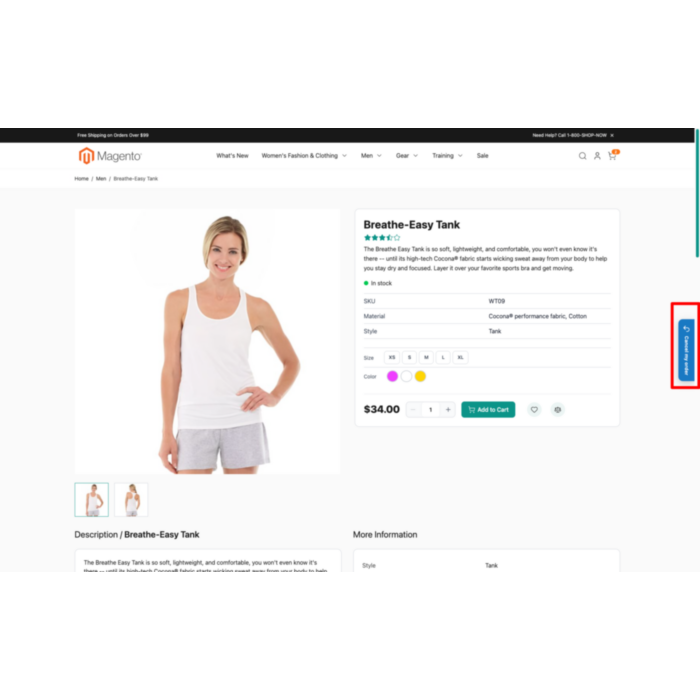
EU-compliant withdrawal button
meets the Directive (EU) 2023/2673 cancellation-function requirement that applies to online stores from 19 June 2026
Add the EU withdrawal button required by Directive (EU) 2023/2673 to your Magento 2 store before the 19 June 2026 deadline. Customers cancel an order in two steps without logging in, and a confirmation email gives both sides durable proof. Includes an always-visible floating s...
Key Features:
Additional Services
Built-in from day one. No add-ons, no upsell, no licence keys to renew.
meets the Directive (EU) 2023/2673 cancellation-function requirement that applies to online stores from 19 June 2026
customers withdraw an order with just an order number and email, no account or login required; logged-in shoppers pick from an order dropdown
every request sends a confirmation email with a unique proof reference, timestamp, and the recorded withdrawal content
floating side tab, header and footer links, customer account menu, and an order-view button so the function is never hidden
The EU Right of Withdrawal Button for Magento 2 is a compliance extension that adds the digital order-cancellation function required by Directive (EU) 2023/2673, which applies to online stores from 19 June 2026. It gives shoppers a clearly labeled way to withdraw from a purchase and gives the merchant a dated, durable record of every request.
Customers cancel in two steps without signing in. They enter an order number, email, and name on a short form, review the matched order, and confirm; logged-in shoppers pick from an order dropdown instead. The store then sends a confirmation email with a unique proof reference and timestamp, the durable medium the directive expects. The cancellation function stays visible everywhere the rule wants it: a floating side tab, header and footer links, the customer account menu, and a button on the order view.
Staff handle every request from a dedicated admin grid with statuses, internal notes, and the recorded proof, while the order itself is touched only by a comment, so no refund or status change happens automatically unless you configure one. The module is Full Page Cache friendly, loads customer data over a session request rather than from cached HTML, and renders identically on Hyvä and Luma. It runs on Magento 2.4.4 to 2.4.9 and PHP 8.1 to 8.4, and ships with en_US, nl_NL, de_DE, and fr_FR translations.
Panth EU Withdrawal Button covers the full cancellation workflow, from the storefront request to the admin response:
The directive updates the rules for distance contracts and, from 19 June 2026, requires a usable online cancellation function. In short, a compliant store must:
This module covers the technical side of all of the above. The compliance text on the form and in emails is fully editable so you can match it to your own terms.
/withdrawal page.| Requirement | How it is met |
|---|---|
| Clearly labelled, easy-to-find button | Floating side tab on every page, plus header/footer/account options, with an editable label |
| Reachable for the full period, desktop and mobile | Always-visible, responsive, available for the configured window |
| No login required, guests included | Order lookup by order number and email; no account needed |
| Two-step process | Step 1 minimal form, Step 2 confirmation page before it is recorded |
| Minimal data, optional reason | Asks order number, email and name; the reason field can never be required |
| Immediate confirmation on a durable medium | Automatic email with proof reference, date, time and withdrawal content |
| Link in every order email | Signed, pre-filled withdrawal link injected into order confirmation emails |
| Inform of exclusions, shipping, refunds | Editable notices shown on the form and in emails |
This extension provides the cancellation function and the supporting workflow. It is not legal advice, set your compliance notices and refund handling to match your own terms and local implementation of the directive.
If the order has already been withdrawn, the form shows the existing request's status instead of recording a second one.
Logged-in customers get a My withdrawals entry in the account menu, directly after My Orders. The page lists each request with its order number, date, status badge and proof reference, and a View link to a read-only detail page. The order view page also shows a Cancel my order button for orders that are still eligible.
Open Panth Extensions → EU Withdrawal Button → Withdrawal Requests for the grid. Each row links to its sales order; the Status column and filters help you work through the queue. Open a request to read the full proof content, change its status, and add an internal note.
On the sales order view, an EU Withdrawal Request panel appears for any order that has a request, showing the status badge and a link to the request detail. The relationship is visible from both sides, request to order, and order to request.
The public lookup step is open by design, so it is protected in layers:
None of this stores extra personal data, and the markup stays cacheable.
The storefront detects the active theme through the shared Panth_Core theme helper and renders the matching markup. Styling is shipped as an external stylesheet, so it is identical on both themes and safe under Hyvä's strict Content Security Policy, no inline styles or inline scripts. Order emails are theme-independent. The floating tab, modal and forms have been tested on both Hyvä and Luma.
A cron job runs on a schedule and processes requests in configurable batches. It re-sends any confirmation email that failed the first time, so the durable-proof guarantee holds even if mail was briefly unavailable. It also emails staff a reminder when a request is approaching the 14-day refund deadline and is still unresolved, which helps the store meet its refund obligation.
The storefront ships with full translations for:
en_US)nl_NL)de_DE)fr_FR)All strings use Magento's __() function, so you can add or override any locale from your own theme or language pack.
| Issue | Cause | Resolution |
|---|---|---|
| Button not visible | Module disabled, placement, or cache | Check Enable and Placement, then bin/magento cache:flush |
| Wrong theme markup | Stale generated/static files | bin/magento cache:flush and remove generated/code/Panth/EuWithdrawal |
| No confirmation email | Sender identity or mail transport | Check the email settings; the batch cron retries failures |
| Order not found | Order number and email must match | Confirm both, and the correct store scope |
| Withdrawal link missing in order email | Setting disabled or order out of window | Enable Add Withdrawal Link To Order Emails |
| Hyvä storefront missing styles | Static content not deployed | bin/magento setup:static-content:deploy -f |
| Requirement | Versions Supported |
|---|---|
| Magento Open Source | 2.4.4, 2.4.5, 2.4.6, 2.4.7, 2.4.8, 2.4.9 |
| Adobe Commerce | 2.4.4-2.4.9 |
| Adobe Commerce Cloud | 2.4.4-2.4.9 |
| PHP | 8.1.x, 8.2.x, 8.3.x, 8.4.x |
| MySQL | 8.0+ |
| MariaDB | 10.4+ |
| Hyvä Theme | 1.1+ (native support) |
| Luma Theme | Native support |
| Required Dependency | mage2kishan/module-core ^1.0 |
composer require mage2kishan/module-eu-withdrawal
bin/magento module:enable Panth_Core Panth_EuWithdrawal
bin/magento setup:upgrade
bin/magento setup:di:compile
bin/magento setup:static-content:deploy -f
bin/magento cache:flush
app/code/Panth/EuWithdrawal/ in your Magento installation.Panth_Core is installed (required dependency).bin/magento module:enable.bin/magento module:status Panth_EuWithdrawal
# Expected output: Module is enabled
Go to Admin → Stores → Configuration → Panth Extensions → EU Withdrawal Button.
| Setting | Default | Description |
|---|---|---|
| Enable Withdrawal Button | Yes | Master toggle for the whole feature. |
| Button / Link Label | Cancel my order | The visible label. Use clear wording; vague labels are not compliant. |
| Storefront Placement | Floating + Account | Where the always-visible button appears: floating side tab, header, footer, account. |
| Floating Button Side | Right | Right or left, when the floating tab is used. |
| Withdrawal Period (days) | 14 | Minimum is 14. Extends to 12 months if the customer was not informed before purchase. |
| Period Starts From | Order date | Order date or shipment date (date of receipt). |
| Set Order Status On Withdrawal | (none) | Optional status applied on withdrawal. A comment is always recorded. |
| Setting | Default | Description |
|---|---|---|
| Ask For Withdrawal Reason | Yes | When shown, the reason field is always optional. |
| Enable Honeypot Spam Protection | Yes | Hidden trap plus a JavaScript speed-check on the lookup step. |
| Lookups Allowed Per IP (per 10 min) | 10 | Anti-enumeration throttle. 0 disables it. |
| Setting | Description |
|---|---|
| Right Of Withdrawal Notice | Shown on the form and in emails. |
| Excluded Products Notice | Custom-made goods, perishables, sealed hygiene items, downloaded digital content, and so on. |
| Return Shipping Costs Notice | Who pays for returns. |
| Refund Policy Notice | How and when refunds are issued. |
| Setting | Default | Description |
|---|---|---|
| Email Sender | General Contact | Sender identity for outgoing mail. |
| Send Customer Confirmation (durable proof) | Yes | The required durable-medium confirmation. |
| Customer Confirmation Template | Panth default | Email template for the confirmation. |
| Send Admin Notification | Yes | Notify staff of new requests. |
| Admin Notification Email | orders@example.com | Recipient for admin notifications. |
| Admin Notification Template | Panth default | Email template for admin notices. |
| Add Withdrawal Link To Order Emails | Yes | Injects a signed, pre-filled link into order confirmation emails. |
| Setting | Default | Description |
|---|---|---|
| Enable Batch Processor (cron) | Yes | Retries failed confirmation emails and sends refund reminders. |
| Batch Size | 50 | Records processed per run. |
| Send Refund-Deadline Reminder To Admin | Yes | Reminds staff before the 14-day refund window lapses. |
| Remind After (days) | 10 | Days after the request before the reminder is sent. |
All settings respect Magento's scope hierarchy (default → website → store view).
Panth EU Withdrawal Button is licensed under a proprietary license, see LICENSE.txt. One license per Magento installation.
Talk to Kishan directly: written quote, scope and timeline within 24 hours. No sales call.
EU Right of Withdrawal Button for Magento 2