
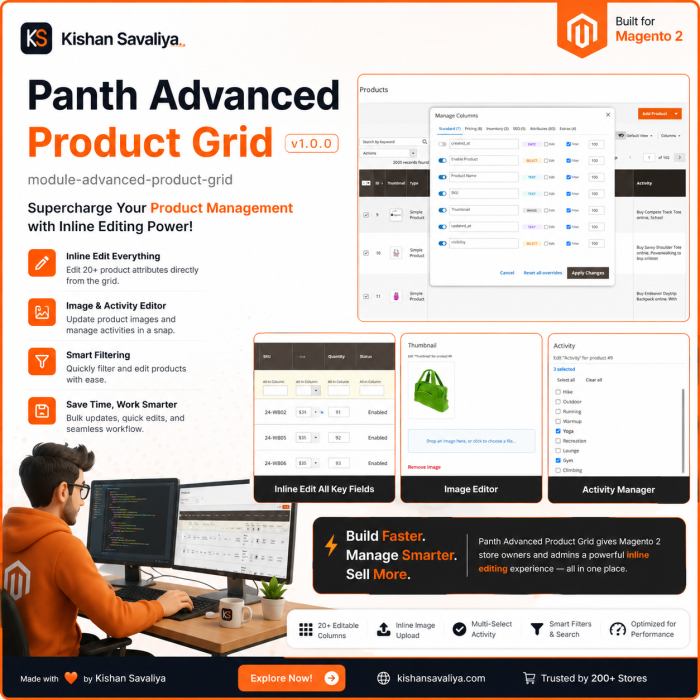
Inline-edit every column
text, number, URL key, SKU, select, yes-no, searchable multiselect, date, datetime, price, cost, special price, weight, tier price - all without leaving the grid
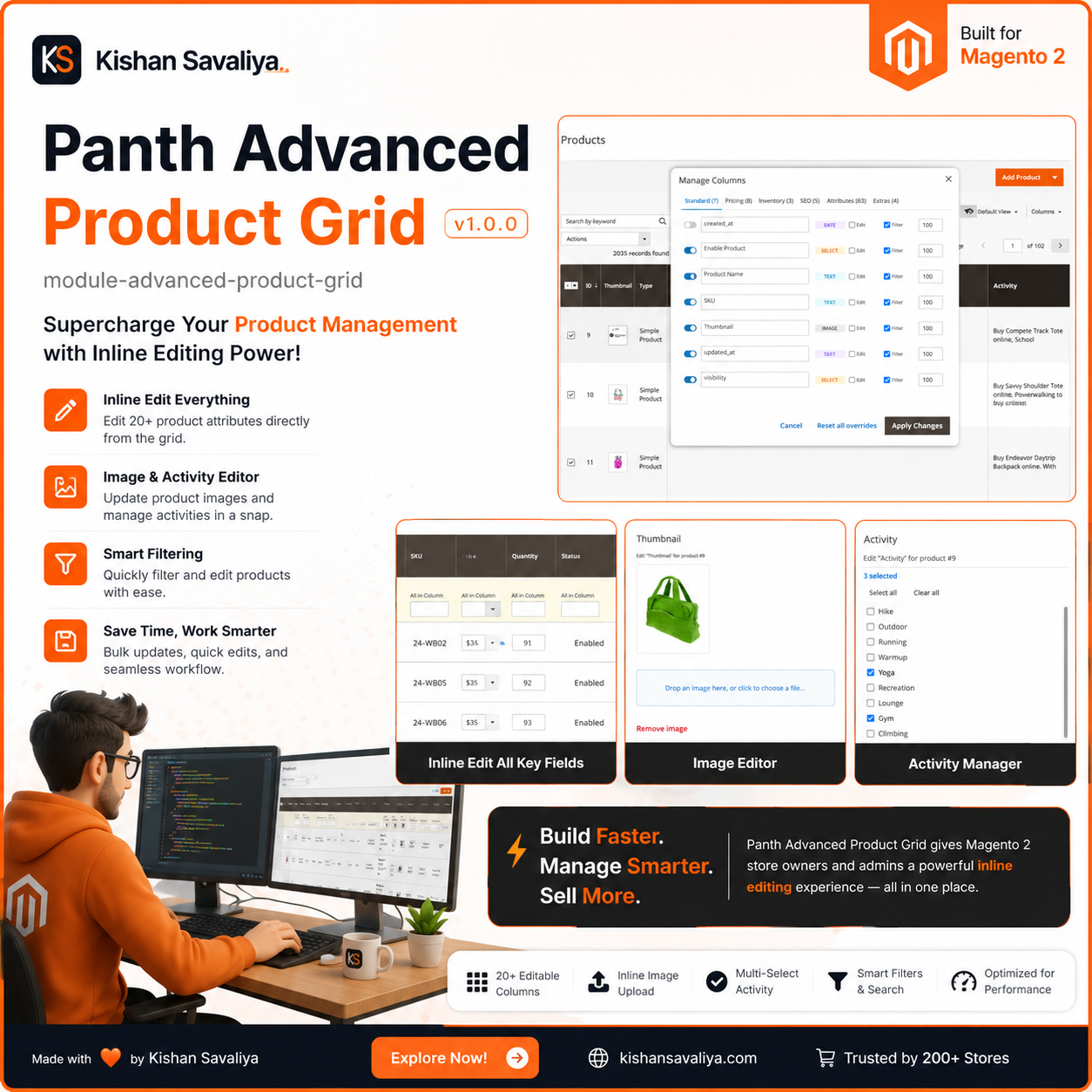
Edit products straight from the Magento 2 admin product grid: text, prices, dates, images and tier prices all edit inline. It also adds 20+ extra columns such as categories, qty sold and salable qty.
Key Features:
Additional Services
Built-in from day one. No add-ons, no upsell, no licence keys to renew.
text, number, URL key, SKU, select, yes-no, searchable multiselect, date, datetime, price, cost, special price, weight, tier price - all without leaving the grid
update many products across many cells in one batch, with an unsaved-changes guard so you never lose work
new attributes appear in the grid the moment you enable them, zero XML required, auto-bound to attribute sets on first save
thumbnail with hover overlay, categories color chips, product type, attribute set, visibility, availability tri-state, backorders, low stock, qty, salable qty per MSI source, special price From / To, cost, tier price ...
Panth Advanced Product Grid is an admin productivity extension for Magento 2 and Adobe Commerce that lets merchandisers rename, reorder, and export catalog columns without touching XML.
The Advanced Product Grid module replaces the rigid native column manager with an inline-editable surface that persists every customization into the user’s bookmark profile. Set a custom label per column, drag columns into the order you actually scan, and toggle CSV and XML export inclusion per column, all from the Manage Columns panel. A “Reset all overrides” button wipes per-column customizations in one click when a new admin user takes over.
Exports respect bookmark intent: only the columns visible in the active profile are exported, and they appear in the order the user arranged them. A synchronous fast-path keeps the grid responsive when nothing is dirty, every controller is gated by an ACL resource, and URL rewrites refresh automatically after dispatch when needed. Verified column changes write through the strategy dispatcher so bookmark data, persistence, and the visible grid never drift out of sync, behavior the native Magento product grid simply never offered.
Best for:
The Advanced Product Grid gives admins per-user control over catalog columns, order, and exports.
Advanced Product Grid extends the standard product grid in the Magento 2 admin (Catalog > Products). It adds inline editing to the grid columns, discovers product attributes flagged "Use in Grid" and turns them into columns with filters and editors, adds computed columns such as image, availability, low stock, qty sold, tier prices and storefront link, provides a tabbed "Manage Columns" panel for showing, renaming and ordering columns, a "Mass Edit Attributes" mass action, and CSV/XML export limited to the visible columns.
It is intended for catalog managers and store administrators who update product data from the product grid instead of opening each product edit form. The module works in the admin area only and does not change the storefront.
Product page: Magento 2 Advanced Product Grid
$1,234.50) are parsed with the admin locale before validation.finset, select and boolean filters use eq, text and textarea filters use like. Filter classes are shipped for categories (including a "No Categories" option), availability, backorders, low stock, qty sold range and thumbnail added / not added; they are registered for the columns panth_categories, panth_availability, panth_backorders, panth_low_stock, panth_qty_sold and panth_thumbnail.panth_product_grid_qty_sold) that aggregates sales_order_item quantities for a configurable date window and set of order statuses.in_export flag).INDEX,FOLLOW), store-scope aware sorting for "Country of Manufacture", and an explicit maximumStocksToShow value for the MSI "Salable Quantity" column.Go to Catalog > Products, or use the admin menu entry Panth Extensions > Product Grid Extended > Open Extended Grid, which opens the same page. The Configuration menu entry under the same group opens the configuration section.
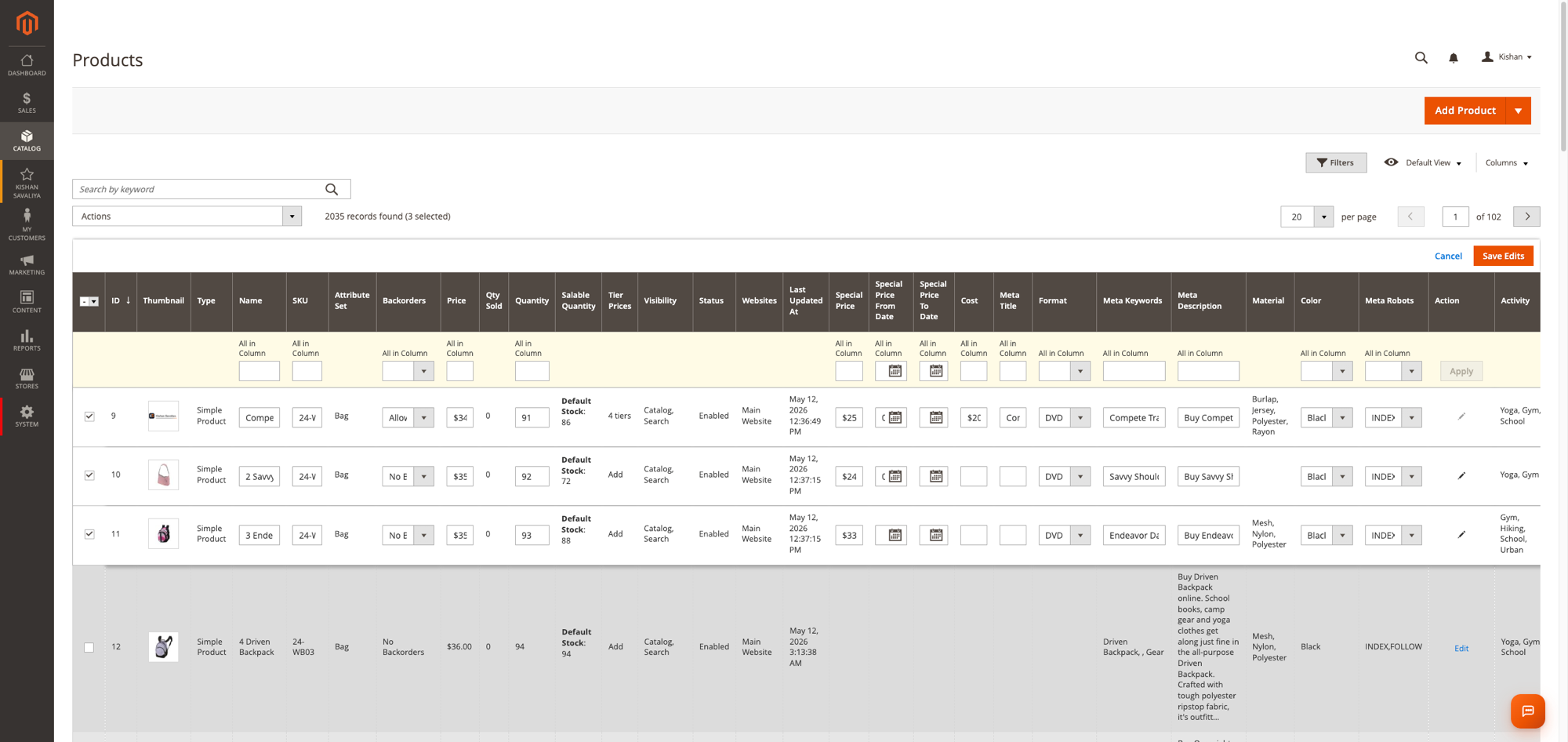
Click a cell in an editable column to open Magento's grid editor for that row. Edits are collected in the editor and saved together with its Save button; the request is posted to panth_product_grid/index/inlineEdit. Each attribute is applied through a save strategy and the product is then saved with the product repository:
qty: sets the stock quantity and, when "Auto-flip Stock Status on Qty Change" is Yes, the stock status.panth_availability: sets is_in_stock and manage_stock ("In Stock", "Out of Stock", "Manage Stock Disabled").panth_backorders: sets backorders ("No Backorders", "Allow Qty Below 0", "Allow Qty Below 0 and Notify Customer").category_ids: assigns the product to the given categories, or removes it from all categories when the value is empty.tier_price: replaces the product's tier prices with the submitted rows.weight: sets the weight and the "product has weight" flag.visibility: sets visibility; values outside the four Magento options fall back to "Catalog, Search".url_key: sets the URL key.image, small_image, thumbnail, swatch_image: assigns an existing or uploaded gallery file to that image role. Paths containing .. segments, backslashes, control characters or a URL scheme are rejected.__use_default__ and __empty__ clear the value.Only keys that the grid can show as editable columns are accepted: the virtual keys listed above and product attributes that are visible in the admin and have a text, textarea, price, weight, date, datetime, select, boolean or multiselect input. System keys such as entity_id, type_id, attribute_set_id, created_at, store_id, website_ids, url_path, custom_layout_update_file, media_gallery and quantity_and_stock_status, unknown keys and hidden attributes are rejected. Values are checked against the attribute type: prices, weights and quantities must be numbers of zero or more, dates must parse, select, boolean and multiselect values must be existing option values, text values must be scalars (at most 255 characters for varchar attributes), and required attributes cannot be emptied. A rejected change stops the save for that product and the error names the attribute. The entity_id value that Magento's grid editor sends with each row is ignored when it matches the row.
Before a save, the module checks that each edited attribute belongs to the product's attribute set and adds it to the set's default group if it is missing, so the value is persisted.
Edits are saved in the store scope given by the store_id request parameter; when the parameter is absent the default (global) scope is used. The popup editors load and save values in the store view selected in the grid's "Store View" filter, or in the default scope when no store view is selected.
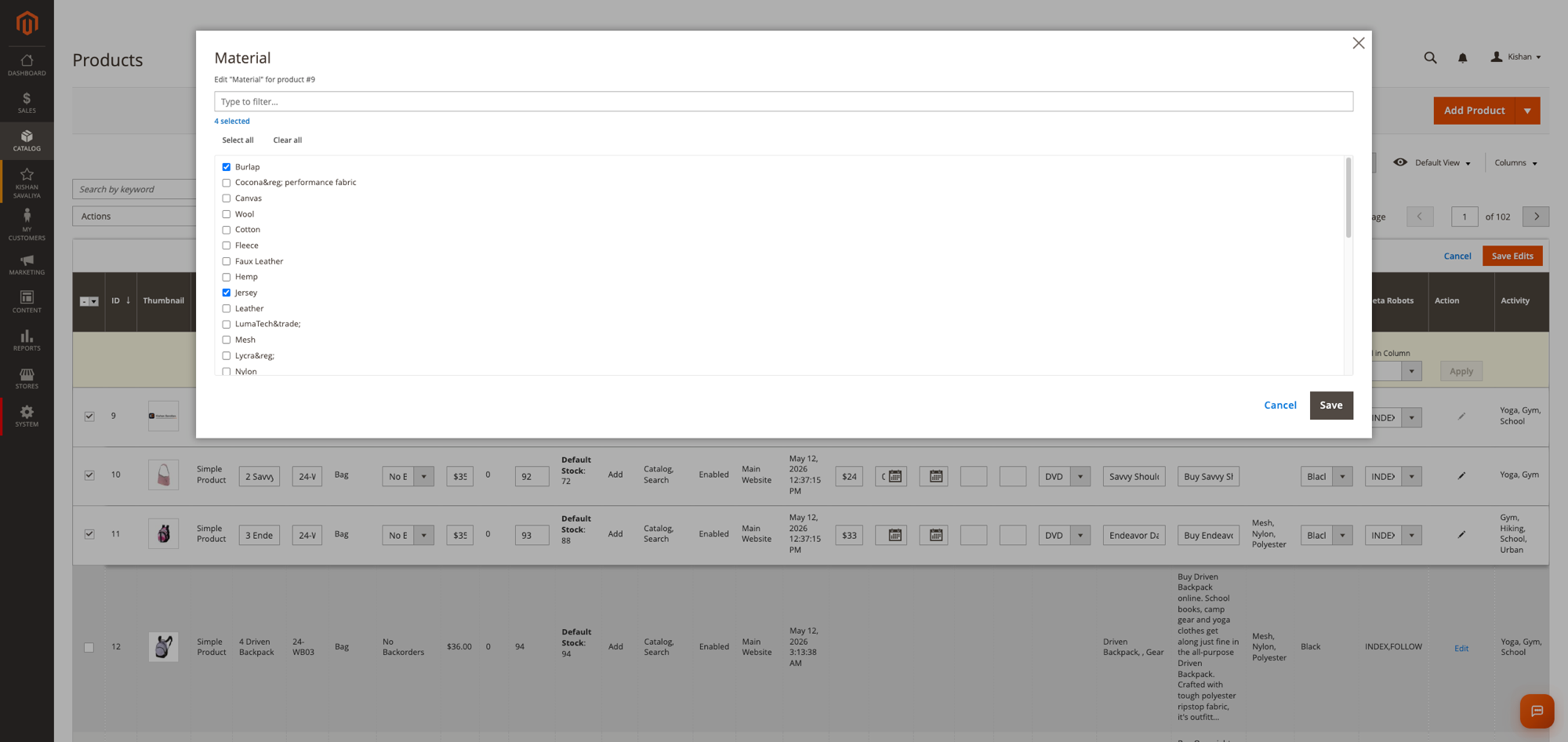
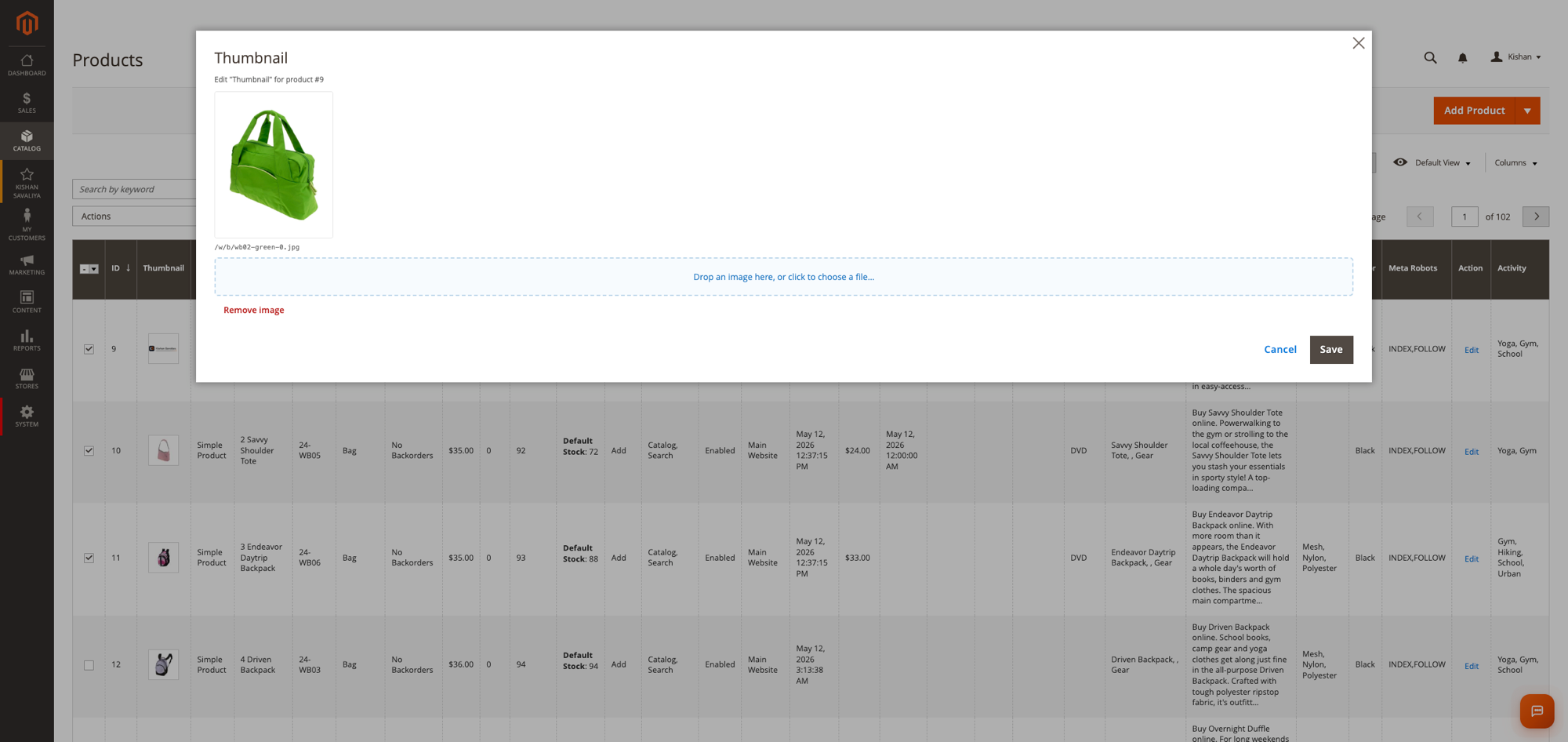
Cells in the following columns open a popup instead of the inline editor: tier_price / "Tier Prices", category_ids / categories, description, short_description, image roles, and every product attribute whose input type is textarea or multiselect. The popup loads the current value and options from panth_product_grid/cellEdit/form, and saves through the same inline-edit endpoint. Image cells show a hover overlay: "View" triggers Magento's standard image preview, "Edit" opens the upload popup (JPG, JPEG, GIF, PNG and WebP; files are stored under the catalog product media directory; each upload must be a valid image).
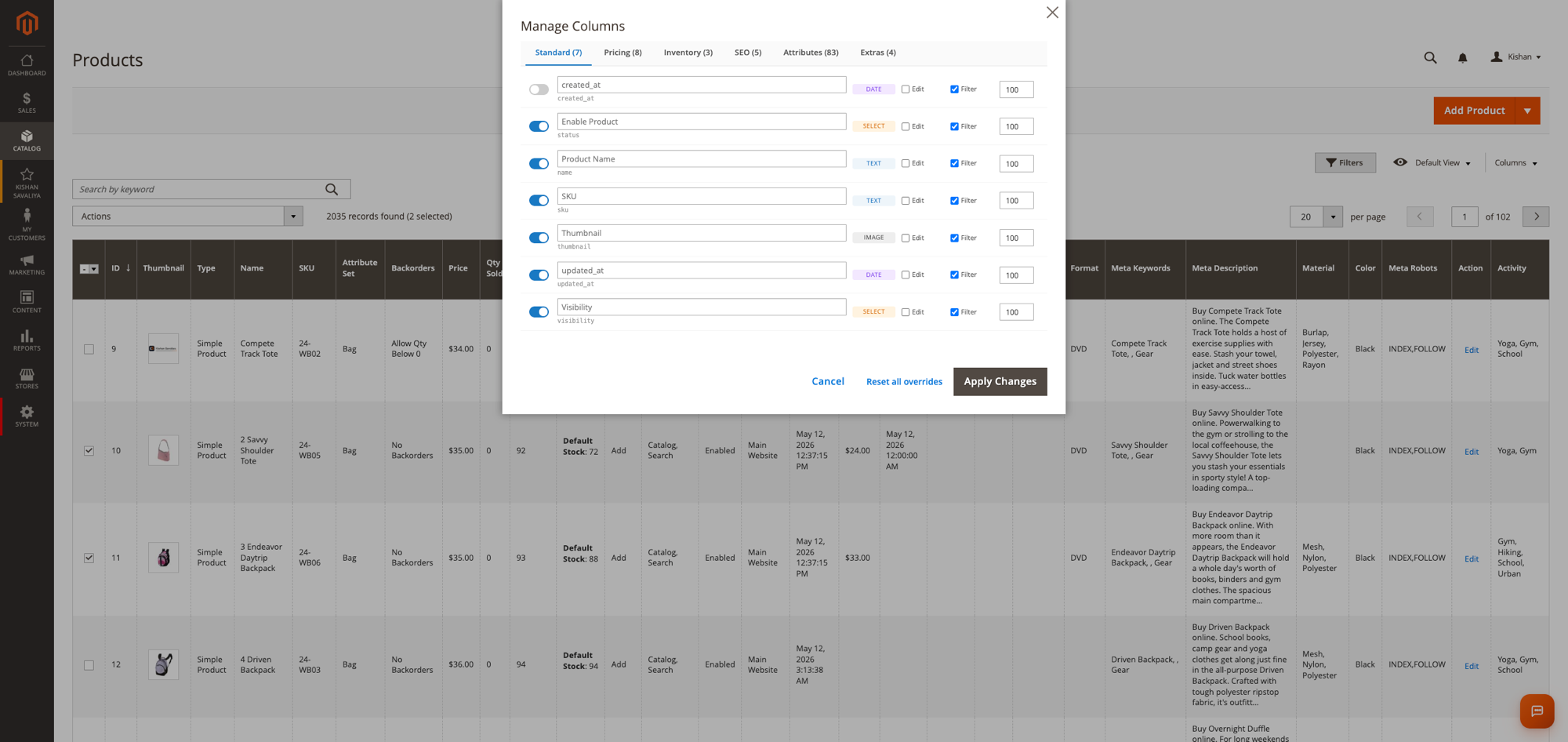
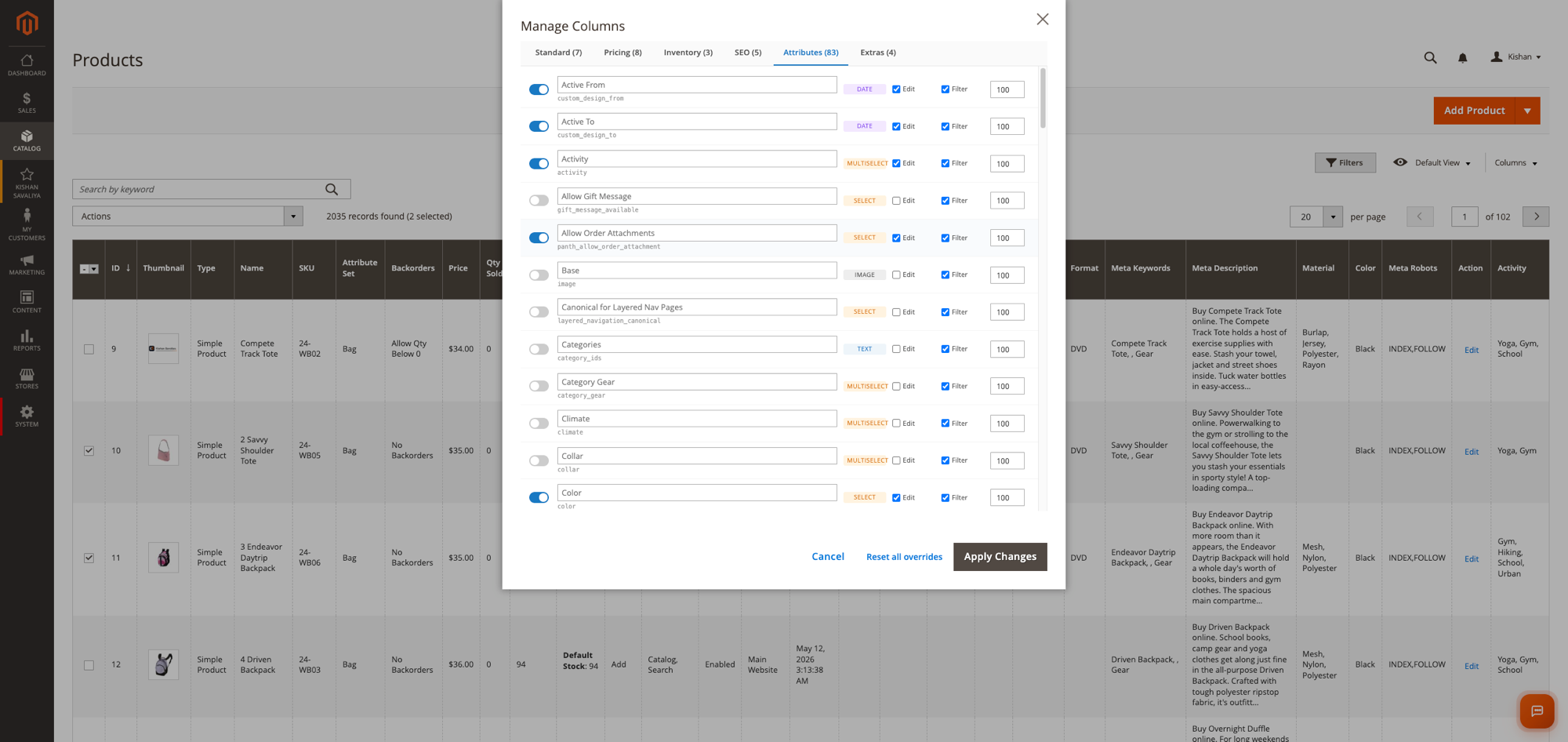
The "Columns" button on the grid toolbar opens the "Manage Columns" popup with the tabs Standard, Pricing, Inventory, SEO, Attributes and Extras. Every grid column is listed, including ID, Type, Attribute Set, Quantity, Salable Quantity, Websites and Action; the label field shows the grid's own column label as placeholder, and the switches show the column's current state in the grid. For each column you can toggle visibility, enter a custom label, toggle "Edit" (inline editable) and "Filter" (filter shown in the toolbar), and set a sort order. "Apply Changes" saves the overrides to panth_product_grid_column_config, updates the visibility and positions in the current admin user's product grid bookmark, and reloads the page. "Reset all overrides" deletes every stored override and the admin user's product grid bookmarks.
Columns that are hidden in the panel are still loaded into the data provider when they have an override row or are visible in any bookmark. The in_export flag stored per column is honoured by the export but the panel in this version does not expose a toggle for it.
Double-clicking a column header in the grid opens a "Rename Column" prompt that stores a custom label for that column.
Select products, then choose "Mass Edit Attributes" from the Actions dropdown. A slide-in panel lists attributes grouped as Pricing, Inventory, Visibility, Content, SEO and Other (only user-defined or static attributes with text, textarea, price, weight, date, select or multiselect input, plus "Availability", "Backorders" and "Categories"). Tick the attributes to change, enter values, and click "Apply Changes". The values are applied to every selected product through the same save strategies as inline editing; multiselect and category values are entered as comma-separated lists. The same attribute and value checks as inline editing apply. Mass edits are saved in the store view selected in the grid's "Store View" filter; the default scope is used only when the filter is "All Store Views".
The "Qty Sold" column reads from the table panth_product_grid_qty_sold, which is filled by the indexer "Product Qty Sold" (panth_product_grid_qty_sold). A full reindex truncates the table and re-aggregates sales_order_item.qty_ordered (minus qty_refunded when configured) for orders in the configured statuses and date window. In "Update on Save" mode the affected products are re-aggregated after an order is saved; in "Update by Schedule" mode changes to sales_order_item are picked up by the mview subscription, which is bound to the sales connection so it also works with a split sales database. New products get a zero row when they are first saved.
With "Export Visible Columns Only" set to Yes, the CSV and XML export actions on the product grid write only the visible columns in their current order. Select and multiselect values are exported as their option labels. Columns whose in_export flag is 0 are skipped. Exports from other admin grids are not changed and use Magento's standard export.
See CHANGELOG.md.
| Platform | Versions |
|---|---|
| Magento Open Source | 2.4.4 to 2.4.8 |
| Adobe Commerce | 2.4.4 to 2.4.8 |
| PHP | 8.1, 8.2, 8.3, 8.4 |
Composer constraints on Magento packages: magento/framework ^103.0, magento/module-backend ^102.0, magento/module-catalog ^104.0, magento/module-catalog-inventory ^100.4, magento/module-eav ^102.1, magento/module-store ^101.1, magento/module-ui ^101.2.
php: ~8.1.0||~8.2.0||~8.3.0||~8.4.0)mage2kishan/module-core ^1.0 (module Panth_Core; provides the "Panth Extensions" configuration tab and admin menu)magento/module-inventory-api (MSI) and magento/module-configurable-product; both are optional and the module loads after Magento_ConfigurableProduct when it is presentcomposer require mage2kishan/module-advanced-product-grid
bin/magento module:enable Panth_Core Panth_AdvancedProductGrid
bin/magento setup:upgrade
bin/magento setup:di:compile
bin/magento setup:static-content:deploy -f
bin/magento cache:flush
setup:di:compile is only required in production mode. setup:static-content:deploy -f is needed because the module ships JavaScript, templates and LESS under view/adminhtml/web.
The "Qty Sold" column is empty until the indexer has run once:
bin/magento indexer:reindex panth_product_grid_qty_sold
Check that the module is enabled:
bin/magento module:status Panth_AdvancedProductGrid
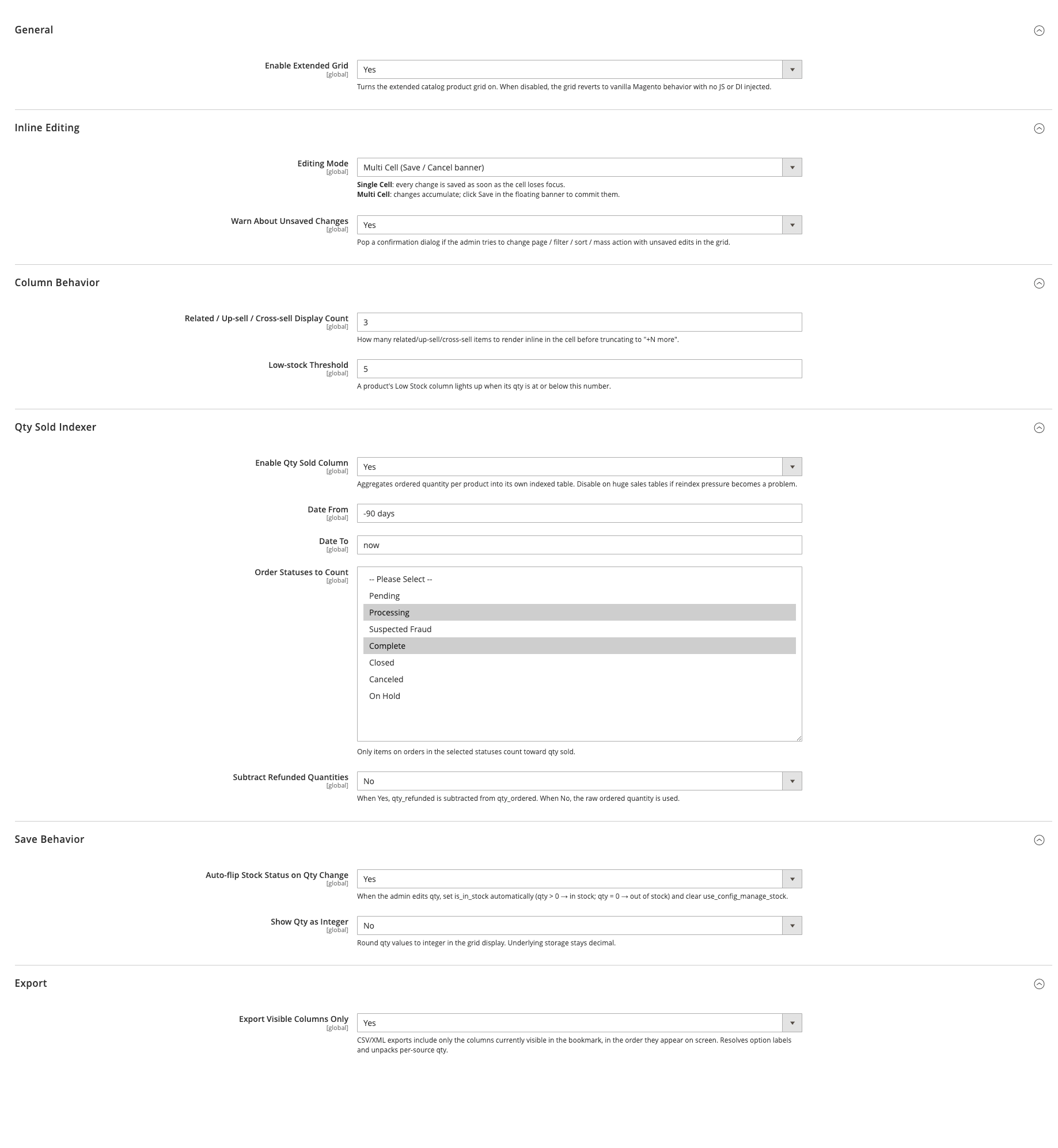
Admin path: Stores > Configuration > Panth Extensions > Product Grid Extended. All settings are global (default scope only).
| Setting | Default | What it does |
|---|---|---|
| Enable Extended Grid | Yes | Master switch. When No, Catalog > Products shows the standard Magento product grid: no extra columns or filters, no inline editing, no "Mass Edit Attributes" action, no "Export" button and the native "Columns" dropdown instead of the "Manage Columns" panel. Saved grid views keep working; filters and sorting saved on the extended columns are ignored while the switch is off. Changes apply after the next page load (flush the config cache if it is enabled). |
| Setting | Default | What it does |
|---|---|---|
| Editing Mode | Multi Cell (Save / Cancel banner) | Options are "Single Cell (save on blur)" and "Multi Cell (Save / Cancel banner)". Shown only when "Enable Extended Grid" is Yes. |
| Warn About Unsaved Changes | Yes | Declared as the switch for the confirmation dialog shown when the admin changes page, filter, sort or runs a mass action with unsaved edits. Shown only when "Editing Mode" is Multi Cell. |
Note: "Editing Mode" and "Warn About Unsaved Changes" are not read in this version. The grid editor always runs in Magento's standard mode (edits are collected and sent when the editor's Save button is clicked) and the unsaved-changes confirmation is always active. The module's RequireJS mixins stay loaded when the switch is off; they do nothing without the extended grid.
| Setting | Default | What it does |
|---|---|---|
| Related / Up-sell / Cross-sell Display Count | 3 | Number of linked products to render in a cell before truncating. The value is passed to each grid row as panth_linked_products_max. |
| Low-stock Threshold | 5 | A product is flagged in the "Low Stock" column when stock is managed and its qty is at or below this number. |
| Setting | Default | What it does |
|---|---|---|
| Enable Qty Sold Column | Yes | Declared as the switch for the qty-sold aggregation. |
| Date From | -90 days | Start of the aggregation window. Accepts a YYYY-MM-DD date or a relative strtotime expression. |
| Date To | now | End of the aggregation window, same formats as "Date From". |
| Order Statuses to Count | complete, processing | Only order items on orders in these statuses are counted. Changing the value invalidates the indexer. |
| Subtract Refunded Quantities | No | When Yes, qty_refunded is subtracted from qty_ordered per item. Changing the value invalidates the indexer. |
| Setting | Default | What it does |
|---|---|---|
| Auto-flip Stock Status on Qty Change | Yes | When qty is edited in the grid, is_in_stock is set to 1 for qty > 0 and 0 for qty = 0, manage_stock is set to 1 and use_config_manage_stock to 0. |
| Show Qty as Integer | No | Rounds qty values to an integer for display in the grid. Stored values stay decimal. |
| Setting | Default | What it does |
|---|---|---|
| Export Visible Columns Only | Yes | CSV and XML exports from the product grid contain only the columns visible in the current bookmark, in on-screen order, with option labels resolved. When No, Magento's standard export is used. |
Configuration paths: panth_product_grid/general/enabled, panth_product_grid/editing/mode, panth_product_grid/editing/confirm_navigation, panth_product_grid/columns/linked_products_qty, panth_product_grid/columns/low_stock_threshold, panth_product_grid/qty_sold/enabled, panth_product_grid/qty_sold/date_from, panth_product_grid/qty_sold/date_to, panth_product_grid/qty_sold/statuses, panth_product_grid/qty_sold/include_refunded, panth_product_grid/modification/qty_to_stock, panth_product_grid/modification/show_qty_integer, panth_product_grid/export/visible_columns_only.
With the default values the extended grid is active, qty edits update the stock status, the qty-sold window is the last 90 days of complete and processing orders, and exports contain only visible columns.
bin/magento module:disable Panth_AdvancedProductGrid
composer remove mage2kishan/module-advanced-product-grid
bin/magento setup:upgrade
bin/magento setup:di:compile
bin/magento cache:flush
Disabling the module leaves the tables panth_product_grid_qty_sold and panth_product_grid_column_config, the panth_product_grid/* rows in core_config_data, the indexer state for panth_product_grid_qty_sold, product grid bookmark changes in ui_bookmark and attribute-set assignments created during inline editing in place. Remove them manually if they are no longer needed.
Free and open source under the MIT License. See LICENSE.txt.
Panth_AdvancedProductGridmage2kishan/module-advanced-product-gridPanth\AdvancedProductGridpanth_product_grid (controllers under Controller/Adminhtml: Index/InlineEdit, CellEdit/Form, CellEdit/Upload, ColumnManager/ListColumns, ColumnManager/InlineEdit, ColumnManager/MassAction, ColumnManager/RenameFromGrid, ColumnManager/Reset, MassEdit/Form, MassEdit/Save, Thumbnail/GetModal, TierPrice/GetModal)product_listing (view/adminhtml/ui_component/product_listing.xml) with Ui\Component\Listing\Columns as the columns class; Ui\Component\Listing\ColumnFactory builds columns for discovered attributes; Ui\Component\Listing\AttributeRepository selects the attributes.Plugin\Catalog\Ui\DataProvider\ProductDataProviderPlugin (adds attributes to the collection and computed row data), Plugin\Catalog\Ui\DataProvider\ProductDataProviderFilterPlugin (rewrites filter conditions per input type), Plugin\Catalog\Ui\DataProvider\ProductDataProviderSortPlugin (SQL sorting for the computed stock and qty sold columns, using Ui\DataProvider\Product\StockExpressions), Plugin\Ui\Model\Export\CsvExport and XmlExport (visible-column export), Plugin\Catalog\Model\Product\Attribute\Source\CountryofmanufactureSortingPlugin, Plugin\Mview\SalesConnectionPlugin.Model\InlineEdit\StrategyResolver maps attribute codes to Model\InlineEdit\Strategy\StrategyInterface implementations; add a strategy through the strategies argument in etc/di.xml. Model\InlineEdit\Processor runs the strategies and saves the product. After a url_key or visibility change the processor dispatches the event panth_product_grid_url_rewrite_refresh with the product; no observer for it is shipped.Model\ColumnConfigRepository (table panth_product_grid_column_config); Model\BookmarkVisibilityUpdater writes visibility and positions into ui_bookmark.Model\Indexer\QtySold (etc/indexer.xml, etc/mview.xml); observers Observer\OrderSaveAfter (sales_order_save_after) and Observer\ProductSaveAfter (catalog_product_save_after); Model\Config\Backend\QtySoldInvalidate invalidates the indexer when statuses or the refund setting change.Model\MassEdit\AttributeCatalog builds the attribute list for the mass edit panel.view/adminhtml/requirejs-config.js on paging, sizes, search, filters, toolbar, bookmarks, massactions, tree-massactions, export, the select column and the grid editor (the editor mixin limits the inline-edit payload to changed cells); js/model/unsaved-flag.js holds the dirty state; the column manager, popup editors and rename prompt are bootstrapped from view/adminhtml/templates/rename-header-init.phtml (added to head.additional of the product grid page only by view/adminhtml/layout/catalog_product_index.xml).etc/acl.xml, under Panth_Core::panth_extensions): Panth_AdvancedProductGrid::product_grid ("Product Grid Extended"), Panth_AdvancedProductGrid::inline_edit ("Inline Edit Products"), Panth_AdvancedProductGrid::tier_price ("Edit Tier Prices"), Panth_AdvancedProductGrid::manage_gallery ("Edit Product Gallery"), Panth_AdvancedProductGrid::column_manager ("Manage Grid Columns", checked by the column manager controllers), Panth_AdvancedProductGrid::config ("Configuration"). Every controller of the module also requires Magento_Catalog::products. Inline edit and mass edit requests that change tier prices require Panth_AdvancedProductGrid::tier_price, and requests that change an image role require Panth_AdvancedProductGrid::manage_gallery. POST requests are validated with the admin form key.etc/db_schema.xml): panth_product_grid_qty_sold (product_id, qty_sold, indexed_at) and panth_product_grid_column_config (config_id, attribute_code, is_visible, is_editable, is_filterable, in_export, is_required, custom_label, sort_order, default_width, marker_color, editor_type_override, updated_at).Model\InlineEdit\ChangeValidator holds the allow-list and type checks used by Model\InlineEdit\Processor for inline edit, popup edit and mass edit.Test/Unit/Observer/OrderSaveAfterTest.php and Test/Unit/Model/InlineEdit/ChangeValidatorTest.php.Talk to Kishan directly: written quote, scope and timeline within 24 hours. No sales call.
Panth Advanced Product Grid